How to Modernize ITSM for SLED Agencies—and Why Jira Service Management Is the Solution
EXECUTIVE SUMMARY: State, local, and education (SLED) agencies are under pressure to deliver faster, more reliable services while meeting strict compliance and security requirements. Legacy ITSM platforms can’t keep pace, draining budgets, slowing response times, and creating unnecessary risk. Today, the need to modernize ITSM for SLED agencies has never been more urgent. Atlassian’s Jira Service Management (JSM) offers a modern, secure, and cost-effective alternative that empowers agencies to streamline workflows, improve collaboration, and future-proof IT operations. This blog explores why migrating to JSM is more than an upgrade—it’s a strategic move toward better service delivery, operational resilience, and long-term value.
Across the public sector, the expectations for service speed, security, and quality have never been higher. State, local, and education (SLED) agencies are under pressure to match the seamless, efficient experiences of the private sector while operating within tight constraints. Yet many remain tethered to legacy IT service management systems; tools that once served well but now lack the security, flexibility, and integration power required to modernize ITSM for SLED agencies aiming for high-performing service delivery.
The Cost of Standing Still in ITSM Modernization
Legacy ITSM solutions aren’t just outdated technology—they’re a drag on mission performance. Agencies still relying on them face:
Cybersecurity vulnerabilities that put sensitive public sector data at risk
High operational costs that strain already limited budgets
Integration challenges that create silos and slow service delivery
Poor user experiences that frustrate employees and hinder adoption
Limited scalability that makes it difficult to meet growing or changing demands
The result? Slower response times, diminished public trust, and missed opportunities to innovate.
Why Jira Service Management Works for SLED Agencies
Streamlined service delivery through intuitive portals for staff, students, and citizens
Cross-team collaboration that breaks down silos between IT, operations, and service units
Configurable workflows that adapt to agency processes rather than forcing rigid templates
Compliance-ready architecture that meets public sector security and regulatory requirements
Proven ROI: Forrester research shows a 277% return over three years, with payback in under six months
Real-World Proof: University of Minnesota’s ITSM Optimization
The Research Data Assistance Center (ResDAC) at the University of Minnesota supports researchers nationwide in accessing CMS data — a mission that depends on reliable IT service delivery. But inefficiencies in their Jira Service Management (JSM) configuration were creating bottlenecks: turnaround times lagged, SLA thresholds from CMS weren’t consistently met, and staff lacked structured tools for workload prioritization.
Oxalis partnered with ResDAC to reimagine their JSM and Confluence environment through a multi-phased optimization program:
Discovery & Assessment – Identified inefficiencies and defined requirements through stakeholder workshops.
Workflow & SLA Optimization – Configured SLAs and streamlined request handling to improve turnaround times.
Reporting Enhancements – Built new reporting capabilities for visibility and accountability.
Training & Go-Live – Provided hands-on staff training to ensure adoption and confidence.
Continuous Optimization – Ongoing support and improvements for long-term success.
The results were measurable and transformative:
51% reduction in Time to Submission
42% reduction in Time to Resolution
26% increase in SLA adherence, achieving 91%+ compliance
By modernizing JSM, ResDAC enhanced workflow efficiency, improved SLA performance, and strengthened its ability to support researchers at scale — a model for how SLED organizations can unlock more value with modern ITSM.
Reduce security vulnerabilities and ensure compliance
Improve operational efficiency and service speed
Enhance citizen, student, and employee satisfaction
Prepare for future demands with scalable, adaptable infrastructure
Take the First Step Toward ITSM Modernization
Oxalis, an Atlassian Platinum Solution Partner, specializes in helping SLED organizations plan and execute smooth, low-risk migrations to Jira Service Management. Whether you need a phased rollout, tailored training programs, or custom workflows to meet compliance needs, we’ll help you modernize ITSM for SLED agencies with confidence.
Download our white paper A Guide to Jira Service Management for Government Agencies to explore the full case for modernization, and start building a stronger, more resilient ITSM environment today.
TriMet’s Human-Centered ITSM Transformation
When TriMet — the public transit agency serving the Portland, Oregon metropolitan region — set out to modernize its IT service management, the goal was clear: build a system that works for people first. Oxalis partnered with TriMet to deliver an ITSM transformation that prioritized the needs of frontline staff, reduced friction in service delivery, and established a foundation for continuous improvement.
The Challenge: Legacy Systems, Growing Demands
TriMet operates one of the most complex public transit networks in the Pacific Northwest, serving over 300,000 riders daily across bus, light rail, and commuter rail lines. Behind the scenes, a growing IT infrastructure supports everything from fare collection systems to real-time vehicle tracking, dispatch communications, and internal business applications.
The existing ITSM platform had served TriMet adequately for years, but it was showing its age. Key pain points included:
Fragmented request workflows — Employees across multiple departments used different channels to submit IT requests, leading to inconsistent tracking and delayed responses.
Limited self-service options — Most issues required direct interaction with IT staff, creating bottlenecks during peak demand periods.
Minimal reporting visibility — Leadership lacked the data needed to identify systemic issues, allocate resources effectively, or measure service quality trends.
Oxalis Approach: Human-Centered Design Meets ITSM Best Practices
Rather than imposing a templated ITSM implementation, Oxalis began with extensive discovery. Our team spent weeks embedded with TriMet’s IT staff and their internal customers — maintenance crews, dispatch operators, administrative staff, and field supervisors — to understand how technology support actually flowed through the organization.
This human-centered approach revealed that the biggest barriers to effective service management were not technical — they were organizational. Workflows had grown organically over years, creating unofficial processes that operated alongside (and sometimes in conflict with) the formal ITSM tooling.
Armed with these insights, we designed a transformation roadmap built on three principles:
Simplify before automating — We streamlined 47 distinct request workflows into 12 standardized service categories, each with clear ownership, SLAs, and escalation paths.
Empower end users — A new self-service portal gave employees the ability to resolve common issues independently, submit requests with structured intake forms, and track progress in real time.
Build for visibility — Custom dashboards provided IT leadership with actionable metrics on ticket volume, resolution times, recurring issues, and team capacity.
Results That Speak for Themselves
Within six months of the new platform going live, TriMet reported measurable improvements across every key service metric. First-contact resolution rates increased by 28%. Average ticket resolution time dropped from 4.2 days to 1.8 days. And employee satisfaction scores for IT services rose from 62% to 89% — the highest in the agency’s history.
Perhaps more importantly, the transformation gave TriMet a platform for continuous evolution. New service categories, automation rules, and integration points can be added incrementally as the agency’s needs grow — without requiring another large-scale overhaul.
Lessons for Public Sector ITSM
TriMet’s experience underscores a truth that applies broadly across public sector IT organizations: the most successful transformations start with the people who use the systems, not the systems themselves. Technology is an enabler, but empathy and operational understanding are what turn a platform migration into a genuine service improvement.
Oxalis continues to partner with TriMet on the next phases of their ITSM journey, including expanded automation, knowledge management, and integration with enterprise asset management systems.
Break Free from Legacy ITSM: A Smarter Approach with Atlassian’s System of Work
How AI, Collaboration, and Knowledge Sharing are Transforming ITSM
Today’s service management landscape looks very different from even a few years ago. IT teams are no longer simply “keeping the lights on”—they are expected to deliver seamless experiences, power business agility, and drive innovation across the organization.
Yet many service teams are still trapped by outdated, siloed systems that slow down progress and create friction between teams.
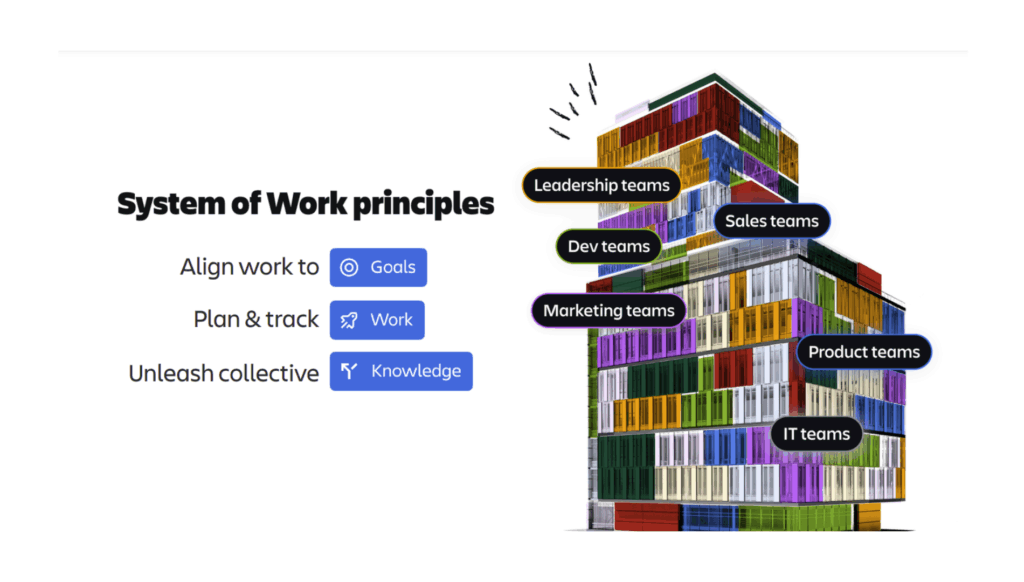
Atlassian’s System of Work offers a new path forward. By connecting people, processes, and technology through a unified platform, organizations can transform IT Service Management (ITSM) into a strategic advantage.
Today, we’ll explore how the System of Work reimagines service management—and why it’s time to modernize.
Why Traditional ITSM Models Are Falling Short
Legacy ITSM systems were designed for a different era—one where IT operated behind a ticket queue, isolated from the rest of the business. In today’s environment, that model creates several major problems:
Slow response times due to disconnected tools and manual workflows
Limited visibility across teams, making collaboration difficult
Fragmented knowledge hidden in silos, inaccessible when needed most
Reactive operations rather than proactive, value-driven service
Organizations that want to deliver high-velocity service—and stay competitive—need a better system.
How the Atlassian System of Work Modernizes ITSM
Atlassian’s System of Work is a connected philosophy powered by a tightly integrated platform. It transforms service management in three critical ways:
In this white paper, you’ll discover:
How partners like Oxalis bring it all to life through expert implementation, cloud migration, and change enablement
Why legacy ITSM and project tools no longer cut it for complex organizations
How Atlassian’s Teamwork Graph and Rovo AI supercharge collaboration and decision-making
Real-world strategies to unify project management, service delivery, and strategic planning
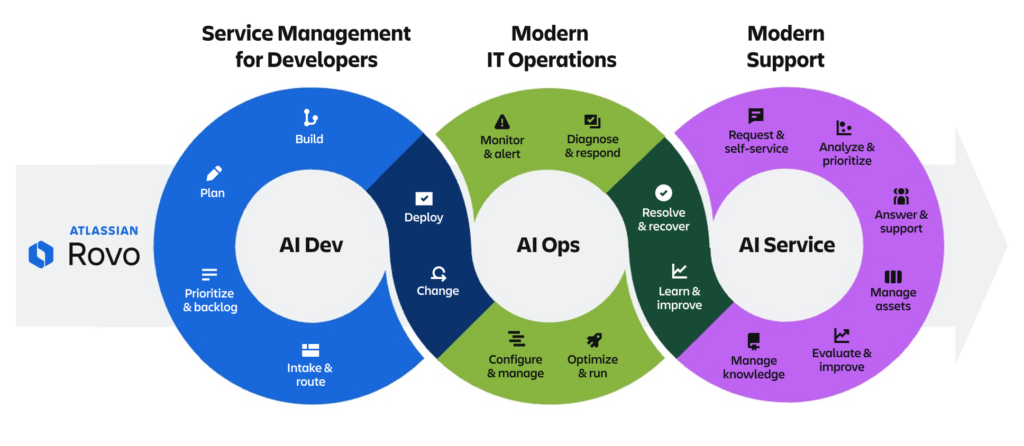
1. AI-Driven Service Management
With the Teamwork Graph and AI capabilities like Rovo, service teams now have access to intelligent, context-aware automation:
Virtual agents can resolve common issues automatically by referencing connected knowledge bases.
Smart routing directs tickets to the right team or person based on past trends and context.
Real-time summaries allow support teams to respond faster, with key information surfaced instantly.
Example: A service desk agent receives an incident report. Rovo automatically pulls in recent changes from Jira, highlights potential related issues, and recommends a resolution article from Confluence—all before the agent even clicks into the ticket.
The result? Faster resolution times, higher SLA adherence, and more satisfied customers and employees.
2. Cross-Team Collaboration, Built In
Modern service management is no longer just the responsibility of IT. Facilities, HR, Finance, and Security teams are all part of the service delivery ecosystem.
Atlassian’s System of Work makes cross-team collaboration seamless:
Jira Service Management allows non-technical teams to manage requests without heavy configuration.
Shared workspaces in Confluence and Jira mean incidents, changes, and problems can be tackled together—with full visibility.
Linked workflows ensure that escalations between development, security, and operations happen in real time.
Example: When a cybersecurity incident occurs, the service team logs it in Jira Service Management. Linked development and security teams are automatically pulled in through integrated workflows—reducing time to resolution and keeping all stakeholders aligned.
No more disjointed email chains. No more lost handoffs. Just integrated, streamlined service delivery.
3. Knowledge-Enabled Support
Knowledge is the fuel that powers high-velocity service management. But if knowledge is scattered, outdated, or hidden, it can’t drive value.
The System of Work ensures knowledge is:
Centralized in Confluence, linked directly to service tickets
Dynamic through live updates and crowd-sourced improvements
Accessible through intelligent search powered by the Teamwork Graph
Automated with AI suggesting relevant articles to agents and customers alike
Example: An employee submitting an IT ticket about VPN access immediately receives an AI-suggested knowledge base article explaining how to troubleshoot common VPN issues—often resolving the problem without ever escalating to IT.
Knowledge sharing doesn’t just make support faster—it turns service teams into enablers of self-service and empowerment.
What This Means for IT and the Business
Modernizing service management with the Atlassian System of Work delivers tangible, organization-wide benefits:
Reduced operational costs through automation and faster resolutions
Improved employee experiences with faster, smarter support
Higher service team morale as routine tasks are automated
Greater alignment between IT and business units
Data-driven insights into service trends, risk areas, and opportunities for improvement
In short, service management becomes less about reacting to problems—and more about strategically enabling the business to move faster and smarter.
How Oxalis Helps You Unlock High-Velocity Service Management
At Oxalis, we specialize in helping organizations—especially those in highly regulated and complex industries—modernize ITSM with the Atlassian System of Work.
We help our customers:
Migrate from legacy ITSM tools like ServiceNow and Cherwell to Jira Service Management
Implement cross-team service management practices that scale
Activate AI-driven service capabilities like Rovo agents
Design knowledge management systems that fuel smarter support
Train teams and drive adoption through change enablement strategies
Whether you’re starting fresh or evolving an existing service operation, Oxalis is your partner in delivering high-velocity, connected service management.
Ready to modernize your service management approach?
Contact Oxalis today and let’s build a smarter, more connected future together.
The Evolution of IT Operations: Why Atlassian is Moving Beyond Opsgenie
Since acquiring Opsgenie in 2018, Atlassian has continuously evolved its IT operations capabilities, integrating alerting, on-call management, and incident response features into the Atlassian platform. Now, in a move to simplify and enhance collaboration between IT and development teams, Atlassian has announced the end of support for Opsgenie, effective April 5, 2027.
This transition aligns with Atlassian’s broader strategy: moving key Opsgenie capabilities into Jira Service Management (JSM) and Compass to create a modern, AI-powered IT operations platform.
What’s Changing?
Opsgenie will no longer be available for purchase after June 4, 2025 — no new instances will be sold.
Opsgenie will be fully retired on April 5, 2027 — all access will be shut down, and unmigrated data will be deleted.
Jira Service Management will now own incident, problem, and change management with enhanced alerting capabilities.
Compass will provide service and robust alert management, offering context-rich alerts integrated with a comprehensive internal developer platform.
Why the Shift?
Atlassian is doubling down on AI-powered IT operations and consolidating tools to streamline workflows across DevOps, ITSM, and support teams. Instead of managing multiple platforms, teams can now centralize their incident and alerting workflows within Jira Service Management and Compass.
By embedding AI-driven alert grouping, automated alert resolution, and post-incident reviews (PIRs) into this consolidated platform, teams can resolve incidents faster, prevent outages, and increase productivity.
What Should Opsgenie Users Do Next?
Atlassian is offering two migration paths, depending on your organization’s needs:
Move to Jira Service Management (JSM) — Ideal for teams needing a comprehensive ITSM solution with built-in incident response, problem, and change management.
Move to Compass — Best for DevOps teams looking for advanced alerting and on-call management alongside an intuitive software component catalog.
How Oxalis Can Help
As an Atlassian Platinum Solutions Partner specializing in ITSM and Cloud, Oxalis is here to help your organization navigate this transition smoothly. Our team has deep expertise in JSM migrations, DevOps transformations, and IT operations strategy, ensuring you get the right solution for your needs with minimal disruption.
We can help with:
Migration planning and execution – Ensuring a seamless transition from Opsgenie to JSM or Compass.
Configuration and optimization – Tailoring JSM or Compass to fit your workflows.
Training and enablement – Equipping your teams to get the most out of Atlassian’s modern IT Ops platform.
The clock is ticking on Opsgenie. Don’t wait until the last minute—reach out to Oxalis today to start planning your migration and ensure your IT operations remain uninterrupted.
Taming the IT Beast: How to Master Your Operating Model and Maximize Value
The IT department: a constant whirlwind of activity. From launching cutting-edge projects to keeping the email server humming, IT teams juggle a mind-boggling array of responsibilities. This complexity can make prioritization a nightmare, leaving IT leaders feeling like they’re constantly putting out fires instead of driving strategic value.
But fear not! By understanding the nuances of your IT operating model and leveraging the right tools, you can transform your department from a reactive cost center into a proactive value powerhouse.
Understanding the IT Operating Model
Every IT department, regardless of size or industry, operates across three core areas:
Projects: The engine of innovation. Projects deliver the new systems, capabilities, and products that keep your organization competitive and future-ready. Think of things like implementing a new CRM, developing a mobile app, or migrating to the cloud.
Operations: The bedrock of stability. This involves keeping the lights on—ensuring systems are running smoothly, data is secure, and users can access what they need. Daily tasks include server maintenance, security patching, and incident response.
Services: The face of IT. This is where your team provides direct support to end-users, resolving issues, answering questions, and fulfilling requests. Think password resets, software installations, and troubleshooting those “my computer is slow” complaints.
Each of these areas comes with its own unique challenges, and when we focus on one, it can sometimes mean that another gets overlooked. For instance, if we see a rise in service tickets, it might slow down our progress on strategic projects or impact the operations team’s ability to keep our systems running smoothly. It’s important to find a balance that allows us to address all these aspects effectively.
The Balancing Act: Why Prioritization is Key
Each of these areas demands attention, but resources are finite. Focusing on one inevitably means deprioritizing another. A sudden influx of service tickets can derail critical projects, while an operational crisis can drain resources needed for innovation.
Without a clear prioritization strategy, IT departments risk falling into common traps:
Missed SLAs: Failing to meet service level agreements erodes user trust and impacts productivity across the organization.
Stalled Projects: Strategic initiatives get bogged down as resources are constantly diverted to address urgent operational or service issues.
Wasted Effort: Time and money are invested in projects that don’t align with overarching business goals.
Gaining the Upper Hand with Atlassian
The key to effective prioritization? Visibility. You need a clear understanding of where your team is spending its time and how that effort aligns with your strategic objectives. This is where Atlassian shines.
Jira: The gold standard for project management. Jira allows you to track progress, manage resources, and ensure your projects stay on track and deliver maximum value.
Jira Service Management (JSM):Purpose-built for IT service management, JSM streamlines incident management, change requests, and service delivery, freeing up your team to focus on higher-value work.
Analytics Tools: Whether you use Atlassian Analytics or another platform, integrating data from Jira, JSM, and other sources provides a holistic view of your IT operations.
With this data-driven insight, you can:
Identify bottlenecks and resource constraints.
Track SLA compliance and identify areas for improvement.
Ensure projects are aligned with business priorities.
Make informed trade-offs between competing demands.
Strategic Decision Making in Action
Imagine this: your service desk is overwhelmed with tickets. Armed with data from your Atlassian tools, you identify the root cause: a recent software update. You can then make informed decisions, such as:
Temporarily reassign staff to the service desk to address the backlog.
Accelerate development of a self-service portal to deflect common requests.
Implement automated solutions to reduce the need for manual intervention.
The Path to IT Excellence
Mastering your IT operating model is an ongoing journey. By embracing a data-driven approach and leveraging powerful tools like Jira and JSM, you can strike the right balance between projects, operations, and services.
The result? A high-performing IT department that delivers exceptional service, drives innovation, and consistently aligns with your organization’s strategic goals.
Unlock Your IT Potential with Oxalis
Ready to take control of your IT destiny and unlock the true potential of your team? Oxalis, an Atlassian Platinum Solutions Partner specializing in ITSM, can help! We’ve empowered countless organizations to streamline their operations, optimize service delivery, and achieve their strategic goals with Atlassian. Explore our range of services and discover how we’ve helped clients like you conquer the complexities of IT. Or, if you’re ready to take the next step, reach out to one of our experts today for a no-obligation consultation. Let’s build a better IT future, together!
Boost Business Value with Mature ITSM: A Guide to Service Excellence
In today’s fast-paced business environment, IT is no longer just about keeping the lights on. It’s about delivering exceptional service that drives business value and fuels innovation. But if your IT team is stuck in “help desk mode,” constantly reacting to incidents and putting out fires, you’re missing out on the strategic power of mature IT Service Management (ITSM).
So, how do you know where your organization stands on the ITSM maturity journey? Let’s explore the five stages of ITSM maturity and uncover the path to achieving service excellence.
Stage 1: Initial (Chaos)
At this stage, IT processes are often ad hoc, reactive, and inconsistent. There’s a lack of formal procedures, documentation, and metrics. The focus is primarily on resolving immediate issues, with little emphasis on proactive problem-solving or continuous improvement.
Key characteristics:
Firefighting and reactive problem-solving
Limited documentation and standardization
Siloed teams and lack of communication
Technology-centric approach
Stage 2: Repeatable (Basic Processes)
Organizations at this stage have established some basic IT processes and procedures, often documented in informal knowledge bases or wikis. There’s a growing awareness of the importance of service management, but implementation is still inconsistent and often driven by individual heroics.
Key characteristics:
Basic incident and request management processes
Some documentation and standardization efforts
Increased awareness of service level agreements (SLAs)
Limited use of automation and technology
Stage 3: Defined (Formalized Processes)
At this stage, IT processes are well-defined, documented, and standardized across the organization. There’s a focus on process improvement and adherence to best practices, often guided by frameworks like ITIL. Service level management is more mature, with defined metrics and reporting.
Key characteristics:
Formalized incident, problem, and change management processes
Comprehensive documentation and knowledge management systems
Proactive problem-solving and root cause analysis
Increased use of automation and ITSM tools
Stage 4: Managed (Quantitatively Managed)
Organizations at this stage have moved beyond process definition to active measurement and control. Key performance indicators (KPIs) are tracked and analyzed to optimize service delivery and drive continuous improvement. There’s a strong focus on efficiency, effectiveness, and customer satisfaction.
Key characteristics:
Data-driven decision-making and performance reporting
Continuous service improvement initiatives
Proactive identification and mitigation of risks
Strong alignment between IT and business goals
Stage 5: Optimizing (Continuous Improvement)
This is the pinnacle of ITSM maturity, where organizations have achieved a high level of service excellence. Processes are continuously optimized through automation, innovation, and feedback loops. There’s a strong culture of learning and collaboration, with a focus on delivering exceptional customer experiences.
Key characteristics:
Proactive service optimization and automation
Predictive analytics and proactive problem prevention
Well, how do we even start to evaluate where we are? There are so many parts of our operations. Let’s review ten of the most critical aspects of IT service management.
Service Request Management
The process of responding to, coordinating and fulfilling requests for support from customers. This (along with incident management) is the starting point for most all IT service organizations. Largely, this is what customers perceive as the “face of IT” and should be revisited regularly to ensure satisfaction.
Service Level Management
The process of monitoring and reviewing service levels, including the agreement and refinement of those levels. Service level measure the performance of support given to customers, and are often expressed in terms such as “time to resolution”. Further, a service level agreement (SLA) is the defined and agreed upon service levels between the service provider and the customer.
Incident Management
The process of managing incidents (defined as “unplanned events that cause a disruption”), including the identification, resolution and closure of incidents. Immature IT organizations will often refer to this as “fire fighting”, and end up spending a disproportionate amount of time on resolving incidents.
Problem Management
The process of managing problems (defined as “a cause or potential cause of one or more unplanned events”), including the identification, resolution and closure of problems. Where Incidents are often identified and reported by customers, Problems should be identified internally (likely as a result of an Incident). Immature IT organizations often skip Problem management all together, and go from Incident to Incident in perpetuity.
Change Management
The process of assessing, approving, implementing and reviewing changes to the IT environment. This is often in collaboration with DevOps teams, and involves a CAB (change advisory board). Diligent change management will improve your overall service delivery, while helping to avoid unintended incidents.
Knowledge Management
The process of creating, curating, sharing, using, and managing knowledge across the organization. Depending on your approach to Service Request Management, this may be split between internal and customer facing documentation.
Asset and Configuration Management
The process of ensuring an organization’s assets and systems are accounted for, deployed, maintained, upgraded and disposed of when necessary. Often time, the asset management system or CMBD (configuration management database) will be integrated with a scanning tool, to automatically identify assets on an organization’s network.
Capacity Management
The process of assessing, planning for, and monitoring the human capacity of an IT organization. This is how leadership understands if there are enough resources to meet the current and upcoming workload.
Service Continuity Management
The process of planning, testing, and implementing service continuity measures, so that essential services are maintained during unexpected events or natural disasters.
Financial Management
The management of financial aspects of IT services, including forecasting, budgeting, cost management, reduction and charging for IT services. For many immature organizations, IT is seen only as a cost center, and not a value driver. In these cases, there is often too much focus solely on cost reduction.
Oxalis Solutions, an Atlassian Platinum Solution Partner, is your experienced guide on the path to ITSM maturity. Our team of certified experts takes a creative, consultative approach, understanding that each organization’s journey is unique.
We go beyond simply implementing tools and processes. We work closely with you to understand your specific needs and challenges, tailoring our solutions to help you achieve your desired level of maturity. We’re not just improving your IT; we’re optimizing your business, enhancing collaboration, and empowering your teams to deliver exceptional service.
With Oxalis, you can trust that your ITSM journey will be handled with the utmost care and expertise, ensuring a smooth transition and maximized ROI. We’re committed to your success, providing ongoing support and partnership every step of the way.
Ready to Elevate Your Service Management?
Don’t let your IT team remain stuck in reactive mode. Embrace the power of mature ITSM and unlock the strategic value of IT. Contact us today for a no-obligation consultation and let’s chart your course to service excellence!
Unlock a Service-Centric Mindset: The Key to ESM Success
In today’s competitive landscape, exceptional service delivery isn’t just a nice-to-have—it’s a business imperative. But what if we told you that the key to transforming service delivery across your entire organization lies in the principles of IT Service Management (ITSM)?
Enter Enterprise Service Management (ESM), a powerful approach that extends the proven practices of ITSM beyond the realm of IT to encompass all service-providing departments, from HR and finance to facilities and legal.
ESM breaks down silos, streamlines workflows, and empowers employees to deliver exceptional service experiences across the entire enterprise. Let’s explore how ESM can revolutionize your organization.
The ESM Advantage: Key Benefits
ESM isn’t just about applying IT tools to other departments; it’s about adopting a service-centric mindset across the organization. Here’s how ESM can transform your service delivery:
Enhanced Efficiency and Productivity: ESM streamlines workflows, automates tasks, and eliminates redundant processes, freeing up employees to focus on higher-value activities. Imagine onboarding new hires with automated workflows or resolving employee inquiries through a self-service portal.
Improved Employee Satisfaction: ESM empowers employees with easy access to information and services, reducing frustration and boosting morale. Think of a centralized knowledge base for common HR questions or a streamlined process for submitting expense reports.
Increased Customer Satisfaction: By optimizing service delivery across all departments, ESM contributes to a seamless and positive customer experience. Whether it’s resolving customer inquiries faster or providing proactive support, ESM helps you build stronger customer relationships.
Reduced Costs: ESM eliminates inefficiencies, reduces manual errors, and optimizes resource utilization, leading to significant cost savings. Imagine the cost savings from automating invoice processing or streamlining facilities requests.
Greater Agility and Responsiveness: ESM enables organizations to adapt quickly to changing business needs and customer demands. By providing a flexible and scalable service delivery model, ESM helps you stay ahead of the curve.
HR: Streamline onboarding processes, manage employee requests, and provide self-service access to HR information.
Finance: Manage policy reviews, budget allocations, expense reports, and provide efficient financial support services. Manage expense reports, and provide efficient financial support services.
Facilities: Handle maintenance requests, manage work orders, and optimize space utilization.
Legal: Manage contracts, track legal requests, and provide efficient legal support services.
Oxalis: Your Partner in ESM Transformation
Embarking on an ESM journey can be exciting, but it requires careful planning and execution. Oxalis Solutions, an Atlassian Platinum Solution Partner, is your experienced guide in navigating the complexities of ESM implementation.
Our team of certified experts takes a creative, consultative approach, understanding that each organization’s needs are unique. We go beyond simply implementing tools; we work closely with you to understand your specific challenges and goals, tailoring our solutions to optimize service delivery across your enterprise.
With Oxalis, you can trust that your ESM transformation will be handled with the utmost care and expertise, ensuring a smooth transition and maximized ROI. We’re committed to your success, providing ongoing support and partnership every step of the way.
Ready to Embrace the Power of ESM?
Don’t let your organization be held back by siloed departments and inefficient processes. Embrace the power of ESM and unlock the potential for exceptional service delivery across your enterprise. Contact us today for a complimentary consultation, and together, we can outline your path to service excellence!
Shipyard SOS: Jira Service Management to the Rescue for Subcontractor & Vendor Compliance
Managing subcontractor and vendor compliance in the maritime industry can feel like a constant battle against a rising tide of regulations and paperwork. From tracking certificates of insurance (COIs) to ensuring adherence to stringent cybersecurity standards, the complexities can be overwhelming.
However, what if there was a solution that could transform this challenge into a smooth-sailing operation? Imagine a centralized platform that not only streamlines vendor information but also automates compliance tasks and provides valuable insights into vendor performance. This is precisely what Jira Service Management (JSM) and Jira Assets offer to the maritime industry.
Why Shipyards Need a Better Way to Manage Vendors
Let’s face it: vendor management in ship repair is a complex beast. You need to know who’s approved, what they can do, and how they’ve performed in the past. Different departments like Supply Chain, Finance, and Production all need this information, but it’s often scattered across emails and spreadsheets. COIs expire, the wrong vendors get chosen, and everyone loses time trying to track down the right details.
Sound familiar? The good news is, it doesn’t have to be this way.
JSM & Assets: Your All-in-One Vendor Management Solution
Jira Service Management and Assets, by Atlassian, are tools that are transforming how shipyards handle vendor compliance. Here’s what they bring to the table:
Centralized Vendor Database: Say goodbye to endless email threads and scattered spreadsheets. All your vendor information, from contact details to certifications, lives in one place where everyone who needs it can access it.
Automated Workflows: Need to track expiring COIs? Want to automatically update vendor status based on performance? JSM automates these tasks, freeing up your team for more important work.
Vendor Portal: No more chasing down vendors for information. With the Assets vendor portal, they can easily submit and update their details themselves.
Integration with Oxalis: The real magic happens when you integrate JSM with the Oxalis Ship Repair System. Estimators can see approved vendor information right in OSRS, and CARs/NCRs automatically link to vendor records, giving you a clear view of performance.
Real-World Results: A Shipyard’s Transformation with JSM
A major shipyard, facing the typical challenges of scattered vendor information and manual compliance tracking, decided to take the plunge and implement Jira Service Management (JSM) along with Jira Assets. The results were nothing short of transformative.
By integrating JSM with their existing ship repair production tracking and estimation systems, they created a centralized hub for all vendor-related data. No more digging through emails or spreadsheets – everyone from Supply Chain to Finance had instant access to the latest vendor information.
Efficiency Unleashed:
Vendor Portal: The shipyard empowered vendors through a self-service portal built with Jira Assets. Vendors could easily update their own information, certifications, and insurance documents, saving the shipyard countless hours of administrative work.
Automated Notifications: Say goodbye to missed COI expirations! Automated notifications kept both the shipyard and vendors in the loop, ensuring compliance and preventing costly disruptions.
Performance Tracking: Integrating JSM with the ship repair system allowed the shipyard to automatically link CARs/NCRs to vendor records. This meant a clear, objective view of vendor performance, informing smarter decisions for future projects.
The Bottom Line:
Time Savings: The shipyard reported a significant reduction in administrative time spent on vendor management.
Improved Efficiency: With a centralized system, teams across the shipyard worked more efficiently, eliminating the need for constant back-and-forth communication.
Data-Driven Decisions: Real-time visibility into vendor compliance and performance enabled the shipyard to make informed choices, mitigating risks and ensuring project success.
This case study is a testament to the power of Jira Service Management and Assets in transforming vendor management for shipyards. If you’re tired of the vendor compliance struggle, it’s time to consider a solution that can set you on a course for smoother sailing.
Smooth Sailing Ahead
Ready to leave the compliance headaches behind? Jira Service Management and Assets could be the solution you’ve been waiting for. With streamlined workflows, automated processes, and a centralized vendor database, you’ll be navigating the complexities of compliance like a seasoned captain.
Want to learn more about how JSM and Assets can revolutionize your vendor management? Contact the Oxalis team today for a demo and consultation!
Revolutionizing ITSM: A Guide to Jira Service Management Fundamentals
IT Service Management (ITSM) isn’t just about managing IT work; it’s about transforming the way your entire organization functions. From simple end-user requests (like a new Adobe account) to complex infrastructure needs (like provisioning a server), ITSM streamlines every IT process. Jira Service Management (JSM) is revolutionizing this landscape, going beyond traditional ITSM to optimize how you design, deliver, and support IT services. In this guide, we’ll dive into some Jira Service Management fundamentals and show you how Atlassian’s powerful tool is reshaping the future of IT.
Modern ITSM software must empower IT teams and their global collaborators to manage work seamlessly and collaborate effortlessly. It needs to provide the agility and scalability needed to meet evolving business and technology demands, while supercharging customer service — all without creating data silos or process bottlenecks.
High-performing teams thrive when empowered to work in ways that best suit their needs while aligning with the organization’s goals; it’s a delicate balance of autonomy and alignment. Poorly implemented autonomy breeds data silos, obscures visibility, and wastes time as IT grapples with disjointed tools. Mistaking alignment for control stifles innovation, slows progress, hinders collaboration, and limits scalability.
Jira Service Management is designed to empower all types of teams, and mastering its fundamentals unlocks that value from the start.
Atlassian’s Jira Service Management strikes a balance between autonomy and alignment, fueling its rising popularity. Gartner recognized this strength by naming Atlassian a Leader in the 2022 Magic Quadrant for ITSM Tools.
JSM’s genius lies in its versatility and unifying power:
Empowering all teams: JSM recognizes that virtually any team can elevate customer service, collaboration, and efficiency by adopting a service management approach.
Unifying IT and business: By bringing IT and business teams onto a single platform, JSM delivers unparalleled data breadth and depth. This empowers leaders at every level with the insights needed to ensure alignment with overarching business goals, while saving time and eliminating the frustrations caused by disjointed tools.
Balancing autonomy with security: JSM grants teams significant control over their workflows within Jira, while administrators retain essential permissions to uphold organizational security policies. This fosters a healthy balance of empowerment and oversight.
Grounded in the latest ITIL practices, Jira Service Management unites all teams on a powerful, scalable platform with a single, intuitive interface designed to elevate customer service. However, even the most advanced tools require a strategic approach to maximize their value. Let’s dive into the Jira Service Management fundamentals that will unlock your full potential and deliver the highest return on investment.
Establishing a Strong Foundation
Request forms power Jira Service Management’s customer portals, serving as the primary interaction point for both internal and external users. They’re the engine that unlocks JSM’s full value, as customer portals don’t mandate a JSM license for access (although you can configure JSM to require an Atlassian account). Even with robust knowledge bases integrated into your portals, users will inevitably submit requests. Therefore, creating exceptional portals and request forms is the critical first step in mastering Jira Service Management fundamentals.
Streamlining Your Service Request Forms
Customers, both internal and external, benefit from a well-balanced selection of request types and groups. Too many options can overwhelm, while too few can limit their ability to find the right fit. If you’re just starting, begin with fewer options and add more as needed based on user feedback and JSM’s reporting features. Additionally, tailor the visible request types to each customer’s needs for a more personalized experience.
Craft request type names and descriptions from the customer’s perspective, not the agent’s. “Provision new hardware” might resonate with IT, but users are more likely to search for “request new computer or mobile device.”
Make request forms user-friendly with clear descriptions and instructions. Guide users to provide the precise information JSM agents need to fulfill requests promptly. Use hidden fields to automatically route requests to the right team without requiring any extra effort from the customer.
Leverage Jira’s Forms feature to create dynamic forms with conditional field display. This reduces clutter by showing only relevant fields based on the user’s selections. For example, the form for “Request new computer or mobile device” could first ask the user to specify the hardware type, then display only the fields relevant to that choice. By minimizing irrelevant information, you streamline the process, reduce confusion, and enhance the user experience. This conditional logic can also help consolidate request types, making it easier for customers to find what they need.
Crafting an Intuitive Customer Portal: A Step-by-Step Guide
Effective Jira Service Management (JSM) portals go beyond well-designed request types and forms. Let’s explore additional steps you can take to ensure your portals deliver exceptional support to your customers.
1. Optimize the Portal Home Page
The portal home page serves as a central hub where customers can search and access all configured portals within your JSM instance. Its importance grows with the number of portals you have, as it allows users to easily navigate and find the resources they need.
Add a login message: Orient new users with helpful information and instructions.
Set the Help Center Name: This appears in browser tabs and navigation breadcrumbs, providing context for users.
Set the Home Page Title: Displayed above the search bar, this title clearly indicates which portal the user is currently viewing.
Add your logo: Reinforce your branding and provide a link back to the portal home page.
Upload a Help Center Banner image: Customize the visual appearance of your portal with a background image that aligns with your brand.
Set banner background color and link/button colors: Further tailor the portal’s appearance by choosing specific colors.
Set Home Page Title color: Ensure optimal readability against the banner image or color.
Add “topics”: Organize request forms, external resources, and knowledge articles into collections for easy browsing.
Highlight “featured portals”: Increase visibility for frequently used portals.
Hide portals: Restrict access to specific portals by requiring direct URLs.
2. Customize Each Customer Portal
Each portal can be further customized to cater to specific customer needs.
Add introduction text: Provide guidance, tips, or instructions to assist users.
Add external websites: Share relevant resources in a “Related Resources” section.
Group request forms: Enhance browsing by organizing forms into logical groups.
Highlight knowledge base articles: Promote self-service by showcasing helpful articles in categories.
Prioritize User Experience
By following these steps, you empower customers with a user-friendly, informative, and visually appealing portal experience. This not only streamlines their interactions but also sets your service teams up for success by ensuring efficient and effective communication.
Harnessing Automation for Efficiency
Every team grapples with repetitive, time-consuming tasks that drain valuable resources. Why burden your employees with tracking down signatures or navigating complex approval processes?
Free your team to focus on high-value work that drives your organization forward. Jira Service Management offers two powerful features designed to eliminate manual effort and streamline workflows.
Optimizing Processes with Automation
Automated Ticket Actions and Approvals
JSM’s project-level Automation feature enables you to create simple “if-then” rules that trigger specific actions when predefined events occur. You have complete control over the setup:
Triggers: Define the events that initiate the rule, such as issue creation or status changes.
Conditions: Specify additional criteria that must be met for the rule to execute.
Actions: Choose the automated response, such as commenting on an issue, sending an email, or assigning the issue to a specific team member.
You can also leverage built-in templates or create custom rules tailored to your specific needs. Common use cases include automatically setting reviewers or approvers based on priority, risk level, or customer.
Streamlined Workflows
Automation rules are easily configurable and can be toggled on or off as needed, providing flexibility for project-specific adjustments. For more complex automation scenarios, JSM offers workflow customizations that are shareable and more powerful, giving you a comprehensive toolkit to optimize your processes.
Seamless Integrations
JSM’s automation seamlessly integrates with various external systems, allowing you to trigger actions in other tools or receive data from them. For example, you can automatically update your ERP system when a critical bug fix is released in Jira Software, ensuring smooth coordination between teams. You can also use webhooks to establish two-way communication between JSM and other systems, enabling real-time updates and seamless collaboration.
Empowering Teams Through Automation
JSM’s automation capabilities offer a wealth of possibilities, with a wide range of triggers, conditions, and actions to choose from. You can even create custom variables and lookup tables to enhance the flexibility of your automation rules.
To maximize the benefits of automation, start by engaging your team in brainstorming sessions to identify the most time-consuming and repetitive tasks. Once you’ve gathered their insights, your project or Jira administrators can then translate these ideas into actionable automation rules.
By harnessing the power of automation, you free your employees from mundane tasks, allowing them to focus on meaningful work that drives your organization forward.
Mastering Intelligent Workflows
Jira Service Management projects come equipped with built-in workflows, which you can customize or replace entirely. Each workflow can be tailored to specific issue types and, unlike automation rules, can be reused across multiple projects. While workflows primarily track a ticket’s state or phase (e.g., In Progress, Submitted for Review), JSM workflows offer much more through three powerful features:
Conditions: These logic tests determine whether a transition is visible to the user. You can control visibility based on user roles, specific field values, or other criteria. This ensures users only see relevant options, streamlining their interaction with the workflow and reducing administrative overhead.
Validators: These checkpoints verify the content of ticket fields against your predefined criteria. By blocking transitions with incomplete or inaccurate data, validators guarantee data integrity, preventing downstream delays and frustration.
Post Functions: Executed during status transitions, post functions perform actions such as reassigning tickets, clearing or setting field values, sending notifications, and triggering web hooks to interact with external systems. While some overlap exists with automation functionality, workflows offer several advantages:
No usage limits: Unlike some JSM Cloud plans, workflows have no execution limits. Clearer troubleshooting: Workflows provide a transparent, sequential execution order, which makes it easier to identify and resolve issues compared to the simultaneous firing of multiple automation rules. Field validation: Workflows offer field validation capabilities not available in automation. Reusability: Workflows can be reused across projects, eliminating the need to recreate automation rules for each project or make them global.
By understanding and leveraging these features, you can create intelligent workflows that optimize your processes, improve data quality, and enhance overall efficiency within Jira Service Management.
Amplify Efficiency with Integrated Automation
By automating repetitive tasks and customizing workflows, you empower your existing employees to work more efficiently, enabling your organization to scale faster. Jira Service Management’s seamless integration with other Atlassian products like Jira, Bamboo, and Bitbucket unlocks even greater potential. Imagine these possibilities:
Automated updates: Every time one product updates another, a comment is automatically added to the relevant issue, keeping everyone informed.
Streamlined change management: Code commits in Jira Software automatically trigger change requests in JSM.
Effortless approvals: Standard change requests are auto-approved, with relevant information like service impact and risk level automatically populated.
Seamless communication: When a new product feature is released, related development issues are automatically closed, and sales and marketing teams receive notifications.
Rapid incident response: Critical service outages automatically trigger a master incident ticket, assigned to the appropriate team or individual for immediate action.
Dynamic approvals: Approval workflows adapt based on the type of change, associated risk, or procedures defined by your change advisory board.
This is just a glimpse of what’s possible when you integrate JSM with your existing tools and processes. By harnessing the power of automation and integration, you can create a truly efficient and responsive IT service management ecosystem.
Maximizing the Power of Your Knowledge Bases
Studies show that knowledge workers spend a staggering 20–30% of their time searching for information, disrupting productivity and hindering efficiency. Recognizing this challenge, ITIL 4 includes Knowledge Management as a core ITSM practice.
At the heart of Knowledge Management lies the knowledge base (KB): a self-service online library of information about products, services, departments, or topics, all easily accessible through a powerful search engine. Each KB article you create becomes a reusable resource, answering customer questions time and again. While KBs are often seen as customer-facing tools for self-service, Jira Service Management also leverages KBs to empower team members working on service requests.
Empowering Customers with Self-Service
It’s a win-win: when customers find answers to their questions or the right forms for their needs through your knowledge base (KB), it saves your team’s time and your organization’s money. This is the power of request deflection. Moreover, many customers prefer self-service, so offering a comprehensive, user-friendly KB with robust search capabilities significantly boosts customer satisfaction.
Jira Service Management (JSM) seamlessly integrates with your knowledge bases. As customers start entering their request summary in a JSM portal connected to a KB, the portal dynamically searches the KB for relevant articles and displays them as “Suggested Articles” for the user to review.
To ensure a targeted experience, Confluence (where JSM’s KBs reside) allows you to label articles. You can then configure each JSM project to use specific labels when suggesting articles. For example, label HR-related articles as “hr” and set the Billing request type to only consider articles labeled “billing.” This prevents customers from wading through irrelevant search results, saving them valuable time.
The best part? Your portal searches become smarter over time. JSM employs machine learning to analyze user search behavior, article views, and engagement, continuously refining its suggestions for a more personalized and effective self-service experience.
Empowering Agents with Knowledge
While your customer portal’s KB search aims to provide relevant articles, it might not always capture every nuance of a user’s query. That’s where JSM’s agent-facing KB integration comes in.
Within a KB-connected JSM project, agents can easily access potentially helpful articles while viewing a ticket. A Knowledge Base field dynamically updates, indicating the number of articles that match the keywords in the ticket’s Summary. Agents can then quickly review and search the list, and with a single click, share a relevant article directly with the customer through a comment. Even better, agents can create new KB articles directly from the ticket, ensuring your knowledge base continuously grows and evolves.
Prioritize Knowledge Base Quality
Even if a portal user finds the perfect KB article for their needs, it won’t be helpful if it’s poorly written. While optimizing KB articles is a complex topic that deserves its own discussion, let’s cover some essential best practices:
Not everyone possesses strong writing skills. Often, subject matter experts are tasked with creating KB articles, but technical writing requires a separate skill set. It involves presenting complex information in a way that resonates with the target audience. While hiring dedicated writers might incur additional costs, it’s an investment in your customers’ experience. Providing clear, concise, and engaging content can ultimately save you money by reducing support requests and boosting user satisfaction.
Engage visually, not distractingly. Most KB users seek specific information within an article. A wall of undifferentiated text with no visual cues makes it difficult for users to find what they need. Visual learners require more than just text to comprehend complex concepts, and visual variety can help maintain reader engagement. Utilize headers, formatting, layout, and relevant images to create a visually appealing and easy-to-navigate article. However, avoid excessive visual clutter, as it can hinder readability. Strive for a balance that enhances the user experience.
Maintain knowledge base accuracy. Your knowledge base is a living resource that requires ongoing attention. Implement a process to ensure KB articles remain accurate and up-to-date. Ideally, every system change should trigger a review of relevant KB articles. Even with this practice, regular audits are essential. Outdated or incorrect information can be more harmful than no information at all.
By prioritizing the quality and usability of your KB articles, you empower your customers with the tools they need to self-serve, reducing the burden on your support team and fostering a positive user experience.
Gaining Insights for Continuous Improvement
As your organization grows, maintaining efficiency and exceptional customer service becomes paramount. Jira Service Management equips you with the tools to strike that balance. By continuously collecting real-time data on your team’s service delivery, you unlock valuable insights that drive improvement.
With Jira’s native search and filtering capabilities, built-in reporting, and powerful reporting plugins available in the Atlassian Marketplace, you can harness this data to analyze and understand crucial aspects of your operations:
Employee needs and pain points: Identify what employees truly need from different teams, gaining valuable insights into their work experience and uncovering opportunities for improvement.
Interdepartmental bottlenecks: Pinpoint and address inefficiencies that hinder cross-functional collaboration and service delivery.
Internal team bottlenecks: Uncover approval process bottlenecks or other internal roadblocks that slow down your team’s progress.
Process optimization: Analyze your data to discover best practices for managing process changes within and between teams, ensuring continuous evolution and refinement.
Think of it as fine-tuning your organization’s engine for peak performance. Just as a winning Indy 500 car requires constant measurement, analysis, and adjustment, your organization thrives on data-driven insights that fuel ongoing improvement.
Reporting and Dashboards: Your Real-Time Insight Engine
In Jira Service Management (JSM), a “report” typically refers to a chart generated within a project’s Reports page. However, it can also describe a table of search results delivered via email. Both types of reports seamlessly integrate into JSM dashboards, providing dynamic, real-time insights.
Jira Service Management Reports: Your Performance Snapshot
JSM provides a variety of reports to give you insights into your team’s performance and customer satisfaction. While you cannot modify the default reports, the time-based ones allow you to select the desired time period. Here’s what you’ll find in every JSM project:
Default Reports
Workload: Tracks the number of requests assigned to each agent, allowing you to identify and address workload imbalances.
Satisfaction: (Requires enabling Collect satisfaction (CSAT) feedback) Displays the average customer satisfaction rating for your team, providing valuable feedback on service quality.
Requests deflected: Measures the effectiveness of your knowledge bases by showing how many times customers found KB articles helpful in the portal.
Requests resolved: Shows the number of requests resolved with and without KB articles, offering additional insights into KB effectiveness.
You can run these reports individually or add them to a dashboard for real-time monitoring and easy access to the latest data.
Custom Reports
Custom reports come pre-configured for immediate use, but you can also tailor them by changing the name and modifying the data series displayed in the chart. Add new series or modify existing ones to meet your specific needs. The following custom reports are available in every JSM project unless otherwise specified, each plotting the specified data per day for the selected time period:
Created vs. Resolved:Compare the number of requests created and resolved over time to gauge your team’s workload management and identify any potential bottlenecks. Are you keeping up with demand? Are there weekly or monthly patterns in request creation? This report reveals it all.
Time to Resolution:Track the average time it takes to resolve requests for different types, priorities, and other configurable parameters. Discover if your team is improving resolution times or facing challenges. Are there recurring patterns? This report helps you pinpoint areas for optimization.
SLA Met vs. Breached:Monitor your adherence to service level agreements (SLAs). Identify how often SLAs are met or breached and investigate any patterns. This report is crucial for maintaining service commitments and identifying improvement opportunities.
SLA Success Rate: Evaluate your team’s overall performance against SLA goals. Track each SLA individually and identify areas where your team excels or needs improvement. This report helps you proactively address issues and enhance service delivery.
Service Requests:Analyze the volume of requests by type to understand customer needs and trends. Discover if specific request types are increasing or decreasing, and uncover any patterns that can inform your resource allocation and service prioritization.
Incidents by Priority (Incident Management):If you’re using JSM’s Incident Management feature, this report compares the priority of reported incidents. It helps you monitor trends in high-priority incidents, identify potential problem areas, and allocate resources effectively.
Problems by Priority (Incident Management):Similar to the previous report, this one focuses on problem priorities. By analyzing trends and patterns, you can proactively address recurring issues and minimize their impact on service delivery.
Changes by Type (Change Management):With the Change Management feature enabled, this report shows the distribution of standard, normal, and emergency changes. Monitor trends in emergency changes and identify any patterns that can help you optimize your change management process.
Time to Approve Normal Change (Change Management):Evaluate your team’s adherence to SLAs for normal changes. Identify how often SLAs are met or breached and uncover any recurring patterns. This report is essential for improving the efficiency and effectiveness of your change approval process.
Tailor Your Custom Reports for Actionable Insights
With JSM’s custom reports, you have the power to modify, delete, and add to the pre-configured data series, as well as rename the reports themselves. This flexibility allows you to tailor your reports to your specific needs and gain deeper insights into your service desk performance.
Need a detailed SLA breakdown? Modify the SLA Met vs Breached report to display each SLA criterion as a separate series.
Curious if request volume impacts SLAs? Add series for each SLA (or criterion) to the Support Requests report.
Investigating a correlation between emergency changes and problem reports? Add a series for emergency changes to the Problems by Priority report.
The possibilities are endless. You can run these custom reports on demand or add them to a dashboard that automatically refreshes, ensuring you always have the most up-to-date information at your fingertips.
Filter Reports and Dashboards: Visualizing Your Data
Filtering reports offers a powerful way to slice and dice your JSM data based on specific criteria. By applying filters to your searches, you can create focused reports that answer specific questions and highlight key trends.
Dashboards
Dashboards in JSM provide a centralized view of your most important metrics and insights. With a variety of gadgets to choose from, you can create custom dashboards tailored to your team’s needs.
Standard Gadgets
JSM offers over two dozen standard gadgets, including:
Activity Stream: Displays recent activities in configured projects and issue types.
Filter Results: Shows issues returned by a saved filter, allowing you to visualize filtered data.
Issues Calendar: Presents a calendar view of issue due dates, aiding in deadline management.
Pie Chart: Displays a pie chart breakdown of issues based on a selected field, providing a quick overview of data distribution.
You can also find additional gadgets in the Atlassian Marketplace or even develop your own custom gadgets.
Real-Time Dashboards
By default, gadgets display data as of when the dashboard loads. However, you can configure any gadget to refresh every 15 minutes. This allows you to create real-time dashboards, also known as wallboards, that continuously display up-to-date information to your team.
Turning Feedback into Action: A Guide to CSAT Data
“You can’t improve what you don’t understand.” This fundamental principle applies to all customer service interactions, including those facilitated through your portal.
Imagine onboarding new team members to handle portal requests. While JSM’s reports measure their performance within the system, they don’t reveal the crucial element: customer satisfaction.
Enter CSAT (customer satisfaction) measurement. By enabling CSAT Feedback in your project settings, the “request resolved” email sent to customers includes a 1-5 star rating option. Upon selecting a rating, a webpage opens, allowing them to confirm or change their rating and provide additional comments.
JSM’s built-in Customer Satisfaction report presents the average rating, comment count, and detailed feedback data, including comments, ratings, request IDs, assignees, and dates received.
You can also design custom reports that leverage the Satisfaction and Satisfaction Date fields. Analyze feedback by request type, issue type, agent, team, or other relevant dimensions. If the standard CSAT survey is too limited, you can customize the resolution email using Automation or explore apps from the Atlassian Marketplace to expand JSM’s capabilities.
CSAT reports work synergistically with custom reports. For instance, if one request type receives lower satisfaction scores, understanding its frequency is crucial. A request type accounting for 75% of the total warrants more attention than one representing 25%. Similarly, if your team’s average CSAT rating drops, you can investigate if it’s due to a specific agent’s performance or an uneven workload distribution.
JSM’s Customer Satisfaction feature illuminates your path, enabling you to make informed decisions and drive continuous improvement in your customer service efforts.
Embracing Collaboration and Integrations: Empowering Every Team
While Jira Service Management (JSM) originated as a tool for IT teams, it has evolved into a comprehensive Enterprise Service Management (ESM) platform that empowers all types of business teams. By providing a seamless and predictable help experience for both internal and external stakeholders, JSM’s value multiplies as more teams adopt it. Even Atlassian itself leverages 130 internal service desks, demonstrating the power and scalability of ESM.
Every team handles requests, whether from colleagues or external customers. HR manages time-off requests, Facilities addresses maintenance issues, Finance allocates budgets, Legal reviews contracts, and the list goes on. Instead of each team relying on separate software and processes, JSM offers a unified solution. Each team can establish its own JSM service portal and knowledge base (KB), streamlining interactions and eliminating confusion for both employees and IT.
But JSM’s benefits for business teams extend beyond standardized service portals. The ITIL 4 practices that underpin JSM’s features offer advantages for teams across the entire organization. Here are a few examples:
Change Management: While business teams may not have the sort of mission-critical infrastructure as IT, their services are often time-sensitive and vital to organizational success. For example, swift collaboration between HR and IT is crucial when a delayed project requires an emergency contractor. Additionally, in a growing organization, every team’s ability to adapt processes smoothly is paramount.
JSM’s Change Management establishes a framework that streamlines the change process, prioritizing critical changes, allocating resources effectively, and involving necessary stakeholders from dev and IT for approvals.
Incident and Problem Management: Even well-defined business processes can encounter hiccups. Incidents like payroll errors can cause confusion, frustration, and lost productivity. While identifying the immediate cause is important, truly improving service quality requires delving deeper. JSM empowers teams to investigate the underlying factors and conditions that led to the incident.
With JSM’s Incident and Problem Management, business teams can continuously learn from incidents, track and assess known problems, conduct thorough investigations, and create a record of known errors, ultimately leading to improved procedures and enhanced service delivery.
Low-Code Automation: Repetitive tasks plague every team, wasting valuable time and resources. JSM’s Automation feature provides a solution.
As discussed above, JSM’s project-level Automation allows you to create simple “if-then” rules that trigger automated actions based on predefined events. These digital workflows handle routing, information gathering, SLA application, approvals, escalations, notifications, and much more. By automating mundane tasks, you free your employees to focus on strategic initiatives that drive your organization’s growth.
JSM offers a range of project templates tailored for HR, Facilities, Legal, Finance, Marketing, and other departments. These templates provide pre-built components like request types, forms, queues, and workflows that are ready to use out of the box. You can easily customize these components to perfectly align with your team’s specific needs.
However, the true power of JSM emerges when multiple teams embrace it. Imagine a new employee onboarding request submitted to HR. With JSM, this single request can automatically trigger a cascade of actions:
A request to IT for desk equipment.
A request to Facilities for a security access card.
And any other necessary requests for different departments.
All these requests are linked, providing HR agents with a comprehensive view of the onboarding progress directly within the ticket. You can even add a custom status to indicate that HR has completed their tasks but is awaiting responses from other departments. Once all related requests are resolved, the original onboarding request automatically closes.
This is just one example of how JSM fosters seamless collaboration and streamlines cross-functional processes. By integrating JSM across your organization, you create a unified platform where teams work together efficiently, eliminating silos and accelerating service delivery.
Integrations for a Unified Ecosystem: Amplifying JSM’s Impact
Beyond mastering JSM’s core features, two additional strategies can significantly enhance your return on investment: integrating with other Atlassian products and connecting to external systems.
In today’s data-driven world, work often revolves around information. When data remains isolated in disparate systems, it hinders your ability to form a comprehensive understanding of your organization. However, as Big Data tools evolve, integrating your tools allows you to access a richer, more granular view of the big picture. Each integration you add to JSM eliminates errors, delays, and inefficiencies caused by siloed data.
The Atlassian Cloud Platform: A Connected Ecosystem
The Atlassian Cloud platform boasts 19 products, many of which seamlessly integrate with JSM to unify data and workflows across your organization. Here are a few standout tools:
Jira Software (now Jira): Collaborate on big ideas and manage projects for all teams with this powerful project management tool.
Confluence: Organize work, create documents, and foster discussions in one central hub.
Statuspage: Keep users informed during incidents and minimize support requests with transparent communication.
Opsgenie: Ensure timely incident response with powerful alerting and on-call scheduling.
Trello: Boost collaboration and productivity with fun, flexible, and visually engaging project boards.
Beacon: Safeguard your Atlassian Cloud products with intelligent threat detection, investigation, and remediation capabilities.
Many of these products offer free plans, making it easy to explore and experience their benefits firsthand.
Atlassian’s mission extends beyond helping teams; it aims to revolutionize how teams work, transforming them into powerful, efficient, and user-centric engines of productivity. Atlassian products serve as the components of this engine, and the more you incorporate, the greater the transformation.
For instance, Confluence not only provides the knowledge base for JSM but also serves as a versatile platform for internal documentation, project plans, meeting notes, brainstorming sessions, and more. You can even create overview pages that display real-time JSM data.
Similarly, Trello empowers teams and individuals to manage their work independently. Its intuitive interface facilitates task management, project tracking, meeting organization, editorial calendars, client management, and various other use cases.
By leveraging the Atlassian Cloud platform, you create a cohesive ecosystem where tools work together seamlessly, enhancing collaboration, streamlining processes, and unlocking your team’s full potential.
Integrating with Other Systems: Enhancing Connectivity and Data Flow
While specialized systems like CRM and DevOps tools are essential, most organizations also rely on external systems for specific functions. Often, data in these systems overlaps with JSM data. For example, JSM maintains customer lists, while your CRM tool handles detailed customer information. Integrating your CRM with JSM allows you to leverage the specialized features of both tools while eliminating duplicate customer data.
JSM’s extensibility enables seamless integration with a wide range of systems, unlocking significant efficiency gains. Let’s explore the different integration methods available:
System-specific apps: Available in the Atlassian Marketplace, these apps are designed to integrate specific systems with JSM, such as Microsoft 365, Structure PPM, or Salesforce. They can synchronize data sets between the two systems, allowing you to manage data in the external system without duplicating efforts in JSM. Additionally, they can bring external system functionality into JSM or enable you to interact with JSM through the external system. For example, you can work with Sharepoint content directly in JSM while creating and accessing JSM issues from your Outlook email.
Web requests: Many modern systems offer REST APIs that enable custom interactions. You can send data to the external system and receive a response, or have it send data to JSM for processing. This can involve retrieving data for display, updating records, creating new entries, triggering notifications, and more. In JSM, you can add a “Send web request” action to an Automation rule or a “Trigger a Webhook” post function to a workflow (created by an admin). This method allows you to create precise, tailored interactions between JSM and external systems without relying on third-party apps.
Custom workflow development: This is the most powerful, yet most complex, integration option. By leveraging Atlassian Marketplace apps like Scriptrunner, you can write custom code for workflow conditions, validators, or post functions, enabling highly sophisticated interactions with external systems. You can utilize the Jira API, as well as any other APIs you have access to, and even interact directly with the Jira database. This flexibility allows you to work with data beyond JSM’s standard capabilities. However, custom code requires careful maintenance and testing to ensure compatibility with updates to JSM, its database, or the external system.
Unleash Your Organization’s Potential with Jira Service Management
Jira Service Management (JSM) is more than just a tool; it’s a catalyst for transformation. By implementing the fundamentals we’ve explored, you can unlock a multitude of benefits:
Deflect tickets: Empower customers with self-service through comprehensive knowledge bases.
Reduce triage time: Automate routing and prioritization for faster response times.
Escalate efficiently: Streamline escalation processes for critical issues.
Accelerate resolution: Improve time-to-resolution through automation and collaboration.
Eliminate waste: Optimize processes and eliminate manual bottlenecks.
Enhance customer satisfaction: Deliver exceptional service experiences that build loyalty.
Empower employees: Enable teams to work autonomously and efficiently.
Scale rapidly: Adapt and grow your service operations with ease.
$1.4 million in productivity improvements over three years
$2 million in cost savings
115 hours recovered per month for IT Ops, with 25% faster change request approvals
Return on investment within six months
A staggering 277% ROI
$4.19 million in total benefits over three years
Atlassian’s commitment to delivering value is evident in every JSM feature. They often develop these features internally, ensuring they are battle-tested and proven to benefit teams and organizations before becoming available to you.
By mastering the fundamentals of JSM and embracing its full potential, you set your organization on a path toward increased efficiency, transparency, velocity, alignment, and ultimately, a greater return on your investment.
Atlassian Support: Documentation and resources for all Atlassian products
Jira Support: Troubleshooting and how-to articles for Jira products
Atlassian Community: Get product advice from experts, take free classes, and more.
ESM – The Natural Extension of ITSM: Introduction to ESM, its relationship to ITSM, and how Jira Service Management’s ESM features enable continuous improvement.
ESM Practices: Improving interdepartmental efficiency and collaboration
Take the next step towards a more efficient, collaborative, and customer-centric IT service organization. Contact Oxalis today for a personalized demo of Jira Service Management.
Used by Google Analytics 4 to persist session state and track usage across visits. The XXXXXXXXXX portion corresponds to the Oxalis Google Analytics property ID.
1 year
_gac_
Contains information related to marketing campaigns of the user. These are shared with Google AdWords / Google Ads when the Google Ads and Google Analytics accounts are linked together.
90 days
__utma
ID used to identify users and sessions
2 years after last activity
__utmt
Used to monitor number of Google Analytics server requests
10 minutes
__utmb
Used to distinguish new sessions and visits. This cookie is set when the GA.js javascript library is loaded and there is no existing __utmb cookie. The cookie is updated every time data is sent to the Google Analytics server.
30 minutes after last activity
__utmc
Used only with old Urchin versions of Google Analytics and not with GA.js. Was used to distinguish between new sessions and visits at the end of a session.
End of session (browser)
__utmz
Contains information about the traffic source or campaign that directed user to the website. The cookie is set when the GA.js javascript is loaded and updated when data is sent to the Google Anaytics server
6 months after last activity
__utmv
Contains custom information set by the web developer via the _setCustomVar method in Google Analytics. This cookie is updated every time new data is sent to the Google Analytics server.
2 years after last activity
__utmx
Used to determine whether a user is included in an A / B or Multivariate test.
18 months
_ga
ID used to identify users
2 years
_gali
Used by Google Analytics to determine which links on a page are being clicked
30 seconds
_ga_
ID used to identify users
2 years
_gid
ID used to identify users for 24 hours after last activity
24 hours
_gat
Used to monitor number of Google Analytics server requests when using Google Tag Manager
1 minute
Marketing cookies are used to follow visitors to websites. The intention is to show ads that are relevant and engaging to the individual user.