Healthcare IT Modernization in Focus: What Atlassian Team ’25 Means for Smarter, Safer Systems

Two months after Atlassian Team ’25, the implications for healthcare IT modernization are still coming into focus—and they’re substantial.

Atlassian’s latest innovations offer healthcare organizations something many have long needed: tools that support fast, compliant, and coordinated operations without adding complexity. With updates to Jira Service Management, the introduction of Atlassian Rovo, and continued investment in cross-team visibility, Atlassian is building a foundation for modern, safe, and scalable healthcare IT.

Whether you’re part of a hospital system, a public health agency, or a digital health company, here’s what Atlassian Team ’25 means for your team—and how Oxalis can help turn possibility into progress.

Jira Service Management: A Foundation for Safer, Smarter Service Delivery

One of the most impactful updates out of Atlassian Team ’25 centered on Jira Service Management (JSM)—a flexible ITSM platform built for speed, security, and visibility. With its latest enhancements, JSM makes it easier than ever for healthcare IT teams to:

  • Triage and resolve incidents faster
  • Align change management with regulatory requirements
  • Automate service delivery across departments

What’s new? Atlassian introduced built-in risk scoring, smarter workflows, and deeper integration with tools like Confluence and Rovo. These enhancements are especially valuable for healthcare organizations that must balance HIPAA compliance, clinical support, and IT governance.

JSM is already helping teams reduce friction across IT and operations. In one Oxalis-led engagement, a clinician submitted a ticket for a misconfigured device. Thanks to JSM’s integration with Confluence and asset data, the IT team was able to respond quickly—reducing downtime and improving continuity of care.
Rovo: AI That Understands the Stakes

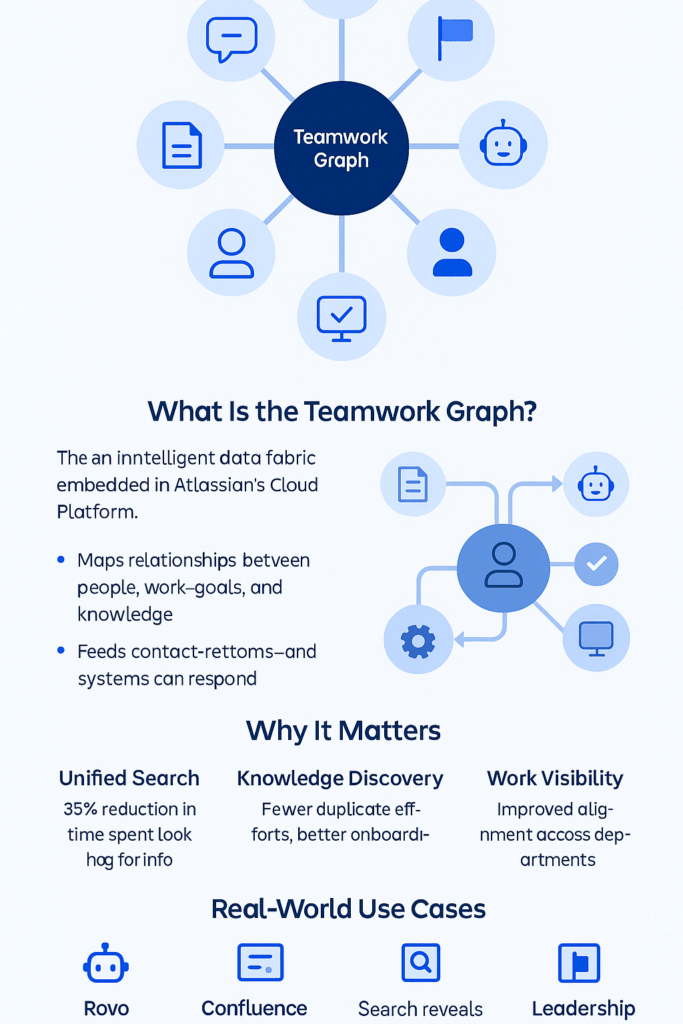
Layered on top of JSM and the broader Atlassian ecosystem is Atlassian Rovo—a secure, AI-powered assistant built on the Teamwork Graph.

Rovo doesn’t just mimic ChatGPT functionality—it provides intelligent assistance within your actual workflows, respecting permission structures and compliance boundaries. For healthcare IT teams, this unlocks tremendous value:

  • Summarize SOPs, policy documentation, or incident threads
  • Ask contextual questions about services, workflows, or knowledge base content
  • Find relevant information across Confluence, Jira, and JSM—in seconds

And perhaps most importantly: Rovo does not train on your data. It’s built for the real-world needs of highly regulated teams who can’t afford to compromise privacy or trust.

Imagine using Rovo to summarize a device’s configuration history before escalating an issue—or to instantly surface policy documentation during an audit. That’s what smart, compliant AI looks like.

Jira Plans: Bringing Strategic Visibility to Healthcare Projects

Healthcare transformation doesn’t happen in isolation. Whether it’s an EHR rollout, a digital front-door initiative, or infrastructure upgrades, success depends on coordinated execution across multiple teams.

That’s where Jira Plans (formerly Advanced Roadmaps) comes in.

Jira Plans helps you:

  • Visualize timelines, risks, and capacity across teams
  • Align IT, clinical, and business functions around shared goals
  • Provide real-time progress updates for leadership and stakeholders

For organizations dealing with fragmented systems and regulatory oversight, the ability to tie day-to-day work to long-term strategy isn’t just helpful—it’s essential.

Atlassian’s System of Work: Built for Regulated Environments
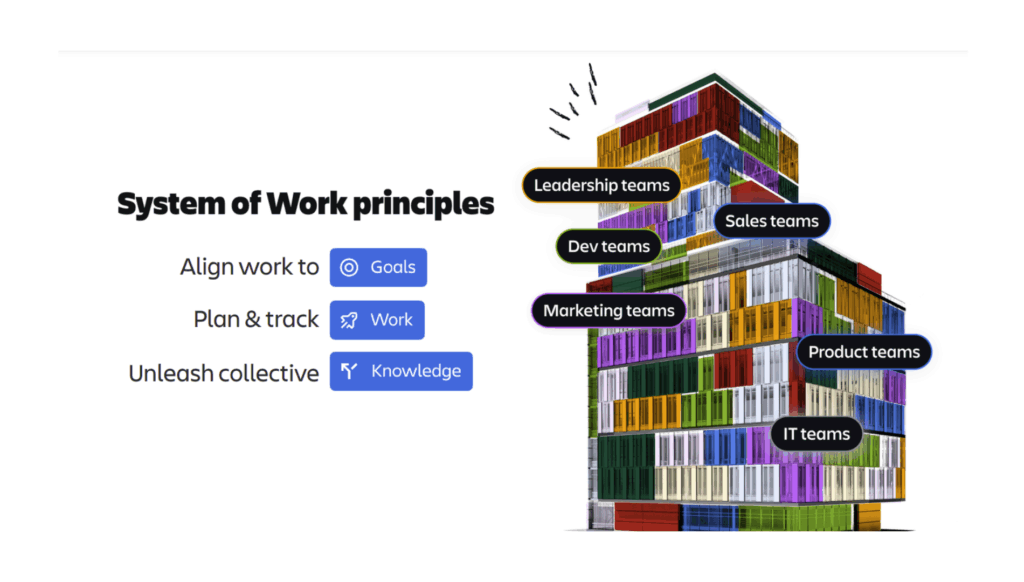
Atlassian System of Work

What makes these updates truly powerful is how they connect. Atlassian is evolving into a full System of Work—a modular, cloud-native ecosystem that supports everything from incident resolution to strategic planning, all in a secure and compliant environment.

For healthcare organizations, that means:

  • Reducing tool sprawl and complexity
  • Improving visibility across functions
  • Strengthening documentation and governance
  • Unlocking safe, purposeful AI

And with Oxalis as your implementation partner, you don’t have to go it alone. As an Atlassian Platinum Solution Partner with deep experience in healthcare and public sector transformation, we help you align technology with mission-critical outcomes.

What Comes Next: Let’s Reconnect

We know the conversations at HIMSS were just the beginning. If your team is still exploring ways to modernize your IT stack, reduce risk, or safely explore AI, let’s pick up where we left off.

Whether you’re ready for a roadmap workshop or just want to talk through what’s changed, we’re here.

Schedule a conversation with the Oxalis team

Get Out of MS Project and Into Jira Plans: Plan AND Distribute Tasks Easily

Does This Sound Familiar?

You’ve spent weeks building a meticulous project plan in Microsoft Project—outlining every detail, mapping dependencies, structuring task relationships, and perfecting a Gantt chart. Your stakeholders have approved it, your team is ready to roll, and the project is kicking off. But then you hit a wall: how do you efficiently assign tasks and track progress?

Suddenly, you realize that MS Project wasn’t built for execution. Your carefully crafted plan now requires manual tracking in multiple disconnected systems, leading to frustration, inefficiency, and misalignment.

Do you love Excel so much that you want your project management tool to resemble it? If not, it’s time for a better approach.

Enter Jira Plans, Atlassian’s powerful work and project management tool designed to support teams of all types—Agile, Waterfall, business operations, HR, and more. Jira Plans pulls together multiple Jira projects to easily visualize work for cross-functional teams, centralizing everything in one intuitive UI. With Jira Plans, teams can strategically plan, execute, and distribute tasks efficiently—without the bottlenecks associated with legacy project management tools.

MS Project is the old-school cubicle approach to project management.
Jira Plans is the modern, sleek startup office space.

Why Choose Jira Plans Over Microsoft Project?

While Microsoft Project is known for its structured approach to project planning, Jira Plans offers a more dynamic, transparent, and scalable solution that supports both traditional Waterfall project management and Agile methodologies. Here’s why healthcare leaders, system integrators, and state department executives should consider switching:

1. Seamless Transition from Planning to Execution

  • With MS Project, plans look great on paper but become difficult to operationalize once teams need to start executing tasks.
  • Jira Plans bridges the gap between planning and execution, allowing teams to assign tasks, track progress, and update dependencies in real time.
  • Instead of maintaining multiple external systems, Jira Plans provides a centralized workspace where project plans, dependencies, and execution details are all connected.

2. Supports Both Waterfall and Agile Workflows

  • Unlike MS Project, which is predominantly Waterfall-based, Jira Plans provides flexibility for organizations that use Waterfall, Agile, or a hybrid approach.
  • Gantt chart-style roadmaps allow for structured planning, while Agile boards enable iterative execution—giving teams the best of both worlds.
  • Healthcare IT teams, EHR implementation vendors, and hospital systems don’t have to abandon existing methodologies; instead, Jira Plans accommodates and enhances them.

3. Collaboration Across Teams & Locations

  • Jira’s real-time collaboration capabilities allow for seamless communication between hospital administrators, IT teams, clinicians, and external vendors.
  • Unlike MS Project, which operates in silos, Jira enables cross-functional teams to work in parallel—reducing delays and ensuring alignment.

4. Compliance, Security, and Governance in Highly Regulated Environments

  • Jira’s role-based access control and data governance ensure secure project management for healthcare organizations dealing with PHI and HIPAA compliance.
  • Audit trails, version tracking, and regulatory alignment make Jira a safer and more compliant option than traditional project management tools.

5. Built-In Reporting, Forecasting, and Portfolio Management

  • Advanced roadmap capabilities provide visibility across teams, dependencies, and milestones—essential for large EHR implementations or multi-hospital IT rollouts.
  • Real-time insights allow stakeholders to track progress, identify risks, and adjust strategies proactively.
  • Jira integrates with Atlassian Analytics, enabling data-driven decision-making for healthcare leaders.

Oxalis: Your Trusted Atlassian Platinum Solutions Partner for Healthcare IT

At Oxalis, we specialize in helping highly regulated industries—including healthcare, public sector organizations, and government agencies—leverage Atlassian solutions to drive operational efficiency, compliance, and digital transformation.

Our Expertise Includes:

  • IT Service Management & Cloud Migrations
  • Agile Project & Portfolio Management
  • Enterprise Strategy & Planning for Healthcare IT
  • Jira Implementations for EHR, Security, and Compliance Initiatives

Whether your organization is looking to move away from Microsoft Project’s rigid, outdated workflows or seeking expert guidance on Jira adoption, Oxalis is here to help.

Ready to Modernize Your Project Management Approach?

If you’re currently using Microsoft Project and struggling with inefficiencies, limited collaboration, or lack of scalability, it’s time to make the switch to Jira Plans.

Talk to our experts today to explore how we can transform your project management capabilities and streamline healthcare IT operations.

Don’t miss these posts: 

Cloud or Data Center? The Best Atlassian Deployment for Healthcare

For healthcare organizations using Atlassian products like Jira or Confluence, navigating the shift to a cloud-first strategy is more important than ever. With Atlassian discontinuing Server support in 2024, organizations must decide whether to migrate to Atlassian Cloud, adopt Data Center, or implement a hybrid approach.

For highly regulated industries like healthcare, compliance, security, and data control are top priorities. The critical question is: Does Atlassian Cloud meet HIPAA requirements, or is Data Center the better choice?

This guide explores your options, addresses HIPAA compliance concerns, and provides expert insights into making the best decision for your organization.

Atlassian Cloud vs. Data Center: What Healthcare Organizations Need to Know

Atlassian Data Center: A Behind-the-Firewall Option

For healthcare organizations needing full control over their infrastructure, Atlassian’s Data Center products offer a self-hosted, behind-the-firewall solution. This is particularly important for organizations that must store PHI/PII in Jira or Confluence but cannot meet compliance requirements in a cloud environment.

Key Advantages of Data Center:

  • Increased Security & Compliance – Full control over hosting, access, and compliance settings.
  • Scalability & High Availability – Load balancing and disaster recovery support.
  • Customization & Integration Flexibility – Ability to customize workflows and integrate with on-premises systems and security tools for enhanced compliance.

Atlassian Cloud’s Compliance and Security Features

Atlassian has made significant investments in security, compliance, and scalability for its Cloud offerings. Jira Software, Jira Service Management, and Confluence on the Enterprise plan are HIPAA-compliant, and Atlassian is prepared to sign Business Associate Agreements (BAAs) for them.

However, Jira Work Management is not HIPAA-compliant, and Atlassian has no plans to certify it. If your organization is not on the Enterprise plan, other considerations, such as Data Loss Prevention (DLP) tools and controlled third-party plugin usage, become essential.

Key Considerations for Cloud Deployments:

  • HIPAA Compliance – Available on Enterprise plans with a signed BAA.
  • Data Loss Prevention (DLP) Tools – Critical for enforcing PHI/PII storage policies.
  • Third-Party Plugins – Vendors may or may not be HIPAA-compliant; review all Marketplace apps carefully.
  • Process & Policy for Reporting and Remediation – A structured approach is needed to flag, review, and remove PHI. If your organization needs assistance evaluating whether Atlassian Cloud is the right fit, Oxalis can help assess your compliance needs and implementation strategy.

Considerations for Data Center:

  • Higher Hosting & Maintenance Costs – Requires dedicated IT resources and infrastructure investment.
  • User Minimums – Higher licensing costs with a 500-user minimum for Jira Software.

For organizations prioritizing compliance, security, and control, Data Center remains a viable alternative to Cloud, particularly for those not yet ready to fully migrate.

A Hybrid Approach: The Best of Both Worlds?

For organizations looking to balance security and efficiency, a hybrid cloud approach may offer the best of both worlds. This strategy allows teams to use Atlassian Cloud for non-sensitive operations while keeping PHI/PII in a secure Data Center environment.

Common Hybrid Cloud Scenarios:

  1. Customer-Facing Services on Cloud, Internal Systems on Data Center
    • Example: A healthcare IT company uses Jira Service Management on Data Center for handling PHI in customer support requests, while Jira Software and Confluence remain in the Cloud for agile development and knowledge management.
  2. Sensitive Workflows in Data Center, General Operations in Cloud
    • Example: A multi-state healthcare provider operates Quality Management in Jira Cloud, but runs compliance-sensitive projects in Jira Data Center to meet regulatory requirements.

Making the Right Decision for Your Healthcare Organization

Choosing between Atlassian Cloud, Data Center, or a hybrid approach depends on your security needs, compliance requirements, and IT infrastructure.

  • If you need a fully managed solution with built-in compliance, Atlassian Cloud (Enterprise Plan) is a strong option.
  • If you require full control over data storage, security, and compliance policies, Atlassian Data Center is the better fit.
  • If you want flexibility, a hybrid approach offers tailored security and scalability.

Atlassian’s Compliance Roadmap

The chart below details current and future Cloud compliance standards according to the Atlassian Cloud compliance roadmap.

UPDATESTATUSTIMEFRAME
FedRAMP Moderate Authority to Operate (ATO)Coming SoonQ2-Q3 2025
FedRAMP Moderate Security Assessment and Agency ReviewCompletedQ4 2024
HIPAA eligibility expansionReleasedQ3 2023
Notifications for HIPAA customersReleasedQ3 2023
WCAG (Web Content Accessibility Guidelines) Level ‘A’ReleasedQ1 2024
TISAX level 2 complianceReleasedQ3 2023
IRAP ComplianceFuture2026
C5 ComplianceFuture2026
BYOK Compliance in Copy Product DataReleasedQ2 2024
Accessibility Support in Primary ExperiencesFuture2025
SOC 2 Compliance for Rovo and AIReleasedQ4 2024
Usage limits monitoring for RovoReleasedQ4 2024
Atlassian Cloud Migration Playbook

Oxalis’ Proven Methodology: Your Atlassian Cloud Migration, Simplified

As your trusted Atlassian Cloud Migration advisors, we’ve distilled our extensive experience into a step-by-step eBook. Whether you’re transitioning from Server or Data Center, this guide covers every aspect of your journey.

How Oxalis Can Help

At Oxalis, we specialize in helping healthcare organizations navigate Atlassian deployments while ensuring compliance with HIPAA and other regulatory frameworks. Our team provides:

  • Compliance Assessments – Evaluating Cloud vs. Data Center fit for your organization.
  • Architecture & Deployment Strategy – Implementing secure, scalable solutions.
  • Hybrid Cloud Solutions – Designing an optimal mix of Cloud and Data Center products.
  • Security & Compliance Best Practices – Ensuring ongoing HIPAA compliance and data protection.

Need expert guidance on your Atlassian deployment? Contact Oxalis today to explore the best path forward for your healthcare organization.

Is Jira HIPAA Compliant? What Healthcare Organizations Need to Know

For healthcare organizations and businesses handling protected health information (PHI), compliance with the Health Insurance Portability and Accountability Act (HIPAA) is a fundamental requirement. However, as organizations increasingly adopt modern cloud-based collaboration and service management tools, ensuring compliance becomes more complex. Atlassian’s suite of products—particularly Jira and Confluence—offers powerful solutions for enterprise teams, but are they suitable for HIPAA-compliant environments? This guide breaks down the current state of Atlassian’s HIPAA compliance, comparing Cloud and Data Center deployment options and providing best practices for maintaining compliance.

What You’ll Learn

  • An overview of HIPAA compliance
  • The HIPAA compliance status of Jira and Confluence Cloud
  • The HIPAA compliance considerations for Jira and Confluence Data Center
  • Best practices for using Jira in HIPAA-compliant environments

Is Jira HIPAA-Compliant?

HIPAA compliance is a critical concern for healthcare organizations and any entity handling protected health information (PHI). Atlassian has made strides in ensuring HIPAA compliance for select products. As of February 2023, Atlassian has implemented HIPAA compliance for specific Cloud products on its Enterprise plan. Additionally, Atlassian Data Center products continue to provide a self-hosted alternative for organizations that require full control over their compliance framework.

However, achieving HIPAA compliance is not solely about using a compliant product. Organizations must ensure their hosting, access controls, and plugin usage align with their HIPAA compliance program.

Interested in learning more about HIPAA compliance with Atlassian? Oxalis can help guide you through the decision-making and implementation process. Contact us below to get in touch. Keep reading to learn more about which Atlassian products are now HIPAA-compliant.

Are Jira and Confluence Cloud HIPAA-Compliant?

The short answer: partially. Atlassian provides HIPAA compliance for select Cloud products, but only under its Enterprise plan. Atlassian is also prepared to sign Business Associate Agreements (BAAs) for the following products:

  • Jira Software Cloud
  • Jira Service Management Cloud
  • Confluence Cloud

Notably, Jira Work Management is not HIPAA-compliant, and Atlassian has no current plans to make it so. Organizations using non-Enterprise Cloud plans should anticipate future expansions of HIPAA compliance, but currently, only Enterprise customers can fully leverage HIPAA protections.

For organizations considering Atlassian Cloud, it is essential to follow Atlassian’s HIPAA Implementation Guide to configure their environment properly.

Is Jira/Confluence Data Center HIPAA Compliant?

The answer: it depends on your hosting strategy.

Atlassian Data Center offers a viable solution for organizations handling PHI, as it can be self-hosted or managed by a healthcare-oriented Managed Service Provider (MSP). This model provides greater control over compliance policies, security configurations, and access permissions. When properly implemented, Jira and Confluence Data Center can be part of a HIPAA-compliant infrastructure.

Organizations should ensure their Data Center deployment includes:

  • Secure hosting (on-premises or through an MSP with HIPAA safeguards)
  • Role-based access controls and audit logging
  • Regular security assessments and compliance audits

Regardless of whether you use Atlassian’s Cloud or Data Center products, we recommend the following:

  • Ensure your infrastructure’s configuration and controls (internally hosted or managed by an MSP) are aligned with your organization’s HIPAA Compliance Program.
  • Leverage a Data Loss Prevention (DLP) tool to keep PHI/PII out of your system, and eliminate it if found.
  • Analyze which plugins you intend to use, and whether the third party vendor is considered a business associate subject to a BAA.
  • Consider your options for remediating PHI/PII accidentally stored in issue data/history, pages, and attachments.

For an in-depth review, check out our article Atlassian Cloud vs Data Center: Which is Better for Healthcare Organizations?

Best Practices for HIPAA Compliance with Atlassian Products

Regardless of whether you choose Atlassian Cloud or Data Center, ensuring HIPAA compliance requires careful planning. Oxalis recommends the following best practices:

  1. Align Hosting and Configuration with HIPAA Requirements
    Ensure your Cloud or Data Center infrastructure aligns with your organization’s HIPAA compliance program.
  2. Use a Data Loss Prevention (DLP) Tool
    Implement a DLP solution to prevent PHI from being stored inadvertently and ensure it is removed when necessary.
  3. Evaluate Third-Party Apps and Plugins
    Review third-party apps and integrations to determine if vendors qualify as business associates and require a BAA.
  4. Develop a Remediation Plan for PHI Storage
    Establish procedures for identifying and removing PHI/PII that may have been accidentally stored in issues, pages, or attachments.

How Oxalis Can Help

At Oxalis, we understand that security and compliance are critical for healthcare organizations. Our team has extensive experience helping organizations determine whether Atlassian Cloud or Data Center is the right fit for their HIPAA compliance needs. We provide expert guidance on implementation, configuration, and ongoing compliance management.

If you need assistance navigating HIPAA compliance with Atlassian products, contact Oxalis today to schedule a consultation with our experts.

To learn more about making the right choice for your organization, download our whitepaper: Atlassian Cloud vs. Data Center: Key Considerations for Enterprise, Compliance-Heavy Organizations.


Recommended blog posts

Secure, Scalable, HIPAA-Compliant: Cambia’s Atlassian Cloud Journey with Oxalis

The Challenge

Cambia Health Solutions, a leader in healthcare innovation for over a century, faced a pivotal moment. With Atlassian Server reaching end-of-life, Cambia needed to transition to the cloud—but with HIPAA compliance as a non-negotiable requirement, the migration posed significant challenges.

Beyond compliance, Cambia sought:

  • A seamless migration for over 700 users from Atlassian Server to the cloud.
  • Stronger portfolio-level reporting through standardized workflows.
  • A scalable enterprise support model to serve 2,000 users efficiently.

They turned to Oxalis, a trusted expert in regulated industries, to lead the transformation.

The Oxalis Approach

Oxalis designed a strategic, phased migration to ensure security, efficiency, and minimal disruption.

Knowledge & Change Management: As teams transitioned, Oxalis helped build a robust Atlassian Knowledge Base, ensuring long-term adoption and self-sufficiency.

Enterprise Standard Workflows & Best Practices: We conducted a deep analysis of Cambia’s existing workflows, defining standardized Jira configurations that balanced structure with team flexibility.

HIPAA-Ready Security Architecture: Our team integrated Azure AD with Atlassian Access, meeting Cambia’s stringent InfoSec requirements while reinforcing compliance safeguards.

A Cohort-Based Migration Strategy: Rather than a one-size-fits-all approach, we rolled out migration waves tailored to each team’s priorities. Continuous feedback from each phase informed improvements for the next.

The Outcome

Cambia achieved a seamless, secure, and scalable cloud transition with measurable benefits:

Full Migration & Consolidation: 147 Rally workspaces successfully migrated to Jira Software Cloud, benefiting 700+ users.
HIPAA Compliance Maintained: Patient and sensitive health information remained fully protected.
Stronger Reporting & Insights: Standardized issue structures improved portfolio-level visibility across teams.
Streamlined Workflows: Agile teams gained greater efficiency and consistency, enabling faster project execution.

Services Provided

  • HIPAA-compliant cloud migration
  • Workflow optimization and standardization
  • Change and knowledge management
  • Jira reporting and project management

“I cannot speak highly enough of our external partner, Oxalis. Oxalis has been nothing short of top-notch — from a level of professionalism to a trusted Atlassian advisor, to a well-organized project team with great communication, and especially down to their personable, responsive project team members. I only half-joke when I say that the cutover plan for Phase One migration is a work of art. Thank you, Oxalis.”

HEIDI BROWN
Manager of Program Management, Cambia Health Solutions

Get Started with Oxalis: HIPAA-Compliant Cloud Solutions for Healthcare Innovation

Looking to achieve results like Cambia? Partner with Oxalis for HIPAA-compliant cloud solutions that enhance patient care, streamline operations, and ensure compliance.

Sana Benefits: Transforming Healthcare with a Unified Atlassian Ecosystem

The Challenge: A Growing Pain for a Growing Company

Sana Benefits, a trailblazer in providing affordable, accessible healthcare plans for small businesses, was experiencing a common but critical challenge: Their rapid growth was outpacing their technology. A patchwork of disconnected systems — Zendesk for customer support, Asana for project management, and Monday.com for task tracking — was creating operational friction.

Double documentation, delayed communication, and limited visibility into the big picture were hindering efficiency and impacting the customer experience. Sana needed a solution that would scale with their business, foster collaboration, and streamline workflows, all while maintaining strict HIPAA compliance.


The Oxalis Approach: Building a Scalable, Collaborative Foundation

Oxalis embarked on a deep dive into Sana’s challenges. Through in-depth interviews with stakeholders across departments, we painted a clear picture of their current processes and pain points. The diagnosis: A unified, HIPAA-compliant Atlassian ecosystem could be the cure.

Our solution was a multi-pronged approach:

  1. Assessment and Vision: We conducted a thorough assessment of Sana’s needs and technology landscape. Our findings confirmed that Atlassian Data Center, hosted in a HIPAA-compliant cloud environment, could provide the scalability and security they required.
  2. Seamless Implementation: We designed, configured, and implemented a single, integrated Atlassian environment, all while minimizing disruption to Sana’s day-to-day operations. We migrated data from their existing systems, ensuring a smooth transition.
  3. Integration and Streamlining: We integrated Zendesk seamlessly into the Atlassian ecosystem, accelerating communication between support, operations, and engineering teams. Workflows were standardized, unlocking powerful reporting capabilities and providing leadership with the visibility they needed.
  4. Change Management: We didn’t just provide a new system; we empowered Sana’s teams to thrive in it. We provided comprehensive training and change management support, ensuring adoption was swift and successful.

Services Provided

  • Atlassian Toolset (Confluence, Jira Service Management)
  • Jira Migration
  • Change Management
  • Knowledge Management
  • Transition Management
  • Training
  • Project Management

[bodymovin anim_id=”1235″ loop=”true” autoplay_viewport=”true” align=”center”]

“The engineering teams saw improvements in cycle times with a median cycle time of 24 hours for bugs and under five days for stories.”

— James Cadena, Director of Information Security, Sana Benefits

The results were transformative:

  • Improved Customer Support: Teams now had immediate access to all relevant customer information, leading to faster resolution times and happier customers.
  • Streamlined Operations: Eliminating duplicate documentation and manual handoffs saved valuable time, allowing Sana to focus on what mattered most: providing exceptional healthcare solutions.
  • Data-Driven Decisions: A unified system provided leadership with the insights they needed to make informed decisions and guide the company’s growth.
  • Measurable Impact: “The engineering teams saw improvements in cycle times with a median cycle time of 24 hours for bugs and under 5 days for stories,” remarked James Cadena, Director of Information Security at Sana Benefits.

By harnessing the power of a unified Atlassian system, Sana Benefits transformed their challenges into opportunities.They’re now equipped with a scalable, collaborative platform that supports their mission of making quality healthcare accessible to all.

[bodymovin anim_id=”1236″ loop=”true” autoplay_viewport=”true” align=”center”]

About Sana Benefits

Founded in 2017 on the belief that quality healthcare should be understandable, accessible, and affordable for all, Sana Benefits, Inc. is a healthcare provider based in Austin, Texas, whose mission is to build better health plans for small businesses.

Get more information

Do you have similar challenges to Sana and looking for similar results? Connect with our team below.

Atlassian Cloud Enterprise is HIPAA Compliant

What does this mean for Healthcare providers holding PHI and PPI Data?

HIPAA Compliance (Health Insurance Portability and Accountability Act). On February 2nd 2022, Atlassian announced HIPAA compliance for their Jira Software Cloud Enterprise and Confluence Cloud Enterprise products. With the introduction of this service, organizations with access to PHI can now use Atlassian Cloud to store and manage their sensitive data.

Atlassian will make use of Business Associate Agreements (BAA) to facilitate HIPAA compliance. Organizations must enter into a BAA before giving access to or disclosing any PHI to Atlassian Cloud.

Jira Software Cloud Enterprise and Confluence Cloud Enterprise will offer built-in security controls and processes that are compliant with HIPAA.

This is a potential game changer for Healthcare and data sensitive companies. Prior to this announcement, organizations managing PHI were unable to provide or store data in the Atlassian Cloud. Instead they needed to rely on self managed servers with complex Data Loss Prevention tools to scrub their instances of PHI and prevent data contamination. While some organizations may want to continue with hardened Data Loss Prevention techniques and tools as a precaution, others may want to establish a compliant domain. Hybridized solutions can also be used for integrations between server and cloud. Oxalis has successfully delivered these kinds of solutions for multiple healthcare providers and has deep experience in this field.

What is HIPAA Compliance?

Jira HIPAA compliance

The Health Insurance Portability and Accountability Act, is a regulation made by the U.S. Department of Health and Human Services. This
regulation is focused on safeguarding the privacy and security of individuals’ Protected Health Information and covers areas such as

  • Privacy and security measures for protecting PHI
  • Assessments for reasonable remediation or mitigating controls of addressable HIPAA Security Rule requirements
  • An annual HIPAA Security Attestation, Gap Assessment, and Security Risk Analysis
  • The regular review and retention of HIPAA Privacy and Security policies and procedures
  • Privacy and security awareness content regarding the protection of PHI, and
  • The designation and role definition of a HIPAA Privacy and Security Officers

HIPAA has established high standards to protect the security, integrity, and confidentiality of an individual’s Protected Health Information (PHI). This is achieved through various administrative, physical, and technical safeguards, including:

  • Descriptions of permitted use cases of PHI
  • Commitments to not use or further disclose PHI other than as permitted by the contract or as required by law;
  • The use of appropriate measures and safeguards to prevent inappropriate PHI use or disclosure
Atlassian is HIPAA Compliance

Next Steps

To qualify for Cloud HIPAA compliance your organization must utilize an Enterprise product and enter into a BAA Business Associate Agreement (BAA) with Atlassian. Oxalis can help you request a BAA and determine your eligibility.

The following products are not currently covered by the BAA but may be road mapped by Atlassian soon:

  • Any Cloud product other than Confluence Cloud Enterprise or Jira Software Cloud Enterprise
  • The Cloud Standard or Cloud Premium editions of Jira Software and Confluence

As a Solution Partner, Oxalis is positioned to provide you with the best value license arrangement and can optimize your Atlassian products so that you reap the most benefit from your software subscriptions.

Other things you need to know

Marketplace apps and Jira Service Management are not yet included in the HIPAA Compliant offering. Atlassian customers will need to individually assess each app that handles PHI to determine if they are HIPAA compliant. Oxalis can provide assistance with App assessment and provide workarounds via customized plugins and specialized support.

Recommended blog posts

Want to find out more?

Please get in touch. Oxalis specializes in high compliance implementations of Atlassian products for Healthcare organizations. We’ll ensure you get the maximum value from your Atlassian services and secure your organization against the risk of HIPAA exposure. Check Atlassian’s guide & Atlassian’s HIPAA requirements guide to learn more about HIPAA compliance. Oxalis is an Atlassian Partner who delivers tailored solutions and support services within the healthcare industry. These partnerships are instrumental in driving innovation and productivity, ultimately improving patient care and healthcare delivery

Streamlining Portfolio Reporting at a National Health Care Company

The Challenge

Streamlining Portfolio Reporting, a national healthcare organization was struggling to define, prioritize, and manage execution of their Infrastructure and Operation initiatives in a consistent manner. Countless hours were spent by teams creating and recreating status reports in various formats (Jira, Excel, Smartsheets) in an effort to keep leadership informed. Grassroots movements started and failed to transition the process to Jira, so Oxalis was brought in to help set up a structure for success.

Streamlining Portfolio Reporting -healthcare industry

Our Approach

Knowing that the crux of the problem was providing leadership-level visibility while enabling team autonomy, the Oxalis team immediately went to work analyzing the needs of both management and individual contributors.

Using Advanced Roadmaps for Jira, to streamline portfolio reporting, the Oxalis team helped put a structure in place so that individual delivery team epics could be rolled up to organization-wide Initiatives. Permission and data schemas were configured to ensure appropriate levels of segmentation, and to provide coverage for current reporting needs. Automation and subscription-based reports were used as controls to help promote data integrity, and training was developed for key personnel to establish and sustain usage of the tool.

Services we provided

  • Oxalis Integrated Services
  • Atlassian Licensing

[bodymovin anim_id=”1235″ loop=”true” autoplay_viewport=”true” align=”center”]

The Outcome

Over the course of three months, the configuration and process for managing initiatives in Jira was fully rolled out to streamline portfolio reporting.

Leadership is currently benefiting from a single view into the status of all key initiatives, which are updated in real-time based on the work completed by the delivery teams. Delivery teams can easily see how their work ties back to strategy while working in a way that suits them best to streamline portfolio reporting. Substantial savings from reporting overhead are anticipated over the coming years.

[bodymovin anim_id=”1236″ loop=”true” autoplay_viewport=”true” align=”center”]

Get more information

Feel free to send us a message in the form below