The Next Generation of OSRS: Advancing Shipyard Performance
Executive Summary: Atlassian Data Center will retire in 2029, but Oxalis has already prepared the path forward. With proven expertise in regulated industries, we ensure continuity today while guiding customers toward secure, compliant, and future-ready cloud platforms. From Atlassian Government and Isolated Cloud to tailored alternatives, Oxalis delivers stability now and innovation for tomorrow.
At Oxalis, we believe the most effective technology isn’t just about keeping up—it’s about staying ahead. That’s why we continue to evolve the Oxalis Ship Repair System (OSRS) to meet the needs of the modern shipyard, whether serving the U.S. Navy or supporting commercial customers.
Building the Next Generation of OSRS
The next chapter of OSRS will build on that strength, unlocking new opportunities for efficiency, integration, and smarter decision-making.
We’ve been working on our roadmap for the product, and the next generation of OSRS is already underway. Our goal is simple: continue to support the best-in-class functionality that enables ship repair organizations nationwide, while building a future platform capable of expansion and advanced AI capability.
OSRS has become the most trusted ship repair management system because it was designed around the real needs of shipyards. From streamlining operations to ensuring compliance with the Navy’s strictest requirements, OSRS has delivered value where it matters most. The next chapter of OSRS will build on that strength, unlocking new opportunities for efficiency, integration, and smarter decision-making.
Anticipating What’s Ahead
Oxalis has leveraged Jira Service Management (JSM) Data Center as part of the OSRS platform. It has served us well as both a flexible workflow management system and a compliant solution. Atlassian will be retiring the Data Center product line by March 2029 in favor of future-state cloud platforms, including ITAR- and DoD-compliant infrastructure.
While noteworthy, this announcement is not new for us—we’ve anticipated it, and it’s already accounted for in our plans. Our roadmap ensures OSRS remains fully supported, secure, and future-ready, no matter what.
Why This Matters for Shipyards
The future of OSRS is about more than technology—it’s about outcomes for shipyards. By re-platforming and expanding capabilities, we’re making sure shipyards can:
Work more efficiently, reducing cycle times and controlling costs.
Stay compliant, even as Navy and commercial requirements evolve.
Operate with confidence, knowing their systems are secure, supported, and designed for the future.
Leverage new technologies, including AI, to deliver smarter insights and performance gains.
Looking Ahead
We’re excited about where OSRS is going—and about the opportunities it will unlock for shipyards across Navy and commercial sectors alike.
Want a More Resilient Business? Tell Your Best People to Take a Break
At a Glance: What’s the business case for offering sabbaticals in consulting?
Oxalis’s “3 for 3” sabbatical program gives employees three fully paid weeks off after three years of service—with a full disconnect required. It’s helping prevent burnout, build resilience, reduce key-person risk, and shift the firm’s focus from hours worked to impact delivered.
As the CEO and founder of Oxalis, I know how intense our work can be. Consulting moves fast, the problems are complex, and people care—sometimes too much for their own good. Early on, I saw the signs of burnout in high performers, even those who genuinely love what they do. So we asked ourselves a simple question: what would it look like to give people real time to rest?
That question led us to create something we now call the “3 for 3” sabbatical program. The idea is simple: if you’ve been with us for three years full-time, you get three continuous, fully paid weeks off. You can add a week of PTO and turn it into a full month. But there are two non-negotiables: it has to be taken all at once, and you have to completely unplug—no emails, no Slack, no “quick questions.”
Why We Did It
The original goal was preventing burnout. Consulting firms, especially in the early years, often see high turnover around the 2–3 year mark. Some of that’s just career progression, but a lot of it comes down to exhaustion. The people who burn out are usually the ones who care the most—who push hard and rarely take a step back.
At Oxalis, our people are the business. If they’re burned out, the business suffers. If they’re rested and focused, we thrive. So we built a sabbatical program not as a perk, but as a tool to protect the long-term health of our team—and by extension, our company.
The Reality of Implementing It
Let’s be honest: implementing this in a consulting firm isn’t easy. The economics of professional services revolve around billable hours, utilization, and margin. Most firms talk about work-life balance, but everything in their model pushes the other way.
Even standard PTO can feel hard to take in this environment—so asking someone to take a month off? That’s a big ask. And not just from a planning standpoint—people don’t always want to disconnect. High performers often feel too responsible to step away. They worry things will fall apart, or that it sends the wrong message.
That’s why leadership has to set the tone. At Oxalis, we celebrate sabbaticals during team meetings. We encourage people to share what they did, what they learned, or how they spent their time. And we model it ourselves. If leaders don’t unplug, no one else will feel like they can.
“If your company can’t run without one person, that’s a risk. Sabbaticals help expose—and fix—that risk.”
What We’ve Gained
The benefits have gone far beyond burnout prevention. Here’s what we’ve seen so far:
1. Better Resilience and Scalability When a key person steps away, the team adjusts. Gaps get revealed. Documentation gets updated. Knowledge gets shared. The business gets stronger because we’re not over-relying on any one individual.
If your company can’t run without one person, that’s a risk. Sabbaticals help expose and fix that risk.
2. A Shift in How We Measure Value In traditional consulting, hours are currency. But we’re moving toward a model based on impact and outcomes. When you encourage people to take real time off, you’re also saying: what matters isn’t how many hours you logged—it’s what you delivered.
That’s a big mindset shift, and an important one as the industry evolves—especially with AI and automation changing how work gets done.
3. A Stronger Culture People come back with fresh ideas and a renewed sense of purpose. And maybe more importantly, they come back knowing their company has their back.
It reinforces trust. And trust is hard to build, easy to lose, and critical to any business that wants to last.
Why I Think More Firms Should Do This
There’s a lot of talk right now about employee wellness, sustainable growth, and the future of work. But talk is cheap. If you’re not building systems that support your people, you’re not really solving the problem.
We built our sabbatical program because we believe rest matters. Not just for the individual, but for the business. Not just as a perk, but as a strategy.
If you’re running a services firm—especially in a high-pressure industry like consulting—I’d encourage you to think seriously about how you treat time. Are you rewarding hours, or outcomes? Are you building a business that can scale, or one that relies too heavily on a few individuals?
And most importantly—are your people getting the rest they need to do their best work?
At Oxalis, we’re still learning and evolving. But I can say this with confidence: giving people space to step away has made us stronger. And I believe it’s one of the smartest decisions we’ve made.
Scaling Smart Communication: A CIO’s Playbook for Async Video Adoption
The best tools in the world only deliver value if teams actually use them.
For CIOs leading digital transformation efforts—especially in highly regulated industries like government and healthcare—rolling out new technologies isn’t just about turning on licenses. It’s about driving thoughtful, strategic adoption that sticks.
Asynchronous video, powered by Atlassian Loom, is poised to reshape how organizations communicate. But realizing its full potential requires more than simply introducing a new recording tool. It demands leadership, cultural alignment, and a clear plan for scaling new behaviors across teams.
At Oxalis, we help IT leaders successfully integrate tools like Loom into their ecosystems. Here’s what we’ve learned about making async video adoption work—at scale, with impact, and in ways that fit tightly regulated environments.
Why Async Video Matters Now
Before diving into adoption strategies, it’s worth stepping back to remember why this shift matters so much.
Remote work, hybrid schedules, and increased operational complexity have all pushed traditional communication methods to the breaking point. Meetings are too frequent. Emails get lost in noise. Critical information often doesn’t reach the right people at the right time.
Async video solves for this by offering:
Human connection without the calendar chaos
Clearer messaging without real-time demands
A scalable way to lead, teach, and collaborate
But introducing async video into your organization requires intentional change management—because it’s not just a new tool. It’s a new way of working.
Key Strategies for Driving Loom Adoption at Scale
1. Start with Leadership Modeling
Adoption starts at the top. When CIOs and senior IT leaders personally use Loom for key communications—weekly updates, strategic announcements, project kickoffs—it signals to the organization that this is not just a side experiment. It’s part of how the business operates.
💡 Action Tip: Record a short Loom welcoming teams to the initiative. Model best practices like brevity, clarity, and human tone.
When leaders embrace async video, others follow.
2. Identify High-Impact Use Cases First
Not every communication needs a Loom. Start by targeting high-impact, low-friction areas where async video will make an obvious improvement.
Some top-of-mind examples are:
Replacing weekly status meetings
Delivering project updates
Providing onboarding walkthroughs
Explaining incident responses
💡 Action Tip: Work with team leads to select 2–3 pilot workflows where Loom will save time and improve clarity right away.
3. Integrate Loom into Existing Tools and Workflows
Adoption accelerates when new behaviors fit naturally into existing systems. Because Loom integrates seamlessly with Jira, Confluence, and Jira Service Management, embedding videos into existing issues, pages, and projects is frictionless.
💡 Action Tip: Train teams on how to add Loom videos to Jira tickets or Confluence documentation as part of their regular updates. Make async video a part of how work gets done—not an extra step.
4. Build Awareness and Training
New tools require enablement. Launch Loom with internal campaigns that explain the why, how, and when to use it.
Provide:
Short Loom-recorded tutorials
Best practice guides (e.g., keep videos under three minutes, focus on one topic per Loom)
FAQs addressing security, access, and compliance
💡 Action Tip: Create a Confluence page hub with Loom how-tos, embedded demos, and links to governance policies.
5. Measure, Celebrate, and Adjust
What gets measured gets managed. Track adoption metrics like:
Number of Loom videos created
Meeting hours saved
Views and engagement rates
Share early success stories across teams. Recognize power users. Adjust training and guidance based on feedback.
💡 Action Tip: Highlight time savings and user wins in leadership reports to show tangible impact early and often.
Navigating Compliance and Governance
In regulated sectors, adoption plans must also account for compliance, security, and governance needs.
Fortunately, Atlassian Loom is built with enterprise-grade security features:
SOC 2 Type II compliance
Encryption at rest and in transit
Access controls and retention settings
Work closely with IT security teams to establish usage policies around:
Video retention and deletion
Access permissions
Appropriate content guidelines
Building compliance into the rollout ensures that excitement around Loom doesn’t create future risks.
Async Video: A Strategic Advantage for Modern CIOs
At a time when every organization is being asked to move faster, operate leaner, and connect more authentically, asynchronous video is no longer optional—it’s a strategic imperative.
CIOs who successfully drive Loom adoption aren’t just deploying a tool.
They’re leading a cultural shift:
Toward smarter communication.
Toward more engaged, empowered teams.
Toward digital workplaces that are agile, resilient, and human-centered.
And in highly regulated environments, doing this well sets organizations apart—not just in efficiency, but in trust, transparency, and operational excellence.
In this eBook, you’ll discover:
Why async video is essential for modern, hybrid teams.
How Loom fits into the Atlassian ecosystem to boost clarity and connection.
Key use cases for Loom across IT, support, leadership, and training.
Steps to build a culture of async communication.
How to roll out Loom effectively and measure its impact.
Ready to Lead the Shift?
At Oxalis, we help organizations adopt transformative technologies like Loom with a clear focus on security, compliance, and long-term success.
Let’s talk.
Striking a Balance: Embracing White-Glove Service in a Self-Help World
In today’s business landscape, self-service solutions have become the norm. But have we lost sight of the invaluable role of a personal touch?
Technology, while efficient, often places the burden of navigation and problem solving on the customer. However, a strategic blend of supportive processes, adaptable technology, and genuine human connection can craft a service model that prioritizes the customer experience without sacrificing efficiency.
In Search of the Human Element: Reclaiming Human-Centric Customer Service
From online shopping to troubleshooting tech glitches, self-service and automation have woven themselves into our everyday lives. Customer service, once synonymous with dedicated training and personalized interactions, has taken a backseat to automated responses and rigid support pathways.
While automation undoubtedly streamlines processes, it risks depersonalizing service interactions. Research highlights a strong consumer preference for human interaction in complex scenarios. According to a survey by Accenture, a staggering 83% of consumers favor human assistance over digital channels for intricate tasks. Furthermore, poor service led to an estimated $1.6 trillion loss for U.S. businesses in 2016 due to customer churn.
This underscores the importance of finding the right balance. While self-help tools have their merits, they shouldn’t replace the human touch. Technology is best utilized when it enhances the user experience from a human perspective.
When Self-Service Falls Short: The Case for White-Glove Support
Complex Problem Solving
Not every problem can be neatly solved by a chatbot. Complex issues demand human expertise and intuition. Cybersecurity threats or intricate technical glitches in IT service management, for instance, require the skilled intervention of professionals.
Personalized Support
Self-service solutions, while efficient, offer standardized responses. White-glove, human-centric customer service, on the other hand, provides the tailored assistance that customers crave. A poll by PwC found that 82% of U.S.-based consumers indicated they “want to interact with a real person more as technology improves,” while 59% of all consumers feel companies have lost touch with the human element of customer experience.
Building Trust and Loyalty
Human connection fosters trust and nurtures long-term relationships. It’s no surprise that customers with positive experiences tend to stick around longer. Case in point, a study by Harvard Business Review discovered that customers with good experiences were likely to remain customers for six times as long as customers with bad experiences. Customer service isn’t just about resolving issues; it’s about cultivating loyalty and positive brand perception.
Human interaction builds trust and fosters long-term relationships. People care about customer service and it affects not only perception but brand loyalty.
Data-Driven, Customer-Centric: Personalizing the Service Experience
Technology as an Enabler
The answer isn’t to reject technology but to harness its potential strategically.
A Two-Pronged Approach:
Offer customers transparent choices. A generic service route might take longer but guarantees personalized attention. Alternatively, a specific support path may be faster but requires more effort from the customer. This empowers customers while optimizing resource allocation.
Data-Driven Insights:
Leverage data analytics to understand customer preferences and pain points. This enables proactive issue resolution and personalized service delivery.
Omnichannel Communication:
Meet customers on their preferred platforms. Whether it’s chat, phone, email, or in person, offering diverse communication channels ensures accessibility and convenience.
Continuous Training:
Invest in your service agents. Equip them with the latest knowledge and tools to deliver exceptional service.
AReal-World Example
Oxalis partnered with a leading public transportation provider to design a customer-centric Jira Service Management system that delivered a white-glove service experience. By focusing on the user journey, Oxalis revamped intake, triage, routing, and notification processes. The result? A significant increase in customer satisfaction and perceived ease of use. This demonstrates the power of a customer-focused service model, even in sectors where it might not seem immediately obvious.
The Human Touch: The Ultimate Competitive Advantage
The digital age has brought remarkable advancements, but it shouldn’t come at the cost of human connection. Personalized service remains a cornerstone of exceptional customer experiences, particularly in complex fields like IT service management. By striking the right balance between technology and human interaction, we can deliver faster, more efficient, and ultimately more fulfilling service experiences. Remember, the self-help world shouldn’t overshadow the irreplaceable value of genuine human connection.
Ready to elevate your customer experience? Let’s explore how to infuse the human touch into your service model. Contact us today for a personalized consultation!
Full Steam Ahead: Propelling Shipyards into the Digital Age with ShipyardOS
The U.S. shipbuilding and repair industry is at a crossroads. We’re facing stiff competition from around the globe, and it’s clear that the old ways of doing things just aren’t cutting it anymore. We need to embrace the digital age, not just by adopting shiny new technologies, but by fundamentally transforming how we use data to run our businesses.
That’s where ShipyardOS comes in. It’s not just another software solution; it’s a vision for a smarter, more connected, and more efficient shipyard. Think of it as the operating system for your entire operation, designed to harness the power of data and propel you ahead of the competition.
From Gut Feeling to Hard Data: Making Smarter Decisions, Faster
At its core, ShipyardOS is about empowering every person in your shipyard with the data they need to excel. Imagine a world where your estimators have real-time insights into past project performance, where your production teams can track progress in real-time, and where your executives have a bird’s-eye view of the entire operation, all fueled by data.
This isn’t some far-off dream; it’s achievable today. The technologies are mature, and the potential benefits are enormous. But it requires a shift in mindset — a move away from reactive IT towards a proactive, data-driven approach.
Building Blocks for a Digital Shipyard: The Tech Stack that Powers ShipyardOS
Building ShipyardOS starts with a solid technological foundation. Think of it as laying the groundwork for a digital shipyard. This involves:
Strong identity management: Making sure the right people have access to the right data at the right time.
Seamless data exchange: Breaking down data silos so information flows freely across departments.
Powerful analytics: Turning raw data into actionable insights that drive decision-making.
Smooth integration: Making it easy to add new technologies as your shipyard evolves.
Smart automation: Streamlining repetitive tasks and freeing up your team for more strategic work.
Setting Sail: Your Shipyard’s Digital Transformation Roadmap
We understand that every shipyard is at a different stage in its digital transformation journey. That’s why we’ve developed a maturity model to guide you. It helps you assess where you are today and chart a course towards a fully data-driven shipyard.
Take ship maintenance and repair, for example. The journey might start with digitizing work orders and production management. Then, you could integrate data across teams and stakeholders, build a common data platform, and eventually leverage predictive maintenance and even cutting-edge technologies like AR and robotics.
Rising Tides Lift All Boats: ShipyardOS and the Future of the Maritime Industry
ShipyardOS isn’t just about individual shipyards; it’s about transforming the entire maritime industry. Imagine a world where shipyards, suppliers, and the U.S. Navy all speak the same data language, collaborating seamlessly to build and maintain the ships that keep our nation strong.
The U.S. Navy, in particular, has a huge role to play. Their standardized work patterns offer a blueprint for industry-wide best practices. By working together, we can create a more efficient, innovative, and resilient maritime ecosystem.
Don’t Miss the Boat: ShipyardOS is Your Ticket to a Smarter Shipyard
ShipyardOS is a call to action for the maritime industry. It’s time to move beyond reactive IT and embrace a data-driven future. The tools and technologies are ready; what’s needed is the vision and commitment to make it happen.
ShipyardOS isn’t just about technology; it’s about transforming your business. It’s about empowering your people, streamlining your operations, and achieving sustainable success in the digital age. The future of shipbuilding is data-driven, and ShipyardOS is your roadmap to get there.
Unlock Your Shipyard’s Full Potential.
Discover the power of data-driven shipbuilding with ShipyardOS.
The Power of GenAI: With Great Power Comes Great Responsibility
The froth surrounding Generative AI (GenAI) tools like ChatGPT, Gemini, and Copilot is undeniable. These powerful large language models (LLMs) can create realistic text, translate languages, and even write different kinds of creative content. But for highly regulated industries — think shipping, healthcare, or government — the excitement comes with a healthy dose of caution.
California’s Executive Order N-12-23 provides a valuable framework for navigating this complex landscape. It acknowledges the immense potential of GenAI while emphasizing responsible use. The EO’s directives — procurement guidelines, high-risk use inventories, pilot project sandboxes, and government worker training — all point toward a measured approach.
California’s Executive Order N-12-23: Breaking Down the Directives & Their Implications
Let’s dive deeper into how the directives in the EO can translate into concrete actions within high-compliance industries.
Procurement Guidelines: These guidelines ensure responsible acquisition of GenAI tools. In healthcare, for instance, procurement guidelines could mandate that hospitals only acquire AI-powered medical diagnostics that are FDA-approved. This ensures adherence to patient safety regulations. Similarly, in the U.S. public sector, procurement guidelines could emphasize data security and privacy when acquiring AI for public service applications.
High-Risk Use Inventories: These inventories help identify situations where GenAI use poses significant risks. For example, a high-risk use inventory in the shipping industry might highlight autonomous ship navigation as a high-risk area. Extensive testing in pilot project sandboxes would be mandatory before real-world implementation. Similarly, in healthcare, high-risk use inventories might highlight AI for personalized drug dosages. Careful evaluation and sandbox testing would be crucial to ensure patient safety and efficacy.
Pilot Project Sandboxes: These sandboxes allow controlled experimentation with GenAI in low-risk environments. This allows regulated entities to test functionalities, identify potential issues, and refine their GenAI strategy. The U.S. public sector could use sandboxes to test AI-powered chatbots for citizen inquiries. This would allow for evaluation of effectiveness and identification of any potential biases before deploying the technology at scale.
Government Worker Training: Training government workers on responsible GenAI use is critical. This training could cover topics like bias detection in AI outputs, understanding limitations of GenAI, and legal and ethical considerations. In healthcare, for instance, training would equip healthcare workers to identify patient bias in AI-driven decisions. This ensures that medical professionals maintain a human-centric approach while leveraging the power of AI.
Challenges and Opportunities in a Regulated Landscape
Highly regulated industries share a common set of challenges when it comes to GenAI adoption. Let’s take a closer look:
Safety and Security: From ensuring safe maritime routes to protecting patient health data, safety is paramount. GenAI outputs must be thoroughly vetted to mitigate bias and ensure accuracy in critical decision-making.
Transparency and Explainability: Public trust is essential in government, healthcare, and other regulated sectors. GenAI models need to be transparent, allowing users to understand how they arrive at their outputs.
Compliance and Governance: Existing regulations need to be considered when deploying GenAI. Frameworks like NIST’s AI RMF provide guidance, and robust governance processes ensure responsible use within legal boundaries.
These challenges are outweighed by the immense opportunities GenAI offers:
Enhanced Efficiency: GenAI can automate routine tasks, freeing up human expertise for higher-level analysis and decision-making.
Improved Insights: GenAI can analyze vast amounts of data, uncovering hidden patterns and generating valuable insights across various sectors.
Innovation and Personalization: GenAI unlocks new possibilities for innovation, from personalized healthcare to more efficient government services.
By navigating the challenges and embracing the opportunities, highly regulated industries can leverage GenAI to achieve significant advancements. It’s here that leveraging a suite of solutions, like those built by Atlassian — a trusted company with guardrails in place — can help high-compliance industries adopt GenAI technology, use it to maximum advantage and, most importantly, use it responsibly and safely.
Unlocking the Potential of Generative AI in Regulated Industries: A Cautious and Collaborative Approach
The opportunities presented by Generative AI (GenAI) are vast for highly regulated industries. From automating tasks to gleaning deeper insights from data, GenAI can revolutionize the way these sectors operate. However, responsible adoption is paramount; ensuring safety, transparency, and compliance requires a thoughtful and collaborative approach.
This is where Atlassian shines. Its suite of tools fosters seamless collaboration across teams, empowering organizations to navigate the GenAI landscape effectively. Let’s delve into the ways Atlassian equips you to harness the power of GenAI while prioritizing responsible use.
Keeping Teams Aligned: Collaboration is King
Atlassian products excel at fostering collaboration within and across teams of all sizes. This is crucial for managing GenAI effectively. Here’s how:
Confluence: Your Policy and Playbook Hub Create and maintain clear guidelines for GenAI use and deployment within Confluence. This central repository offers easy access to policies, procedures, and playbooks, with version control ensuring everyone stays on the same page, even as best practices evolve.
Inventorying Use Cases with Jira Service Management Leverage Jira Service Management’s asset management capabilities to track GenAI use cases. Score use cases based on pre-defined criteria using custom fields. Create tickets for follow-up and evaluation, ensuring each use case is thoroughly assessed.
Learning from the Field Atlassian understands the importance of capturing insights from all stakeholders. The Jira Service Management customer portal allows you to collect usage data and feedback directly from those interacting with GenAI tools.
Pilot Projects & Sandboxes: Learning from Controlled Environments
Effective pilot projects and sandboxes require enterprise-wide visibility. Atlassian provides the tools to achieve this:
Atlas: Sharing Across Teams Use Atlas for horizontal information sharing across departments. Disseminate pilot project goals, approaches, and outcomes, ensuring lessons learned translate into improved GenAI adoption.
Connecting Strategy to Execution Align individual project goals with top-level strategic objectives using Jira Align. This fosters a unified approach to GenAI implementation across the organization.
Confluence: Capturing Knowledge, Sharing Success Leverage Confluence to document pilot project learnings and disseminate final reports and outcomes. This centralized knowledge base helps future projects build upon past successes.
The Power of Built-In AI
Atlassian products themselves leverage AI, offering a familiar and trusted environment for GenAI exploration. The benefit? Built-in guardrails ensure responsible use.
From smart suggestions in Jira to AI-powered summaries in Confluence, Atlassian provides a range of AI features designed to augment human expertise. These tools operate within a framework of trust and safety, fostering responsible innovation.
Effective GenAI implementation goes beyond tools. Consider these additional elements:
Incident Management: Things will go wrong. Leverage Atlassian tools for incident management. JSM tickets, Confluence documentation, and Jira Align can be used to collaboratively develop incident response plans and track resolutions.
Prompt Repositories: Prompt development is crucial for GenAI success. Capture and store prompts in Confluence or Bitbucket, ensuring consistency and knowledge sharing across teams.
Governance & Risk Management: The California EO mandates leveraging frameworks like NIST’s AI RMF. JSM Assets helps manage risks, ensuring alignment with chosen frameworks and facilitating regular reviews with robust reporting.
The Future of GenAI: Responsibility is Key
GenAI presents a generational opportunity, but responsible adoption is key. Atlassian, alongside partners like Oxalis, can help you navigate this exciting landscape. Whether you require specific tools, a comprehensive governance framework, or assistance with change management, Oxalis can guide you from strategy to implementation. Following frameworks like California’s EO and leveraging solutions like Atlassian’s suite of products, as well as the experience and guidance of Oxalis, will enable responsible adoption, maximizing the potential of GenAI while safeguarding public trust.
Remember, the “gates are open,” but let’s walk through them thoughtfully, together.
The CISO’s Castle: Bolstering Security with Integrated Asset Management
In today’s ever-evolving threat landscape, CISOs face a constant siege — maintaining robust security postures while navigating a complex web of compliance requirements. A critical weapon in this ongoing battle is a unified system that seamlessly integrates asset management with IT service management (ITSM) practices.
The Fragmented Fortress: A Common Challenge
Many organizations find themselves struggling with a fragmented landscape of tools for asset management and ITSM. This often resembles a castle with separate towers, each manned by different teams with limited visibility into the bigger picture. This siloed approach leads to:
Incomplete asset inventory: A lack of a centralized view of all hardware, software, and cloud resources across the organization.
Security blind spots: Difficulty in tracking the security posture of each asset, making it challenging to identify and address vulnerabilities promptly.
Compliance headaches: Meeting regulations like GDPR, HIPAA, PCI DSS, and FISMA becomes an uphill battle due to the difficulty of generating comprehensive compliance reports.
Compliance Tightrope: A Balancing Act for CISOs
CISOs are constantly on a compliance tightrope, juggling a multitude of regulations that mandate strict data security controls and regular reporting on asset inventory and security posture. Failure to comply can result in hefty fines, reputational damage, and operational disruptions.
Jira Service Management: Unifying Your ITSM Castle
Jira Service Management (JSM) acts as the unifying bridge between your asset management and ITSM operations. Imagine transforming your fragmented castle into a centralized command center with JSM at its core. Here’s how JSM empowers CISOs:
Centralized Asset Data: Maintain a single source of truth for all asset information, providing complete visibility into your IT environment.
Automated Asset Discovery: Leverage automated discovery tools to continuously identify and register new assets within the network, ensuring your inventory remains up to date.
Enhanced Vulnerability Management: Integrate asset data with vulnerability scanning tools to prioritize and remediate security risks effectively.
Streamlined Compliance Reporting: Generate compliance reports with ease, demonstrating ongoing adherence to regulatory requirements.
Building Stronger Defenses with Oxalis
JSM’s capabilities are further amplified by partnering with Oxalis. Among the many things Oxalis offers is expertise in implementing and overlaying ITSM maturity models onto your JSM instance. This ensures your organization leverages JSM to its full potential, achieving enterprise-grade security and governance.
By combining JSM’s asset management features with Oxalis’ implementation and maturity model expertise, CISOs can:
Gain complete control over their IT environment.
Proactively address security vulnerabilities before they can be exploited.
Demonstrate continuous compliance with regulations.
Achieve enterprise-grade security and governance, fortifying your organization’s digital castle.
JSM and Oxalis, together, empower CISOs to move from reactive firefighting to proactive security leadership. With a unified system and a focus on continuous improvement, CISOs can ensure their organizations are well-equipped to face the ever-changing threat landscape and emerge victorious.
Take control: learn how JSM & Oxalis can fortify your security
The complexities of modern IT infrastructure demand a unified approach to security and compliance. In this blog, we explored the challenges CISOs face in a fragmented landscape, and how a centralized system integrating asset management and ITSM offers a powerful solution. Jira Service Management empowers CISOs with a central hub for asset data, automated discovery, vulnerability management, and streamlined compliance reporting.
However, maximizing JSM’s potential requires expert guidance. Partnering with Oxalis provides the expertise to implement and overlay ITSM maturity models on your JSM instance, ensuring you achieve enterprise-grade security and governance.
Ready to learn more about how JSM and Oxalis can transform your organization’s security posture? Download our white paper, “How Jira Service Management and Asset Management Meet Security & Compliance Requirements: A Guide for CISOs.” This comprehensive resource dives deeper into how JSM’s functionalities, coupled with Oxalis’ expertise, empower CISOs to build a robust defense against evolving threats.
In this white paper, you’ll discover:
A detailed breakdown of JSM’s asset management capabilities.
Strategies for integrating asset data with vulnerability scanning tools.
Practical steps for generating comprehensive compliance reports.
How Oxalis’ ITSM maturity model expertise optimizes JSM for maximum security benefit.
Take control of your IT environment and empower your security leadership. Download the white paper today!
DevSecOps Security Best Practices
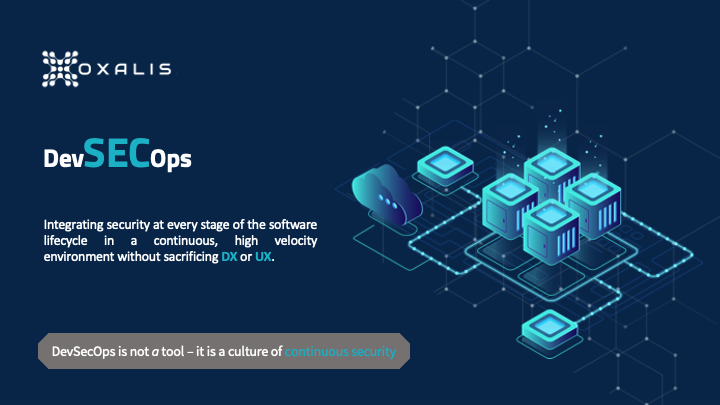
The DevOps software development model has become increasingly popular, but it doesn’t inherently lend itself to the level of security required these days. DevSecOps builds on the value of DevOps, preserving its throughput and stability while integrating security best practices.
At Oxalis, we frequently work with healthcare and government organizations, whether states, defense contractors, or the DOD directly. Sometimes we develop the software and other times we help our clients develop the software, but in both cases, we take security seriously in our software development processes. Security in software development doesn’t tend to excite many people outside the software security industry, so let’s be clear on why it is always important.
Table of Contents
Why You Should Prioritize Security
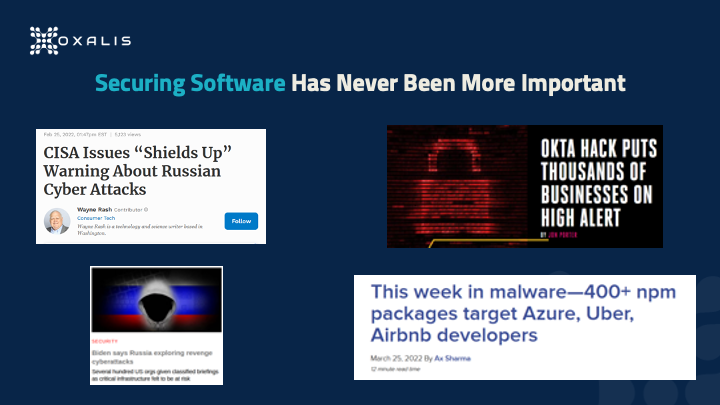
Threats have been increasing – from malware, bots, hackers, and more – and are hitting much more than just the largest targets. It’s not only the software products themselves that are the targets: recently there was a supply chain attack on Azure developers via malicious NPM packages. And since the goal of many attacks is simply to gain some form of access, even development-adjacent platforms such as documentation are targets, as we’ve written about in Confluence Remote Code Execution Vulnerability: Everything you need to know about it. With the conflict in Ukraine, the number of state actor attacks has also greatly increased.
For any given week we could provide another ten example headlines. The fact is that it doesn’t matter what your role is in software development – whether you are a developer, a tester, project manager, program manager, or product manager of software – software security is now part of your job. It can’t be outsourced to a security team at the 11th hour to give their final blessing. This article covers how you can include security as part of your full lifecycle without interrupting the developer experience.
DevOps Overview
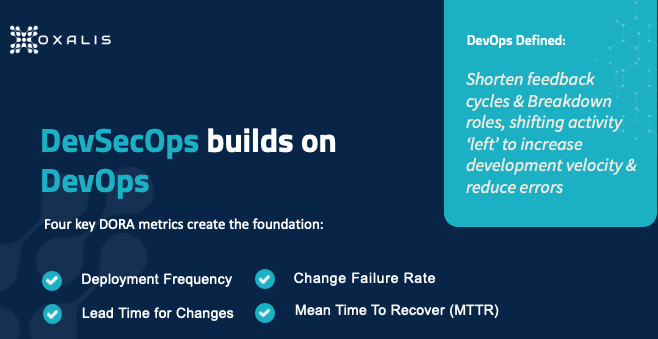
DevSecOps builds on top of the foundation that the DevOps revolution has put in place, so you really need a common working understanding of DevOps. There is no central definition, but generally speaking, DevOps is a set of practices intended to enable an organization to release software updates more often without sacrificing quality. It accomplishes this by taking activities traditionally occurring toward the end of the development process and “shifting them left”, a reference to the fact that in a left-to-right process diagram, steps to the left occur sooner.
One major effort to pin down the principles driving DevOps comes from DORA, the DevOps Research, and Assessment team, which is a research program acquired by Google in 2018. DORA studied software teams that deliver the most value, fastest, and most consistently, to analyze practices those teams optimized. In 2018 the program identified four metrics, shown in the graphic above, that have been widely adopted as the standard for DevOps teams. The left side represents throughput – release frequency and the development team’s speed – while the right side represents stability – risk and failure management.
How often are you making new releases of your software or pushing new builds into production? In the classic enterprise environment, deployments may be monthly or quarterly, requiring significant processes to implement. In the DORA-based DevOps model, deployment is ongoing, with frequency measured in times per day; organizations leading in DevOps may deploy 100 times in a day. The benefits include improving time-to-value for customers, and reducing the risk from production failures because changes are smaller and easier to fix.
Time for Changes
In a monthly or quarterly release cadence, each release comes at the tail end of a three-month process, so if you are a developer who misses the scheduled cut-off date, your change has to wait for the next release. Conversely, in the rush to meet that cut-off date, you’re more likely to do poor-quality work. DORA’s metric prioritizes reducing the time from the first code commit to the time of code deployment. This enables faster bug fixing and greater responsiveness to changing user needs and external events, which makes your product more useful and valuable to users.
Change Failure Rate
Of course, the chief reason long development cycles exist is to reduce the risk of failures before moving into production. Greater throughput must therefore be accompanied by robust testing of all types that are relevant to the product, otherwise, you risk creating a failed engine. It’s also vital to carefully define what a failure is for your organization, teams, and products – that definition will drive employee behavior (in order to meet the desired metric), so if you make it too broad or too limiting, you can unwittingly encourage undesirable behavior. Increasing your deployment frequency can improve the change failure rate since it’s generally easier to test small changes than large ones.
Mean Time to Recovery
Inevitably, despite your best efforts, failures will occur in production. When they do, you’ll want to minimize the delay between a failure occurring and its resolution via a production change. Going back to the classic enterprise model, these large monthly or quarterly releases are often done during the night because if a failure occurs, the size of your changes actually makes recovery more complex and time-consuming – potentially involving activities such as a database backup reindex – so you have to worry about the failure affecting users for a lengthy period of time.
Well-implemented DevOps relies on designing systems for the fastest possible recovery, such as the blue-green deployment model, in which changes are deployed to a subset of your platform (the “green environment”), testing is done, then production traffic is gradually routed from the subset running the current version (the “blue environment”) to the green environment. If failure is detected after deployment, traffic can be easily routed back to the blue environment. Approaches such as these complete the DORA-driven picture by minimizing both the resources needed to recover from a failure and the impact of the failure.
Integrating Security into DevOps
Now we move on to what it means to add Security to the above foundation.
You want security at every stage of the process, to be something everyone concerns themselves with.
You want to shift it left so security is thought about early in the cycle.
You want to preserve DX and UX.
Traditional security tools, time-consuming to use and siloed in a separate security team, won’t suffice. One challenge with DevSecOps is that there’s no single tool or tool collection you can go out and buy that enables you to suddenly be “doing DevSecOps.” But in pursuing the goal of a culture of continuous security, there are tools you can use to integrate security measures at every step in the software lifecycle.
Continuous Security
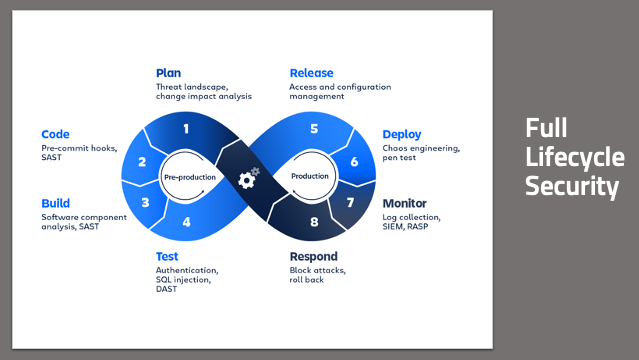
Remember the 8-stage DevOps infinity model? Software is never developed and then just done – it’s a continuous process. You’re making production changes about as fast as developers are releasing code. So your security checks have to be baked into that process as inherently as code commits are, and baked into every one of the eight steps. This is only possible if everyone takes responsibility for security in the stages they participate in.
Full Lifecycle Security
From a planning standpoint, how do you design features that enhance and improve security? You need to think about the threats that a new feature brings to bear on your product, so you can mitigate it in the planning process rather than after it’s already been exploited – and even better, so you can give your developers real-time feedback on potential code issues even as they are writing code. You want to build in a secure manner, pulling in only components that are secure. You want to make sure that your code and your builds aren’t doing anything unexpected or untoward. You want to have confidence that what you build is what goes into production, and that what’s in production behaves as expected. And you want all this automated, with minimal human interaction.
To complete the loop, you want to have the information you’re collecting from your production environments to go right back into the planning process. This gives you a short feedback cycle as you continue to respond and iterate quickly. For those who are new to DevSecOps, and even to DevOps, the big wins come from the code deployment part of the chain, CI/CD steps 2-6. In the monitor and respond steps, traditional cybersecurity tools and approaches can be useful, but only to the extent, they’re integrated into the chain, so they can happen in real-time – rather than having to stop everything and wait for a separate team to do something.
Do Your Threat and Risk Assessments
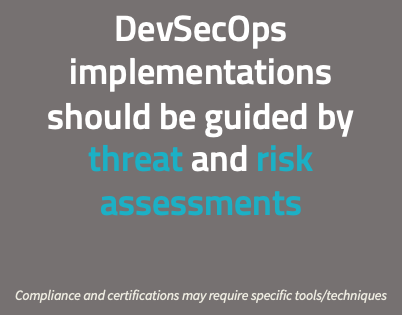
Clearly, every organization is different, and every organization faces a different set of threats and has different concerns when it comes to security. Implementing security measures appropriate for a DevOps model, without sacrificing throughput or stability, is not trivial, and consulting experts is appropriate. There are a lot of standard tools and standard methodologies that can be applied. But it’s vital to ensure that any tools and processes chosen fit your needs well, including accommodating the particular industry space(s) you operate.
You need to do your own threat and risk assessments before any discussion of security tools. If you’re working in the government space, there are compliance and certifications that may dictate security requirements, such as static code analysis. You should be making choices for security without having compliance requirements. That’s definitely the Oxalis position on this. When we work with organizations, we start with such questions as What is the profile that you’re facing? Where’s your organization today? Where do you want to be based on what you’re doing? Where your concerns lie? The answers lead us to determine what will give you the best bang for your buck in the DevSecOps space.
The Foundation of DevSecOps
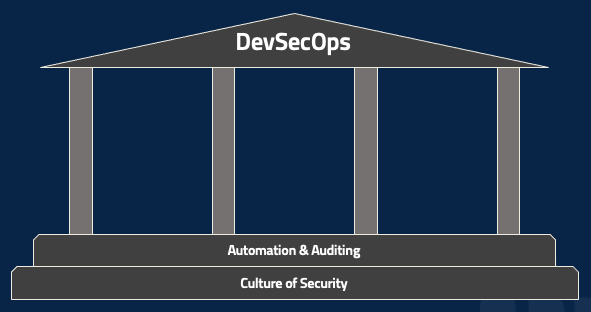
There are, however, two foundational pieces that are required for DevSecOps in all cases. The first, as mentioned earlier, is a culture of security, which underlies everything. While there’s certainly a role for dedicated security folks, DevSecOps requires security to be part of everyone’s job and of the entire organization’s culture. Product management, project management, coding, testing, deployment, network monitoring – everyone. The second part of the foundation is automating every possible action and then auditing the performance of that automation. Regardless of your role, ask yourself how to take a particular tool or tactic and automate it. Then whenever the automation runs, for good or bad, make sure that there’s a clear, indelible record of it. A fully-automated lifecycle can be a nightmare if you have no easy way of determining why it’s malfunctioning.
You can take these steps whether you’re just starting – maybe figuring outsource control and experimenting with some automated builds – or working in a mature enterprise environment. And without them, the following tools and tactics will be minimally useful.
DevSecOps security best practices: Three Areas of High Value
Let’s start talking about some actual tools and tactics that your organization can consider.
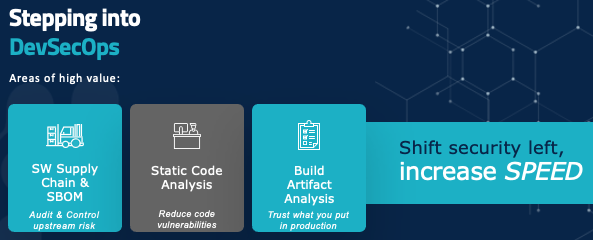
On your path to shift security to the left and increase speed, there are three major areas to focus on: auditing and controlling upstream risk and communicating that downstream, giving developers real-time tools and feedback so they know they’re writing code in a secure manner, and making sure that what you’re building is something you can trust in production.
Software Supply Chain
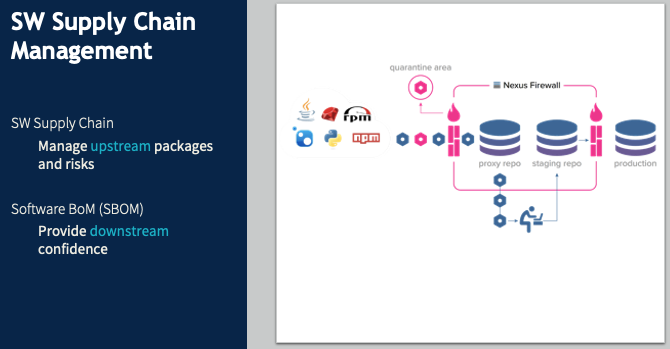
Software supply chain management is a hot topic at the moment. In December 2021, Oxalis spent a lot of time tracking and navigating the Log4j risk. Log4j, an almost ubiquitous Java component, has been around for decades before a major vulnerability was detected, with active exploits being run against it. Without functional software supply chain management, many organizations had no idea what their Log4j vulnerabilities were – which products had incorporated this component, or which internal tools or software used it.
Say I, as a software developer, don’t want to write my own tool to log errors because I know that’s a common component someone else has surely created. And there’s this great one called Log4j. It’s freely available, it’s in a Maven repository, so I just pull it into my code and start using it. And suddenly, I have introduced an unmanaged risk into the product – and into the company. No one else has any idea that component is being used, so no one else has a chance to anticipate problems or mitigate them if they happen.
In a DevSecOps environment, when I identify the need for a logging package and want to use Log4j, I poll my internal security repository. If Log4j is whitelisted, it gets pulled right in with no problem. Maybe it’s listed as iffy, so I can still add it, but the security team gets notified to inspect it. If it’s blacklisted, it just gets blocked. This approach does two key things.
It provides a clear point of audit since there’s a central repository of all external components used by our products and tools. And since we want to automate as much as possible, this repository can be used by a threat monitoring system that automatically notifies us of our risk points when a new vulnerability is discovered.
It prevents attacks such as the NPM supply chain attack of March 2022. When you’re pulling a library from a public repository, you might mistype the name of the library and not notice that there’s a package for that library – a bogus package containing a threat (this is called typosquatting). We want that library request to go through our security repository and be blocked.
So far we’ve been looking at the upstream side. Software BOM covers the same process downstream. You want to put together a list of every component that goes into a piece of software, and ensure it follows the software through the rest of the lifecycle. This will soon be required for federal contractors. There are plenty of tools for this, but they’re language-specific and rapidly evolving. If you have any questions about your specific case, get in touch with us, and we’ll help you navigate it.
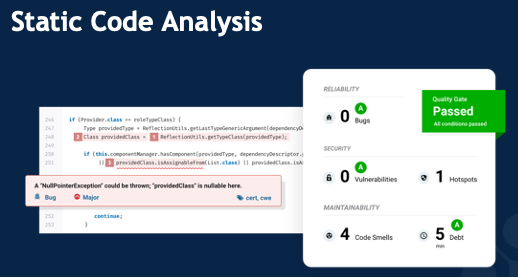
Static Code Analysis
It’s exceedingly rare for an employee to intentionally introduce a security vulnerability. The major risk is accidental coding errors, such as the classic buffer overflow, in which (for example) the code implicitly assumes a particular list will be at most 10 items long. If an attacker finds a way to make an 11-item list, they’ll have broken into the system in some way, shape, or form. The common cross-site scripting attack often relies on code that fails to clean up user inputs, allowing characters that can be used for all sorts of harmful activity.
Static code analysis tools look for these types of errors (including, of course, far more sophisticated and subtle cases than buffer overflows) and provide real-time feedback to developers that they could be introducing security risk, as well as preventing that code from reaching production. These tools often use manual rules for identifying these errors, but are increasingly relying on AI and machine learning to identify those really subtle vulnerabilities that even a conscientious developer might not catch on their own.
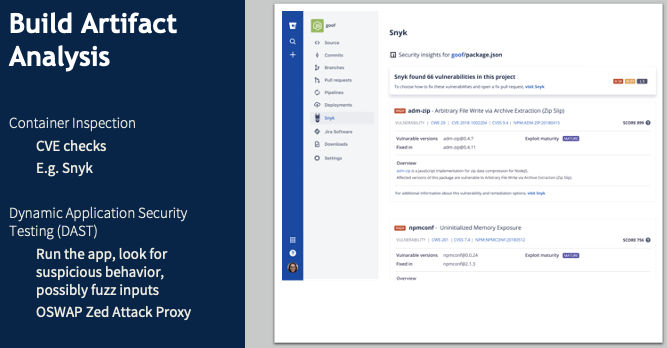
Build Artifact Analysis
Now you’ve verified external dependencies and inspected your code for even subtle vulnerabilities. How do you check the results of the build to make sure they are what you expect to be flowing down into production? If you’re using a containerized application – taking what amounts to a VM image from the internet and putting it into your production environment – how can you be confident you’re not introducing some security vulnerability or an unpatched piece of software? Build artifact analysis relies on DAST tools to identify these risks, monitoring for unexpected external server traffic or unusual memory usage, or unauthorized file access.
Traditional Integrated CI/CD Pipeline
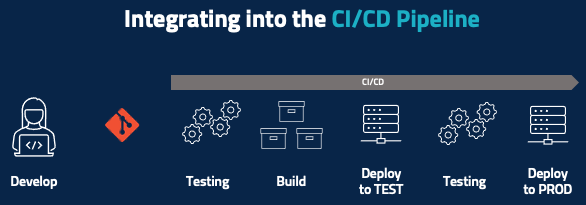
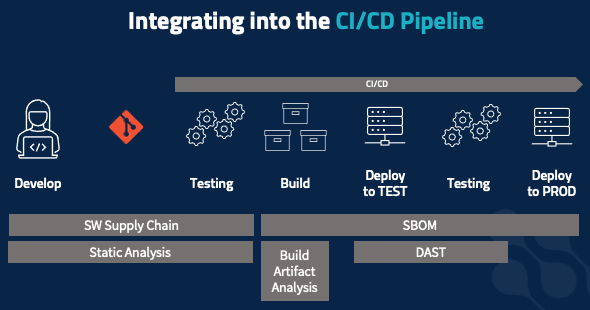
Now it’s time for a closer look at the test-to-deployment portion of the lifecycle, starting with the traditional CI/CD pipeline looks like after the developer develops their code and pushes it to, say, a Git repository. Some amount of automatic testing happens at a code level, unit testing happens here, and maybe there’s some basic code inspection. You then run the build and then deploy that piece of code – or maybe deploy the entire product into a testing environment where you run some integration tests. If all the testing passes, then you deploy to production.
All the security elements we’ve covered need to be integrated into the pipeline. When working on code, you should be receiving real-time feedback, not from the testing stage later on. Static code analysis and software supply chain management apply here – is the package you’re adding allowed? Am you at risk of introducing security vulnerabilities? Those same tools and tactics extend into your static testing phase, to check for vulnerable upstream packages and security code violations that you don’t want to get intoy our production environment. The build process is also where you develop your software BOM, to document everything that’s going into the build as an immutable record that follows the build all the way into production.
Build artifact analysis happens in two stages, starting at build time. Inspect your containers: are you pulling in containers that have, say, a version of SSH with an unpatched vulnerability or a bad root password set. Do your dynamic application testing: check for outbound connections, check unexpected file access, etc. You often do this in your testing environment. But your risk profile might dictate that you do this in a more isolated way, to maximize confidence that the application is behaving as expected and to minimize unexpected risks that might bite you when you go into production.
Sample DevSecOps Toolchain
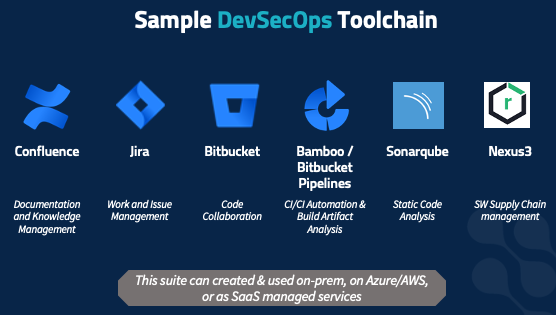
There are, of course, many different tools that fit the scenarios mentioned here, and what’s right for your organization will vary. Here is a set we have found to work for a broad customer base, as a concrete example of what this all can look like. But your threat profile and risk profile, and the type of software you’re developing, where your organization is cultural – all dictate which products you’ll want.
This set of tools is flexible and fits a wide range of customer profiles as well as a variety of software development methodologies. It covers every part of the 8-step infinity model.
Confluence is an enterprise collaboration wiki with many fantastic features built-in for security planning, threat assessment, security incident response, and much more. A vibrant ecosystem of addons/plugins makes it easy to customize for your particular environment. DevSecOps, more than most models, requires everyone to be on the same page, so you need an accessible, robust, centralized knowledge management system.
Jira Software helps developers plan their work with structured security checks in place to ensure that testing has been done and passed appropriately. Jira Service Management makes sure any problems in production get attention from the right people – and are exposed to the development and planning teams, to factor into future work.
Bitbucket tracks who made which changes that got into production, with tight integration with Jira and Confluence.
Bamboo (on-prem) and Bitbucket Pipelines (SaaS) integrate with both Jira products, connecting code commits with build tracking with test reports with incident tickets. The result is that whether you’re a manager, developer, tester, or network monitor, you have access to all the data you need pertaining to a code change. Additional tools we use here include: Snyk, which does a whole suite of build inspections, and OSWAP Zed Attack Proxy, which wraps an internet proxy around your application, runs it, and looks for unexpected external communications.
Sonarqube provides static code analysis, including reports on error types, adherence to coding standards, unit tests, and more – and offers graphs of metrics history. This gives the real-time security feedback developers need and helps developers identify areas of improvement. It supports a large range of languages and development processes.
Nexus3 is an artifact management system that helps manage your software supply chain. It provides a firewall for software coming into your organization, a buffer between your systems and public software tool repositories. It actively polls vulnerabilities and will proactively notify you if there’s been a CVE announcement.
Oxalis has deployed this suite repeatedly for many customers, and helped train developers in it. We value it not just for its flexibility, but because it can be deployed on-prem, in your server closet, in your VMWare cluster, on Azure or AWS both in commercial space and in sovereign high-compliance spaces such as AWS Gov Cloud. In addition, these solutions are all available as SaaS-managed solutions, if your risk profile supports using a third-party managed solution. We’ve deployed this stack to all those scenarios – and we use it internally as well.
How to Get Startedwith DevSecOps Security Best Practices
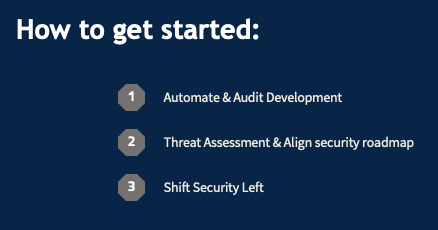
1) The core of everything you do. Using Sonarqube to crank out error messages does you no good if you can’t figure out which developer wrote the code generating the messages so you can catch it earlier in the future. If it’s not happening automatically, it’s probably not happening at all or is consuming huge resources on it and it’s probably slower too. So again, you want to move fast, with frequent code deployments. 2) Understand this and align it with what you want to do on a roadmap basis. We can provide guidance and support on this. We don’t want anyone to add static code analysis just to check a box. It needs to be a specific response to your analysis of your organization’s security risks and concerns. 3) Break down silos. Get security out of the tail end just before release, and into the planning, early development, and architecture stages. You want security at each step in the lifecycle so that if one step fails, the next can catch it and prevent customer impact.
You develop your own software, and Oxalis helps companies who develop software with their work management tools. We’re excited to discuss this with you and hear about your concerns. Even if you’re just getting started on your DevOps journey or taking your first steps into CI/CD, we can provide guidance.
Recommended blog postsabout DevSecOps security best practices
Do you have questions about DevSecOps Security best practices?
Insight for Jira Service Management – Webinar [ON-DEMAND]
On September 22nd 2021, Oxalis held a webinar on Atlassian’s asset management tool –Insight for Jira Service Management. Viewers were taken on a deep dive of Insight’s capabilities by our Jira Service Management Expert, Dane Warner. Topics included:
[2:52] What is Asset Management?
[4:32] Configuration Management
[6:49] Introduction of Insight for Jira Service Management
[9:05] Asset Management & the Atlassian Ecosystem
[13:21] Case study
[16:18] Insight Terminology
[19:05] Key Features
[21:38] Insight Capability Demonstration
[48:31] Live Q&A Session
Did you miss the live Webinar? Fill out the form below toaccess the On Demand version:
Used by Google Analytics 4 to persist session state and track usage across visits. The XXXXXXXXXX portion corresponds to the Oxalis Google Analytics property ID.
1 year
_gac_
Contains information related to marketing campaigns of the user. These are shared with Google AdWords / Google Ads when the Google Ads and Google Analytics accounts are linked together.
90 days
__utma
ID used to identify users and sessions
2 years after last activity
__utmt
Used to monitor number of Google Analytics server requests
10 minutes
__utmb
Used to distinguish new sessions and visits. This cookie is set when the GA.js javascript library is loaded and there is no existing __utmb cookie. The cookie is updated every time data is sent to the Google Analytics server.
30 minutes after last activity
__utmc
Used only with old Urchin versions of Google Analytics and not with GA.js. Was used to distinguish between new sessions and visits at the end of a session.
End of session (browser)
__utmz
Contains information about the traffic source or campaign that directed user to the website. The cookie is set when the GA.js javascript is loaded and updated when data is sent to the Google Anaytics server
6 months after last activity
__utmv
Contains custom information set by the web developer via the _setCustomVar method in Google Analytics. This cookie is updated every time new data is sent to the Google Analytics server.
2 years after last activity
__utmx
Used to determine whether a user is included in an A / B or Multivariate test.
18 months
_ga
ID used to identify users
2 years
_gali
Used by Google Analytics to determine which links on a page are being clicked
30 seconds
_ga_
ID used to identify users
2 years
_gid
ID used to identify users for 24 hours after last activity
24 hours
_gat
Used to monitor number of Google Analytics server requests when using Google Tag Manager
1 minute
Marketing cookies are used to follow visitors to websites. The intention is to show ads that are relevant and engaging to the individual user.