Remember the AI integration for Jira Service Management (JSM) announced at Team ’23? It’s now a reality! The Virtual Agent for JSM is out of beta and available for everyone. This marks the first step in Atlassian’s broader vision for Atlassian Intelligence, their AI-powered initiative to enhance efficiency across their products.
What Can Virtual Agent Do?
Imagine a helpful assistant in your Slack support channels, interacting with customers around the clock. That’s Virtual Agent! It can:
Answer questions and gather information: It uses your knowledge base to provide instant answers to common queries.
Learn and improve: The more it interacts, the smarter it gets, tailoring its responses to your customers’ specific needs.
Seamlessly connect to human agents: If things get tricky, it smoothly hands off the conversation to your team,ensuring a seamless customer experience.
How Does It Make Your Life Easier?
Virtual Agent takes care of the repetitive stuff, freeing your team to focus on complex issues and strategic work. It’s like having an extra pair of hands, available 24/7 to handle routine customer interactions.
Who Can Use It?
It’s ready for Atlassian Cloud customers with Premium or Enterprise editions of JSM who use Slack as a support channel.Don’t worry if you use another platform – support for other tools is coming soon!
Powered by AI, Designed for You
Developed in partnership with OpenAI, Virtual Agent leverages cutting-edge AI to understand intent, sentiment, and context, personalizing each interaction. It even generates dynamic answers from your internal resources like knowledge bases, onboarding guides, and FAQs.
Security First
Your data’s safety is a priority. Atlassian’s partnership with OpenAI includes a strict zero-day retention policy, ensuring your information remains secure.
Define intents: Tell the agent what problems or questions it should address.
Create conversation flows: Map out how the agent should respond to different inquiries and scenarios.
Activate Atlassian Intelligence answers: Let AI search your knowledge base to handle questions that don’t fit predefined intents.
It’s a learning system that gets better with each interaction, thanks to its advanced natural language processing capabilities.
Why Should You Use It?
Maximize employee value: Let your team focus on meaningful work, not repetitive tasks.
Provide 24/7 support: Offer assistance even when your team is offline.
Enhance customer satisfaction: Deliver faster, more personalized service at scale.
Whether you’re supporting external customers or internal teams (like HR handling PTO requests), Virtual Agent can revolutionize how you deliver service.
Ready to Enhance Your Service Experience?
Contact our experts to learn how to get started with Virtual Agent for JSM today!
Ready To Revolutionize Your Workplace? ESM Is The Answer
In the digital age, IT Service Management (ITSM) has evolved from simply fixing computers to playing a strategic role in delivering seamless technology experiences across the entire organization. This expansion has given rise to Enterprise Service Management (ESM), a framework that applies ITSM principles and tools to streamline processes in every department, from HR and marketing to legal and finance.
Enterprise Service Management: More Than Just IT’s Toolkit
While ITSM focuses primarily on IT-related services, ESM casts a wider net. It’s about using a unified platform, a shared portal, and a standardized service catalog to meet the diverse needs of a modern business. This approach not only breaks down silos between departments but also empowers teams to innovate and automate workflows for maximum efficiency.
Think of it this way: ITSM is like a well-oiled machine for resolving IT issues. ESM takes those same principles and applies them to the entire organization, creating a symphony of streamlined processes and collaborative problem-solving.
From Silos to Synergy: How Enterprise Service Management Transforms Departments
ESM acts as a bridge, connecting departments that were once isolated. Let’s look at a few examples of how this transformation can happen:
HR: ESM streamlines onboarding, automates tasks like equipment provisioning, and improves the overall employee experience.
Marketing: ESM accelerates campaign launches, enhances visibility into project progress, and fosters collaboration between different teams.
Legal: ESM centralizes communication, improves knowledge management, and ensures compliance with regulations like GDPR.
Finance: ESM simplifies procedures, increases transparency, and provides real-time data for better decision-making.
These are just a few examples of how ESM, often supported by platforms like Atlassian Compass, can break down barriers and foster a culture of collaboration and efficiency.
Real-World Enterprise Service Management in Action: Atlassian’s Success Story
Atlassian, the company behind popular collaboration tools like Jira and Confluence, is a prime example of how ESM can transform a business. They’ve successfully integrated ESM into their HR, marketing, legal, and finance departments,resulting in faster processes, better collaboration, and improved employee experiences.
Your Roadmap to ESM Success
The transition from ITSM to ESM is a journey, not a sprint. It requires a strategic approach, the right tools, and a commitment to continuous improvement. Here’s what you need to keep in mind:
Define Your Services: Clearly articulate what each department offers and how those services can be improved.
Break Down Silos: Foster collaboration between teams by using a unified platform and standardized processes.
Embrace Automation: Automate repetitive tasks to reduce errors, speed up delivery, and free up your team for more strategic work.
Establish Control and Governance: Implement systems for tracking, measuring, and optimizing your operations.
Ready to Chart a New Course with Enterprise Service Management?
Enterprise Service Management isn’t just a trend; it’s the future of work. By embracing ESM principles and leveraging tools like Atlassian Compass, you can unlock a new level of efficiency, collaboration, and innovation across your entire organization.
Interested in learning more about how to implement an ESM solution?
Oxalis specializes in helping organizations harness the power of ESM. Contact us today to discover how we can guide you on your journey to a more connected and efficient workplace.
5 Jira Hacks for Effective Scaling: Simple Changes, Huge Results
Are you getting the most out of your Atlassian investment? Most organizations only scratch the surface of Jira’s vast potential, leaving valuable efficiencies and growth opportunities on the table. But it doesn’t have to be that way.
In this post, we’ll share five proven Jira hacks that can revolutionize how your teams work, boost productivity, and lay the groundwork for effortless scaling. These aren’t just theoretical tips — we’ve implemented these strategies ourselves at Oxalis and have seen firsthand the transformative impact they can have.
Agile Beyond Software: A Mindset for Adaptability and Growth
One of the most powerful tools in our arsenal is Agile methodology. While it originated in software development, Agile is fundamentally a way of thinking and working that can benefit any team. At Oxalis, we’ve embraced Agile across our entire organization – from marketing to project management – and the results have been remarkable.
Our team of Atlassian experts has helped countless clients across diverse industries implement and optimize their Jira suite, including Jira Software, Jira Work Management, Jira Service Desk, and more. We know the ins and outs of these tools and how to tailor them to your unique needs.
Let us guide you through five game-changing Jira hacks that will help you:
Automate tedious tasks
Streamline workflows
Empower your teams
Unlock hidden efficiencies
Achieve effortless scaling
It’s time to unleash the full potential of Jira and accelerate your path to success. Are you ready to transform the way you work?
Hack #1: Automate Data Exchange with External Systems
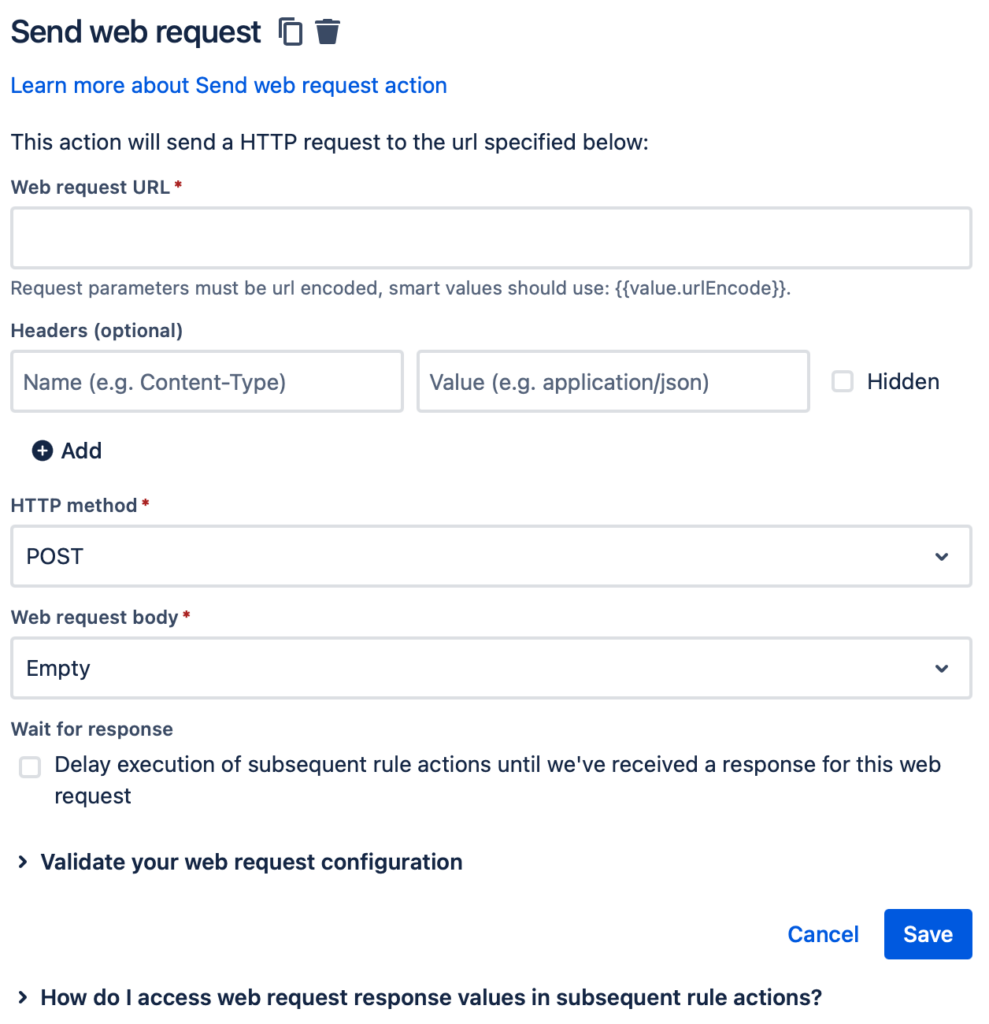
Jira’s Automation feature (available in both Cloud and Data Center) isn’t just about automating tasks within Jira — it’s about connecting Jira to your entire technology ecosystem. While there are many ways to integrate with other systems, the “Send web request” and “Incoming webhook” actions open up a universe of possibilities.
Break Down Silos, Streamline Communication
Imagine this scenario: a critical bug is blocking the release of a major new product. With Jira Automation, the moment that bug is fixed, Jira Software can automatically send an update to your ERP system. This triggers a cascade of actions: Sales adjusts their forecasts, Procurement updates inventory plans, Production schedules the manufacturing run, and Distribution prepares for shipping. The result? No more delays caused by communication breakdowns, and no more wasted hours manually relaying information.
How It Works
Send web request: This action lets you send data from Jira to any system with a web request interface. You simply specify the URL, headers, HTTP method, and data format. Jira can even store the response in “smart values” for later use.
Incoming webhook: This trigger lets you kick off an automation rule when Jira receives data from another system.For example, your ERP system could send a webhook to update a release date in Jira Software based on resource availability.
These actions can be combined in powerful ways. You can even use Jira as a bridge between two completely different systems!
Automation: The Key to Scalability
As your organization grows, manual processes become a bottleneck. Automating data exchange with Jira not only saves time and money, but it also creates a more scalable foundation for your business. When information flows seamlessly between systems, teams can focus on what they do best, instead of getting bogged down in communication overhead.
Hack #2: Forge Intelligent Connections with Custom Issue Links
Issue links are Jira’s built-in way of showing how tasks relate to each other. Think of them as digital breadcrumbs that help you trace the connections between different pieces of work. While Jira provides standard link types like “blocks” or “causes,” you can supercharge your workflow by creating custom links tailored to your specific needs.
Imagine a legal team using “amends/is amended by” to track contract revisions, or a procurement team using “has Purchase Order/is Purchase Order for” to link orders and invoices. These custom links not only add clarity to your Jira projects, but they also open the door to powerful automation.
Automate Updates Across Linked Issues
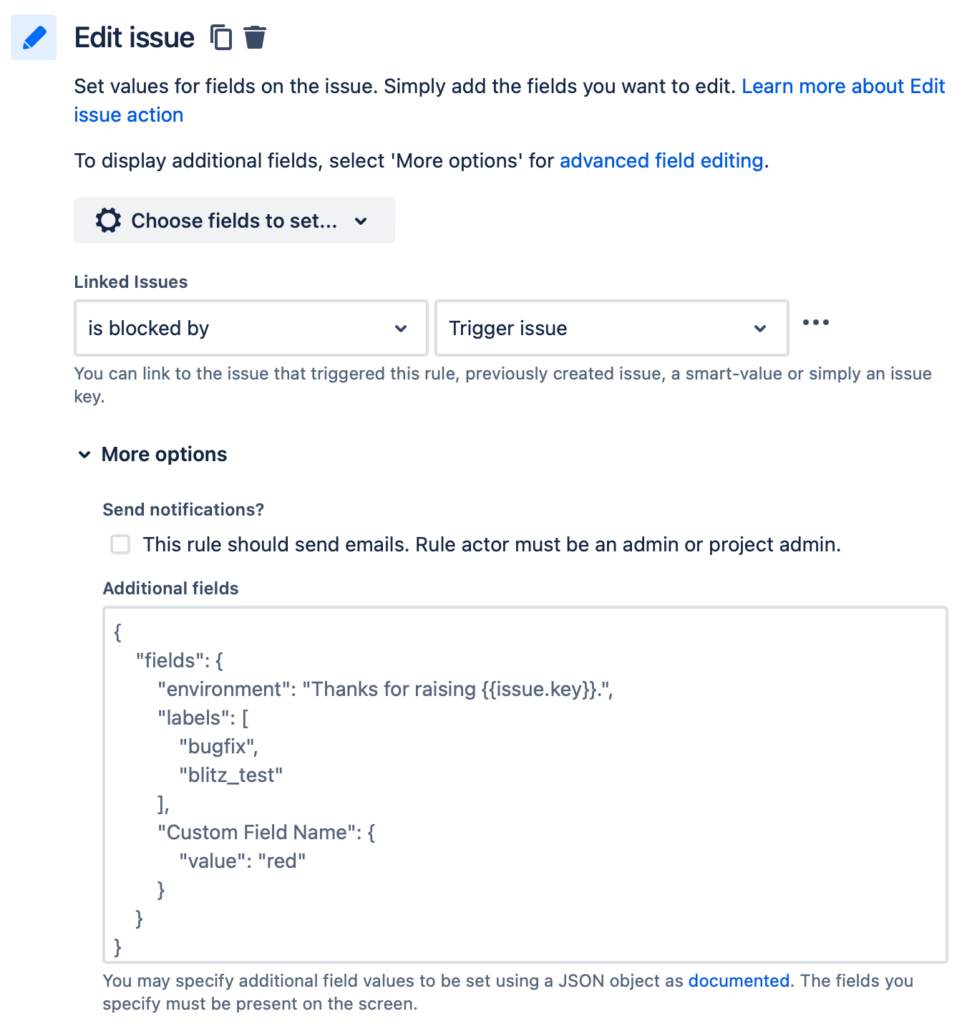
Jira Automation allows you to update linked issues automatically based on changes in the original issue. This means you can keep everyone informed and synchronized without lifting a finger. For example, when a bug is fixed in Jira Software,a linked customer support ticket in Jira Service Management could be automatically updated with the resolution.
You have two main options for automating linked issue updates:
Jira Automation: This built-in feature is perfect for simple automations. However, project-level automations are limited to links within that project. For more flexibility, a Jira admin can create global automations.
Marketplace Apps (like Scriptrunner): These apps offer more advanced workflow customization options, allowing you to trigger updates based on linked issues. While they come with a cost, they often provide greater power and flexibility than standard Jira Automation.
Which Approach is Right for You?
The best choice depends on your specific needs and the complexity of your Jira environment. Oxalis can help you evaluate your options and determine the optimal solution for your organization. We have deep expertise in both Jira Automation and marketplace apps, and we can guide you toward the most efficient and scalable way to automate your linked issue updates.
Hack #3: Unleash the Power of JSM Portals for License-Free Collaboration
Jira Service Management (JSM) customer portals offer a hidden gem: the ability to empower users outside your organization to take action within Jira — without the need for a license. This means stakeholders, approvers, or even team members who don’t typically work in Jira can participate in your workflows.
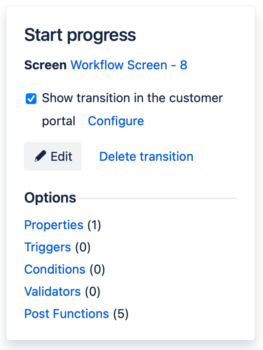
Imagine a scenario where an external stakeholder needs to approve a project request. With JSM, they can simply log into the portal, review the details, leave a comment, and click “Approve” – all without a Jira license. This streamlines approvals, reduces bottlenecks, and improves cross-functional collaboration.
Built-in Flexibility, Extended Possibilities
Out of the box, JSM allows portal users to trigger simple workflow transitions like “Cancel” or “Resubmit.” While this is great for many use cases, you can extend this functionality even further with Atlassian Marketplace apps like “Actions for Jira Service Management.” This app enables you to:
Present custom forms to collect additional information from portal users.
Allow portal users to edit issue details directly.
Create more complex, multi-step workflows for external users.
Benefits Beyond Licensing
Using JSM portals for licenseless users isn’t just about cost savings. It’s also about:
Simplified User Experience: Portal pages are designed for ease of use, reducing the learning curve for external users.
Increased Efficiency: By enabling self-service actions, you free up your team’s time for more complex tasks.
Improved Collaboration: Break down silos and foster communication between teams and external stakeholders.
Oxalis: Your JSM Portal Experts
Whether you’re looking to optimize your existing JSM portals or create new ones for specific use cases, Oxalis can help.We’ll guide you through the configuration process, recommend the right apps for your needs, and ensure your portals are user-friendly and effective.
Let us help you unlock the full potential of JSM and empower your stakeholders to contribute seamlessly to your Jira workflows.
Hack #4: Transform Every Team with Jira Service Management
Here’s a game-changing idea: what if every team in your organization could operate like a well-oiled service desk? Jira Service Management (JSM) makes it possible.
Think about it: most teams receive requests from others, whether it’s HR handling time-off requests, marketing fielding content creation requests, or legal reviewing contracts. JSM provides a structured, efficient way to manage this influx of work.
Your One-Stop Shop for Work Requests
With JSM, each team gets its own dedicated portal where requests can be submitted, tracked, and resolved. This eliminates the chaos of email chains, scattered spreadsheets, and missed deadlines.
The benefits are clear:
Streamlined Communication: All requests and their related conversations are centralized in one place.
Improved Visibility: Everyone can see the status of their requests and track progress in real-time.
Increased Efficiency: Teams can prioritize work, automate repetitive tasks, and measure their performance.
JSM’s flexibility is key – it comes with pre-built templates for common use cases and can be easily customized to fit any team’s unique needs. The more teams adopt JSM, the more standardized and efficient your work management becomes across the entire organization.
Knowledge is Power: The JSM Knowledge Base
But wait, there’s more! JSM integrates seamlessly with Confluence to create a knowledge base that supercharges your team’s effectiveness:
Empower Self-Service: Users can find answers to their own questions, reducing the load on your teams.
Guide Agents to Solutions: Relevant knowledge base articles are surfaced to agents as they work on requests.
Build a Repository of Expertise: Track past requests and resolutions, creating a valuable resource for future reference.
Unlocking Cross-Functional Efficiency
JSM is a catalyst for cross-functional collaboration. When teams work together within a standardized system, they can easily share information, identify dependencies, and resolve issues faster. This is a game-changer for organizations looking to break down silos and achieve true agility.
Oxalis: Your JSM Partner
Ready to unleash the full potential of JSM across your organization? Oxalis can help. Our experienced consultants will work with you to design, implement, and optimize JSM for each of your teams, ensuring a smooth transition and maximizing the value of your investment.
Don’t settle for outdated work management practices. Embrace the power of JSM and create a more collaborative, efficient, and scalable organization.
Jira Hack #5: Unlock the Full Potential of Jira’s Ecosystem
Jira isn’t just a collection of tools; it’s a vast ecosystem of possibilities waiting to be explored. We’ve already touched on how Jira Service Management (JSM) can revolutionize how teams manage work, but the benefits don’t stop there.
Think Beyond Traditional Uses
Don’t limit Jira to its perceived purpose. Jira Software, for example, can be a powerhouse for marketing teams, managing content calendars and campaigns with Agile precision. Even if a product doesn’t seem like an obvious fit at first, delve deeper – you might be surprised by what you discover.
Don’t Leave Features on the Table
Every nook and cranny of Jira holds potential for efficiency. Did you know JSM has a chat feature that can create issues on the fly? Or an embeddable widget that connects users to your portals from any website? Explore the Atlassian Marketplace for apps that add even more functionality. The more you utilize these features, the greater your return on investment.
Jira Work Management: A Project Powerhouse
Jira Software and JSM both come with Jira Work Management (JWM) built-in. This isn’t just a bonus; it’s a game-changer for project teams. JWM offers a powerful yet intuitive interface for managing tasks, resources, and timelines, including Gantt charts for visualizing project plans.
With JWM, you can:
Track Progress: Stay on top of deadlines and milestones with ease.
Identify Roadblocks: Spot potential issues before they derail your project.
Keep Everyone Informed: Ensure all stakeholders have a clear view of progress.
JWM is the perfect tool for teams that need project management capabilities without the full complexity of a service desk.
Beyond Jira: The Broader Atlassian Ecosystem
Jira is just the tip of the iceberg. Atlassian offers a vast suite of products designed to work seamlessly together, creating a comprehensive platform for collaboration and productivity. Explore tools like:
Jira Align: Connect strategic goals with tactical execution at the enterprise level.
Jira Product Discovery: Collaborate on product ideas and roadmaps.
Statuspage: Keep customers informed during incidents and outages.
Opsgenie: Streamline incident management and on-call scheduling.
By embracing the full Atlassian ecosystem, you can unlock even greater efficiencies, foster cross-functional collaboration, and drive innovation across your organization.
These 5 Jira hacks are your roadmap to unlocking the full potential of the Atlassian ecosystem, boosting team productivity, and achieving seamless scalability. But remember, this is just the beginning. Jira’s flexibility and extensive feature set offer countless opportunities for optimization and innovation.
Don’t let your Jira investment go underutilized. Partner with Oxalis, your trusted Atlassian experts, to uncover even more ways to streamline your workflows, empower your teams, and achieve your business goals.
Ready to transform your Jira experience?Contact Oxalis today for a free consultation and discover how we can help you harness the true power of Atlassian tools.
Why wait? Jira can transform your organization now.
The Oxalis Cloud Migration Playbook: Your Atlassian Cloud Journey, Simplified
Migrating to the Atlassian Cloud? It’s a leap towards greater agility, scalability, and innovation. But, let’s face it – the process can be daunting. That’s why Oxalis, your trusted Atlassian Platinum Solution Partner, has crafted a comprehensive playbook to guide you through every step of your cloud migration journey.
Why You Need the Atlassian Cloud Migration Playbook
When Atlassian announced they were discontinuing Server edition products, we knew our clients needed a reliable roadmap to navigate their cloud migration. That’s where our playbook comes in. It’s your compass for a deliberate, secure, and efficient transition, whether you’re moving from Server, Data Center, or another cloud instance.
Inside Oxalis’ Cloud Migration Playbook: Your Step-by-Step Guide
We’ve designed this playbook for you, covering the entire migration process from meticulous pre-planning and thorough testing to flawless execution. No stone is left unturned, ensuring you have the tools and knowledge for a successful in-house migration. We understand that this can be a time-intensive process, and we’re here to make it as smooth as possible.
Our playbook is divided into four key stages:
Planning: Laying the groundwork for a successful migration.
Preparation: Getting your systems and data ready for the move.
Migration: Executing the move with precision and confidence.
Post-Migration: Optimizing your new cloud environment for maximum performance.
Each stage is packed with actionable tasks, expert insights, and considerations tailored to your unique needs. We aim to provide the guardrails you need to develop your own migration strategy, no matter how complex your setup.
Why Choose Oxalis as Your Cloud Migration Partner?
While our playbook equips you for an in-house migration, we know that sometimes you need a helping hand. That’s where Oxalis’ expertise shines. As Atlassian cloud migration advisors, we’ve guided countless organizations through successful transitions. We can create a tailored roadmap, execute the migration with speed and efficiency, and optimize your setup for maximum performance.
Don’t Go It Alone – Let Oxalis Be Your Guide
If you’re hitting roadblocks or simply want the peace of mind that comes with expert guidance, reach out to us. We’ll help you unlock the full potential of the Atlassian Cloud and make your migration a resounding success.
Ready to embark on your cloud migration journey?
Download your free copy of the Oxalis Atlassian Cloud Migration Playbook today and discover the path to a seamless transition.
Remember, with Oxalis, your Atlassian Cloud migration is not just a project, it’s a partnership.
Oxalis’ Proven Methodology: Your Atlassian Cloud Migration, Simplified
As your trusted Atlassian Cloud Migration advisors, we’ve distilled our extensive experience into a step-by-step eBook. Whether you’re transitioning from Server or Data Center, this guide covers every aspect of your journey.
Doubts about the Cloud Migration Playbook? Talk to us; we’re an Atlassian Platinum Solution Partner.
Debunking Atlassian Cloud Migration Myths: Separating Fact from Fiction
Cloud migration often comes with a whirlwind of myths and misconceptions. Let’s take a moment to clear the air and address some of the most common concerns head-on:
Myth #1: Cloud Security is Inferior to On-Premises Hosting
Reality: This is a misconception! Atlassian Cloud boasts robust security measures, including two-factor authentication, data encryption, and regular backups. Their dedicated security team works tirelessly to monitor and safeguard your data around the clock. You’re in good hands.
Myth #2: You Lose Control Over Your Data in the Cloud
Reality: Not at all! Atlassian Cloud puts you firmly in the driver’s seat. You retain complete control over your data, with granular tools to manage user access and permissions. Your data is yours, and you decide who sees what.
Myth #3: Cloud Migration is Overly Complex
Reality: While any migration requires careful planning, Atlassian has your back. They offer comprehensive documentation, resources, and expert partners (like Oxalis!) to guide you through the process, ensuring a smooth and successful transition.
Myth #4: Cloud Sacrifices Customization and Flexibility
Reality: Think again! Atlassian Cloud is surprisingly customizable. You can tailor applications and data to your specific needs, and the cloud’s inherent scalability means you can easily adapt as your business evolves.
The Truth About Atlassian Cloud
In reality, the Atlassian Cloud offers a compelling mix of benefits:
Enhanced Security: Robust safeguards to protect your valuable data.
Scalability: Effortlessly expand or contract resources to match your needs.
Cost Savings: Reduce upfront infrastructure costs and ongoing maintenance.
Customization: Tailor the platform to fit your unique workflows and processes.
By dispelling these myths and embracing the reality of Atlassian Cloud’s advantages, you’re opening the door to a more efficient, secure, and flexible way to manage your work.
Embrace the Cloud: Atlassian’s Advantages Unleashed
Moving to the Atlassian Cloud isn’t just about keeping up with technology; it’s about unlocking a new realm of possibilities for your organization. Here’s what you gain when you make the leap:
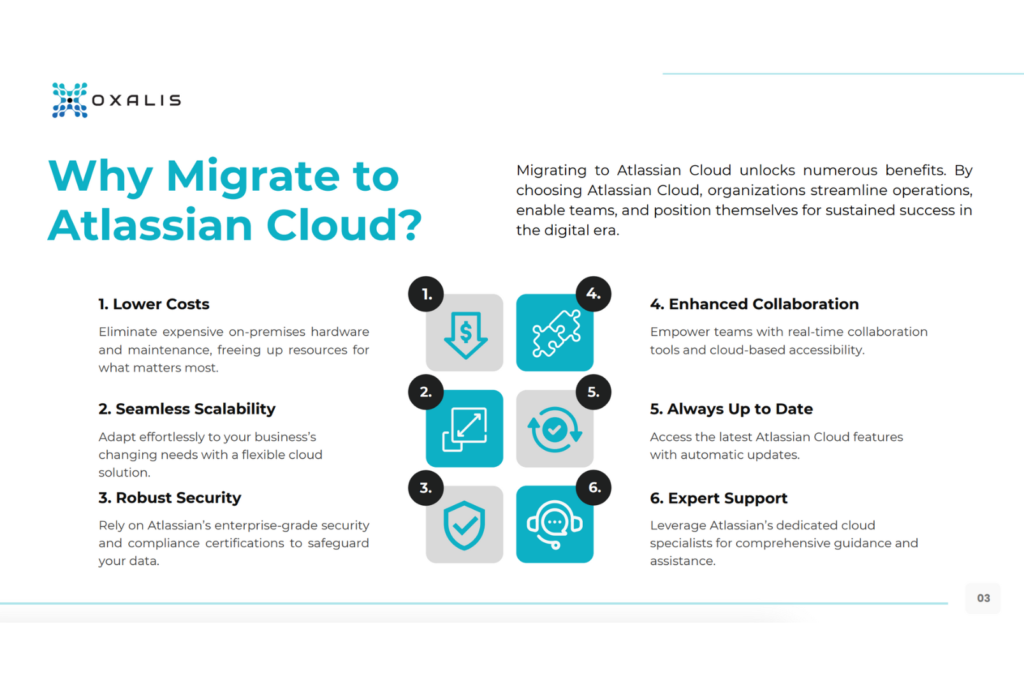
Unleash Your Potential with Scalability: Say goodbye to the limitations of on-premises infrastructure. Atlassian Cloud flexes to fit your needs, effortlessly scaling up or down as your team and projects grow.
Fortress-Like Security: Your data’s safety is paramount. Atlassian Cloud boasts state-of-the-art security measures,including two-factor authentication, encryption, and regular backups, all meticulously monitored by a dedicated security team. Rest easy knowing your information is protected.
Cost-Efficiency, Unleashed: Ditch the expensive hardware and the IT headaches that come with it. Atlassian Cloud eliminates upfront costs and ongoing maintenance, freeing up your budget for more strategic initiatives.
Stay Ahead of the Curve: Innovation is the name of the game. Atlassian Cloud continuously rolls out new features and enhancements, keeping you at the forefront of technology without the hassle of manual upgrades.
Collaboration, Reimagined: Work as one cohesive unit, no matter where your team members are located. Real-time editing, comments, and notifications fuel seamless collaboration, boosting productivity and fostering innovation.
Work from Anywhere, Anytime: Atlassian Cloud is your virtual office. Access your tools from any device, whether it’s a desktop, laptop, tablet, or smartphone. Your work goes where you go.
The Bottom Line: Your Atlassian Cloud Advantage
The Atlassian Cloud isn’t just a platform; it’s a catalyst for growth, collaboration, and efficiency. By embracing its benefits, you’ll empower your teams, streamline processes, and drive innovation like never before. Ready to explore how the Atlassian Cloud can transform your organization? Reach out to an Atlassian Solution Partner like Oxalis for expert guidance and support.
The Oxalis Advantage: Your Atlassian Experts
Navigating the Atlassian ecosystem can be complex. That’s why partnering with an Atlassian Solution Partner like Oxalis is crucial. Our seasoned experts provide tailored solutions to maximize your Atlassian investment, whether it’s implementation, customization, training, or ongoing support. We’re your dedicated co-pilots, ensuring your Atlassian journey is smooth, successful, and aligned with your unique goals.
Unlock the Full Power of Atlassian with Oxalis’ Expert Services
Your Atlassian tools are powerful, but are you maximizing their potential? Oxalis’ suite of Atlassian services empowers your organization to streamline processes, boost productivity, and achieve your business objectives. Here’s how we can help:
Seamless Atlassian Cloud Migration: Transitioning to the cloud can be complex, but not with Oxalis by your side. We’ll guide you through every step, ensuring a smooth, secure, and efficient migration from Server or Data Center to the Atlassian Cloud.
Empower Your Teams with Tailored Training: Whether you’re new to Atlassian or looking to upskill your team, our training programs are designed to meet your specific needs. From on-demand courses to live, interactive sessions, we’ll equip your team with the knowledge they need to thrive.
Expert Consulting, Tailored to You: Every organization is unique. That’s why our Atlassian consultants take a personalized approach, crafting solutions that align with your specific goals and challenges. We’ll help you optimize your tools, customize workflows, and achieve greater efficiency.
Proactive Managed Services for Peace of Mind: Don’t let technical issues slow you down. Our managed services provide ongoing support, troubleshooting, and expert guidance, ensuring your Atlassian tools run smoothly and your team stays productive.
Your Success is Our Priority
Oxalis is more than just a service provider; we’re your dedicated Atlassian partner. We’re committed to helping you maximize your investment in Atlassian tools and achieve your business goals. Let us help you unlock the full potential of your Atlassian ecosystem.
Atlassian Cloud has taken the business world by storm, and for good reason. It’s more than just software; it’s a game-changer that empowers teams to collaborate, innovate, and scale with ease. But if you’re still on the fence about making the switch, let’s dive into why now is the perfect time to embrace the cloud and how Oxalis can guide you through a seamless transition.
The Cloud Advantage: More Than Just Buzzwords
Atlassian Cloud isn’t just about ditching those clunky servers. It’s about gaining a competitive edge through:
Cost Savings: Say goodbye to the hefty price tag of maintaining on-premise infrastructure. The cloud offers a flexible, pay-as-you-go model, eliminating upfront costs and ongoing hardware expenses.
Scalability: Your business is dynamic, and your software should be too. Atlassian Cloud effortlessly adapts to your changing needs, scaling up or down as required.
Enhanced Security: Atlassian takes security seriously, employing robust encryption, proactive monitoring, and rigorous access controls to protect your valuable data.
Streamlined Innovation: Forget about tedious manual updates and compatibility issues. With Atlassian Cloud,you’ll always have the latest features and seamless integrations at your fingertips.
Your Unique Cloud Journey: We’re Here to Help
We understand that every organization’s cloud migration journey is unique. That’s why Oxalis takes a personalized approach, assessing your specific needs and tailoring a solution that aligns with your goals. Whether you’re looking for a phased migration or a comprehensive overhaul, we’ve got you covered.
The Clock is Ticking: Why Wait?
For Atlassian Server users, the clock is ticking. With the end-of-life date for Server approaching, now is the ideal time to plan your move to the cloud. Don’t get left behind; embrace the future of collaboration and productivity.
Your Cloud Toolkit: Jira, Confluence, and More
Atlassian Cloud offers a suite of powerful tools to revolutionize your work:
Jira Software: Track projects, manage tasks, and gain valuable insights to optimize your team’s performance.
Jira Service Management: Streamline IT service delivery and enhance customer support with efficient ticketing and automation.
Confluence: Create a centralized knowledge base, foster collaboration, and keep everyone on the same page.
Oxalis: Your Trusted Cloud Migration Partner
At Oxalis, we’re not just experts in Atlassian products; we’re experts in your success. We’ve guided countless teams through successful cloud migrations, and we’re ready to do the same for you. Our proven methodology, combined with our deep understanding of Atlassian’s ecosystem, ensures a smooth and efficient transition.
Ready to Take the Leap?
The Atlassian Cloud isn’t just a destination; it’s a journey towards a more agile, secure, and cost-effective future. Let Oxalis be your guide.
Contact us today to start your cloud migration journey and unlock the full potential of your Atlassian tools.
Avoid Cloud Chaos: Partner with an Atlassian Cloud-Specialized Expert
The Atlassian Cloud is a powerhouse of collaboration and productivity, offering businesses the flexibility, scalability, and security they need to thrive. But migrating to the cloud can be complex, especially if you’re facing a tight timeline or dealing with a large and intricate Atlassian setup. That’s where Atlassian Cloud-Specialized Partners like Oxalis step in, providing the expertise and support you need for a seamless transition and a successful cloud experience.
What Sets Atlassian Cloud-Specialized Partners Apart?
Not all Atlassian Partners are created equal. Cloud-Specialized Partners have earned this distinction by meeting rigorous requirements set by Atlassian, including:
Deep Cloud Expertise: These partners have proven their mastery of Atlassian’s cloud products and services. They understand the intricacies of cloud architecture, security, and administration, ensuring your tools are optimized for peak performance.
Proven Track Record: They have a history of successfully completing complex cloud migrations for a variety of clients, even those with large and complex enterprise environments.
Licensing Expertise: They can help you navigate the licensing landscape and choose the options that best fit your organization’s needs and budget.
Comprehensive Support: They offer end-to-end support, from initial planning and migration to ongoing optimization and training, ensuring you get the most out of your Atlassian investment.
Why Working with a Cloud Expert Matters
In the face of the Atlassian Server end-of-life, many organizations are rushing to migrate to the cloud. A Cloud-Specialized, Platinum Solution Partner, like Oxalis, can be your lifeline during this transition, offering:
Strategic Guidance: They’ll work with you to develop a tailored migration plan that minimizes disruption to your business.
Technical Expertise: They’ll handle the technical heavy lifting, ensuring a smooth and efficient migration process.
Optimized Configuration: They’ll help you configure your cloud environment for maximum performance and security.
Ongoing Support: They’ll be there to provide training, troubleshooting, and ongoing support to ensure your team thrives in the cloud.
Oxalis: Your Trusted Solutions Partner
Oxalis is proud to be recognized as an Atlassian Cloud-Specialized Partner. We have a proven track record of successful cloud migrations, even for the most complex enterprise environments. Our team of experts will guide you every step of the way, ensuring a seamless transition and a cloud environment that’s tailored to your unique needs.
Ready to Unlock the Power of the Atlassian Cloud?
Don’t go it alone. Partner with Oxalis and experience the benefits of a smooth, successful, and stress-free Atlassian Cloud migration.
Contact Oxalis today to learn more about our Atlassian Cloud-Specialized services and discover how we can help you achieve your cloud goals.
12 Red Flags That Signal It’s Time to Upgrade Your ITSM Strategy
Staying ahead of the curve in the dynamic world of IT Service Management (ITSM) requires a proactive approach. Recognizing when your strategy needs a tune-up is crucial for maintaining efficiency, responsiveness, and overall success. In this blog post, we’ll uncover 12 red flags that signal the need for an ITSM strategy adjustment. By identifying these potential pitfalls, you can take decisive action to optimize your IT service delivery. If you’re facing these challenges, Oxalis, your trusted Atlassian partner, is here to help. Let us craft customized solutions to streamline your ITSM processes and drive lasting success.
1. Absence of Agile Mindset
In today’s fast-paced business landscape, the lack of agility in IT Service Management (ITSM) poses a significant risk. Gartner highlights that organizations without agile ITSM practices will struggle to keep up as other sectors become increasingly agile.
Embracing an agile mindset within ITSM is essential for success. It allows your organization to adapt quickly to changing demands, become more responsive, and foster a culture of continuous improvement. Oxalis can help you integrate agility into your ITSM strategy, empowering you to thrive in an environment where rapid change is the norm.
2. Operational Silos and Disconnected Tools
Traditional service tools often create operational silos, hindering collaboration and stifling the agile mindset essential for modern ITSM. To stay competitive, it’s crucial that you break down these silos and streamline your processes. Implementing integrated ITSM solutions offers numerous benefits, including:
Enhanced efficiency: Streamlined workflows and collaboration reduce delays.
Improved collaboration: Teams work seamlessly towards shared goals.
Customer-centric approach: Better communication delivers better service experiences.
Compliance and security: Centralized tools strengthen oversight.
Cost savings: Reduced redundancies and optimized resource usage.
Scalability: Solutions grow alongside your business needs.
Oxalis can help you overcome these challenges with our ITSM technology solutions, designed to foster collaboration and drive efficiency for a competitive edge.
3. Supporting Diverse Teams
Traditional service management tools often struggle to meet the needs of diverse, collaborative teams. Their emphasis on individual tasks can hinder communication and slow down service delivery. Modern ITSM solutions must prioritize open collaboration and transparency to empower diverse teams.
Intuitive interface: Easy adoption for teams with varying technical backgrounds.
Customization: Adaptable to diverse workflows and communication styles.
Transparency: Shared visibility promotes accountability and problem-solving.
Jira Service Management helps diverse teams work together seamlessly, leading to faster issue resolution and improved customer experiences.
4. Outdated Control vs. Agility
In today’s dynamic business environment, agility is key. Stakeholders demand independence and flexibility, but traditional service request tools often impose rigid, centralized control. This outdated approach clashes with modern ITSM strategies that prioritize adaptability and speed.
To achieve true ITSM agility, your teams need:
Empowerment: The ability to make decisions and respond quickly to changing needs.
Simplicity: Intuitive tools that don’t hinder workflows with unnecessary complexity.
Embrace agile ITSM practices to foster alignment, responsiveness, and innovation throughout your organization.
5. Weak Tools, Big Problems
Weak ITSM tools create numerous risks:
Operational Inefficiencies: Slow processes and clunky workflows waste time and resources.
Slower Issue Resolution: Customers get frustrated with delays.
Higher Costs: Inefficient tools lead to unnecessary expenses.
Decreased Customer Satisfaction: Poor service experiences damage your reputation.
Don’t let weak tools hold you back. Invest in robust ITSM solutions that align with your business needs and drive operational excellence. Oxalis can help you upgrade your ITSM strategy, empowering your team to deliver exceptional service.
6. Inflexibility Holds You Back
Your ITSM solution must adapt alongside your evolving needs. Rigid tools that can’t keep pace will quickly become a liability. Choose an ITSM solution with the flexibility to:
Maintain efficiency: Adjust workflows and processes as your business changes.
Scale with growth: Handle increased service demands without strain.
Respond to challenges: Adapt quickly to new market conditions or customer expectations.
A flexible ITSM solution ensures your IT services consistently support your business goals, giving you a competitive advantage.
7. Unsustainable Costs
Are your ITSM costs rising without delivering corresponding value? This could be a sign of overspending. Watch out for:
Increasing fees: Subscription hikes, setup costs, or personnel expenses.
Limited improvements: Stagnant service desk performance despite higher costs.
Hidden costs: Unexpected fees, add-ons, upgrades, or consulting needs.
Don’t let runaway costs undermine your ITSM strategy. Thoroughly review your terms and identify any unnecessary expenses. Oxalis can help you optimize your ITSM investment, delivering cost-effective solutions that enhance service delivery.
8. Manual Processes Hold You Back
Relying on manual tasks in ITSM creates significant problems:
Wasted time and resources: Repetitive tasks drain productivity.
Increased risk of errors: Human mistakes lead to service issues and security threats.
Limits scalability: Manual processes can’t keep up with growth.
Automation is essential for modern ITSM. It allows you to:
Streamline processes: Eliminate unnecessary steps and speed up workflows.
Reduce errors: Minimize human mistakes for improved reliability and security.
Scale with ease: Handle increased demand without overwhelming your teams.
Embrace automation within your ITSM solution to enhance efficiency, reduce risk, and drive organizational growth.
9. Focus on the Product, Not Just the Process
In today’s customer-driven market, ITSM must prioritize the end-user experience throughout the entire service lifecycle. Adopt a product-centric approach that focuses on:
Customer Needs: Understand and address customer pain points from the start.
Continuous Improvement: Iterate on your service offerings based on user feedback.
High Performance & Availability: Ensure reliability and responsiveness to delight customers.
Outdated ITSM focused solely on internal operations risks delivering services that don’t truly meet user needs. Assess your current approach and make the shift towards a product-centric mindset to drive customer satisfaction and stay competitive.
10. New Tools, No Improvement?
New ITSM tools should drive tangible benefits:
Efficiency gains: Faster processes and streamlined workflows.
Enhanced collaboration: Improved team communication and problem-solving.
Better user experience: Faster issue resolution and greater customer satisfaction.
If you’re not seeing these improvements after adding a tool, it’s time to reassess. Unnecessary tools can drain resources and even hinder your existing ITSM setup.
Oxalis specializes in optimizing Jira Service Management for your IT operations. We’ll help you select and implement the right tools to maximize efficiency and deliver exceptional service.
11. Is Your Provider a Problem?
An unreliable ITSM provider can seriously undermine your IT operations. Watch out for red flags like:
Unreliability: Frequent downtime, inconsistent service, or missed deadlines.
Hidden fees: Unexpected charges or unclear pricing structures.
Inflexibility: Unwillingness to adapt to your changing needs.
Don’t let a bad provider hold you back. If you see these warning signs, don’t hesitate to reassess the relationship. Proactive action can prevent major service disruptions and long-term headaches.
12. Taming the Growing Backlog
An ever-expanding backlog is a sign of deeper problems within your ITSM workflows. To tackle this challenge, you need to:
Investigate the root causes: Identify bottlenecks, inefficient processes, or unrealistic expectations contributing to the backlog.
Distinguish fixable vs. unfixable issues: Address what you can control and understand limitations beyond your power.
Review policies: Examine if outdated policies are hindering backlog resolution.
Don’t let a growing backlog overwhelm your team. Proactive analysis and targeted adjustments can restore efficiency to your ITSM processes.
Transform Your ITSM with Oxalis
Ready to overcome ITSM challenges and drive lasting results? Oxalis is your partner. We’ll help you:
Streamline operations: Eliminate bottlenecks and automate workflows for maximum efficiency.
Enhance service delivery: Deliver faster, more reliable service that delights your customers.
Adapt and thrive: Implement flexible solutions that scale with your business needs.
Don’t settle for inefficient ITSM. Contact Oxalis today and let’s build a solution tailored to your success.
CVE-2019-13990 Vulnerability in Jira Service Management Data Center and Jira Service Management Server
On October 17th 2023, Atlassian released a security advisory for Jira Service Management Data Center and Jira Service Management Server, regarding CVE-2019-13990. Oxalis is sharing this information as part of our commitment to the security of Atlassian users both for our customers and the greater community.
This is a HIGH severity issue with a critical CVSS score of 9.8 – if you believe you are impacted, you should take immediate remediation. For the vulnerability to be exploited, an attacker must be logged in – as a result Atlassian has only assessed at at a 8.4 severity.
Oxalis recommends organizations running impacted versions to take immediate remediation steps.
Please Note: JIRA Cloud customers are NOT affected by this vulnerability.
Summary of this issue
CVE-2019-13990 impacted specific editions of Jira Service Management Server & Data Center. These affected versions included exploitable iterations of Terracotta Quartz Scheduler, permitting authenticated attackers to launch XML External Entity injection attacks by manipulating job descriptions.
Although the NVD classifies the severity of this vulnerability as critical at 9.4, Atlassian assesses it as HIGH (8.4 with the following vector CVSS:3.0/AV:L/AC:L/PR:N/UI:N/S:U/C:H/I:H/A:H) based on our internal evaluation.
XML External Entity (XXE) injection attacks allow attackers access to file systems, backend systems and any resource that the application itself can access. This can give an attacker full control of the infrastructure hosting your Jira Service Management instance if mitigation or remediation steps are not taken.
It is important to note that Jira Software, Jira Core and all Cloud editions are not impacted by this vulnerability.
Which Jira Service Management Versions are affected?
The XXE (XML External Entity Injection) vulnerability impacts Jira Service Management Server and Data Center, affecting all versions from 4.20.0 onwards. Versions that fall outside of the support window may also be at risk. Atlassian suggests upgrading to the fixed LTS version or a later release to mitigate this issue.
All versions prior to 4.20.0
4.20.0
4.20.1
4.20.2
4.20.3
4.20.4
4.20.5
4.20.6
4.20.7
4.20.8
4.20.9
4.20.10
4.20.11
4.20.12
4.20.13
4.20.14
4.20.15
4.20.16
4.20.17
4.20.19
4.20.20
4.20.21
4.20.22
4.20.23
4.20.24
4.20.25
4.21.0
4.21.1
4.22.0
4.22.1
4.22.2
4.22.3
4.22.4
4.22.6
5.0.0
5.1.0
5.1.1
5.2.0
5.2.1
5.3.0
5.3.1
5.3.2
5.3.3
5.4.0
5.4.1
5.4.2
5.4.3
5.4.4
5.4.5
5.4.6
5.4.7
5.4.8
5.4.9
5.5.0
5.5.1
5.6.0
5.7.0
5.7.1
5.8.0
5.8.1
5.9.0
5.9.1
5.10.0
What should you do?
Installing a fixed version of Jira Service Management is the surest way to remediate CVE-2019-13990. Once a fixed version has been installed, all apps in your instance are protected against CVE-2019-13990 and no further action is required. Please reach out to Oxalis if you’re affected by this vulnerability and would like assistance.
Fixed Versions
4.20.26 or later (LTS)
5.4.10 or later (LTS)
5.7.2 or later
5.8.2 or later
5.9.2 or later
5.10.1 or later
What if I am unable to upgrade to a fixed version?
If you cannot promptly upgrade to a patched version, you can temporarily address this vulnerability by following these instructions to deactivate Assets on your Jira Service Management instance. These actions will result in the deactivation of Assets functionality.
Important to note – if you take this approach, be aware that deactivating Assets does make the entire asset system unavailable for use. Disabling assets also causes a restart of the system which may take up to 20 minutes depending on system size.
How to avoid future risks?
Migrate to Atlassian Cloud
At the beginning of 2021, Atlassian announced their journey to cloud, showing their dedication to the Cloud products and services. Even though they will be decommissioning their Server offering, their Data Center platform will continue to be supported. There are many considerations to take into account before deciding to migrate to Atlassian Cloud, but it is certainly worth considering, as it is clear that Atlassian is focusing their efforts towards the Cloud.
Not a Lift-and-Shift – Migrating from Server/Data Center to Atlassian Cloud is not simply a lift-and-shift effort. There are many differences between the on-premise and cloud versions of Atlassian’s applications, along with differences in the Marketplace Apps. A short discovery effort is recommended to plan and map your migration effort to ensure success. You can learn more about our migration approach here.
Compliance – It’s possible Atlassian Cloud may not meet your compliance needs. Currently, Atlassian Cloud does NOT meet the following compliance standards:
HIPAA
FedRAMP Moderate
NIST 800.53
Review Atlassian’s cloud roadmap to see when they plan on meeting these compliance standards.
Trust – Atlassian’s team is dedicated to keeping the trust of their customers, and has you covered. Review information about security, reliability, privacy, and compliance for their products and services here.
Stay Up To Date
Staying on the most recent version continues to be the best strategy. With stability, it can be easy to end up just staying with what works and getting out of date. For Oxalis customers on the Data Center versions of Atlassian products, we perform regular updates including emergency patching to address vulnerabilities
Build Security at Depth
While implementing zero trust architectures can be challenging, choosing architectural patterns that allows for isolation and segmentation of infrastructure components provides both reduced blast radius and limits exploitation.
We’re here to help
If you require assistance in determining your vulnerability status related to CVE-2019-13990, our award winning team is available to provide support. Oxalis, comprising technology consultants and product leaders operating in highly compliant sectors, prioritizes security as a fundamental aspect of our operations. Our commitment to security goes beyond just reacting to vulnerabilities; it’s an integral part of our firm’s ethos.
Atlassian has announced an important update that will affect all Cloud customers, set to come into effect on October 18th, 2023.
What do you need to know?
Atlassian Cloud pricing will be adjusted to reflect the enhanced features, improved performance, and continued innovation that Atlassian is known for. The updates will apply to all Cloud customers, including both new and existing users.
UPDATES
Jira Software & Confluence
Starting October 18th, 2023, subscribers of the Standard, Premium, and Enterprise tiers for Jira Software and Confluence will observe a 5% price adjustment. This adjustment aims to align the pricing with the enhanced features and services that Atlassian is rolling out.
Jira Service Management
For Jira Service Management, the changes will be tier-specific:
In the 250-agent tier, subscribers across all Standard, Premium, and Enterprise tiers will experience a 5% increase.
For the 500-agent tier, a 30% increase will apply across all tiers.
In the 1,000-agent tier, prices will rise by 25% for all tiers.
All other tiers can anticipate a 20% increase.
Atlassian Access
For Atlassian Access, tiers exceeding 1,000 users will incur a 10% price adjustment. Moreover, it’s worth noting that tiers surpassing 10,000 users will no longer increment in 200-user steps.
Talk to Us
We understand that such changes may raise questions or concerns, and we want to assure you that we are here to support you every step of the way. Our dedicated support team is readily available to address any queries you may have regarding these adjustments.
At Oxalis, we remain committed to ensuring a seamless experience for our valued community, and we believe that these adjustments, while necessary, will ultimately contribute to an even stronger and more robust Atlassian Cloud ecosystem.
Our recommendations
As the October 18th date approaches, consider taking the following proactive steps:
Review Your Subscription: Evaluate your existing subscription to ensure it aligns with your team’s needs and goals.
Stay Informed: Keep an eye out for updates from Atlassian regarding the pricing changes. Atlassian will likely provide detailed information on how these updates will affect your specific subscription.
Reach Out: If you have any questions or concerns, don’t hesitate to reach out to Atlassian’s support or your account manager. They can provide insights and guidance tailored to your situation.