What does this mean for Healthcare providers holding PHI and PPI Data?
HIPAA Compliance (Health Insurance Portability and Accountability Act). On February 2nd 2022, Atlassian announced HIPAA compliance for their Jira Software Cloud Enterprise and Confluence Cloud Enterprise products. With the introduction of this service, organizations with access to PHI can now use Atlassian Cloud to store and manage their sensitive data.
Atlassian will make use of Business Associate Agreements (BAA) to facilitate HIPAA compliance. Organizations must enter into a BAA before giving access to or disclosing any PHI to Atlassian Cloud.
Jira Software Cloud Enterprise and Confluence Cloud Enterprise will offer built-in security controls and processes that are compliant with HIPAA.
This is a potential game changer for Healthcare and data sensitive companies. Prior to this announcement, organizations managing PHI were unable to provide or store data in the Atlassian Cloud. Instead they needed to rely on self managed servers with complex Data Loss Prevention tools to scrub their instances of PHI and prevent data contamination. While some organizations may want to continue with hardened Data Loss Prevention techniques and tools as a precaution, others may want to establish a compliant domain. Hybridized solutions can also be used for integrations between server and cloud. Oxalis has successfully delivered these kinds of solutions for multiple healthcare providers and has deep experience in this field.
The Health Insurance Portability and Accountability Act, is a regulation made by the U.S. Department of Health and Human Services. This regulation is focused on safeguarding the privacy and security of individuals’ Protected Health Information and covers areas such as
Privacy and security measures for protecting PHI
Assessments for reasonable remediation or mitigating controls of addressable HIPAA Security Rule requirements
An annual HIPAA Security Attestation, Gap Assessment, and Security Risk Analysis
The regular review and retention of HIPAA Privacy and Security policies and procedures
Privacy and security awareness content regarding the protection of PHI, and
The designation and role definition of a HIPAA Privacy and Security Officers
HIPAA has established high standards to protect the security, integrity, and confidentiality of an individual’s Protected Health Information (PHI). This is achieved through various administrative, physical, and technical safeguards, including:
Descriptions of permitted use cases of PHI
Commitments to not use or further disclose PHI other than as permitted by the contract or as required by law;
The use of appropriate measures and safeguards to prevent inappropriate PHI use or disclosure
Next Steps
To qualify for Cloud HIPAA compliance your organization must utilize an Enterprise product and enter into a BAA Business Associate Agreement (BAA) with Atlassian. Oxalis can help you request a BAA and determine your eligibility.
The following products are not currently covered by the BAA but may be road mapped by Atlassian soon:
Any Cloud product other than Confluence Cloud Enterprise or Jira Software Cloud Enterprise
The Cloud Standard or Cloud Premium editions of Jira Software and Confluence
As a Solution Partner, Oxalis is positioned to provide you with the best value license arrangement and can optimize your Atlassian products so that you reap the most benefit from your software subscriptions.
Marketplace apps and Jira Service Management are not yet included in the HIPAA Compliant offering. Atlassian customers will need to individually assess each app that handles PHI to determine if they are HIPAA compliant. Oxalis can provide assistance with App assessment and provide workarounds via customized plugins and specialized support.
Please get in touch. Oxalis specializes in high compliance implementations of Atlassian products for Healthcare organizations. We’ll ensure you get the maximum value from your Atlassian services and secure your organization against the risk of HIPAA exposure. Check Atlassian’s guide & Atlassian’s HIPAA requirements guide to learn more about HIPAA compliance. Oxalis is an Atlassian Partner who delivers tailored solutions and support services within the healthcare industry. These partnerships are instrumental in driving innovation and productivity, ultimately improving patient care and healthcare delivery
Lucid’s 30 Day Cloud Migration
Oxalis is an Atlassian Platinum Partner, recently executed a successful cloud migration for Lucid in just 30 days. In this blog post, Robin Maxwell interviews project lead Jake Sullivan to learn how Oxalis approached this challenge and to get his take on the state of Cloud Migration in 2022.
Robin Maxwell:
Q. What did you feel was different about the Lucid migration that allowed them to get to the cloud in just 30 days versus an enterprise organization that may take a longer more sustained approach?
Jake Sullivan:
Three things come to mind. The first was an extreme dedication to alignment across their core project team and the rest of the enterprise in regards to their ultimate goal, and MVP needs for the migration. The second critical driver was Atlassian’s end-of-life announcement regarding their server product. Third, they felt it was really important for their developers to experience and interact with their products on the cloud in the same manner as their customers do.
Robin Maxwell:
I’ll add that one of the primary reasons for Lucid to strive towards the cloud was they are an Atlassian Marketplace vendor, in addition to a world renowned software company, so they were able to throw the might of their product teams, internal organization at that goal to essentially get to the place that they are going to build their product of the future.
In an enterprise setting, it is about landing your users not only into a robust cloud ecosystem, but it is about unlocking the capabilities with your data that you have so carefully crafted over multiple years.
So an enterprise has different risks associated with their migration, that is not product development. And their user base is potentially different. So some organizations and enterprises are going to require a more robust methodology co-horted based migration approach, for example, that brings over the first movers and first adopters, and brings over the riskier projects later, that cannot be impacted by a migration.
So you might find this in a 10,000 person plus organization that needs to move at a little bit of a slower pace, but wants to adopt cloud and get cloud benefits immediately. They can do that, but just along a different timeline.
Robin Maxwell:
Q. What is the experience of having Oxalis in your corner on an effort like this? What was the day to day like during those 30 days?
Jake Sullivan:
One of the main benefits is to manage the stress, so the customer doesn’t have to. Many software teams can handle these kinds of projects on their own if they were given the time and resources – but, it’s a really dynamic environment. The benefit of bringing Oxalis on board is that we are the experts in Atlassian migrations and usage. So your team doesn’t have to dedicate a huge amount of time and resources towards doing it themselves.
As the capabilities of Atlassian’s cloud software has evolved there’s a whole lot of nuance and gotchas to be aware of. Having an experienced team that’s seen it all and been through it before, is a huge benefit. As Oxalis goes through these migration cycles over and over again, we know more than a team that has to go in fresh and tackle this as a one time activity.
Robin Maxwell:
Those are really good points. I’d also like to add that a migration gets you to your destination. If you’re gonna make the investment in moving to Atlassian cloud, you need to ask yourself, why not get the most value possible out of this tool and utility?
Why not baseline it to our best practice? Why not apply our best processes possible, overlaid against this tool. It’s a huge opportunity that could be missed.
If you think of it simply as a data migration and not as an opportunity to implement and reinvigorate your workforce, you may be missing a huge opportunity. A Solutions Partner like Oxalis will be able to identify those opportunities for you that will unlock true value for your organisation and really help you excel and be successful in the cloud environment.
Robin Maxwell:
Q. Regarding tools, how has Atlassian migration tooling evolved over the last few months ? Can it really help companies migrate?
Jake Sullivan:
We’ve seen some pretty dramatic shifts recently. In its infancy, the Cloud Migration Assistant could only really move basic spaces from Server to cloud. In the past few months, we’ve seen big improvements in capability so we’re now able to migrate Confluence Spaces and JIRA Software projects much more completely.
There’s a whole bunch of new functionality that helps migrate plugins, vendor data and configuration to the cloud that wasn’t really present before. That had been a big barrier for folks making the transition. Atlassian has recently introduced new utilities to help migrate Bitbucket server to the cloud. So as part of this push they’re investing very heavily in tools that make this a lot simpler and a lot more streamlined.
Moving from server to cloud is a totally different paradigm. We see it as migrating the organization and their mindset. With cloud there are new capabilities for you to explore.
So we recommend having a trusted advisor with you every step of the way to help understand and navigate those changes, and to make sure that you’re positioning yourself for success on day one. You’ll want to minimize risk to the business during the migration, but also want to make sure that you’re getting the most value out of your investment.
Robin Maxwell:
Oxalis has been recognized by Atlassian as a rising star and now with this case study as an expert in cloud migration. What are the benefits of having an Atlassian partner drive this effort?
Jake Sullivan:
It really feels like we’ve seen it all because everything’s changing so quickly. There’s always going to be new challenges for us to uncover, but as a Solution Partner, we’re really tied in closely with our Atlassian counterparts and constantly staying up to date with the latest and greatest tooling methodology. We’re constantly looking to refine our process and we have a seat at the table with the Atlassian product team.
These kinds of transformations and changes are hard, that’s why they’ve developed and cultivated the Solution Partner ecosystem. I think it’s really beneficial to have someone who can give you that gut check of “this is something we’ve seen before – it’s pretty typical”, or, “this is more complex, we’re going to need to work together to solve it”. As Solution Partners we have levers to pull at Atlassian to make sure that you’re getting the attention that you need.
Robin Maxwell:
Conducting a cloud migration and being successful with it the first time around is very important for most organizations, because they cannot dedicate this kind of time again. But even more important than the migration itself, is the organization’s arrival at the destination and the capabilities that are unlocked as a result of the migration.
The benefit of having a Solutions Partner alone, is the understanding that is built by the solutions partner with the enterprise to understand their current state, to be able to tailor the future state, the benefits and the value of the cloud, to the organization so that not only is it migrated successfully, all those promises of the cloud, all of the investment Atlassian has laid out for the enterprise is revealed.
And the organization is transitioned and expects to see and knows how to use those really important features for the cloud. That is the importance of having Oxalis along, you know, for this journey, is to make sure that you’re successful once you get there, and that you get there.
Robin Maxwell:
Q. Why the cloud? Why is it so much better than Server? Is this worth it?
Jake Sullivan:
Absolutely. So I think a lot of folks who have been digging into the Atlassian cloud offering, there’s definitely the incentive that Atlassian is deprecating their server products. Cloud is where most software vendors and products are shifting and certainly where Atlassian really sees the future of their product line. They’ve been investing heavily in improving, first to make sure that there is feature parity between the Server and Cloud products.
Even in the last 6 to 12 months, we’re seeing in the cloud platforms far exceeding the capability performance and uptime reliability. Most of the clients that we work with, after landing in the cloud, are really choosing to use JIRA as their enterprise standard for work management and choosing to mature their usage of the process and tools. They’re expanding the capabilities and usage across the organization to other teams now that they’re seeing the value of these kinds of collaboration platforms.
Robin Maxwell:
The cloud is an ecosystem of products. It’s no longer just the server capability “but on the cloud”.
When you move to Atlassian cloud, you’re not only moving to their product roadmap and the capabilities they’ve developed, but you’re also moving to the capabilities developed by their partner ecosystem, which is vast and expansive and important to the operation of the company. Furthermore, it is now very accessible. It’s no longer in the fortress walls of your organization.
It is an accessible but secure foundation for work management collaboration, not only across your entity and enterprise, but all of those partners that you work with. So it is a far more powerful capability to be in the cloud. And as an IT organization, the administrative cost of maintaining this is no longer your burden.
Your burden is to support your organization in an agile IT setting that allows them to collaborate effectively, seamlessly and take advantage of the tools that you have now procured for your teams. Atlassian is bearing the burden of complex server administration, collaboration and integrations.
Jake Sullivan:
I’d also add that something that made Lucid’s migration unique compared to others is that they’d already had dedicated teams working on this for months and months before engaging Oxalis. They burnt time doing a lot of the exploration and testing and running into a lot of the gotchas by trying to navigate the change by themselves.
They brought us in at a point where we’d already agreed that we’re going to be shutting down a lot of the tech debt, we’re able to identify some of those areas that were critical for their migration. And we quickly assessed and re validated those with the team, and we’re able to move forward pretty quickly. As you read, Oxalis has a strong experience with migrating server or data center to Cloud.
Feel free to reach out us to learn more about Atlassian cloud licensing and Atlassian license cost. Read the full story from Atlassian here.
Oxalis can help you with Atlassian license management and Atlassian migration support to unlock efficiency for all of your teams. If you want to learn more about our Atlassian professional services contact us.
Jake Sullivan
Managing Consultant at Oxalis
Jake Sullivan is a Managing Consultant with Oxalis, possessing deep experience implementing and sustaining collaboration tools at enterprise scale. An avid proponent of systems thinking and user-centered design, he’s passionate about using technology to improve and redefine the way we interact with our work.
Oxalis’ Proven Methodology: Your Atlassian Cloud Migration, Simplified
As your trusted Atlassian Cloud Migration advisors, we’ve distilled our extensive experience into a step-by-step eBook. Whether you’re transitioning from Server or Data Center, this guide covers every aspect of your journey.
Atlassian Jira Service Management and Insight Asset Management’s Critical RCE Vulnerability – What you need to know
Atlassian has announced a critical severity security vulnerability on certain versions of the Data Center platform for Jira Service Management. Oxalis has performed additional analysis on this vulnerability announcement and is confident that our current customers are protected by our security practices. This security vulnerability only affects Atlassian’s Data Center Jira Service Management products. Atlassian Cloud products and Jira Software are not affected, and if you are on either deployment, you are not impacted by this vulnerability.
Specifically, the CVE (Common Vulnerabilities and Exposures) ID for this vulnerability is: CVE-2018-10054 (Remote Code Execution through Insight – Asset Management).
As explained by Atlassian, in the affected versions of Jira Service Management:
“Insight – Asset Management has a feature to import data from several databases (DBs). One of these DBs, the H2 DB, has a native function in its library which an attacker can use to run code on the server (remote code execution a.k.a. RCE). The H2 DB is bundled with Jira to help speed up the setup of Jira test environments.”
Atlassian has created the following issue in their system for tracking, where updates will be published:
JSDSERVER-8716 – Jira Service Management / Insight Asset Management vulnerable to RCE Security
This vulnerability specifically affects the following versions of Jira Service Management Data Center:
All 4.15.x versions
All 4.16.x versions
All 4.17.x versions
All 4.18.x versions
All 4.19.x versions
Additionally, this vulnerability covers the following versions of Insight – Asset Management when acquired from the Atlassian Marketplace:
If you are unsure of the best way to confirm the version of Jira Service Management or Insight Asset Management you are on, or have any other concerns, get support here!
You may not be vulnerable
According to Oxalis’ evaluation in addition to Atlassian’s announcement, exploitation of this vulnerability requires a user account with a high level of permissions. Specifically:
The user must be an authenticated Jira user AND
The user must have the user or group permission to “Insight administrator” OR “Object Schema Manager” within Insight – Asset Management
What you should do
Even if you’re not vulnerable, take the opportunity to review your security and maintenance procedures and controls. While rare, being prepared and having strong defenses to these types of vulnerabilities is easier to put in place before they become critical.
It is also a good opportunity to audit user permissions and ensure that users haven’t been granted unnecessary extra permissions
You have layers of protection to prevent exploitation
In order to exploit the issue, an attacker would need to have a valid, highly privileged user account.
Here are some of the ways that our deployments are protected against these types of threats:
Multi-factor user authentication to prevent account hijacking
Behavior-based authentication monitoring to detect unusual account activity
Serverless hosting and isolated instances so any remote code execution does not have any additional access, reducing or eliminating the blast radius and any further privilege escalation.
Active monitoring of network traffic and IDS systems for early detection.
What you should do
Upgrade your system as soon as possible. Also review your maintenance processes to chart a path to staying up to date.
What to do if you believe you’re at risk
Upgrade to the latest release
The latest release of Jira Service Management (JSM) Data Center and the Marketplace version of Insight Asset Management have fixes to resolve this vulnerability. Staying up to date should be the baseline for security practices.
How to check current version
To find the version of Jira Data Center that you are on, click on the Administration cog and go to Applications. Here you can view the current version of your Jira applications.
Note: You will need to be a Jira Administrator to access Jira’s Administration menu.
Need help finding your current version of Jira Data Center? Get help immediately for assistance.
If you’re ready to upgrade, follow Atlassian’s upgrade process. New versions for the affected applications can be downloaded at:
At Oxalis, we hold regular maintenance windows for all deployments and applications. We continuously monitor, review, and upgrade to new releases for applications like Jira to ensure our client’s systems are up to date.
Not Ready to upgrade, or can’t upgrade quickly?
There are various reasons why you may not be able to quickly upgrade to version 4.20.0 of Jira Service Management Data Center, such as:
Outdated DB – There are many older platforms that Jira no longer supports, which would block a potential upgrade to the latest version. Check out the list of Atlassian support platforms for the latest versions here.
Marketplace App compatibility – There are thousands of third party applications in the Atlassian ecosystem, and many systems have at least several downloaded on their system. These Apps usually lag behind the latest Jira versions for compatibility if major changes are made, and need to be reviewed before performing the upgrade.
Change Management overhead – Many organizations have a robust change management process in place which may cause a delay in a system upgrade. While we do recommend having a robust change management process in place, there must be bypasses specifically for situations such as this security vulnerability.
If you are unable to upgrade for any reason, and this vulnerability does apply to your version of Jira Service Management:
Make sure that the user permissions required to exploit the vulnerability are limited
Remove the H2 database in your Jira Service Management installation based on Atlassian’s recommendations below.
To remove the H2 JAR file:
Shut down Jira
Go to <Jira-Installation-Directory>/atlassian-jira/WEB-INF/lib/
Locate the h2-1.4.XYZ.jar file and delete it (where “XYZ” is a placeholder for the version of the file, e.g. h2-1.4.200.jar)
Start Jira again
In a Data Center environment, a rolling restart of the nodes is sufficient after deleting the JAR. If you are running Jira Service Management in a containerized environment, removing the H2.jar requires a different process. Contact Us for assistance.
How to avoid future risks
Migrate to Atlassian Cloud
At the beginning of 2021, Atlassian announced their journey to cloud, showing their dedication to the Cloud products and services. Even though they will be decommissioning their Server offering, their Data Center platform will continue to be supported. There are many considerations to take into account before deciding to migrate to Atlassian Cloud, but it is certainly worth considering, as it is clear that Atlassian is focusing their efforts towards the Cloud.
Not a Lift-and-Shift – Migrating from Server/Data Center to Atlassian Cloud is not simply a lift-and-shift effort. There are many differences between the on-premise and cloud versions of Atlassian’s applications, along with differences in the Marketplace Apps. A short discovery effort is recommended to plan and map your migration effort to ensure success. You can learn more about our migration approach here.
Compliance – It’s possible Atlassian Cloud may not meet your compliance needs. Currently, Atlassian Cloud does NOT meet the following compliance standards:
HIPAA
FedRAMP Moderate
NIST 800.53
Review Atlassian’s cloud roadmap to see when they plan on meeting these compliance standards.
Trust – Atlassian’s team is dedicated to keeping the trust of their customers, and has you covered. Review information about security, reliability, privacy, and compliance for their products and services here.
Stay Up To Date
Staying on the most recent version continues to be the best strategy. With stability, it can be easy to end up just staying with what works and getting out of date.
Build Security at Depth
While implementing zero trust architectures can be challenging, choosing architectural patterns that allows for isolation and segmentation of infrastructure components provides both reduced blast radius and limits exploitation.
We’re here to help
If you need help understanding if you’re at risk, hardening your existing infrastructure, are looking for ongoing maintenance help, or want to move to a more compliant infrastructure, our award winning team is here to help. As a group of technology consultants and product leaders that operate in various high-compliant industries, Oxalis has a strong focus on security. We don’t just care when vulnerabilities occur, it’s a key piece of how we operate as a firm.
Confluence is leading collaboration and documentation system developed and provided by Atlassian.
Confluence vs Jira
While Jira is a leading issue tracking tool, Confluence is a leading collaboration and documentation system, that is tightly integrated with other tools in the Atlassian ecosystem, such as Jira. For teams that are using Jira for project management, software development or issue tracking, Confluence is a value driving addition, enabling users to capture and review information in real time.
How does Jira work with Confluence?
Jira Software integrates with Confluence by providing a place for teams to document and review all of their project information. This way all of the requirements, meetings notes and plans for a project can be captured in one place, linked to the Project and Issues in Jira.
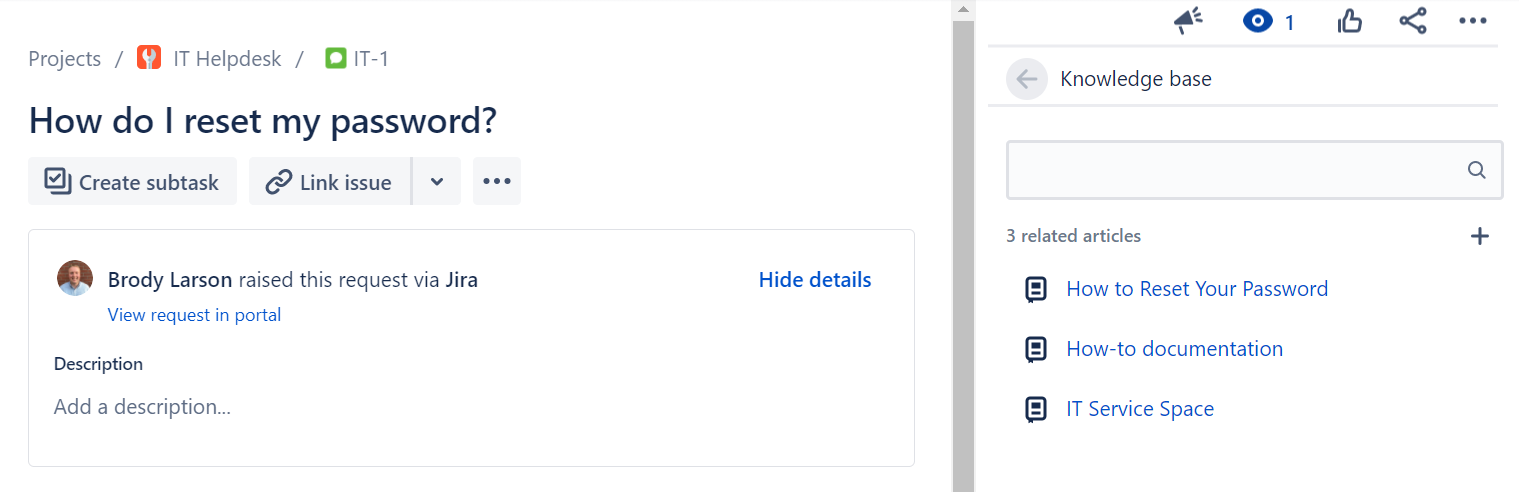
Jira Service Management integrates with Confluence by providing a knowledge base for Agents and Customers, where information is made available based on the request. JSM also allows Agents to create new documents in the Confluence knowledge base directly from their issue in Jira if relevant documentation is missing.
Confluence Features List
We already explained how Jira and Confluence work together to help any and all teams collaborate, but what are some of the other features that we love about Confluence? Keep reading this Confluence guide to learn more about Confluence pricing.
Confluence Templates
Confluence comes shipped with almost 100 best practice templates out of the box to serve as a starting point for new and existing teams to leverage. Don’t start from scratch, take advantage of these templates to make writing and collaborating on documentation faster and more cohesive across the organization.
Collaboration
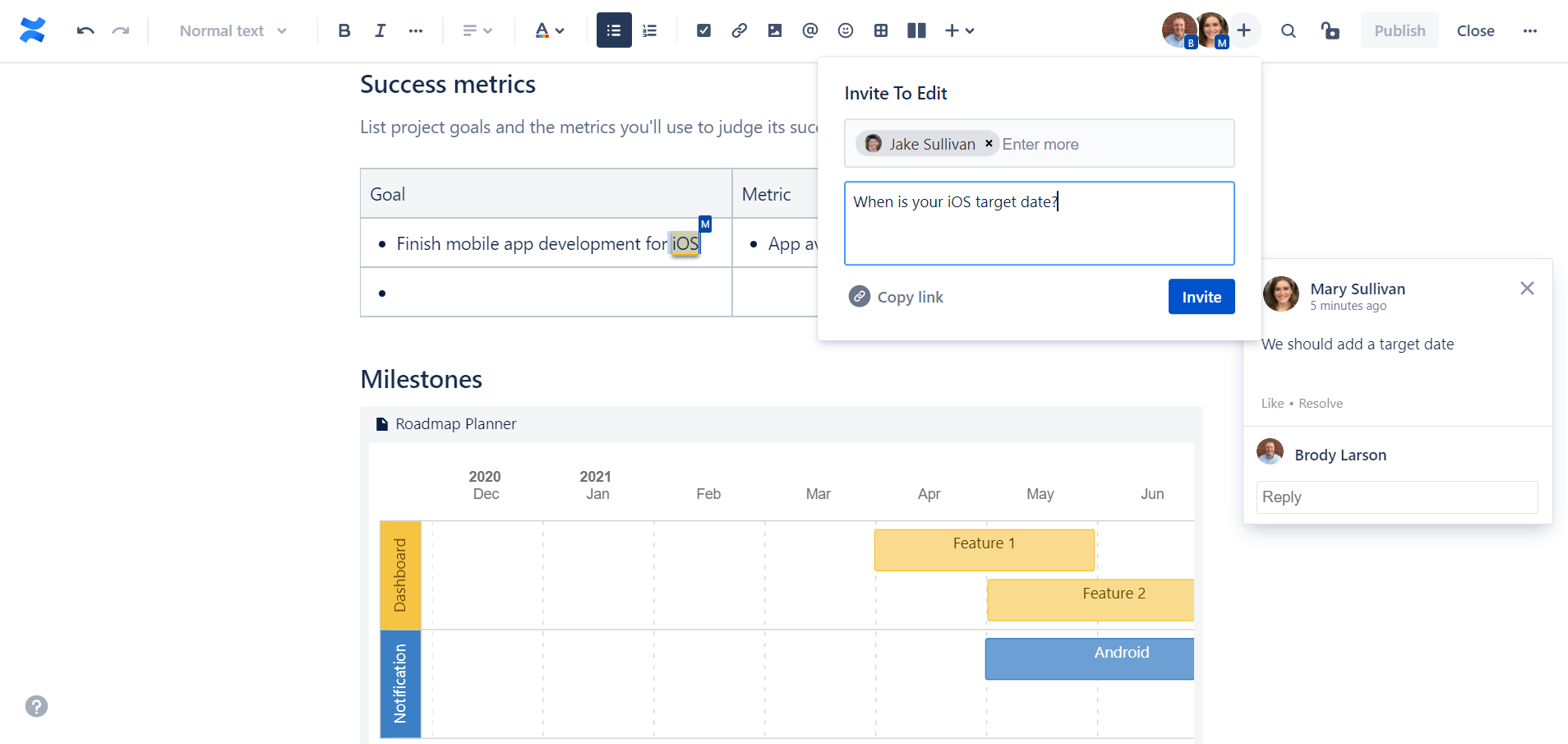
Confluence offers various features that help teams collaborate such as real-time editing, comments on pages or in-line, dynamic notifications and more.
Permissions
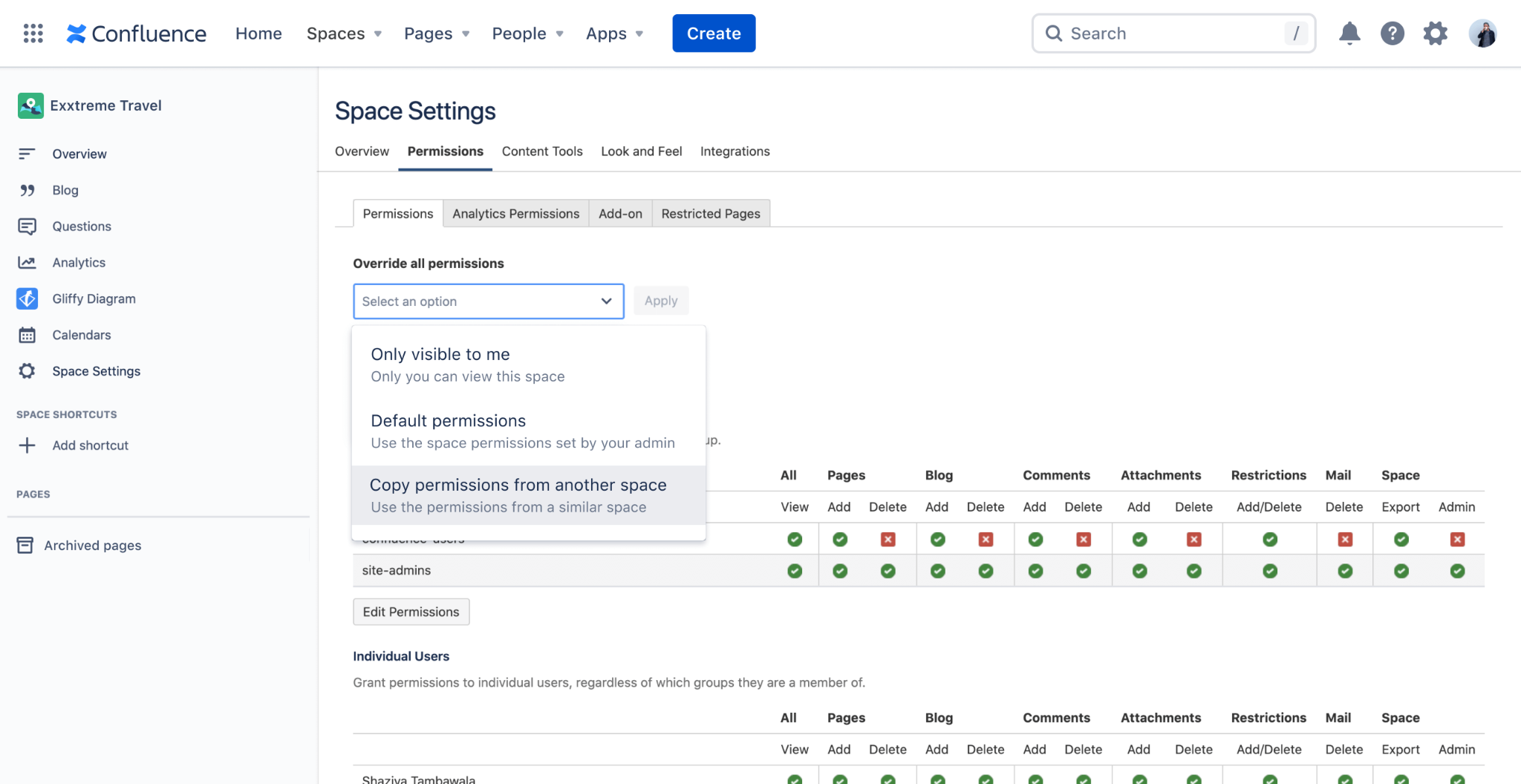
Whether you’re a growing team or a large enterprise, Confluence has a robust and layered permission scheme that enable administrators to ensure that the right users have access to the right information across your site.
Analytics
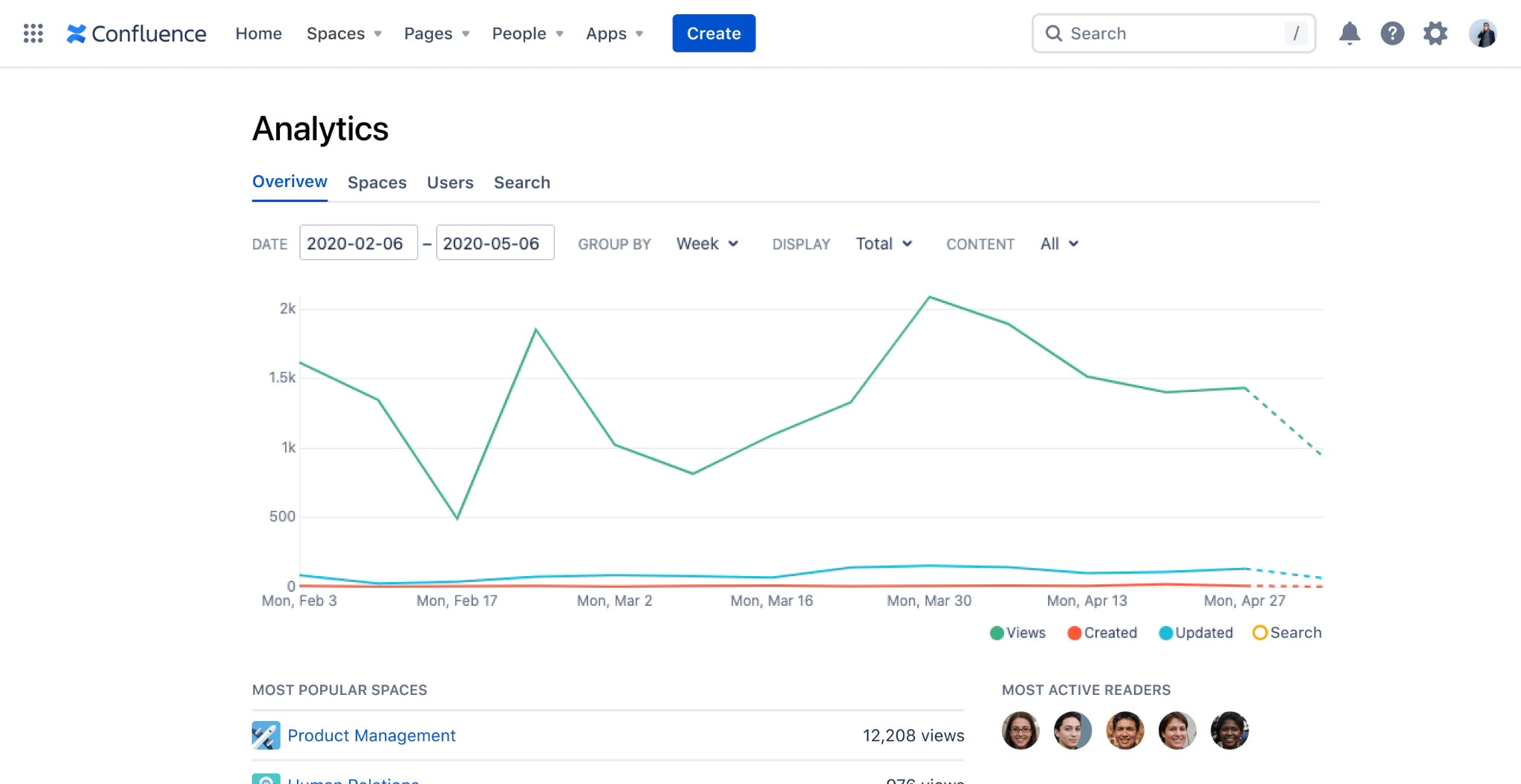
Confluence Data Center and Cloud Premium offer analytics and insights and the page, space and site level, to help administrators and content owners evaluate usage and help make decisions.
Integrations
Beyond the native integrations between Confluence and other Atlassian tools, there are hundreds of Marketplace Apps that make it seamless to integrate Confluence with other documentation tools such a Google Drive, SharePoint or OneDrive and business tools such as Lucid Charts.
How do I know which version of Confluence I need?
There are 3 main factors to consideration when trying to determine which version of Confluence will meet your needs:
Deployment: There are now two different deployment options available for Atlassian’s Confluence product, Cloud and Data Center. As you may already be aware, in October of 2020, Atlassian announced they were discounting their Server products, in favor of Cloud and Data Center. You can read more about their announcement here.
Feature Set: For Confluence Cloud, there are four different versions available, all with a different set of available features. We will outline them below.
User Tier: All Atlassian product licenses are based on # of Users, and most used a tiered system. We will highlight the price for many of the available User Tiers below.
Confluence Cloud vs Data Center
Confluence Cloud
Atlassian has taken a ‘Cloud first’ approach to their products, and encourages all new and existing customers to choose their Cloud offerings. Confluence Cloud is a highly available software-as-a-service that Atlassian hosts and is scalable, secure, reliable, and highly performant. Atlassian is continuously developing new features for the Cloud offerings, and they will soon be available for all sizes of teams.
Confluence Data Center
Unlike Confluence Cloud (which is a SaaS), Confluence Data Center is a self-managed offering, where you host Confluence on your own infrastructure. Other benefits of Confluence Data Center include: environment control, active clustering for high availability, SAML 2.0 and OpenID Connect support, Atlassian-supported disaster recovery and advanced permissions capabilities for added security.
Reasons to choose Confluence Data Center
Compliance Requirements
If your organization must adhere to HIPAA, NIST 800 or FedRAMP Moderate, Confluence Cloud is not currently a viable option for you. These are all on Atlassian’s Cloud Roadmap but for organization’s that are looking to implement Confluence now and must comply with these regulatory requirements, Data Center is the appropriate deployment option.
User Tier
Confluence Cloud currently only supports up to 20,000 Users per site. Atlassian is working on supporting up to 35,000 Users per site, but may not be available until Q4 2022.
Confluence Pricing
Once you have decided on which deployment option (Cloud or Data Center) is appropriate for you, review the various pricing options below to determine which Confluence license is right for your organization.
Confluence Cloud Pricing
Confluence Free, Standard, Premium or Enterprise?
Before explaining the differences between the different versions of Confluence Cloud, note that Confluence Standard, Premium and Enterprise are all currently available for up to 20,000 users per site.
Confluence Free
For up to 10 Users, Atlassian offers a free version of Confluence Cloud, that comes with their basic set of features. Features not included in the free version of Confluence Cloud are things like: permissions, archiving, insights and audit logs.
Confluence Standard
The Standard version of Confluence comes with a robust set of features that meet the needs of most organizations. Remember all of the key features that we highlighted above? You’ll get all of those (besides analytics) and more with Confluence Standard.
Confluence Premium
Confluence Premium adds a specific set of features onto the Standard version of Confluence Cloud, such as: analytics, bulk archiving, permissions copying, a sandbox environment and unlimited storage.
Also worth noting, Atlassian will soon be releasing two new and very exciting features exclusively for Confluence Cloud Premium: external collaboration and automation.
Confluence Enterprise
Meant for large, enterprise organizations, Confluence Cloud Enterprise is available starting at the 1,000 User tier, and only offers Annual licenses, Monthly not available. With Confluence Cloud Enterprise, you are getting all of the features for the lower versions, plus some enterprise-enabling features such as: unlimited sites, Atlassian Access, and enhanced support and uptime. Need some more help with this Confluence guide? Contact us now.
Confluence Monthly Cloud Pricing
# of Users
Standard Price per User
Premium Price per User
1 – 100
$5.00
$10.00
101 – 250
$4.00
$7.00
251 – 1,000
$3.00
$5.50
1,001 – 2,500
$2.75
$5.00
2,501 – 5,000
$2.50
$4.75
5,001 – 7,500
$2.50
$4.50
7,501 – 10,000
$2.25
$4.25
10,001 – 15,000
$2.10
$3.75
15,001 – 20,000
$1.90
$3.50
Confluence Annual Cloud Pricing
# of Users
Standard Price
Premium Price
Enterprise Price
10
$500
$1,000
–
50
$2,500
$5,000
–
100
$5,000
$10,000
–
500
$18,500
$34,250
–
1,000
$33,500
$61,750
$92,625
2,000
$61,000
$112,000
$167,500
5,000
$137,000
$256,000
$383,000
10,000
$256,000
$474,000
$711,000
20,000
$465,000
$837,000
$1,255,000
Note, there are more user tiers available for Annual Confluence Cloud Pricing, we have highlighted these tiers to make the pricing scale more readable.
Confluence Data Center Pricing
There is only 1 pricing and feature level available for Confluence Data Center. All deployments of Confluence Data Center come with the entire feature bundle, and only annual licenses are available. This means that if you have determined that Confluence Data Center is right for your organization, the User Tier the only variable to consider that will impact your license cost.
# of Users
Annual Price
500
$27,000
1,000
$48,000
2,000
$84,000
5,000
$210,000
10,000
$230,000
20,000
$270,000
40,000
$350,000
40,001+
$370,000
Note, there are more user tiers available for Confluence Data Center Pricing, we have highlighted these tiers to make the pricing scale more readable.
Still not sure if Confluence is right for your organization or you just have some doubts about this Confluence guide, or not sure which deployment option and version you should choose? Our dedicated and award-winning team can help you evaluate your next steps.
Confluence Remote Code Execution Vulnerability: Everything you need to know about it
Atlassian has announced a critical severity security vulnerability CVE-2021-26084 on certain versions of the Server and Data Center platform for Confluence. Oxalis performed additional analysis on this vulnerability announcement and is confident that our current customers are protected by our security practices. This security vulnerability only affects Atlassian’s Confluence Data Center and Server products. Atlassian Confluence Cloud products are not affected, and users are not impacted by this vulnerability.
Specifically, the CVE (Common Vulnerabilities and Exposures) ID for this vulnerability is: CVE-2021-26084 (Confluence Server Webwork OGNL injection). To stay on top of the issue, track it here. Beyond its extremely high 9.8 severity level, the fact that it doesn’t require a user to be authenticated puts any publicly facing Confluence instance at risk. High profile teams are reporting successful attacks, including the CI/CD tool Jenkins.
We believe it’s critical you mitigate these issues immediately either on your own or through Oxalis’s assistance. US Cybercom has sent out notice to IT teams alerting to this issue, there is reason to believe CVE-2021-26084 will continue and rapidly increase.
This vulnerability specifically affects the following versions of Confluence Server and Data Center:
The current releases of Atlassian’s Confluence Server and Confluence Datacenter products have added security patches to address this issue – as long as you have a recent release, you are protected. Staying up to date should be the baseline for security practices.
Check Your Current Version of Confluence
How to check current version
To find the version of Jira Data Center that you are on, click on the Administration cog and go to Applications. Here you can view the current version of your Jira applications.
Note: You will need to be a Jira Administrator to access Jira’s Administration menu.
Need help finding your current version of Jira Data Center? Get help immediately for assistance.
Pick the Version of Confluence to Upgrade and Download
These version apply to both Server and Data Center versions of Confluence:
Your best be should be to upgrade to version 7.13.0 (LTS) or higher
If you are running 6.13.x versions and cannot upgrade to 7.13.0 (LTS) then upgrade to version 6.13.23.
If you are running 7.4.x versions and cannot upgrade to 7.13.0 (LTS) then upgrade to version 7.4.11.
If you are running 7.11.x versions and cannot upgrade to 7.13.0 (LTS) then upgrade to version 7.11.6.
If you are running 7.12.x versions and cannot upgrade to 7.13.0 (LTS) then upgrade to version 7.12.5.
Versions can be downloaded from the following pages depending on if you are using server or Data Center:
Confluence Current Version: https://www.atlassian.com/software/confluence/download/data-center
For other patched versions: https://www.atlassian.com/software/confluence/download-archives
Make a Plan to Stay Up To Date
At Oxalis, we hold regular maintenance windows for all deployments and applications. We continuously monitor, review, and upgrade to new releases for applications like Jira to ensure our client’s systems are up to date.
Patch Your Current Confluence Installation
If for some reason you are unable to upgrade immediately, Atlassian has released a mitigation tool that can be run to remove the vulnerability without upgrading. Full details on downloading and applying the mitigation are available on Atlassian’s page here.
How to avoid future risks
Migrate to Atlassian Cloud
At the beginning of 2021, Atlassian announced their journey to cloud, showing their dedication to the Cloud products and services. Even though they will be decommissioning their Server offering, their Data Center platform will continue to be supported. There are many considerations to take into account before deciding to migrate to Atlassian Cloud, but it is certainly worth considering, as it is clear that Atlassian is focusing their efforts towards the Cloud.
Not a Lift-and-Shift – Migrating from Server/Data Center to Atlassian Cloud is not simply a lift-and-shift effort. There are many differences between the on-premise and cloud versions of Atlassian’s applications, along with differences in the Marketplace Apps. A short discovery effort is recommended to plan and map your migration effort to ensure success. You can learn more about our migration approach here.
Compliance – It’s possible Atlassian Cloud may not meet your compliance needs. Currently, Atlassian Cloud does NOT meet the following compliance standards:
HIPAA
FedRAMP Moderate
NIST 800.53
Review Atlassian’s cloud roadmap to see when they plan on meeting these compliance standards.
Trust – Atlassian’s team is dedicated to keeping the trust of their customers, and has you covered. Review information about security, reliability, privacy, and compliance for their products and services here.
Stay Up To Date
Staying on the most recent version continues to be the best strategy. With stability, it can be easy to end up just staying with what works and getting out of date.
Build Security at Depth
While implementing zero trust architectures can be challenging, choosing architectural patterns that allows for isolation and segmentation of infrastructure components provide both reduced blast radius and limits exploitation.
We’re here to help
If you need help understanding if you’re at risk CVE-2021-26084, hardening your existing infrastructure, are looking for ongoing maintenance help or want to move to a more compliant infrastructure, our award winning team is here to help. As a group of technology consultants and product leaders that operate in various high-compliant industries, Oxalis has a strong focus on security. We don’t just care when vulnerabilities occur, it’s a key piece of how we operate as a firm.
Have some questions about CVE-2021-26084? Oxalis can help you.
Knowledge Management at Enterprise Scale with Confluence Cloud – Webinar [ON-DEMAND]
On September 1st, we held our webinar Knowledge Management (KM) at Enterprise Scale with Confluence Cloud. Participants had the opportunity to hear from Oxalis Confluence experts how to advance their team’s knowledge and experience at the Enterprise scale. Topics included:
What is Enterprise Knowledge management?
Why should I care about KM?
How can Confluence help my organization collaborate and share knowledge better?
Where is my company on Oxalis’ KM Maturity Model?
How company’s can optimize Confluence at various stages of maturity
Live Q&A Session
Did you miss the live Webinar? Get the On Demandversion
What are the principal Confluence features and benefits for knowledge management?
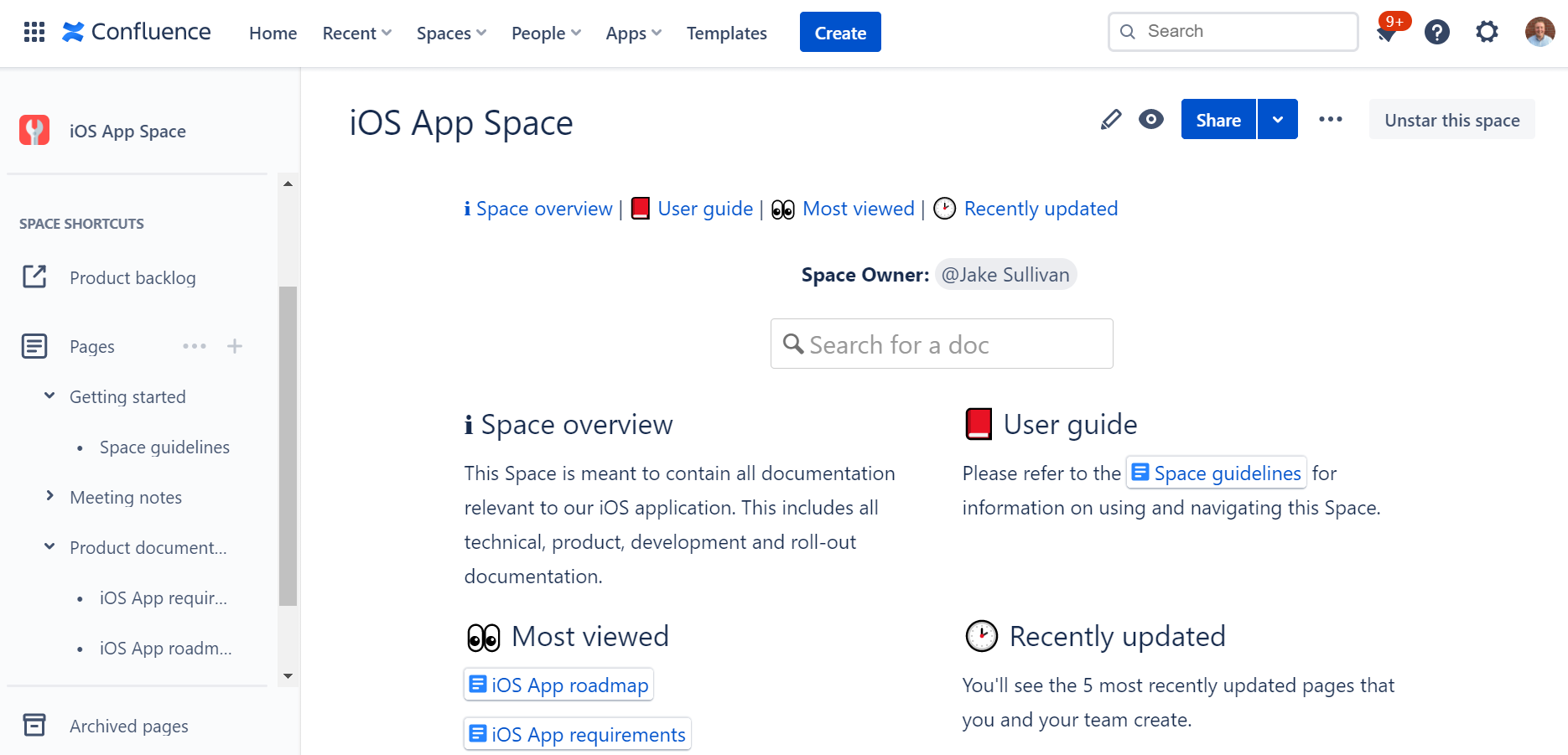
Confluence is a powerful knowledge management tool that offers a wide range of features and benefits for organizations looking to manage their information and knowledge more effectively. Here are some of the key benefits of using Confluence for knowledge management:
Centralized repository: Confluence provides a centralized repository for all of an organization’s information and knowledge, making it easy to find and access the information that you need.
Improved collaboration: With Confluence, teams can work together more effectively, sharing information, discussing issues, and making changes in real-time.
Better organization: Confluence offers a range of features for organizing and categorizing information, making it easier to find and access the information that you need.
Enhanced search capabilities: The platform’s powerful search capabilities allow users to quickly find the information they need, even within large volumes of data.
Customization options: Confluence provides a range of customization options, allowing organizations to tailor the platform to meet their specific needs and requirements.
Accessibility: With Confluence, organizations can make their information and knowledge accessible to all members of the team, regardless of their location or device.
Overall, Confluence offers a comprehensive solution for organizations looking to manage their knowledge and information more effectively and improve their overall productivity.
Why using Confluence as a knowledge base can give you multiple benefits?
As organizations grow and become more complex, it can be difficult to keep track of all the information and knowledge that is generated. From project plans and reports to policies and procedures, this information is critical to the success of the business. But if it is not properly organized and managed, it can be lost or become difficult to find, leading to delays, mistakes, and increased costs.
This is where Confluence can help. Confluence is a powerful knowledge management platform that provides organizations with a centralized repository for all of their information and knowledge. With Confluence, organizations can improve their collaboration, streamline their information management processes, and increase their overall productivity.
Here are some of the key benefits of using Confluence as a knowledge base:
Improved collaboration: Confluence provides a range of collaboration tools and features, making it easy for teams to work together, share information, and make changes in real-time.
Better organization: With Confluence, organizations can categorize and organize their information in a way that makes sense for their business, making it easier to find and access the information that they need.
Enhanced search capabilities: The platform’s powerful search capabilities allow users to quickly find the information they need, even within large volumes of data.
Customization options: Confluence provides a range of customization options, allowing organizations to tailor the platform to meet their specific needs and requirements.
Accessibility: With Confluence, organizations can make their information and knowledge accessible to all members of the team, regardless of their location or device.
In conclusion, Confluence offers a comprehensive solution for organizations looking to manage their knowledge and information more effectively. By using Confluence as a knowledge base, organizations can improve their collaboration, streamline their information management processes, and increase their overall productivity.
Here’s an example of how an organization might use Confluence as its knowledge base
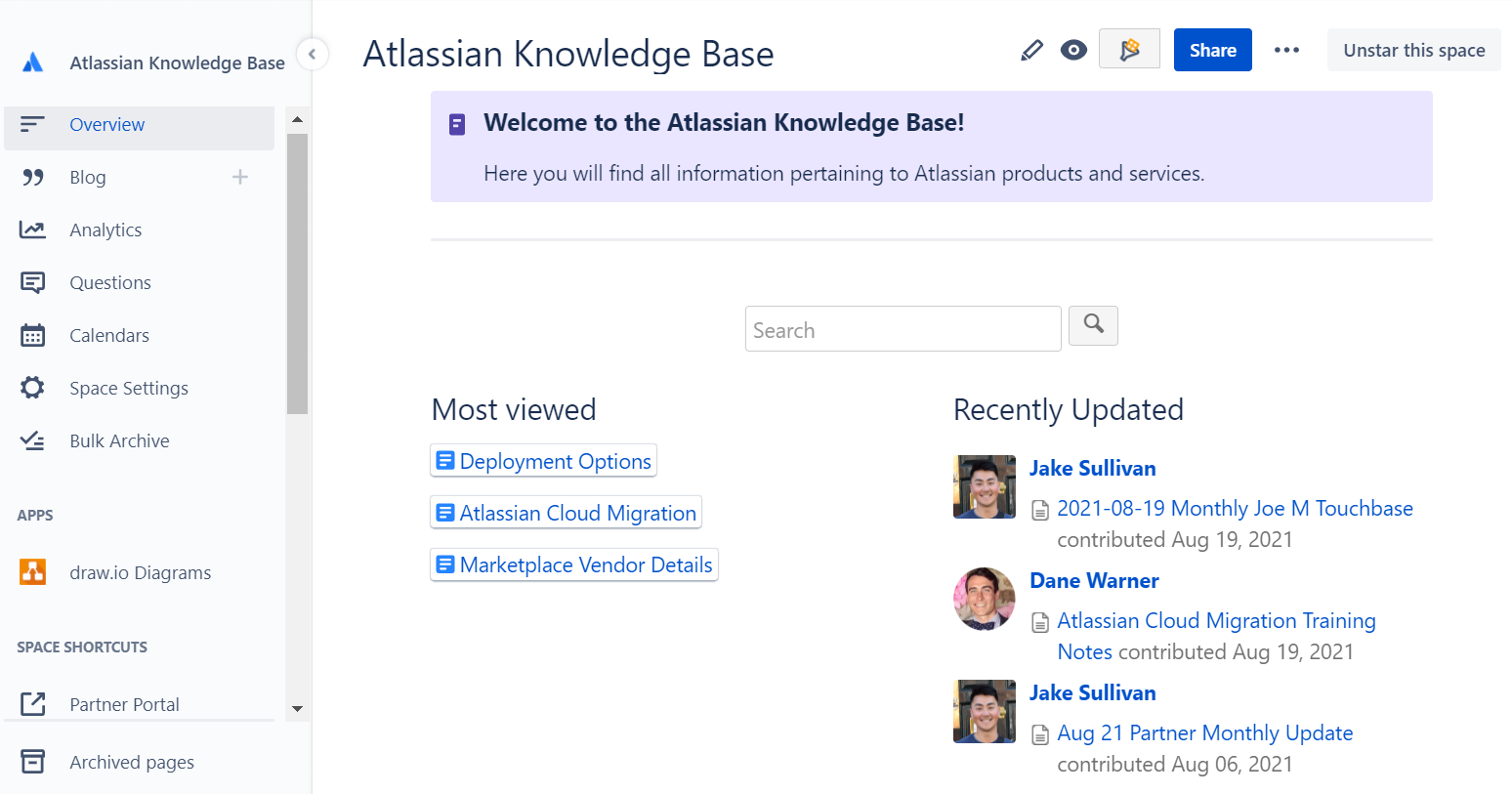
Create a Space: The first step is to create a Confluence Space specifically for the knowledge base. This Space can be customized with a unique look and feel, and organized in a way that makes sense for the organization.
Categorize Information: Next, the organization can begin categorizing their information into pages within the Space. For example, they might create pages for policies, procedures, project information, and team guidelines.
Add Content: With the pages created, the organization can start adding content to their knowledge base. This might include text, images, videos, and other types of media. The organization can also use Confluence’s collaboration features to work together on the content and make changes in real-time.
Make it Searchable: With the content added, the organization can make their knowledge base searchable by adding labels and other metadata to their pages. This makes it easier for users to find the information they need, even within large volumes of data.
Share the Knowledge: With their knowledge base set up, the organization can share it with their team, making the information and knowledge accessible to all members, regardless of their location or device.
This is just one example of how an organization might use Confluence as their knowledge base. With its powerful features and customization options, Confluence can be tailored to meet the specific needs of any organization, making it a flexible and effective solution for managing information and knowledge.
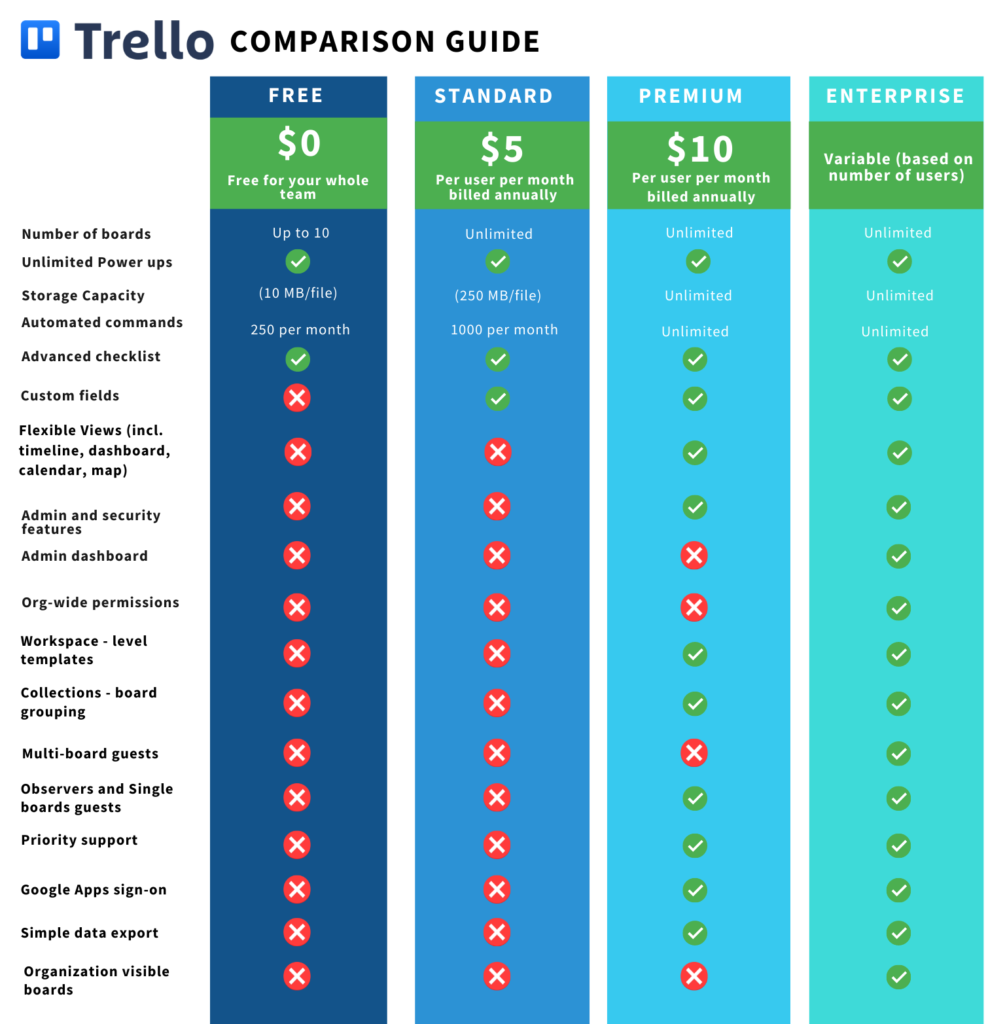
As of August 24th, 2021, Atlassian has launched an updated suite of Trello tiers to provide simplified pricing and greater capabilities for teams of all sizes.
Trello “Business Class” is now called Premium and includes unlimited automation.
Atlassian is introducing a new Standard tier, which is a lower priced plan ($5/mo).
All users can now add unlimited Power-Ups and integrations with no limits.
Trello “Gold” is now discontinued and will be retired throughout September and October. Many of the old “Gold” tier features are now free.
Trello Enterprise remains as the go-to tier for customers seeking greater security and compliance controls.
Jira Work Management remains a powerful alternative for organizations looking to scale.
Curious about whether Trello is right for your organization? Contact us below to set up a free consultation.
If you’re currently a Trello “Gold” customer, be mindful of the following dates:
August 24th, 2021 – Atlassian will stop the sale of new Gold subscriptions.
September 7th, 2021 – If you are a Gold user with a personal board, your board will automatically be migrated to a new Workspace with a 60-day Premium free trial.
September 24th, 2021 – Atlassian will stop the renewal of existing Gold subscriptions.
October 24th, 2021 – All Trello Gold subscriptions will expire.
For all other users, explore the new, powerful functionality unlocked with this change!
What Are the Differences Between Plans?
Where Can I Learn More?
It’s time to escape fragile and messy Excel spreadsheets, countless email threads, and systems that do not integrate with the tools you need. Trello on its own is a strong asset—however, Oxalis unlocks the full potential of the software so your team can work more efficiently, connected, and effectively.
Let us show you how Oxalis makes Trello work for you.
Contact us
Streamlining Portfolio Reporting at a National Health Care Company
The Challenge
Streamlining Portfolio Reporting, a national healthcare organization was struggling to define, prioritize, and manage execution of their Infrastructure and Operation initiatives in a consistent manner. Countless hours were spent by teams creating and recreating status reports in various formats (Jira, Excel, Smartsheets) in an effort to keep leadership informed. Grassroots movements started and failed to transition the process to Jira, so Oxalis was brought in to help set up a structure for success.
Our Approach
Knowing that the crux of the problem was providing leadership-level visibility while enabling team autonomy, the Oxalis team immediately went to work analyzing the needs of both management and individual contributors.
Using Advanced Roadmaps for Jira, to streamline portfolio reporting, the Oxalis team helped put a structure in place so that individual delivery team epics could be rolled up to organization-wide Initiatives. Permission and data schemas were configured to ensure appropriate levels of segmentation, and to provide coverage for current reporting needs. Automation and subscription-based reports were used as controls to help promote data integrity, and training was developed for key personnel to establish and sustain usage of the tool.
Over the course of three months, the configuration and process for managing initiatives in Jira was fully rolled out to streamline portfolio reporting.
Leadership is currently benefiting from a single view into the status of all key initiatives, which are updated in real-time based on the work completed by the delivery teams. Delivery teams can easily see how their work ties back to strategy while working in a way that suits them best to streamline portfolio reporting. Substantial savings from reporting overhead are anticipated over the coming years.
Jira vs Zendesk? Did you know that over 25,000 extraordinary companies like AirBnB and Spotify to news organizations such as the Daily Telegraph are all on the Jira Service Management platform?
Simply put, when it comes to Jira Service Management vs. Zendesk, Service Management is a dominant force!
As always, if you’d like to compare Jira Service Management vs. Zendesk and other platforms like Freshdesk and more, please schedule a free consultation below, or learn more about our Jira consulting services. Want to learn more about Jira Vs Zendesk?
Comparison Overview
Jira Service Management and Zendesk are two of the clear leaders in the customer service management space. Both of these tools offer request tracking, interaction between customers and agents, reporting, customizability and are scalable for most organizations.
One of the clear and most obvious differentiators between these two tools is the pricing structure. Where Jira Service Management includes all of their best-in-class features in their Standard offering, the Zendesk Suite has a more tiered pricing model, with limited features at the lower levels.
Jira Service Management Overview
When it comes to licensing Jira Service Management, you have two main options; Cloud and Data Center. This guide will focus on both Jira Service Management offerings. Jira Service Management is a SaaS-based enterprise-grade Service Management solution that scales way beyond standard Zendesk and Freshdesk platforms. Like all Software as a Service (SaaS) based platforms Jira Service Management is licensed via a subscription model and is hosted and supported by Atlassian, with no additional hosting expenses to consider. However, for those companies that have high-security needs, or specialized performance needs, there is a self-hosted option that can be attractive to certain organizations such as those in Aerospace, Defense and Healthcare. Send us a message.
Jira Service Management can support both internal and external customer business models and is an ideal fit for companies with leaner Help Desk or Service teams that desire to focus their attention on efficiency, process improvement, and traceability. Jira Service Management accomplishes this and adjusts to businesses as their use cases, needs, and teams change.
The Jira Service Management software runs on the base Atlassian Jira core framework and architecture. Service Management is modeled after a plugin architecture that is individually licensed. As a subscriber or buyer of this solution, you essentially obtain the core Jira framework along with Service Management. However, Agile project management, SCRUM boards, and other Jira features are not enabled and you will need to license Jira Software independently of Jira Service Management in order to obtain traditional Scrum and Project Management features.
Features We Love Within Jira Service Management
Issue Types & Request Types: Out-of-the-box configuration of best practice issue and request types to get your team and customers on the same page. Update based on your specific use case if necessary.
Queues: Focused, flexible, customizable list views of the most important requests for your teams to work on.
Workflow & Approval: Easily build off of Jira’s default ITSM workflow to build in automated approval or customer-facing transitions.
Field Configurations: Hide, show and prepopulate various different types of custom fields to ensure your agents are getting the right information from customers.
Service Level Agreements (SLAs): Track your team’s response time, resolution statistics and more with custom SLAs and reports.
Customer Portal: Receive requests via email or direct your customers to a customized, external portal where they can submit, comment on and track all of their requests.
Knowledge Base Integration: Jira Service Management seamlessly integrates with Atlassian’s core document collaboration solution, Confluence, to suggest documentation to customers and agents, and allow agents to quickly document new processes directly from Jira.
Marketplace Extensibility: There are nearly 1,000 compatible Apps to extend Jira Service Management to fit any use case.
Zendesk Overview
In 2021, Zendesk announced their new, revised, Zendesk Suite, combining their different service offerings into one major offering. The Zendesk Suite combines their Support, Talk, Chat and Guide products into one tool for service teams. This is what they refer to as an omnichannel solution, as an integrated customer service platform. Zendesk is strongly focused on the customer experience offering in their support products, pulling in requests from various channels, such as email, phone, social, and more.
Price Comparison
At the lowest plan and user tier, Zendesk is $1 per agent per month cheaper than Jira Service Management, but unlike Zendesk, JSM offers a tiered pricing structure, reducing the cost per agent as you scale up to increased agent counts.
Jira Service Management Pricing Structure
Plan
Description
Price
Standard
Unlimited support projects, with customer portals, SLAs, reports, configurable requests and workflows.
Unlimited number of sites and includes Atlassian Access for SSO.
Contact us
*Enterprise Plan is only available as an annual subscription.
Zendesk Pricing Structure
Plan
Description
Price
Support Team
Includes basic support features.
$19/agent/month
Support Professional
Includes CSAT surveys and SLAs.
$49/agent/month
Support Enterprise
Includes multiple ticket forms, custom permissions and a Sandbox.
$99/agent/month
Suite Team
Includes all basic features, limited to a single help center.
$49/agent/month
Suite Growth
Includes multiple help centers and a self-service portal.
$79/agent/month
Suite Professional
Includes SLA management and custom reports.
$99/agent/month
Suite Enterprise
Includes a Sandbox environment.
$150/agent/month
Next Steps: Jira Vs Zendesk?
Thinking Jira Service Management might be a good fit for your service organization, but not entirely convinced? Our team of experts can help you evaluate Jira Service Management, Zendesk and more. Learn more about our Jira consulting services. If you have any doubts or questions, feel free to send us a message.
Unlock the full capabilities of Jira Service Management by partnering with an Atlassian ITSM expert like Oxalis. Elevate your IT service experience through enhanced efficiency and optimization.
Cookie Consent
We use cookies to improve your experience on our site. By using our site, you consent to cookies.
Used by Google Analytics 4 to persist session state and track usage across visits. The XXXXXXXXXX portion corresponds to the Oxalis Google Analytics property ID.
1 year
_gac_
Contains information related to marketing campaigns of the user. These are shared with Google AdWords / Google Ads when the Google Ads and Google Analytics accounts are linked together.
90 days
__utma
ID used to identify users and sessions
2 years after last activity
__utmt
Used to monitor number of Google Analytics server requests
10 minutes
__utmb
Used to distinguish new sessions and visits. This cookie is set when the GA.js javascript library is loaded and there is no existing __utmb cookie. The cookie is updated every time data is sent to the Google Analytics server.
30 minutes after last activity
__utmc
Used only with old Urchin versions of Google Analytics and not with GA.js. Was used to distinguish between new sessions and visits at the end of a session.
End of session (browser)
__utmz
Contains information about the traffic source or campaign that directed user to the website. The cookie is set when the GA.js javascript is loaded and updated when data is sent to the Google Anaytics server
6 months after last activity
__utmv
Contains custom information set by the web developer via the _setCustomVar method in Google Analytics. This cookie is updated every time new data is sent to the Google Analytics server.
2 years after last activity
__utmx
Used to determine whether a user is included in an A / B or Multivariate test.
18 months
_ga
ID used to identify users
2 years
_gali
Used by Google Analytics to determine which links on a page are being clicked
30 seconds
_ga_
ID used to identify users
2 years
_gid
ID used to identify users for 24 hours after last activity
24 hours
_gat
Used to monitor number of Google Analytics server requests when using Google Tag Manager
1 minute
Marketing cookies are used to follow visitors to websites. The intention is to show ads that are relevant and engaging to the individual user.





![Knowledge Management at Enterprise Scale with Confluence Cloud – Webinar [ON-DEMAND]](https://oxalis.io/wp-content/uploads/2021/09/medium-shot-smiley-woman-taking-notes-1024x683.jpg)