Unlocking Enhanced Security: BYOK Encryption for Jira & Confluence

Keeping your data secure is paramount. Atlassian’s Cloud products encrypt data at rest, but now you have even more control with Bring Your Own Key (BYOK) encryption for Jira Software & Confluence (Early Access Program).

Atlassian Cloud products now empower you to take control of your data encryption with Bring Your Own Key (BYOK). Previously, Atlassian generated encryption keys for each customer and managed them within AWS Key Management Service (KMS) using their own account. Now, you can choose to encrypt your Jira and Confluence data with keys stored directly in your own AWS account.

Who needs BYOK Encryption for Jira & Confluence?

BYOK encryption for Jira & Confluence is ideal for organizations with highly sensitive data or those in strictly regulated industries. These organizations often have strong compliance requirements and need the utmost control over their encryption keys. BYOK offers them the ability to manage and rotate their own keys, ensuring that even Atlassian doesn’t have access to decrypt their data. This extra layer of control can be crucial for meeting specific security standards and mitigating the risk of unauthorized access. It empowers you to:

  • Manage your encryption keys: You hold the keys in your dedicated AWS account, giving you complete control and the ability to revoke access in emergencies.
  • Gain audit trail visibility: Take advantage of AWS CloudTrail to monitor key activity and access detailed logs.

BYOK is available to Cloud Enterprise plans with any of these Atlassian products:

  • Jira Software
  • Jira Work Management*
  • Jira Product Discovery*
  • Jira Service Management (EAP)
  • Confluence (EAP)

Who Can Use BYOK Encryption for Jira & Confluence?

Atlassian offers BYOK encryption on a tiered basis for Jira & Confluence. For Jira Software, all Cloud Enterprise or Cloud Enterprise trial subscribers have immediate access to BYOK encryption. However, BYOK encryption for Jira Service Management and Confluence is still in an Early Access Program (EAP). To leverage BYOK encryption for Jira Service Management and Confluence, contact your Atlassian Enterprise account representative to confirm your eligibility for the Early Access Program (EAP).

Jira Service Management implementation services
  • Attachments
  • Comments
  • Issues and field content (including systems and custom fields)
  • Search data
  • Permissions and restriction configuration data
Confluence consultants
  • Page content
  • Blog content
  • Comments
  • Attachments
  • Confluence questions
  • Whiteboards

Benefits of BYOK Encryption for Jira & Confluence

Leveraging BYOK encryption for Jira & Confluence unlocks several advantages, especially for organizations handling sensitive data. Here’s a breakdown of the key benefits:

  • Enhanced Security: Mitigate the risk associated with relying on someone else’s keys.
    • Using your own encryption key removes the potential security risk inherent in using someone else’s key. You manage and control the key at all times, including the ability to revoke access in the event of security emergencies, such as intrusion.
  • Granular Control: Manage and audit key usage within your AWS environment.
    • You have full visibility into key-related activity because you’re using your own AWS account, and you can use tools likeย AWS CloudTrailย to record activity and access audit logs.
  • Compliance Alignment: Facilitate adherence to strict data security regulations.
    • BYOK encryption can help your organization meet compliance requirements for data security, especially those that mandate stricter control over encryption keys.

Using your own encryption key removes the potential security risk inherent in using someone else’s key. You manage and control the key at all times, including the ability to revoke access in the event of security emergencies, such as intrusion. You have full visibility into key-related activity because you’re using your own AWS account, and you can use tools like AWS CloudTrail to record activity and access audit logs.

Who Should Use BYOK Encryption?

If you have more stringent security or compliance needs and are already on Atlassian’s Cloud Enterprise plan, then BYOK encryption for Jira & Confluence is a good fit. Oxalis can help you assess whether your organization would benefit.

What Data Does BYOK Encryption for Jira & Confluence Cover?

BYOK encryption for Jira & Confluence secures a significant portion of your data, but it’s not all-encompassing. Here’s the breakdown:

  • Good news:ย When enabled for Jira Software or Service Management, BYOK safeguards all product data for Jira family products within that same site. This means your project details, tickets, attachments, and comments in Jira applications are shielded by BYOK encryption.
  • Important to note:ย Certain data categories like backups, personal access tokens, and audit logs remain encrypted using keys managed by Atlassian.

For a complete picture of what BYOK encrypts, we recommend consulting Atlassian’s documentation.

As of March 2024, Atlassian’s BYOK only covers data stored in a few Cloud products, as shown in the image below:

If you need more complete encryption of data in Jira and Confluence, Atlassian’s Data Center products may be the answer. With Data Center, since you host the product instances yourself, you have full control over the underlying file systems, disks, and database, and can enable encryption. Oxalis can help you decide if Data Center better suits your needs. We offer a range of services, from implementing encryption solutions (like Self-Encrypting Drives, Linux Unified Key Setup, or Windows BitLocker) to assisting you with setup. Additionally, we can facilitate the migration of your instances from Cloud to Data Center. We can also migrate your instances from Cloud to Data Center.

How Do I Enable BYOK Encryption for Jira & Confluence?

Ready to enable BYOK encryption for Jira & Confluence?

  1. Set Up a Dedicated AWS Account: Security first! Create a new AWS account solely for managing BYOK encryption for your Atlassian products. Avoid compromising security by using an existing account shared with other applications.
  2. IAM Role Setup: Within your dedicated AWS account, configure an Identity and Access Management (IAM) role (for the Stack Name, use atlassian-key-management-role). This role grants Atlassian the necessary, limited permissions to manage encryption keys on your organization’s AWS account via AWS KMS (Key Management Service).
  3. AWS KMS Key Costs: Be aware that each KMS key incurs a $1/month charge. Additional costs apply if you anticipate exceeding 20,000 requests per month.

Finally, an admin for the relevant Atlassian organization (or an Atlassian Partner, such as Oxalis) contacts your Enterprise account representative to set up your BYOK encryption and add a BYOK-encrypted product to your site. You can check the provisioning status of your BYOK sites through admin.atlassian.com.

BYOK Encryption for Jira & Confluence
The Security tab in your Admin site shows the current BYOK-enabled products,
along with the domain they belong to. Photo credit: Atlassian
Important Notes

Atlassian currently supports BYOK in two regions: the European Union and the United States; data cannot be migrated between locations after selection.

BYOK is available for JSM and Confluence only to participants in Atlassian’s Early Access Program (EAP), which lets you use upcoming releases while developers are still working on them. Cloud Enterprise plans now have full access to BYOK encryption for Jira Software! If you already have an Enterprise account representative, they can sign you up. If not, Oxalis can help evaluate whether Cloud Enterprise is a good fit for your organization, and can sign you up for the EAP for Jira Service Management and Confluence.

BYOK encryption offers enhanced data security and control for organizations with sensitive data in Jira & Confluence, particularly those in regulated industries. While BYOK doesn’t cover everything (backups and audit logs for example), it safeguards critical project details, tickets, attachments, and comments. BYOK encryption only applies to new products created within a site. You cannot retroactively add BYOK to existing products.

Here’s the inside scoop on BYOK limitations:

  • Single BYOK Policy per Organization: Your organization can only have one BYOK encryption policy, applied at the Admin site level.
  • New Products Only: BYOK applies proactively. You cannot enable it for existing products; they must be created with BYOK from the start.
  • Adding New Products: Atlassian can activate BYOK for new products added to the same site. However, directly adding a product through admin.atlassian.com won’t enable BYOK encryption.
  • Data Re-encryption: While you can’t re-encrypt product data with a new key, you can leverage AWS KMS’s auto-rotation feature set to occur annually. This ensures your encryption keys stay fresh.

Once BYOK encryption is in place, you can revoke access, restore access, and request BYOK re-encryption of previously encrypted data. For more detailed information, Atlassian has a BYOK FAQ that may answer some basic questions about BYOK encryption for Jira and Confluence.

Considering BYOK for your Atlassian instance? Oxalis, an Atlassian Platinum Solutions Partner, can help! Our experts can assess your needs and determine if BYOK is the right fit for your data security posture. We can also handle the implementation process or guide you through it yourself. Contact our experts today to learn more!

5 Recent Upgrades That Make Capacity Planning in Jira Align Better Than Ever

Jira Align, Atlassian’s enterprise-grade Agile solution, has offered a degree of capacity planning since its initial release. But a number of recent improvements have made this key feature much more user-friendly, powerful, and flexible. In this post, we’ll cover what five recent upgrades that make capacity planning in Jira Align better than ever.

Jira Align’s five fundamental work items, along with all the built-in laddered work management and reporting features, are central to providing flexibility in managing Agile work at different altitudes.

  • Theme
  • Epic
  • Capability
  • Feature
  • Story

For starters, the existing Forecast page now works for the Feature level, in addition to Epic and Capability. And capacity planning now has its own pageโ€”Capacityโ€”that uses the data from the Forecast page, which, in turn, displays data from the Capacity page.

Forecast Page

Epic

Work forecasting has been available at the Epic and Capability level since the initial release, and now it’s also available for Feature work items. Here are the three key updates.

Capacity Remaining

If you’re using the Capacity page (see section below), your capacity data will appear on the Forecast page at the top of each program column, so you can easily avoid committing to more work than you can accomplish.

Capacity page: Jira Align

Automatic Math

Estimating for a given Epic/Capability/Feature now includes buttons that automatically add up the estimations for each program and team, as well as for the entire Program Increment.ย  You can still do it manually if you like, but now Align will do the math for you if you don’t.

Automatic Math: Jira Align
On left, manual total estimate; on right, auto-estimation

Forecasted Spend

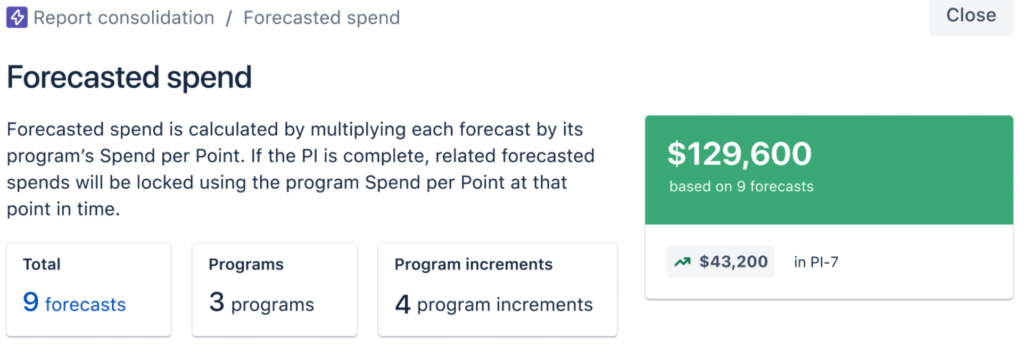
The Forecasted Spend financial value has been added to Featuresโ€”in the Spendย tab inside the Details panel for the work itemโ€”just as it has been for Epics and Capabilities.

Forecasted Spend Financial value: Jira Align
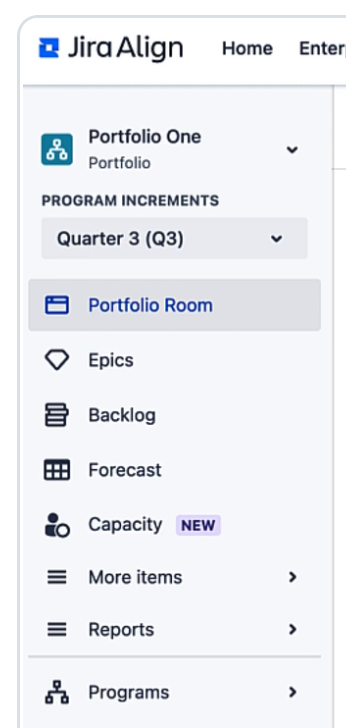
Jira Align menu left sidebar

Capacity Page

The Capacity page is a new feature, located just below Forecast in the left sidebar.

It is available in Portfolio, Solution, or Program context.

Jira align menu bar

There are two sections on the page, Plan Summary and Plan Details.

Plan Summary

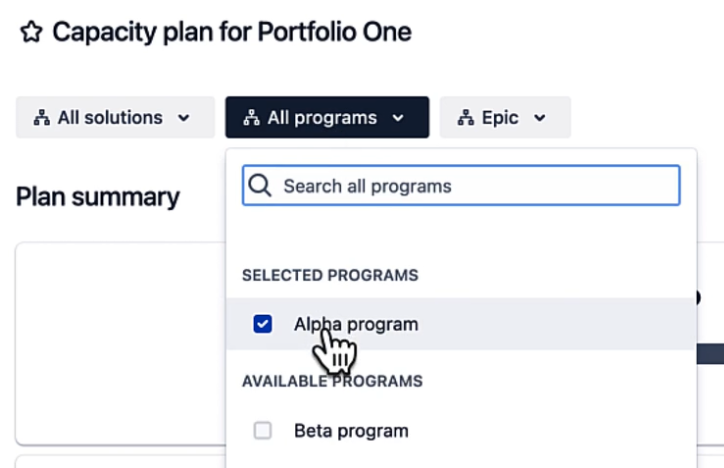
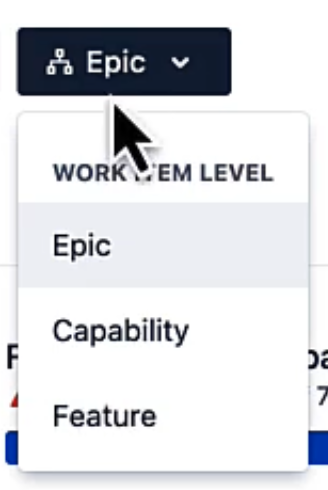
Just like with the Forecast page, you can choose the scope of planning. Choose a subset of the Solutions (if you chose the Solution context), a subset of the Programs, and/or set the work item level to Epic, Capacity, or Feature.

Capacity plan for Porfolio One: Jira Align

Once you’ve set the scope you want to plan for, the Forecast vs. Capacity bar shows you, at a glance, the plan’s total capacity, forecasted work, and current capacity remaining.

And the Forecast page is just a click awayโ€”just use the Source link to the right of the bar. This keeps the two halves of capacity planning in Jira Align conveniently connected.

The last part of the Plan Summary section contains six cards that each display an aggregated sum of all team-level data for the plan scope you’ve selected, showing you how the plan’s total capacity is calculated, along with the same calculations for the previous plan. The data calculated in the first four cards depends on whether you’re using points or member weeks. Here’s an example using points.

Plan Summary Section: Jira Align

These cards update in real time as you plan to help you understand how the changes you make to plan details are affecting your capacity.

Two of the columns need a bit of explanation. Buffer, whether you’re using points or weeks, provides a way to capture factors like planned PTO that reduce the amount of effort the team can put in for the plan’s duration. Capacity Percentage captures how much of the team’s work time will go toward this plan, which is vital because team members may have a certain amount of overhead in their days, or their time may be split between projects. The program’s Buffer value is subtracted before the Capacity Percentage is applied. For example:

20 points per sprint x 6 sprints = 120 points

120 points - 20 points of buffer = 100 points

Capacity % of 80 x 100 points = Available capacity of 80 points

Plan Details

This table breaks down the data in the cards, with the programs or teams as rows, and the same six factors as columns. Initially each program in the plan is a row, to provide an overview.

Plan details: Jira

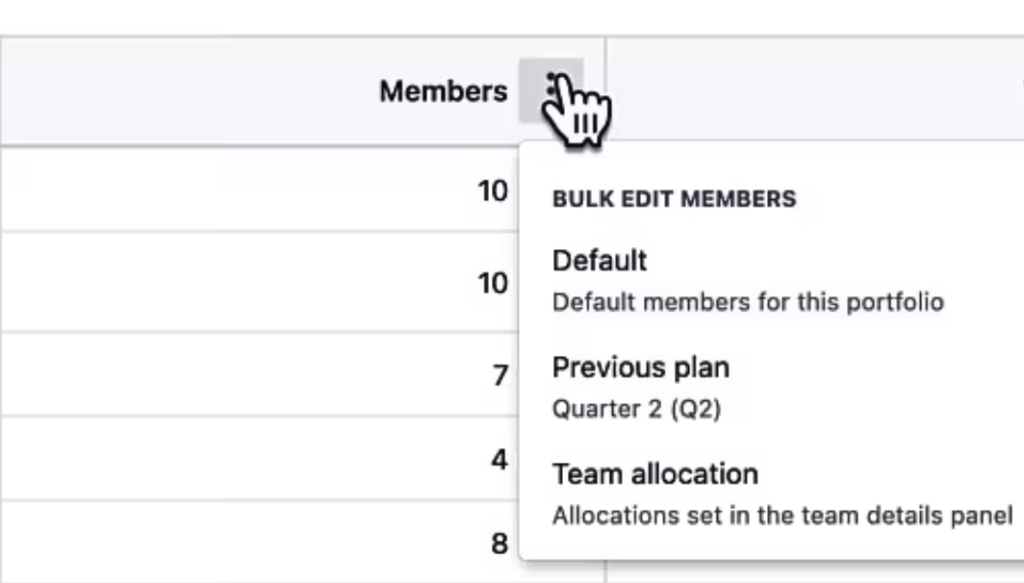
If you want to apply values to all listed programs in the plan, use the three-dot pop-up menu in a column’s header to do so. See below for explanations of these editing options.

Bulk  edit members

If you want to set different values for each program, or for each cell in a column, you do that at the team level; simply click on a program to pull up the team breakdown and directly edit the members, team capacity percentage, and so on. Changes are applied in real time, and are available in other places, like at the top of each program’s column in the Forecast page.

Forecast page

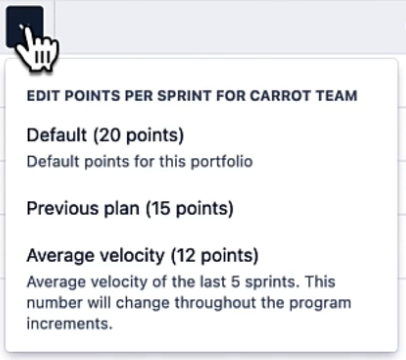
The Available Capacity column is calculated using the values in each row, and you can use the little down arrows in each cell to choose how you want to populate the value for that cell:

Available capacity column: Jira Align
  • Manual entry โ€“ just type in the value.
  • Default value โ€“ use the Solution or Portfolio’s default value, which can be set using the Defaults link above the Available Capacity column.
  • Previous value โ€“ use the corresponding value from the previous plan.

If you’re already using Jira Align, be sure to take advantage of the new capacity planning features we’ve covered here. If you’re considering Jira Align, Oxalis can help. We’ll assess the fit, design and prepare an implementation, then execute and support it. We’re an Atlassian Platinum Solutions Provider and offer premium consultation for Atlassian implementation services.

Contact Us

ย 

Compass Points to Productivity: Atlassian’s New Tool Empowers Developers

Atlassian,ย the powerhouse behind Jira and Confluence,ย has just unveiled its latest innovation to the world:ย Atlassian Compass.ย Originally previewed at Team ’22,ย Compass has emerged from its early access phase and is now ready to revolutionize how development teams navigate the intricate landscape of modern software architecture.ย If you’re managing complex,ย distributed systems and already rely on Jira Software,ย Compass could be the missing piece you’ve been searching for.

Why Compass? The Developer Experience Dilemma

Software developers are the lifeblood of tech companies.ย Their primary mission?ย Write brilliant code and ship it seamlessly.ย But the reality is often far less streamlined.ย Developers find themselves bogged down by tasks that,ย while important,ย distract from their core purpose.ย Security vulnerabilities,ย cloud configurations,ย automated testing โ€” it all adds up,ย chipping away at precious coding time.

And there’s more.ย Understanding the intricate web of dependencies,ย figuring out who owns which component,ย and even just finding the right documentation can turn into a time-consuming treasure hunt.ย This isn’t just frustrating; it’s a drag on productivity and innovation.

Atlassian compass

From its initial early-access launch, Compass has become the world’s most extensive developer portal.

Atlassian Compass: The All-Seeing Eye for Your Software Universe

Compass steps in as your developer experience platform,ย a centralized hub that brings clarity to the chaos.ย It consolidates a real-time view of your entire engineering landscape,ย offering a unified understanding of your software’s inner workings.

Compass’s Key Features at a Glance

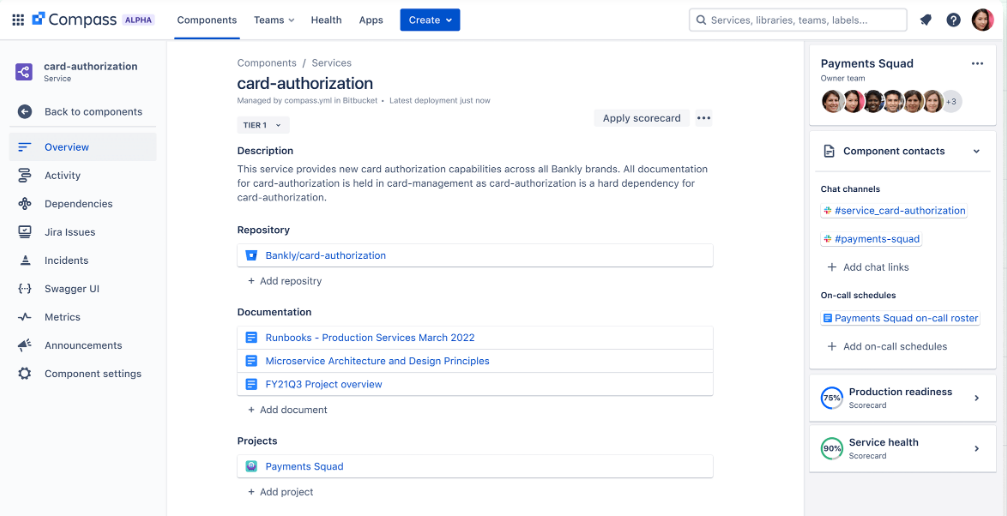
Catalog

A detailed dashboard for each component, showcasing its purpose, repository, documentation, and more.

Health

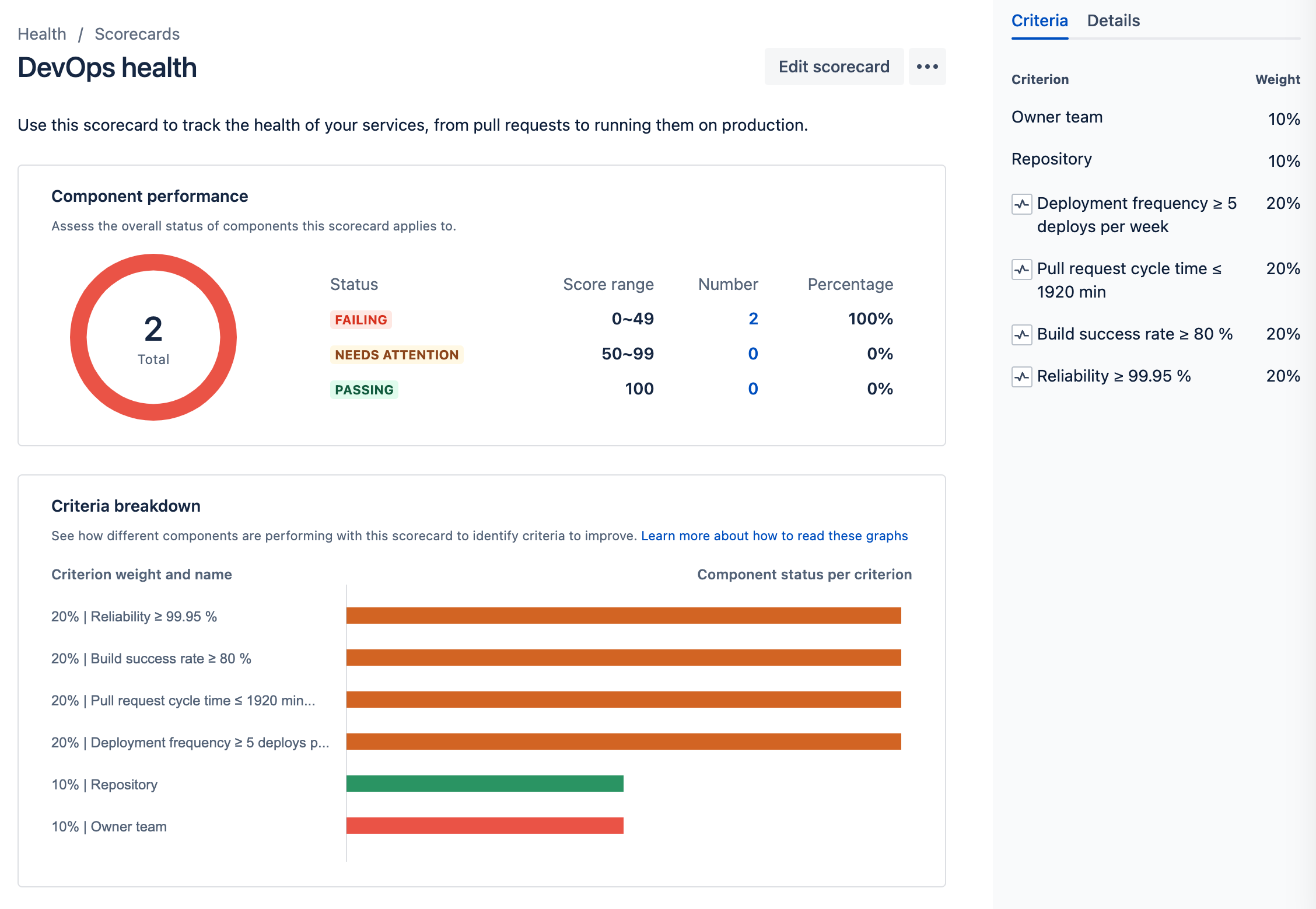
Team-specific dashboards with customizable health scorecards help identify and address potential issues proactively.

Extensibility

A growing marketplace of apps and an open API allow you to tailor Compass to your unique needs.

Compass in Action: Real-World Use Cases

  • Governance:ย Track reliability,ย security,ย and team performance across your entire service landscape.
  • Team Health Operations:ย Empower teams to maintain healthy,ย secure,ย and compliant components with ease.
  • Incident Management:ย Speed up triage and resolution by providing context about affected components and recent activities.
  • Software Templates:ย Streamline the creation of new services with pre-configured templates.
  • API & Dev Docs:ย Centralize repositories,ย documentation,ย and contact information for effortless collaboration.
  • Developer Onboarding:ย Get new developers up to speed quickly with a comprehensive overview of your software ecosystem.
Example health scorecard in Compass

Ready to Set Sail with Atlassian Compass?

Compass is more than just a tool; it’s a philosophy.ย It’s about empowering developers,ย fostering collaboration,ย and maximizing the value your engineering teams bring to the table.ย If you’re already leveraging Jira Software Cloud,ย the benefits of Compass are even more pronounced.ย And with Atlassian’s commitment to continuous improvement,ย the Compass journey is just beginning.

Ready to chart a new course for your software development? Contact our team of experts today! As Cloud-specialized, Atlassian Platinum Solution Partners, Oxalis is perfectly positioned to guarantee that clients receive the highest level of service and expertise. Software development is in our DNA, and we know from experience what successful distributed architecture needs.

Contact Oxalis today to embark on your Atlassian Compass journey.

ย 


Virtual Agent for JSM Is Now in General Release

Remember the AI integration for Jira Service Management (JSM) announced at Team ’23? It’s now a reality! The Virtual Agent for JSM is out of beta and available for everyone. This marks the first step in Atlassian’s broader vision for Atlassian Intelligence, their AI-powered initiative to enhance efficiency across their products.

Jira Service Management: Virtual Agent

What Can Virtual Agent Do?

Imagine a helpful assistant in your Slack support channels, interacting with customers around the clock. That’s Virtual Agent! It can:

  • Answer questions and gather information: It uses your knowledge base to provide instant answers to common queries.
  • Learn and improve: The more it interacts, the smarter it gets, tailoring its responses to your customers’ specific needs.
  • Seamlessly connect to human agents: If things get tricky, it smoothly hands off the conversation to your team,ensuring a seamless customer experience.

How Does It Make Your Life Easier?

Virtual Agent takes care of the repetitive stuff, freeing your team to focus on complex issues and strategic work. It’s like having an extra pair of hands, available 24/7 to handle routine customer interactions.

Who Can Use It?

It’s ready for Atlassian Cloud customers with Premium or Enterprise editions of JSM who use Slack as a support channel.Don’t worry if you use another platform โ€“ support for other tools is coming soon!

Powered by AI, Designed for You

Developed in partnership with OpenAI, Virtual Agent leverages cutting-edge AI to understand intent, sentiment, and context, personalizing each interaction. It even generates dynamic answers from your internal resources like knowledge bases, onboarding guides, and FAQs.

Security First

Your data’s safety is a priority. Atlassian’s partnership with OpenAI includes a strict zero-day retention policy, ensuring your information remains secure.

How Does It Work?

  • Define intents: Tell the agent what problems or questions it should address.
  • Create conversation flows: Map out how the agent should respond to different inquiries and scenarios.
  • Activate Atlassian Intelligence answers: Let AI search your knowledge base to handle questions that don’t fit predefined intents.

It’s a learning system that gets better with each interaction, thanks to its advanced natural language processing capabilities.

Why Should You Use It?

  • Maximize employee value: Let your team focus on meaningful work, not repetitive tasks.
  • Provide 24/7 support: Offer assistance even when your team is offline.
  • Enhance customer satisfaction: Deliver faster, more personalized service at scale.

Whether you’re supporting external customers or internal teams (like HR handling PTO requests), Virtual Agent can revolutionize how you deliver service.

Ready to Enhance Your Service Experience?

Contact our experts to learn how to get started with Virtual Agent for JSM today!

5 Jira Hacks for Effective Scaling: Simple Changes, Huge Results

Are you getting the most out of your Atlassian investment? Most organizations only scratch the surface of Jira’s vast potential, leaving valuable efficiencies and growth opportunities on the table. But it doesn’t have to be that way. In this post, we’ll share five proven Jira hacks that can revolutionize how your teams work, boost productivity, and lay the groundwork for effortless scaling. These aren’t just theoretical tips โ€” we’ve implemented these strategies ourselves at Oxalis and have seen firsthand the transformative impact they can have.

Agile Beyond Software: A Mindset for Adaptability and Growth

One of the most powerful tools in our arsenal is Agile methodology. While it originated in software development, Agile is fundamentally a way of thinking and working that can benefit any team. At Oxalis, we’ve embraced Agile across our entire organization โ€“ from marketing to project management โ€“ and the results have been remarkable.

Our team of Atlassian experts has helped countless clients across diverse industries implement and optimize their Jira suite, including Jira Software, Jira Work Management, Jira Service Desk, and more. We know the ins and outs of these tools and how to tailor them to your unique needs.

Let us guide you through five game-changing Jira hacks that will help you:

  • Automate tedious tasks
  • Streamline workflows
  • Empower your teams
  • Unlock hidden efficiencies
  • Achieve effortless scaling

It’s time to unleash the full potential of Jira and accelerate your path to success. Are you ready to transform the way you work?

Agile at scale Webinar on-demand

Watch On-Demand: Our Agile-at-Scale Webinar

Top 5 Jira Hacks for Scaling

Hack #1: Automate Data Exchange with External Systems

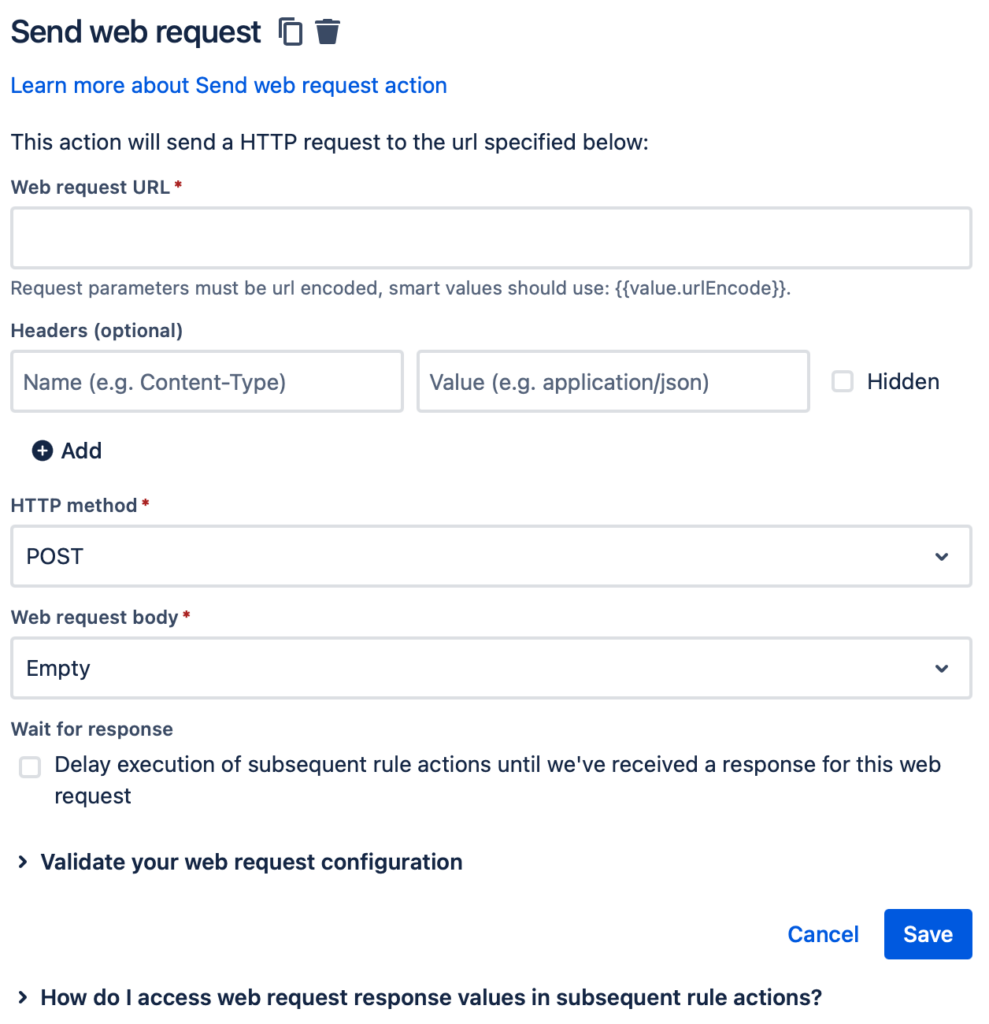
Jira’s Automation feature (available in both Cloud and Data Center) isn’t just about automating tasks within Jira โ€” it’s about connecting Jira to your entire technology ecosystem. While there are many ways to integrate with other systems, the “Send web request” and “Incoming webhook” actions open up a universe of possibilities.

Send a web request: Jira

Break Down Silos, Streamline Communication

Imagine this scenario: a critical bug is blocking the release of a major new product. With Jira Automation, the moment that bug is fixed, Jira Software can automatically send an update to your ERP system. This triggers a cascade of actions: Sales adjusts their forecasts, Procurement updates inventory plans, Production schedules the manufacturing run, and Distribution prepares for shipping. The result? No more delays caused by communication breakdowns, and no more wasted hours manually relaying information.

The screen in Jira Automations for adding an Incoming Webhook trigger.

How It Works

  • Send web request: This action lets you send data from Jira to any system with a web request interface. You simply specify the URL, headers, HTTP method, and data format. Jira can even store the response in “smart values” for later use.
  • Incoming webhook: This trigger lets you kick off an automation rule when Jira receives data from another system.For example, your ERP system could send a webhook to update a release date in Jira Software based on resource availability.

These actions can be combined in powerful ways. You can even use Jira as a bridge between two completely different systems!

Automation: The Key to Scalability

As your organization grows, manual processes become a bottleneck. Automating data exchange with Jira not only saves time and money, but it also creates a more scalable foundation for your business. When information flows seamlessly between systems, teams can focus on what they do best, instead of getting bogged down in communication overhead.

Issue links are Jira’s built-in way of showing how tasks relate to each other. Think of them as digital breadcrumbs that help you trace the connections between different pieces of work. While Jira provides standard link types like “blocks” or “causes,” you can supercharge your workflow by creating custom links tailored to your specific needs.

Use custom link types: Jira

Imagine a legal team using “amends/is amended by” to track contract revisions, or a procurement team using “has Purchase Order/is Purchase Order for” to link orders and invoices. These custom links not only add clarity to your Jira projects, but they also open the door to powerful automation.

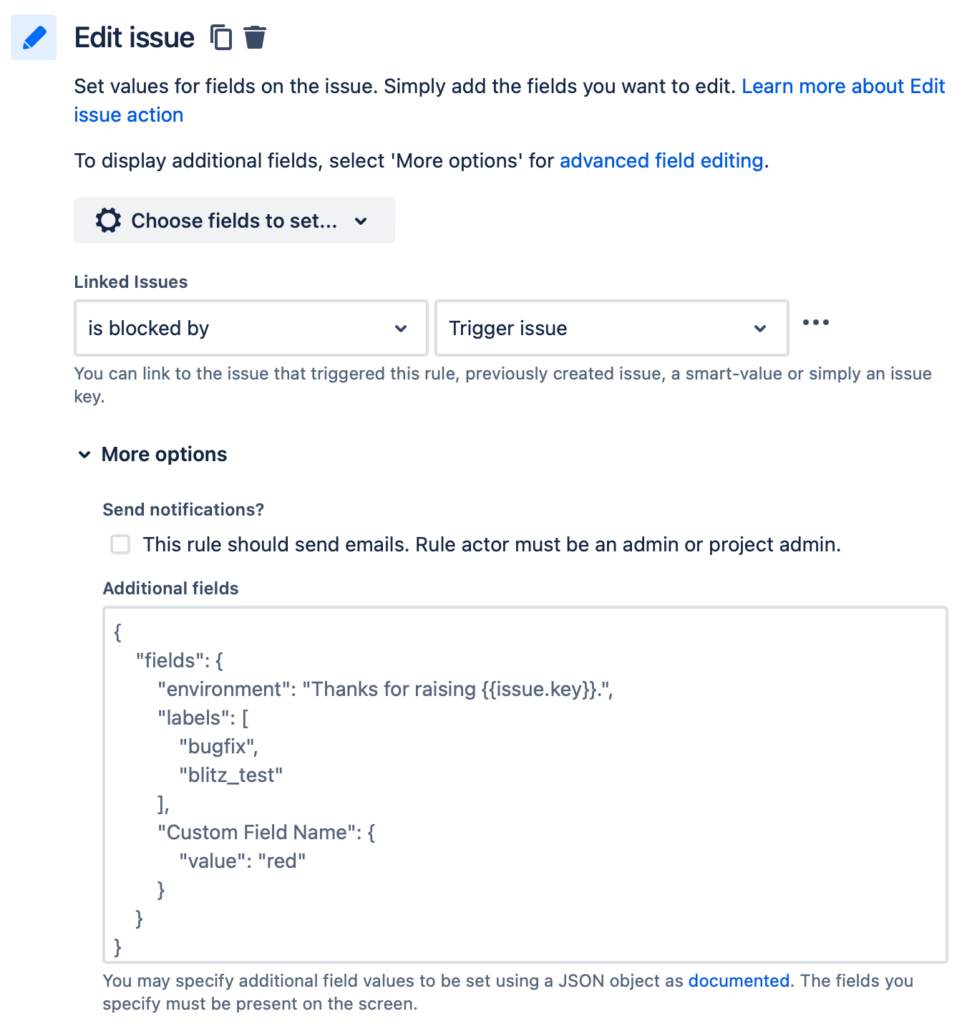
Use smart values to set the value with JSON: Jira

Automate Updates Across Linked Issues

Jira Automation allows you to update linked issues automatically based on changes in the original issue. This means you can keep everyone informed and synchronized without lifting a finger. For example, when a bug is fixed in Jira Software,a linked customer support ticket in Jira Service Management could be automatically updated with the resolution.

You have two main options for automating linked issue updates:

  • Jira Automation: This built-in feature is perfect for simple automations. However, project-level automations are limited to links within that project. For more flexibility, a Jira admin can create global automations.
  • Marketplace Apps (like Scriptrunner): These apps offer more advanced workflow customization options, allowing you to trigger updates based on linked issues. While they come with a cost, they often provide greater power and flexibility than standard Jira Automation.

Which Approach is Right for You?

The best choice depends on your specific needs and the complexity of your Jira environment. Oxalis can help you evaluate your options and determine the optimal solution for your organization. We have deep expertise in both Jira Automation and marketplace apps, and we can guide you toward the most efficient and scalable way to automate your linked issue updates.

Hack #3: Unleash the Power of JSM Portals for License-Free Collaboration

Jira Service Management (JSM) customer portals offer a hidden gem: the ability to empower users outside your organization to take action within Jira โ€” without the need for a license. This means stakeholders, approvers, or even team members who don’t typically work in Jira can participate in your workflows.

Imagine a scenario where an external stakeholder needs to approve a project request. With JSM, they can simply log into the portal, review the details, leave a comment, and click “Approve” โ€“ all without a Jira license. This streamlines approvals, reduces bottlenecks, and improves cross-functional collaboration.

Built-in Flexibility, Extended Possibilities

Out of the box, JSM allows portal users to trigger simple workflow transitions like “Cancel” or “Resubmit.” While this is great for many use cases, you can extend this functionality even further with Atlassian Marketplace apps like “Actions for Jira Service Management.” This app enables you to:

  • Present custom forms to collect additional information from portal users.
  • Allow portal users to edit issue details directly.
  • Create more complex, multi-step workflows for external users.

Benefits Beyond Licensing

Using JSM portals for licenseless users isn’t just about cost savings. It’s also about:

  • Simplified User Experience: Portal pages are designed for ease of use, reducing the learning curve for external users.
  • Increased Efficiency: By enabling self-service actions, you free up your team’s time for more complex tasks.
  • Improved Collaboration: Break down silos and foster communication between teams and external stakeholders.

Oxalis: Your JSM Portal Experts

Whether you’re looking to optimize your existing JSM portals or create new ones for specific use cases, Oxalis can help.We’ll guide you through the configuration process, recommend the right apps for your needs, and ensure your portals are user-friendly and effective.

Let us help you unlock the full potential of JSM and empower your stakeholders to contribute seamlessly to your Jira workflows.

Hack #4: Transform Every Team with Jira Service Management

Here’s a game-changing idea: what if every team in your organization could operate like a well-oiled service desk? Jira Service Management (JSM) makes it possible.

Think about it: most teams receive requests from others, whether it’s HR handling time-off requests, marketing fielding content creation requests, or legal reviewing contracts. JSM provides a structured, efficient way to manage this influx of work.

Your One-Stop Shop for Work Requests

With JSM, each team gets its own dedicated portal where requests can be submitted, tracked, and resolved. This eliminates the chaos of email chains, scattered spreadsheets, and missed deadlines.

The benefits are clear:

  • Streamlined Communication: All requests and their related conversations are centralized in one place.
  • Improved Visibility: Everyone can see the status of their requests and track progress in real-time.
  • Increased Efficiency: Teams can prioritize work, automate repetitive tasks, and measure their performance.

JSM’s flexibility is key โ€“ it comes with pre-built templates for common use cases and can be easily customized to fit any team’s unique needs. The more teams adopt JSM, the more standardized and efficient your work management becomes across the entire organization.

Knowledge is Power: The JSM Knowledge Base

But wait, there’s more! JSM integrates seamlessly with Confluence to create a knowledge base that supercharges your team’s effectiveness:

  • Empower Self-Service: Users can find answers to their own questions, reducing the load on your teams.
  • Guide Agents to Solutions: Relevant knowledge base articles are surfaced to agents as they work on requests.
  • Build a Repository of Expertise: Track past requests and resolutions, creating a valuable resource for future reference.

Unlocking Cross-Functional Efficiency

JSM is a catalyst for cross-functional collaboration. When teams work together within a standardized system, they can easily share information, identify dependencies, and resolve issues faster. This is a game-changer for organizations looking to break down silos and achieve true agility.

Oxalis: Your JSM Partner

Ready to unleash the full potential of JSM across your organization? Oxalis can help. Our experienced consultants will work with you to design, implement, and optimize JSM for each of your teams, ensuring a smooth transition and maximizing the value of your investment.

Don’t settle for outdated work management practices. Embrace the power of JSM and create a more collaborative, efficient, and scalable organization.

Jira Hack #5: Unlock the Full Potential of Jira’s Ecosystem

Jira isn’t just a collection of tools; it’s a vast ecosystem of possibilities waiting to be explored. We’ve already touched on how Jira Service Management (JSM) can revolutionize how teams manage work, but the benefits don’t stop there.

Think Beyond Traditional Uses

Don’t limit Jira to its perceived purpose. Jira Software, for example, can be a powerhouse for marketing teams, managing content calendars and campaigns with Agile precision. Even if a product doesn’t seem like an obvious fit at first, delve deeper โ€“ you might be surprised by what you discover.

Don’t Leave Features on the Table

Every nook and cranny of Jira holds potential for efficiency. Did you know JSM has a chat feature that can create issues on the fly? Or an embeddable widget that connects users to your portals from any website? Explore the Atlassian Marketplace for apps that add even more functionality. The more you utilize these features, the greater your return on investment.

Jira Work Management: A Project Powerhouse

Jira Software and JSM both come with Jira Work Management (JWM) built-in. This isn’t just a bonus; it’s a game-changer for project teams. JWM offers a powerful yet intuitive interface for managing tasks, resources, and timelines, including Gantt charts for visualizing project plans.

With JWM, you can:

  • Track Progress: Stay on top of deadlines and milestones with ease.
  • Identify Roadblocks: Spot potential issues before they derail your project.
  • Keep Everyone Informed: Ensure all stakeholders have a clear view of progress.

JWM is the perfect tool for teams that need project management capabilities without the full complexity of a service desk.

Beyond Jira: The Broader Atlassian Ecosystem

Jira is just the tip of the iceberg. Atlassian offers a vast suite of products designed to work seamlessly together, creating a comprehensive platform for collaboration and productivity. Explore tools like:

  • Jira Align: Connect strategic goals with tactical execution at the enterprise level.
  • Jira Product Discovery: Collaborate on product ideas and roadmaps.
  • Statuspage: Keep customers informed during incidents and outages.
  • Opsgenie: Streamline incident management and on-call scheduling.

By embracing the full Atlassian ecosystem, you can unlock even greater efficiencies, foster cross-functional collaboration, and drive innovation across your organization.

These 5 Jira hacks are your roadmap to unlocking the full potential of the Atlassian ecosystem, boosting team productivity, and achieving seamless scalability. But remember, this is just the beginning. Jira’s flexibility and extensive feature set offer countless opportunities for optimization and innovation.

Don’t let your Jira investment go underutilized. Partner with Oxalis, your trusted Atlassian experts, to uncover even more ways to streamline your workflows, empower your teams, and achieve your business goals.

Ready to transform your Jira experience? Contact Oxalis today for a free consultation and discover how we can help you harness the true power of Atlassian tools.

Why wait? Jira can transform your organization now.

Recommended blog posts

What’s the Difference Between JWM and JSM?

Jira Work Management (JWM) and Jira Service Management (JSM) have similar names that could be confusing. Maybe you just started using JSM and discovered that it comes with JWM; why would you need two products?  Maybe you’ve been using Jira for a while, and missed the fact that Atlassian renamed Jira Core to Jira Work Management โ€“ a name that better reflects the product’s goal of serving business teams โ€“ and added a number of features in the process.  In this article we’ll review what features make each product distinctive and what features they share.

In this article you will learn:
  • Key differences & similarities between JWM & JSM
  • In-depth look at each product’s most distinctive features
  • Which product is the right for your business?

Jira Service Management

Jira Service Management is one of Atlassian’s flagship products, so we won’t describe it in detail. While it offers a number of features targeted at ITSM teams, JSM is at heart a service-oriented version of Jira.  It gives your team an organized, centralized way of managing work that comes from outside the team โ€“ whether from other teams or from external customers.  As we’ve written about, this service model can benefit business teams as well as ITSM teams, since most business teams get work from other teams.

Jira Service Management distinctive features

Here are the major features that set JSM apart from other Jira products.

  • Customer portals – Easy external access for self-service and submitting requests
  • Request types – Customer-facing variations on an issue type that enable more granular customer support
  • SLAs โ€“ Monitor and manage the level of service quality teams are providing
  • External comments โ€“ Communicate with the customer while keeping internal discussions separate
  • Queues โ€“ Manage the team’s work and know exactly where every issue is in its process
  • Confluence knowledge bases – Provide customer self-service in portals and improve agent efficiency
Sample customer portal in JSM
Sample project queue in JSM

Jira Work Management

In summary, JSM offers a service-oriented approach to managing work. Jira Work Management shares many of the basic features of JSM, but is geared toward business teams and offers extra features for them. It’s less complex, and cheaper, and is a good fit for some teams.  While it’s built into JSM, you can also get JWM on its own.

Jira Work Management takes a project management-oriented approach to managing work, offering a variety of ways to add, update, and track the tasks, resources, and timeline in a project โ€“ including the popular Gantt-style view. JWM makes it easy to keep track of progress, identify potential roadblocks, and keep everyone informed and in sync.

Just choose a project on the left, and a view or other tool from the options across the top.

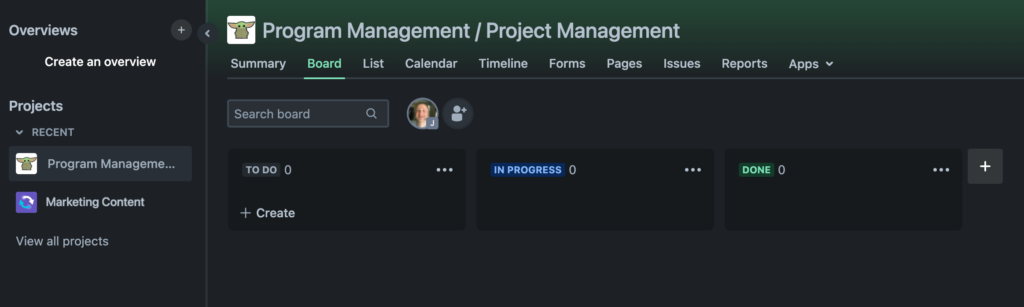
Jira work management board

Let’s take a look at what makes JWM distinctive, then review what the two products have in common.

Here are the major features that set JWM apart from other Jira products.

  • Project templates: for common types of business process, like document approval, recruitment, procurement, sales pipeline, email campaign, and much more.  Each comes with workflows and other components that are tailored for that business process.
  • Summary view: shows recent activity in the project, a variety of numerical overviews of the issues and their types, number of assignments by person, and more.
  • Board view: shows the status of ongoing items for day-to-day work in the team, for daily work status; just drag an item between columns to change its Status.
  • List view: shows an Excel-like list of items and all information given by a user when completing a form.
  • Calendar view: shows the start and end dates (if any) of items for long-term planning.
  • Timeline view: shows a Gantt chart of the roadmap and dependencies between all items in the project.
  • Forms: let you can create one or more shareable forms, for a particular project and Issue type, that make it easy for anyone to create new items to a project.
  • Pages: a place to connect the project with a Confluence space, to easily access and create project documents.

Similarities Between JWM and JSM

To illustrate how much Jira Work Management and Jira Service Management have in common, here’s a list of major features they share. For simplicity sake, we’re only looking at the Standard plans.

FeatureJWMJSM
250 GB Storage
Unlimited projects
Unlimited tasks
Business project templates2410
Custom fields
Customizable workflows
Apps and integrations
Single-project automationUnlimitedUnlimited
Global and multi-project automation500 executions/mo.Unlimited
JQL filters
Dashboards
Reports
Issue-level security
Audit logs

As is true with all flavors of Jira, these features mean that both products can be heavily customized and extended to work for your particular needs.

JWM vs. JSM: Which Is the Best Fit?

Now that we’ve reviewed the similarities and differences between Jira Work Management and Jira Service Management, here’s a summary of who each product is the best fit for.

JWM might be a better fit if…

  • Your team is using a modern project management tool for the first time.
  • Your teams work on smaller or less complex projects.
  • You just don’t think the service model makes sense for you right now.
  • Your admins have limited bandwidth that would make configuring and/or managing JSM a challenge.
  • You want the project-planning tools that JSM lacks.
  • JSM doesn’t make financial sense at the moment (but don’t underestimate the potential productivity gains from JSM’s service model!).

JSM might be a better fit if…

  • You’re ready to take team productivity to the next level with the service model.
  • You need external customers to be able to submit work easily, and you want to track that work with agents working queues.
  • You want to track service level agreements.
  • Having dedicated projects with special features to manage IT assets, incidents, problems, and changes appeals to you.
  • Your teams have the bandwidth to create knowledge bases that enable customer self-service and improve agent response times.

Oxalis Can Help

We can review your business teams and requirements, and recommend an approach that works for you. Unlock the potential of Jira Service Management with an Atlassian ITSM Partner. Boost efficiency and ensure the seamless operation of your IT services. Elevate your IT service experience with our expertise.

Recommended blog posts

Enterprise Service Management (ESM) โ€“ The Natural Extension of ITSM

In this blog post we’ll look at Enterprise Service Management (ESM) and its relationship to ITSM, as well as how IT processes apply to and can benefit business teams. We’ll review examples of how these teams are using tools and principles such as knowledge management, service request, change management, and more, to address challenges and apply solutions across ALL enterprise teams. We will discover how ESM, when implemented with Jira Service Management, captures invaluable data about the service your business teams are providing each other.

What is Enterprise Service Management? How Does it Compare to ITSM?

Enterprise Service Management (ESM) strategically expands the proven principles and practices of IT Service Management (ITSM) to encompass the entire organization. This approach optimizes service delivery across departments like HR, Finance, Legal, and beyond.

Key Differences Between ESM and ITSM

  • Scope:ย ITSM focuses specifically on managing IT services, while ESM encompasses the service needs of all business units.
  • Reach:ย ITSM typically serves internal IT customers, whereas ESM aims to improve service experiences for both internal and external stakeholders.

Core Components of ESM

As Forrester outlines, ESM typically involves these essential elements:

  1. Adapting ITSM Practices:ย Proven ITSM processes like incident management, change management, and knowledge management are tailored for use across various business functions.
  2. Unified Platform:ย A centralized platform, often based on existing ITSM tools, offers a single service portal and catalog for all teams within the organization.
  3. Low-Code Automation:ย Low-code solutions streamline workflows and accelerate service delivery innovation, breaking down service barriers and empowering teams.

Beyond Bug Tracking: Understanding Jira’s Evolution and the Rise of ESM

Jira has come a long way from its humble beginnings as a bug-tracking tool. Atlassian wisely recognized its potential and expanded Jira’s capabilities to serve a whole range of teams.

The Power of Adaptability

In 2013, Atlassian saw a fascinating trend: 40% of users were already bending Jira to manage service requests! In response, Jira Service Desk was born, later evolving into Jira Service Management (JSM) in 2020 to fully embrace ITSM principles.

Read more about the origin of the name Jira.

But the story doesn’t end there. Organizations boldly (and successfully!) used Jira even beyond its original design. This showed that the service desk concept isn’t just for IT โ€“ it benefits HR, legal, facilities, literally any team that deals with requests. This realization paved the way for Enterprise Service Management. Atlassian itself uses a whopping 130 internal service desks โ€“ proof of ESM’s power!

The Core Idea

It’s simple: every team gets requests and needs to fulfill them. HR handles time-off, facilities tackles maintenance issues โ€“ the service desk model streamlines this process for everyone. ESM makes this ‘unofficial’ use case official, allowing JSM’s strengths to benefit the entire organization.

Enterprise Service Management (ESM) empowers your entire organization by creating a seamless and predictable help experience. Each team benefits from a standardized help portal where users can find self-service knowledge articles and easily submit and track service requests. This consistent approach boosts efficiency by eliminating confusion and streamlining workflows across all departments.

How do ITSM processes apply to non-IT teams?

Let’s go over some examples of the practices that Enterprise Service Management with Atlassian includes.

Knowledge Management

The Challenge

Most organizations can benefit from improving how they organize and manage their documents and information. A survey of 2,000 hybrid and remote office workers found that the average respondent needs to search for documents or other information seven times each day. In addition, respondents spent 13 minutes searching on their own before asking for help. Do the math: 13 minutes of searching, seven times a day, five days a week… that’s 455 minutes, about 7.6 hours. Almost a full workday every week lost to searching for information they need to do their job โ€“ per person.

Every team manages โ€“ย whether intentionally organized or not โ€“ย a body of institutional knowledge that people they serve will need to know at some point.ย  But how many teams, aside from IT, have systems and procedures in place to ensure that stakeholders get the right information, in the proper format, at the right level, and at the correct time, according to their access level and other relevant policies?ย 

The Solution

The practice of knowledge management is built around the knowledge base, a self-serve online library of information about a product, service, department, or topic, all easily accessible by a robust search engine.ย  By putting the organization’s information in one organized, access-controlled place like Confluence, where employees can search for what they need, you can go a long way toward minimizing time wasted.

And it does double duty, because it benefits both team members and those they serve; the latter use the knowledge base through the service portal.

Service Request Management

The Challenge

Every team’s work can be usefully described in terms of the services they provide to those outside the team.Users typically access those services haphazardly, whether it’s in Slack asking for payroll information, or by email reporting an urgent maintenance need, or as a walk-in wondering how to replace a security access card.ย  When teams must then track their work in multiple places, inevitably errors, oversights, and delays will creep in.

The Solution

Service Request Management is what ITSM is perhaps best known for.It begins with the concept of the Service Catalog: an organized, managed collection of repeatable, defined services within a group, including such information as description, ownership, dependencies, and escalation.

When employees start to submit a request in a service portal, recommended articles from the knowledge base appear with helpful information through a tool like Jira Service Management, getting employees the answers they need quickly while deflecting requests from busy teams. Requests submitted are all organized in one central place, saving time, hassle, and mistakes.

The growing body of fulfilled requests also becomes a time-saving resource for teams, by looking up the resolution of previous similar requests.

Change Management

The Challenge

The services that business teams provide usually follow defined procedures, and once employees understand those procedures, altering them can cause confusion, frustration, and wasted time if not implemented properly. Do all the stakeholders get a chance to provide feedback during planning? Are all potential users notified of the change and its timeline?

While business teams may not have the sort of mission-critical infrastructure โ€“ requiring 99.9% or 99.99% uptime โ€“ that IT teams support, they do provide important services that can be time-sensitive.ย  For instance, prompt coordination between HR and IR is vital for a behind-schedule project that needs an emergency contractor up and running ASAP.

Furthermore, every team’s ability to adapt its processes smoothly to new business needs matters to a growing organization.

The Solution

Modifications to the procedures business teams follow should be made thoughtfully, and in a controlled fashion that allows for review by stakeholders and ensures adequate communication.ย  Change Management practices enable this by breaking down silos, providing context and transparency, avoiding bottlenecks, and minimizing risk. They can also help meet regulatory standards.

Change Management with JSM helps accomplish change in the following ways:ย 

  • Establishing a framework to manage the change processย 
  • Prioritizing necessary changes to properly allocate resourcesย 
  • Incorporating relevant information for smarter decision makingย 
  • Involving necessary stakeholders from dev and IT for approvalsย 
  • Incorporating testing of changes, to avoid incidents
  • Streamlining and improving the flow of changes to deliver value more quickly

Problem Management

The Challenge

As with change management, when problems occur in the defined procedures that enable theservices business teams provide, confusion, frustration, and wasted time can result โ€“ย like when an employee loses an afternoon dealing with a Payroll mistake.

And no team wants that to happen. It’s easy to ask “what caused that incident?” But uncovering the surface, immediate cause isn’t good enough when you aim to provide quality customer service. You need to dig into the underlying causes, the factors and conditions that led up to the incident. Why? A service-disrupting incident is an opportunity for improvement, because it reveals an inefficiency or a bottleneck or a miscommunication that can be identified and fixed IF you take the time to find out what’s really going on. The team’s service will improve.

The Solution

Problem management enables business teams to continually investigate, learn from incidents, and improve their procedures. It uses the same service portal as Service Request Management, so employees have a centralized, seamless service experience, and team members who work the problem reports benefit from all the features of JSM.

The smoother a team’s procedures work, the more time the team and the people it serves have to do the work the organization needs them to do. Effective problem management also builds inter-team cohesion across the organization by minimizing points of friction โ€“ when employees are always complaining about, say, how hard it is to get what they need from HR, the whole organization suffers.

Problem Management relies on basic steps like these:

  1. Proactive problem detectionย 
  2. Track and assess known problems
  3. Investigation and diagnosis
  4. Create a known error record
  5. Create a workaround, if necessary
  6. Resolve and close the problem

Workflow Automation

The Challenge

Every team faces repetitive, mundane tasks that waste employee time.ย  How many people do you really want to pay to track down a signature for a piece of paper? How much time should employees spend trying to figure out who to escalate a request to, or who has to approve?

You want every employee to devote as much time as possible to the work the organization needs them for.

The Solution:

Automation uses digital workflows to route requests properly, gather the information needed to work the request, apply SLAs, obtain approvals, escalate, notify, and much more.

In Jira Service Management, Automation is a per-project feature for building simple if-then workflows called โ€œrulesโ€ that fire off whenever the defined trigger event occurs. You can configure your own by choosing what event(s) trigger the rule (like โ€œRule is run when an issue is createdโ€), what additional conditions have to be true (like โ€œRequest Type equals Promotionโ€), then what happens โ€“ or you can use built-in templates like โ€œResolve issues due to inactivityโ€ or โ€œWhen an incident is created, create a post-mortem page in Confluence.โ€

Because JSM’s Automations are just a list of rules that can easily be individually configured and enabled/disabled, theyโ€™re fairly easy to work with. All Jira versions also come with customizable workflows that, while they require admin setup, provide a much more powerful form of automation that works across any projects you want.

Continuous Improvement with JSM

Each of the above Enterprise Service Management practices, when implemented with Jira Service Management, captures invaluable data about the service your business teams are providing each other. The combination of Jira’s native search/filter capability, its builtin reporting, and powerful reporting plugins available in Atlassian Marketplace, you can harness that data to analyze and understand, for instance:

  • What employees are actually requesting from different teams, which can provide insight into the reality of employee work experience and help identify pain points to resolve.
  • Where interdepartmental bottlenecks are occurring, so you can improve service efficiency.
  • Where bottlenecks are occurring within teams, such as with approvals, which also enables improving service efficiency.
  • What the best practices are for your organization to manage process changes, both within and between teams.

Think of this as continually tuning up the performance of the engine that is your organization. To build a car that wins the Indy 500, you have to measure performance, analyze it, and make adjustments, then repeat the process โ€“ย constantly.

“The pace of business today demands that teams move at higher velocity. Technology is moving fast, from super quantum computing to artificial intelligence to self-driving cars. Enterprises across every industry – from traditional banks to pizza delivery – are undergoing massive digital transformation.”


Resource: The Atlassian Approach to ESM Whitepaper.

Oxalis has practiced Enterprise Service Management since our inception, using Jira and Confluence for all our teams โ€“ย most recently including Marketing. Stop struggling to share information and visualize work across departments. Seamlessly connect ALL teams. Get the conversation started with Oxalis and get started with ESM today.

Contact Us

Elevate your entire IT service ecosystem with Oxalis. From strategy to implementation and ongoing optimization, we’re your end-to-end Atlassian ITSM partner.

ย 

Understanding Microsoft Cloud Compliance

Confused about Commercial vs. Government vs. GCC vs. GCC High Terminology?

Microsoft cloud compliance offerings for 365 and Azure can be confusing if you need to comply with data protection requirements.

  • Why are there two 365 Government levels?
  • Why does 365 Government (GCC) use Azure Commercial?

We’re here to break down Microsoft cloud compliance offerings for Microsoft 365 and Azure, clarify the important distinctions, and explain how each offering affects the compliance types most important to our customers.

Let’s get some terminology and acronyms out of the way first.

Microsoft Cloud Compliance Terminology

Being clear on these acronyms and terms will help for the following discussion.

Officially means Non-Federal Information Systems, which includes more than commercial organizations.

GCC – means Government Community Cloud.

CONUS – stands for Continental United States.

OCONUS – stands for Outside the Continental United States.

Data Enclave, in this context, refers to a segregated environment, with servers residing in regional Azure data centers.

Data residency means the hosted data is stored entirely on servers in the U.S.

Data sovereignty builds on data residency by specifying that the data will be handled and supported only by US persons, and accessed via a US-only network and directory.

  • Sovereignty includes controls for restricting sensitive data access to only screened US persons with data processing.
  • It also specifies technical support provided 24×7 by screened US Persons in a US Location, but note that this only applies to the customer service personnel you contact to open and update support tickets. A support engineer you escalate to may be anywhere in the world, and it’s up to you to watch what you share. You can request that your support ticket be restricted to screened US Persons in a US Location only, but be aware that the response time and mitigation level may suffer.

Overview of Microsoft Cloud Compliance offerings

Microsoft cloud compliance offerings

This table packs in a lot of distinctions; let’s unpack them.

Microsoft Cloud: Microsoft 365 vs. Azure

  • Microsoft 365 is a family of software products and online services, with three levels: “Commercial,” GCC, and GCC High. Despite the names, GCC and GCC High are fundamentally different since they use different Azure offerings.
  • Azure is a cloud computing platform, like AWS, with two levels: “Commercial,” and Government.  GCC is only a 365 offering, and has nothing to do with Azure.

Each 365 level pairs with an Azure level, but not in a 1:1 way, since 365 “Commercial” and GCC both pair with Azure Commercial.

Microsoft Cloud: MS 365 Commercial vs. MS 365 Government (GCC)

  • Commercial is open to all customers. All datacenters, customer support, and network/directory are global. It meets the fewest compliance requirements.
  • Government (GCC) is restricted to certain customers. All datacenters are in CONUS, and more compliance requirements are met.  It does NOT include any specifications about where customer support personnel are located, or the network and directory used.

Microsoft Cloud: GCC vs. GCC High

As noted, the language is a bit confusing: GCC and GCC High are not variants of each other. The only element they share is compliance with a few low-level requirements.

GCC

MS 365 Government (GCC) is a CONUS data enclave of Microsoft 365 Commercial, so it inherits all shared services from Commercial. These shared services may have data processing OCONUS, and they leverage a global follow-the-sun support model. Most notably, this includes a global network and a global directory. For example, Azure Active Directory (AAD) in Commercial is shared with GCC. AAD is supported globally and may have data processing occur OCONUS along with service management by global support personnel. For the primary Office 365 workloads (as opposed to Azure services), GCC has a commitment to ensure data residency and data processing is in CONUS. In addition, only screened US Persons in datacenters are authorized for restricted customer data. However, Microsoft 365 Government (GCC) customer support is provided under the same terms and conditions offered to Microsoft 365 Commercial, without assurances for agent physical location or citizenship โ€“ so you have to ensure that your own internal data sharing controls, policies, and procedures are followed when engaging with Microsoft customer support. Will GCC meet your needs? Since there are many CUI categories, we can only offer guidelines here. Several categories may not require data sovereignty, such as Privacy, Legal, etc. GCC does not support export-controlled data, such as ITAR and EAR natively. If youโ€™re absolutely clear on which CUI categories you deal with, and what level of compliance they require, GCC may work for you. If youโ€™re not sure, or if the categories or compliance level change over time, or if you donโ€™t want to have to worry whether youโ€™ve got it right, then GCC High is for you.

GCC High

Like GCC, all datacenters are all in CONUS and only certain customers are eligible. Unlike GCC, the network is sovereign and constrained to CONUS. The GCC High directory services with AAD are provided by Azure Government and are sovereign to the US. It meets all listed compliance requirements. Customer support is provided 24ร—7 by screened US Persons in a US Location, but MS customer support relies on support engineers in other countries for their expertise in certain topics. If you require your support ticket be restricted to โ€œscreened US Persons in a US Locationโ€ only, be aware that the response time and mitigation level may suffer. As a result of the above, GCC High is suitable for any level of compliance you need.

Microsoft Cloud: Azure Commercial vs. Azure Government

For clarity, Microsoft’s own official distinction is between Azure and Azure Government, but we use “Azure Commercial” to minimize confusion.

  • Azure Commercial is supported with a global follow-the-sun support model, with a global network and a global directory.
  • Azure Government contains every aspect of the data and its handling to CONUS.  The network is sovereign and constrained to CONUS.  Directory services with Azure AD are provided by Azure Government and are sovereign to the US, to holistically safeguard all categories of CUI.

Note that because all services must meet all the applicable compliance requirements, adding them to Azure Government often takes longer or may come with limitations, so be sure to check Microsoft’s documentation for the latest service offerings.


Compliance: CMMC 2.0 Level 1 vs. Levels 2-3

The goal of the Cybersecurity Maturity Model Certification (CMMC, which we’ve blogged about before) is to increase the trust in measures of compliance to a variety of NIST standards.

Level 1

This level applies to FCI โ€“ information that is not intended for public release, but does not require safeguarding like CUI does. It relies on self-assessment. GCC provides compliance with CMMC 2.0 Level 1 for protection of FCI, but not for absolute protection of CUI. Level 1 may may meet your need if you have CUI that does not require explicit commitments to protect CUI Specified and ITAR export-controlled data. Or if you add additional compensating controls, such as FIPS 140-2 validated end-to-end encryption to protect ITAR export-controlled data. If youโ€™re absolutely clear on which CUI categories you deal with, and what level of compliance they require, GCC may work for you. If youโ€™re not sure, or if the categories or compliance level change, or if you donโ€™t want to have to worry whether youโ€™ve got it right, GCC High is for you.

Levels 2-3

These levels aim to safeguard CUI/CDI, which is a safeguarding system for unclassified information (CDI is the DoD’s almost interchangeable term for CUI). Although this type of information is not considered โ€œclassified,โ€ it is still sensitive, important, and requires protection. They involve many more practices and objectives that protect your information. Level 2 requires a mix of third-party assessments and self-assessments, while Level 3 requires government-led assessments. You may demonstrate compliance with all maturity levels of CMMC with Azure Government, so as with GCC, if youโ€™re not sure whether Level 1 meets your needs, or if your the categories of your CUI change, or if you donโ€™t want to have to worry whether youโ€™ve got it right, Levels 2-3 are for you.

Compliance: ITAR/EAR

ITAR and EAR regulate export controls of certain items, and compliance with both necessitates screened US Persons and data residency/sovereignty in CONUS.

  • ITAR (International Traffic in Arms Regulations) regulates the export of items, both physical objects and technical data, that are built for defense and military use. It dictates that information and material pertaining to these technologies may only be shared with US Persons (where “person” does not mean “citizen”, but includes some permanent resident non-citizens, legal entities incorporated in the US, and federal government bureaus, departments, offices, etc.) unless authorization from the Department of State is received to export the material or information to a foreign person.

The Department of State interprets and enforces ITAR.

  • EAR (Export Administration Regulations) regulates the export of items, both physical objects and technical data, that may have defense/military use in addition to commercial use. This necessarily means that EAR covers a much wider range of items than ITAR โ€“ for example, radar systems have broad use in commercial enterprises, but because they can also be a component in missiles, their export is regulated by EAR.

EAR contains a list of 10 General Prohibitions that restrict export-related activity for the regulated items, and require that you receive either a license or a license exception from the Bureau of Industry and Security, an agency in the Commerce Department.

The Commerce Department interprets and enforces EAR.

Using ITAR-compliant and EAR-compliant systems ensures that foreign persons won’t accidentally gain access to your data without the federal government’s authorization โ€“ as can happen, for instance, if a data center or customer service center is OCONUS.


There’s More to Microsoft Cloud Compliance

As we said at the beginning, this article focuses on the compliance types most important to our customers, but there are plenty more, including DFARS, FedRAMP, StateRAMP, SRG, and NIST SP-800.

You can find more in-depth information at this article, Understanding Compliance Between Commercial, Government and DoD Offerings – written by Richard Wakeman, Published Mar 17 2022, Source: Techcommunity.microsoft.com.

We can help you sort through which Microsoft cloud offerings best meet your compliance needs.


Oxalis Is Here to Help

As experts in Microsoft cloud compliance, we provide consultancy services to better enable businesses to be more productive while maximizing the ROI of their tools. Get in touch with an Oxalis expert and get secure today.

Best Practices for Atlassian Cloud Security: Introducing Beacon

Concerned About Securing Your Atlassian Cloud?

Atlassian prides itself on putting security first, even ahead of feature development in its products. When security incidents do occur, they prioritize transparency and fixing the issue.

Reading about security incidents concerning products we use can understandably leave us wondering what to worry about and what not to. In this complicated security and compliance landscape, CIOs, CISOs. and security-minded personnel should know what the best practices are, and why.

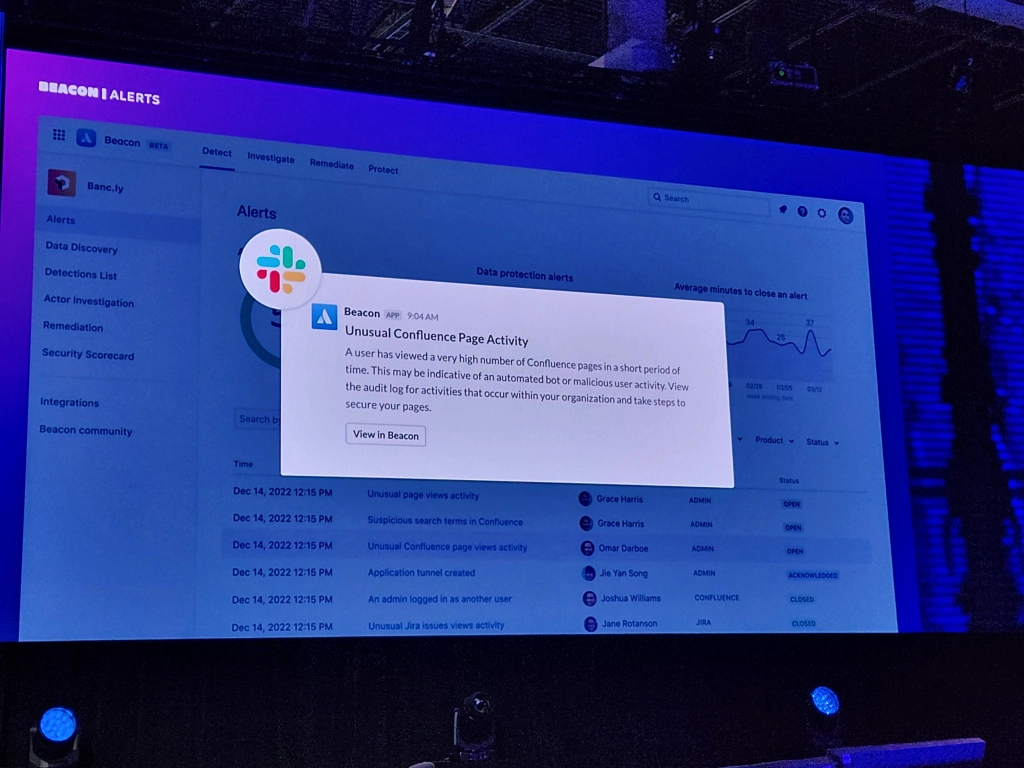
In this blog post, we will provide you with five best practices for effectively managing internal security threats within your business. Additionally, we are excited to introduce Beacon, the latest security tool by Atlassian. Discover how Beacon’s advanced features, including real-time updates and dependable visibility, can bring assurance to teams as they monitor and detect security risks.

Internal Security Management

It’s vital to be clear on what you can and cannot control, and to focus on what you can.ย  You can’t control whether a third party vendor has a breach, but you can, for instance, control what access their employees have to your system, and you can monitor your systems for unusual activity.ย  You can’t control whether an exploitable defect is discovered in an Atlassian product โ€“ย but you can, for instance, ensure every employee has no more access or permissions than they need, to minimize the damage if a user account is compromised, and you can monitor your systems for unusual activity.

If you’re using Atlassian Cloud products, the good news is that you’re already benefitting from the latest security improvements. But it is extremely difficult โ€“ and arguably impossible, given the complexity of software and tech interdependence โ€“ to achieve a perfectly secure environment all the time. So let’s look at the big picture to identify what you can do.


Top 5 Best Practices

#1 Create a Culture of Security

Security doesn’t just magically happen, and a breach only takes one weak point.ย  Conduct security trainings, especially for admins, and get feedback on those trainings so you can improve them.ย  Reward employees for finding weaknesses and pointing out potential vulnerabilities.ย  Ensure employees feel engaged and cared for, since disaffected employees are less likely to care about security. ย 

You want employees to be so motivated that they are willing to, for instance:ย 

  • Use strong, unique passwords every time, even though it’s more work.
  • Keep login information, API keys, etc., carefully controlled even for dev and test systems, even though that’s inconvenient.
  • Pay attention every time to what’s on those printouts they recycle, even when they’re in a hurry.

#2 Follow all Best Practices for General Security

You need to control who can access what, and how.ย 

Keep your security solutions and network systems up to date, by patching promptly, enforcing strong passwords, using MFA + SSO, employing least-privilege protocols and zero-trust policy, encryption mechanisms for sensitive data both in transit and at rest, etc.ย  Don’t forget the big picture too:

  • Make funding for security a top priority, because even the best policies, procedures, and methods will fail you if they’re not fully implemented due to budget constraints. Accept that this priority must be ongoing, since risk assessment and management must be continuous and adaptive or you’ll inevitably fall behind.
  • Put asset inventory programs in place for hardware and user software, and employ a central repository of all external components used by your products and tools so you can monitor and control any potential security risks they may introduce. You can’t effectively protect against vulnerabilities you don’t know exist.
  • Wherever possible, centralize security policies, methods, practices, etc. The more fragmented your security landscape is, the more likely something will slip โ€“ and you might not even know it. You need company-wide visibility, security policies, and control across your infrastructure (Atlassian Access provides this).

All these general best practices apply as much to Atlassian Cloud as any tech environment. Read more about what Atlassian recommends for securing your Atlassian Cloud platform, including setting up MFA, using Atlassian Access to enforce MFA and to set up SAML SS.

#3 Do the Same for Data Exchange

It’s easy to get caught up in thinking of your organization and its network as a closed system that you can defend like a castle. But in this interdependent, interactive tech world, data has to go back and forth constantly between you and other systems.

So make sure you apply all those same security principles and approaches to inter-system communication, especially where data is exchanged with third parties, such as add-ons, plugins, integrations, vendors, et al. Each of those represents a potential hole in your defenses.ย  The goal has to be to make it as hard for an intruder to breach your security through a third party as it would to do so directly.

And because data exchange involves another party, you need to build a good working relationship with that party, to work together to secure both sides of the exchange. Security, in this case, is a group affair.

In the case of Atlassian Marketplace apps, always study the app’s Privacy and Security tab.

Here the vendor explains the policies and procedures they have in place for data storage and management, security and compliance, and privacy, as well as listing any relevant security-related certifications.

#4 Define Where Data Belongs

Establish a clear policy on what data should and shouldn’t go into a particular system, based on what can be used to penetrate your security.ย  We’re not talking about CUI and other generally sensitive data.

This is:

  • Personal user data, which could provide clues to guess passwords or answer security questions
  • User credentials, which obviously gives an intruder front-door access
  • API keys, which can be used to make unauthorized requests, which can in turn be used to gather data that enables further breaches, and so on
  • Digital certificates, since they’re central to establishing identity

and other data that could be used to breach, to gain further access once inside, to corrupt or alter data, etc. All this must be store in secured locations, for production systems AND for dev/test systems; the latter can easily become vulnerabilities because it’s easy to think an intruder can’t do any real damage from there.

Use custom security schemes (like Issue Security in Jira, or group permissions and page-level restrictions in Confluence) to lock down access to sensitive data to only those who truly need it. Store as much authentication information as possible in central locations, to minimize the number of places you have to protect. For instance, if Confluence has pages for different dev/test systems, keep all login information for them in one page rather than storing it in each system’s page.

#5 What if Someone Gets in?

All the above practices help keep intruders out, and minimize what they can do if they get in.ย  But you can’t stop there.ย  Vigilance is required to identify when an intruder has gained access โ€“ an intruder who remains undetected has more time to penetrate further and do more damage.

The steps an intruder takes to achieve their goal, whether it’s ransom, sabotage, hijacking, espionage, or so on, leave traces behind. And those traces can be identified. Atlassian system admins should be monitoring for a variety of activities which, individually, an employee might do for legitimate reasons, but in a series of actions can form a suspicious pattern that’s worth investigating.

  • Marketplace and ecosystem app installs: You need know which Atlassian Marketplace apps have access to your system, and what they allow users to do with your data. If the same user who added an Organization admin used it for suspicious searches and mass exports, and then they install an app that adds options for exporting data, that’s worth looking into.
  • Product configuration events: Stay on top of changes to your Atlassian product configurations, so you know when security settings are weakened.
  • Data exfiltration: mass exports, exports of the System audit log in Jira or in Confluence, or of the App audit log. Exported data can be transmitted or transported outside your systems, giving intruders much more time to do damage with it.
  • Suspicious searches and excessive crawling: An intruder who’s looking for information they can use to expand their access, or who’s looking for data to export, would show up here.
  • Admin activity: logging in as another user, a user resetting their own password, adding/removing an Org admin, creating or modifying an API key, modifying IP allowlists, etc. These can be signs of an intruder who’s trying to gain more access, or reach certain information, or set up or exploit a vulnerability.

Beacon Can Help

All the monitoring described in #5 can be time-consuming โ€“ and therefore expensive, especially for a large organization.ย  Fortunately, Atlassian is stepping up to help security teams monitor for and identify security risks.

Real-time and Reliable Visibility

Beacon โ€“ currently in public beta โ€“ builds on an internal anomaly detection program Atlassian developed for their own security teams; it won a 2022 ARN Innovation Awards in the Vendor Innovation category.ย  They describe it as “an intelligent threat detection engine, built for Atlassian cloud products.”ย  Beacon provides a system of intelligence over your entire Atlassian Cloud suite, ingesting user activity and alerting you to review events that might post a risk.

Photo Credit. The Jira Guy – thejiraguy.com

How does it work?

Beacon continuously monitors your Atlassian Cloud products for five different kinds of events:

  • Authorization and access events: Safeguard your data against unauthorized access with alerts for unusual logins, policy changes, password resets, and API key changes.
    • Account access: An admin has logged in as another user, Org admin removed/added
    • Policy change: An IP allowlist has been created, modified, or deleted; A 2FA/MFA/2SV policy for a user or org changed, authentication policy created/updated/removed, Verified domain added/removed
    • Password change: An organization admin has reset their password
    • API key changes: An admin API key was created
  • Data exfiltration events: Secure the flow of information throughout your business with alerts for mass exports, audit log exports, and external syncing risks.
  • Unusual user activity: Spot high-risk user behavior at scale with alerts for suspicious searches and excessive crawling on Confluence and Jira.
  • Product configuration events: Surface insecure configurations that can impact your companyโ€™s hosted data, whether theyโ€™re created by accident or by malicious actors.
  • Integration change events: Always know which apps have access to your systems with alerts for marketplace and ecosystem app installs.

When Beacon identifies an unusual event, it alerts you with details like user location, previously triggered alerts, and recent user activity.ย  Atlassian also provides an ever-growing Detection Library, a catalog of detections to familiarize yourself with each alert you may receive. Some detections have instructions on testing or checking settings within the Admin hub.

Beacon also integrates with Teams, Slack, and SIEM so your teams can receive alerts where it’s most useful to them.

You can learn more about Beacon, and request to join the beta testing phase, on Atlassian’s Beacon product page.

With Beacon, you have visibility where it counts, and can act before suspicious activity becomes an incident.

Oxalis Is Here to Help

We provide Atlassian consultancy services to better enable businesses to be more productive while also enabling efficiency. As an Atlassian Platinum Partner, whatever your need, the team at Oxalis can help you scale, develop, and grow.ย 

ย