Streamlining Portfolio Reporting at a National Health Care Company

The Challenge

Streamlining Portfolio Reporting, a national healthcare organization was struggling to define, prioritize, and manage execution of their Infrastructure and Operation initiatives in a consistent manner. Countless hours were spent by teams creating and recreating status reports in various formats (Jira, Excel, Smartsheets) in an effort to keep leadership informed. Grassroots movements started and failed to transition the process to Jira, so Oxalis was brought in to help set up a structure for success.

Streamlining Portfolio Reporting -healthcare industry

Our Approach

Knowing that the crux of the problem was providing leadership-level visibility while enabling team autonomy, the Oxalis team immediately went to work analyzing the needs of both management and individual contributors.

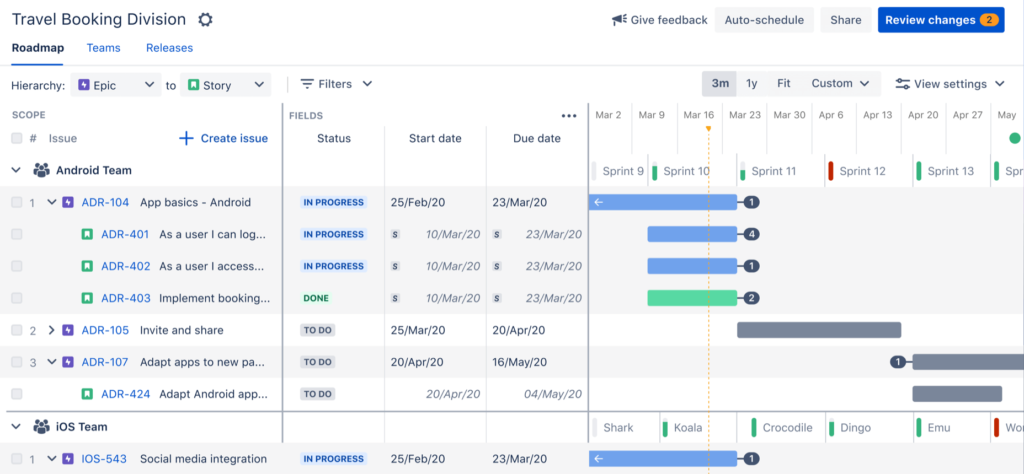
Using Advanced Roadmaps for Jira, to streamline portfolio reporting, the Oxalis team helped put a structure in place so that individual delivery team epics could be rolled up to organization-wide Initiatives. Permission and data schemas were configured to ensure appropriate levels of segmentation, and to provide coverage for current reporting needs. Automation and subscription-based reports were used as controls to help promote data integrity, and training was developed for key personnel to establish and sustain usage of the tool.

Services we provided

  • Oxalis Integrated Services
  • Atlassian Licensing

[bodymovin anim_id=”1235″ loop=”true” autoplay_viewport=”true” align=”center”]

The Outcome

Over the course of three months, the configuration and process for managing initiatives in Jira was fully rolled out to streamline portfolio reporting.

Leadership is currently benefiting from a single view into the status of all key initiatives, which are updated in real-time based on the work completed by the delivery teams. Delivery teams can easily see how their work ties back to strategy while working in a way that suits them best to streamline portfolio reporting. Substantial savings from reporting overhead are anticipated over the coming years.

[bodymovin anim_id=”1236″ loop=”true” autoplay_viewport=”true” align=”center”]

Get more information

Feel free to send us a message in the form below

Mineral Migration to AWS Case Study

The Challenge

Mineral needed to get their primary revenue generating application to the cloud fast. The business was about to scale dramatically and needed to be move fast to set the stage for the fast approaching uptime requirements, expansion, and partnerships. Oxalis was engaged to assess, architect, and migrate Mineral monolith code base to AWS services and resilient cloud architecture so that the business could proceed with revenue generating partnerships.

Previous efforts had failed and something needed to be done.

Mineral logo

Our Approach

Oxalis is skilled with charting the path forward for complex technology migration and then delivering results. The following steps were taken:

  • Current state assessment: Oxalis did a deep dive into the existing application, infrastructure, and efforts to migrate. Not only was the technology considered, but so were the processes, existing CI/CD and tooling that would be needed to be implemented. Finally Oxalis built a concrete understanding of the desired state and scale requirements.
  • Cloud Architecture and Design: With a solid understanding of the current state and to be requirements defined. Oxalis quickly got to work mapping the cloud formation templates and desired architecture at an MVP level that was required to be successful with a Cloud migration.
  • Code and Process Remediation: Oxalis moved to remediate processes and code required to fully leverage the managed services of AWS such as RDS and EC2. Code was altered to parameterize the system to allow for automated deployment and the ability to fully leverage cloud formation automation.
  • Migration: One of the primary facets of the Oxalis service was technical leadership. This was brought to bear with an integrated team that was highly knowledgeable of migration best practices. Oxalis developed a robust migration script, tested it, then tested it again. Once vetted, the migration went off during a schedule outage window and exactly as rehearsed and planned.

Services we provided

  • AWS Cloud Architecture Design and Development
  • Programmatic Remediation and Refactor for Cloud Scale
  • Technology Leadership
  • Cloud Migration Services
  • Cloud AWS Development Operations and Maintenance

[bodymovin anim_id=”1235″ loop=”true” autoplay_viewport=”true” align=”center”]

The Outcome

It starts with the business challenge. Our team moves quickly to define the challenge and start executing a robust plan forward. The results for Mineral were clear. They now have a fully scalable cloud architecture, faster path to deployments, additional revenue opportunity, and a future development state that leverages advanced AWS capabilities to fully do region to region failover, and a full micro-service strategy going forward.

[bodymovin anim_id=”1236″ loop=”true” autoplay_viewport=”true” align=”center”]

Get more information

Feel free to send us a message in the form below

Jira Service Management vs Zendesk: What’s Best?

Things you’ll learn

Jira vs Zendesk? Did you know that over 25,000 extraordinary companies like AirBnB and Spotify to news organizations such as the Daily Telegraph are all on the Jira Service Management platform?

Simply put, when it comes to Jira Service Management vs. Zendesk, Service Management is a dominant force!

As always, if youโ€™d like to compare Jira Service Management vs. Zendesk and other platforms like Freshdesk and more, please schedule a free consultation below, or learn more about our Jira consulting services. Want to learn more about Jira Vs Zendesk?

Comparison Overview

Jira Service Management and Zendesk are two of the clear leaders in the customer service management space. Both of these tools offer request tracking, interaction between customers and agents, reporting, customizability and are scalable for most organizations. 

One of the clear and most obvious differentiators between these two tools is the pricing structure. Where Jira Service Management includes all of their best-in-class features in their Standard offering, the Zendesk Suite has a more tiered pricing model, with limited features at the lower levels.

Jira Service Management Overview

When it comes to licensing Jira Service Management, you have two main options; Cloud and Data Center. This guide will focus on both Jira Service Management offerings. Jira Service Management is a SaaS-based enterprise-grade Service Management solution that scales way beyond standard Zendesk and Freshdesk platforms.  Like all Software as a Service (SaaS) based platforms Jira Service Management is licensed via a subscription model and is hosted and supported by Atlassian, with no additional hosting expenses to consider. However, for those companies that have high-security needs, or specialized performance needs, there is a self-hosted option that can be attractive to certain organizations such as those in Aerospace, Defense and Healthcare. Send us a message.

Jira Service Management can support both internal and external customer business models and is an ideal fit for companies with leaner Help Desk or Service teams that desire to focus their attention on efficiency, process improvement, and traceability. Jira Service Management accomplishes this and adjusts to businesses as their use cases, needs, and teams change.

The Jira Service Management software runs on the base Atlassian Jira core framework and architecture. Service Management is modeled after a plugin architecture that is individually licensed. As a subscriber or buyer of this solution, you essentially obtain the core Jira framework along with Service Management. However, Agile project management, SCRUM boards, and other Jira features are not enabled and you will need to license Jira Software independently of Jira Service Management in order to obtain traditional Scrum and Project Management features.

Features We Love Within Jira Service Management

  1. Issue Types & Request Types: Out-of-the-box configuration of best practice issue and request types to get your team and customers on the same page. Update based on your specific use case if necessary.
  2. Queues: Focused, flexible, customizable list views of the most important requests for your teams to work on.
  3. Workflow & Approval: Easily build off of Jira’s default ITSM workflow to build in automated approval or customer-facing transitions.
  4. Field Configurations: Hide, show and prepopulate various different types of custom fields to ensure your agents are getting the right information from customers.
  5. Service Level Agreements (SLAs): Track your team’s response time, resolution statistics and more with custom SLAs and reports.
  6. Customer Portal: Receive requests via email or direct your customers to a customized, external portal where they can submit, comment on and track all of their requests.
  7. Knowledge Base Integration: Jira Service Management seamlessly integrates with Atlassian’s core document collaboration solution, Confluence, to suggest documentation to customers and agents, and allow agents to quickly document new processes directly from Jira.
  8. Marketplace Extensibility: There are nearly 1,000 compatible Apps to extend Jira Service Management to fit any use case.

Zendesk Overview

In 2021, Zendesk announced their new, revised, Zendesk Suite, combining their different service offerings into one major offering. The Zendesk Suite combines their Support, Talk, Chat and Guide products into one tool for service teams. This is what they refer to as an omnichannel solution, as an integrated customer service platform. Zendesk is strongly focused on the customer experience offering in their support products, pulling in requests from various channels, such as email, phone, social, and more. 

Price Comparison

At the lowest plan and user tier, Zendesk is $1 per agent per month cheaper than Jira Service Management, but unlike Zendesk, JSM offers a tiered pricing structure, reducing the cost per agent as you scale up to increased agent counts.

Jira Service Management Pricing Structure

PlanDescriptionPrice
StandardUnlimited support projects, with customer portals, SLAs, reports, configurable requests and workflows.1-3 $20 Flat, 4-15 $20/agent, 100 $15.75/agent, 250 $12.30/agent, 1,000 $6.83/agent, 5,000 $5.37/agent
PremiumIncludes asset and configuration management, as well as incident management and global automation. Also includes Sandbox environment.1-15 $45/agent, 100 $39.90/agent, 250 $31.56/agent, 1000 $17.64/agent, 5000 $11.33/agent
EnterpriseUnlimited number of sites and includes Atlassian Access for SSO.Contact us
*Enterprise Plan is only available as an annual subscription.

Zendesk Pricing Structure

PlanDescriptionPrice
Support TeamIncludes basic support features.$19/agent/month
Support ProfessionalIncludes CSAT surveys and SLAs.$49/agent/month
Support EnterpriseIncludes multiple ticket forms, custom permissions and a Sandbox.$99/agent/month
Suite TeamIncludes all basic features, limited to a single help center.$49/agent/month
Suite GrowthIncludes multiple help centers and a self-service portal.$79/agent/month
Suite ProfessionalIncludes SLA management and custom reports.$99/agent/month
Suite EnterpriseIncludes a Sandbox environment.$150/agent/month

Next Steps: Jira Vs Zendesk?

Thinking Jira Service Management might be a good fit for your service organization, but not entirely convinced? Our team of experts can help you evaluate Jira Service Management, Zendesk and more. Learn more about our Jira consulting services. If you have any doubts or questions, feel free to send us a message.

Recommended blog posts

Contact us

Unlock the full capabilities of Jira Service Management by partnering with an Atlassian ITSM expert like Oxalis. Elevate your IT service experience through enhanced efficiency and optimization.

Agile Collaboration at Scale: Unlocking Enterprise Agility with Jira

Agile methodologies have taken the world by storm. Teams love the flexibility, faster delivery, and increased collaboration that Agile offers. But scaling Agile to the enterprise level? That’s where things get tricky. Many companies struggle to break free from traditional hierarchies and mindsets, leading to Agile initiatives getting lost in a sea of bureaucracy.

The Agile Essentials

Before we dive into scaling, let’s recap the Agile basics. The Agile Manifesto, published in 2001, introduced a new way of working. Instead of rigid, sequential plans (waterfall), Agile emphasizes iterative progress, frequent feedback, and adapting to change. This means:

  • Autonomy: Empowering teams to make decisions and innovate.
  • Customer-centricity: Building what customers truly need.
  • Collaboration: Working closely together to overcome obstacles.

Why Agile Scaling is Hard

Scaling Agile across an entire organization requires a significant shift in culture and mindset. Here’s why many companies stumble:

  • Lack of leadership buy-in: Agile transformations need strong leadership support and investment to succeed.
  • Unclear organizational structure: Teams need to be organized in a way that supports Agile principles and clear responsibilities.
  • Loss of autonomy: Scaling Agile shouldn’t mean stifling the very autonomy and innovation that makes it work.

Scaling Agile Successfully

To truly reap the benefits of Agile at scale, companies need to address these challenges head-on:

  • Invest in Agile: Go beyond training and tools. Foster an Agile mindset across all levels of the organization. Encourage leaders to become problem-solvers and remove roadblocks for teams.
  • Define clear team structures: Organize teams around value streams, product lines, or customer journeys. Ensure everyone understands their roles and responsibilities.
  • Maintain autonomy and trust: Empower teams to make decisions and innovate within clearly defined strategic priorities. Foster a culture of trust and transparency.

Organizing for Scale: Why Clarity Matters

While Agile thrives on close collaboration, scaling it across a large organization requires a more structured approach. Simply put, you can’t rely solely on personal relationships when you have hundreds or thousands of employees.

Many Agile frameworks use Dunbar’s number (150) as a guide for team size, recognizing the cognitive limits of maintaining close relationships. However, most enterprises far exceed this number. Therefore, it’s crucial to establish a clear organizational taxonomy โ€“ a well-defined structure that outlines team responsibilities and capabilities.

Think of it this way: everyone should know who’s doing what. As USAA COO Carl Liebert puts it, you should be able to ask, “Who owns X?” and get a clear, confident answer from the responsible team. This eliminates confusion, streamlines decision-making, and ensures accountability.

There are various ways to structure teams at scale, such as by feature area (like in the Spotify model), by product, or by customer journey. The key is to find an organizational design that aligns with your company’s values and priorities, enabling efficient collaboration and value delivery.

Empowering Teams: The Foundation of Agile at Scale

Agile thrives on trust and autonomy. As the Agile Manifesto states, “motivated teams are more likely to deliver their best work.” This principle becomes even more critical when scaling Agile.

However, traditional top-down management practices often undermine autonomy. Instead of empowering teams, organizations may inadvertently create rigid structures and processes that stifle innovation and erode trust.

To avoid this pitfall, leaders should focus on setting clear strategic priorities and goals. Then, trust your teams to determine the best way to achieve those goals. Empower product owners to collaborate closely with customers and make informed decisions. This approach fosters a sense of ownership and allows teams to leverage their expertise and creativity.

Remember, Agile is about adapting to change. Be prepared to adjust priorities and goals as needed, maintaining a flexible and responsive approach to meet evolving customer needs.

Scaling Agile: A Journey of Transformation

Successfully scaling Agile requires a fundamental shift in mindset and culture. It’s not just about adopting new processes; it’s about embracing the core values of Agile throughout the organization.

Teams, leaders, and organizational structures must evolve in unison, always aligning with the company’s overall purpose. This means fostering a culture of collaboration, trust, and continuous improvement.

Crucially, no team should be left behind in this transformation. Every part of the organization needs to embrace Agile principles to ensure everyone is moving in the same direction. Otherwise, you risk creating internal friction and hindering the progress of your Agile journey.

Agile Frameworks: Your Roadmap to Success

Scaling Agile doesn’t have to be a journey into the unknown. Several frameworks can guide your transformation:

Scaled Agile Framework (SAFe): A Structured Approach to Enterprise Agility

The Scaled Agile Framework (SAFe) provides a comprehensive blueprint for implementing Lean and Agile practices at the enterprise level. It offers a set of organizational and workflow patterns that help align strategy with execution, enabling large organizations to deliver value more effectively.

SAFe is built on seven core competencies of the Lean enterprise and introduces concepts like Program Increments (PIs) and Agile Release Trains (ARTs) to coordinate work across multiple teams. While SAFe emphasizes alignment and planning, it’s sometimes considered less “purely Agile” than other frameworks due to its more structured, top-down approach.

Large-Scale Scrum (LeSS): Scaling Simplicity

LeSS takes the principles of Scrum and applies them to the enterprise level, with a focus on minimalism. Instead of adding complexity, LeSS aims to reduce it. Teams continue to use Scrum boards, sprints, and ceremonies, but they might share a single product backlog and sprint cadence to improve coordination.

A key role in LeSS is the Area Product Owner, who provides guidance and oversight across multiple Scrum teams. By keeping rules and guidelines to a minimum, LeSS empowers teams to self-manage and deliver value efficiently, while minimizing waste and unnecessary overhead.

The Spotify Model: Agile-at-Scale in Action

More than a rigid framework, the Spotify Model is a compelling example of how a company successfully scaled Agile. Introduced in a 2012 whitepaper by Henrik Kniberg and Anders Ivarsson, it highlights Spotify’s unique approach to Agile at scale, emphasizing autonomy, culture, and network-based collaboration.

At its core, the Spotify Model empowers individuals and teams. Teams have the freedom to choose their preferred Agile framework and organize themselves into “Squads” focused on specific features or missions. To foster knowledge sharing and cross-team collaboration, individuals with similar skills can join “Chapters” and “Guilds” based on their interests and expertise. These squads are then grouped into “Tribes” to tackle larger initiatives.

While the Spotify Model offers valuable insights, it’s important to remember that it was tailored to Spotify’s specific needs and culture. It’s not a one-size-fits-all solution, but rather an inspiring example of how to adapt Agile principles at scale.

Don’t Just Copy, Adapt!

Every organization is unique. Find a framework (or combination of frameworks) that aligns with your specific needs and culture. Be prepared to adapt and evolve your approach over time.

Jira: Your Agile Partner at Scale

When it comes to scaling Agile, Atlassian’s Jira suite stands out as a leading solution. With a proven track record and a wide range of tools, Jira supports organizations of all sizes in their Agile journey.

Jira Software, used by thousands of teams worldwide, provides a robust foundation for Agile work management. Its flexibility allows teams to adopt various Agile methodologies, while features like Advanced Roadmaps offer portfolio-level visibility and planning.

For larger enterprises with complex needs, Jira Align offers a dedicated platform for scaling Agile frameworks like SAFe, LeSS, and more. Jira Align provides out-of-the-box support for popular frameworks, incorporating their terminology and reporting structures, and integrates seamlessly with existing Jira deployments.

However, even without Jira Align, the Atlassian ecosystem provides a powerful solution for scaling Agile. Jira Software, Confluence, Bitbucket, and Jira Service Management can be combined to create a customized platform that empowers teams, enhances collaboration, and provides leadership with the insights they need to manage at scale.

Key benefits of Atlassian for scaling Agile:

  • Flexibility: Supports various Agile methodologies and team structures.
  • Customization: Adapts to your unique organizational needs and workflows.
  • Scalability: Grows with your organization, from individual teams to large enterprises.
  • Integration: Connects different tools and teams for seamless collaboration.

Whether you’re just starting your Agile journey or looking to optimize your existing practices, Atlassian’s Jira provides the tools and flexibility to scale Agile effectively.

Jira: Empowering Teams While Maintaining Alignment

Jira Software provides the flexibility to support various Agile styles, from Kanban and Scrum to hybrid approaches like Scrumban. This allows teams to choose the method that best suits their needs and preferences.

Jira’s issue hierarchies enable effective management of work at different levels. Leaders can track long-term initiatives and programs, while teams focus on features and epics. Advanced Roadmaps provides a clear overview of planned work, with the ability to drill down for more detailed information. Effort estimation is streamlined across the organization, making it easier to allocate resources and plan strategically.

Flebility and Autonomy at Scale with jira advanced roadmaps

Beyond software development, Jira’s capabilities extend to other business functions. Jira Work Management supports marketing, HR, finance, and more, while Jira Service Management integrates service desk operations with the rest of the organization. This cross-functional approach ensures alignment and collaboration across all teams.

If you’re unsure whether Jira meets your specific needs, Oxalis can help. We’ll assess your Agile maturity and create a tailored transformation roadmap to guide your implementation.

Atlassian Cloud: Agile in the Fast Lane

Atlassian is heavily invested in cloud technology, recognizing its ability to deliver value quickly and enable rapid adoption of best practices. Their streamlined cloud offerings โ€” Cloud Standard, Cloud Premium, and Data Center (for on-premises needs) โ€” provide flexible options for organizations of all sizes and compliance requirements.

This focus on cloud demonstrates Atlassian’s commitment to providing cutting-edge Agile tools with enhanced accessibility and scalability. To learn more about the different cloud options and choose the best fit for your organization, check out our white paper: “Atlassian Compliant Cloud vs Data Center.”

Oxalis: Your Partner in Scaling Agile with Atlassian

Scaling Agile successfully requires a deep understanding of your organization’s unique structure, culture, and existing tools. It’s a journey of continuous improvement, involving testing, measuring, learning, and adapting.

Whether you’re new to Atlassian or already using their products, Oxalis can help you navigate this journey. We’ll work closely with your team to design a tailored solution that meets your specific needs. Our services include:

  • Comprehensive discovery: We’ll analyze your current state and identify areas for improvement.
  • Best-practice implementation: We’ll guide you in adopting Agile best practices and configuring Atlassian tools effectively.
  • Expert support: Our dedicated team provides ongoing support and expertise to ensure your success.

If you’re looking to migrate to Atlassian or consolidate existing tools, our cohort-based migration approach has a proven track record of success. We’ll help you seamlessly transition to a unified platform, enabling better collaboration and efficiency across your organization.

Taking the First Steps to Agile-at-Scale

Scaling Agile is a journey, not a destination. Here are some key starting points:

  • Cultivate an Agile mindset: Encourage a proactive, problem-solving approach at all levels of the organization. Empower individuals to identify and remove roadblocks, fostering a culture of agility.
  • Establish clear team structures: Define a clear organizational taxonomy that outlines roles, responsibilities, and team structures. This promotes effective communication and collaboration.
  • Foster trust and transparency: Implement feedback mechanisms and prioritize transparency to build a culture of trust and autonomy. This empowers teams to make decisions and drive innovation.

While the full benefits of Agile-at-scale may take time to realize, you’ll likely see positive changes early on. By investing in Agile best practices now, you’re building a foundation for adaptability and responsiveness, enabling your organization to thrive in the face of changing market dynamics and seize new opportunities.

Contact Oxalis:

References

Citations

  1. Scaling Agile Methods for Department of Defense Programs
  2. The Agile Manifesto

Frameworks

  1. Scaled Agile Framework (SAFe)
  2. Large-Scale Scrum (LeSS)
  3. The Spotify Model

Learn More About Agile-at-Scale

Do you need Atlassian Access? A Comprehensive Guide

Things you’ll learn

If your company has attempted to set up SAML Single Sign-On (SSO), two-step verification, and/or API token controls in Atlassianโ€™s Cloud, youโ€™ve encountered the need for Atlassian Accessโ€”Atlassianโ€™s solution for enterprise-level user management and security in the Cloud. 

Atlassian customers often ask us if Atlassian Access is essential to their Jira Software, Jira Work Management, Jira Service Management, Confluence, or BitBucket instance. The answer to that question is typically โ€œyesโ€โ€”however, it is not a requirement for every organization. 

Oxalis has compiled a list of the most frequently asked questions surrounding Atlassian Access, and provided answers in this post. In this blog you will learn about Atlassian Access usage, the Atlassian Access pricing model, and key considerations for your organization.

An important note: Atlassian Access is only available for Atlassian’s Cloud products. If you are interested in user management and security solutions for Data Center instances, contact us and weโ€™ll provide you with information for your specific configuration. 

Are there questions we missed? Message us and let us knowโ€”plus weโ€™ll provide you with an answer. 

What is Atlassian Access?

According to Atlassian, Access is โ€œโ€ฆyour enterprise-wide subscription for enhanced security and centralized administration that works across every Atlassian cloud product used at your organization including Jira Software, Jira Service Management, Confluence, Bitbucket, Trello, and Statuspage.โ€ 

To us, Atlassian Access is the bottom line security requirement for operating enhanced security and user management within Atlassian Cloud products. Atlassian Access is a necessity if your organization would like to set up SSO or user and group provisioning with Atlassian Cloud products.

What are the benefits of Atlassian Access?

When thinking about Atlassian products, think about user Identity Management and the level of security you require for your business. Simply stated, Atlassian access is what allows you to enable a scaled administrative and security framework for your users.

Access will afford you more security features, such as SAML and SSO integration to existing identity providers in a federated model. This will allow for centralized administrative capability in an established IT organization. More information is available from Atlassian here.

If you are small or just starting out in the Atlassian ecosystem, you may choose to forgo this product to get used to Atlassian tools and because you donโ€™t mind an extra login or Google login integration.

For enterprise or large business customers, this product is essential for integration into existing SSO like Okta or Azure Active Directory. Trust us, you’ll want this tool to protect your Atlassian tools and data under a strong user identity.

At Oxalis, we strongly advise you do your homework before enabling advanced enterprise identity solutions such as this. It is not simply a feature you turn on. Youโ€™ll want to consider your user identity management strategy and policies before moving forward.

Atlassian Access Pricing: What is the Atlassian Access Pricing model?

250 UsersNext 251 โ€“ 1000 UsersNext 1000+
$4 per user (1-10 $30 flat)$3.25 per user$1.5 per user

Atlassian Access pricing uses a tiered pricing structure, similar to their other products. You can either pay monthly or annually (see more below), with user volume discounts.

Itโ€™s worth noting that when you go up a user tier (Read: Next 251 โ€“ 1000), only those users who are past the 251 user count will be billed at the higher rate. E.g., the cost for the first 250 users doesn’t change. 

How are users calculated?

Each billing cycle, you will be charged once for each unique user provisioned to an Atlassian Access-supported product (Jira Software, Jira Service Management, Confluence, Trello, Bitbucket, etc.) no matter how many products they use. This means if Jane has access to Jira Software, Confluence, and Bitbucket, sheโ€™ll only count once toward your Atlassian Access licensing cost. If John only has access to Trello, and is subject to your Atlassian Access SSO policy, he will also count once toward your Atlassian Access licensing cost.

You can purchase Atlassian Access in the following ways:

  • Monthly: Atlassian offers a monthly subscription option, where businesses can pay per user. The monthly subscription is more flexible with usersโ€”with a monthly subscription you only pay for the number of users that are on the account. The more users you have, the less your subscription is per user. 
  • Annual: There are several reasons to bill Atlassian Access annually.
    • Leveraging your User Tier: First and foremost, there are potential cost savings should your user count fall toward the top end of a user tier (generally within the top ten percent). For example, if you have 170 Atlassian Access users, it would cost $680 per month or $8,160 per year if you went the monthly route; however, if you paid annually for that user tier (101-200), youโ€™d receive the flat rate $8,000 per year and have 30 seats left over for when your business grows. 
    • Simple Billing: Your Atlassian Access quote will bill alongside your Jira Software Jira, Jira Service Management, Jira Work Management, Confluence, etc. license. This way there will not be fluctuating costs month-to-month based on user changes.  

Key Note: Atlassian Access is included with Jira Cloud Enterprise subscription. There is no additional cost. However, if you are considering Cloud Standard or Premium, be ready to pay for Atlassian Access. You will most likely need it to enable your SSO or Active Directory sign on capabilities.

The only way to purchase an annual Atlassian license is through an Atlassian authorized reseller like Oxalisโ€”we are an Atlassian Solution Partner who not only ensures youโ€™re getting the best deal on your current products but ensures any future products are leveraging discounts and not causing any redundancies. Read more about license optimization here. 

What does it mean to โ€œClaim User Accountsโ€ with Atlassian Access?

If youโ€™ve tried to set up Atlassian Access in the past, youโ€™ve likely been asked to Claim User Accounts after verifying your domain with Atlassian.

This process identifies for Atlassian which users, with an account under your company domain no matter which Atlassian product they signed up for, to include in Access. You can include all your users โ€“ but keep reading for a warning on that โ€“ or you can exclude user accounts that you don’t want to use Access for. Atlassian will bill only for the accounts you designate for Access. 

The Claim User Accounts process covers all user accounts in the Cloud organization, which is why the total number of accounts can be larger than customers expect, especially for large enterprises who are trying to get Access only for their Jira Software, Confluence, or Jira Service Management instance. Any user can be included whose account has access to any Atlassian product that Cloud organization uses. We recommend doing a full user audit to ensure any unused accounts are deactivated or transferred to personal email addresses before purchasing, and clearly identify which users or user groups you’ll actually need Access for.

Can you apply SSO on Jira without Atlassian Access?

No. Atlassian Access is the only avenue for companies to have SAML SSO in the Cloud. 

Is Atlassian Access actually just SAML Single Sign On (SSO)? 

The short answer is No. However, you cannot have SAML SSO with Jira Software/Confluence/Jira Service Management without Atlassian Access.

Atlassian Access is a consumer downstream of your IDP (identity provider) which might be Azure AD or Okta. Both of these solutions are supported and documented by Access. 

However, setting up Access with Azure AD or Okta presents some challenges. If youโ€™re migrating from Server to Cloud (which you should if youโ€™re not alreadyโ€”see our post about Atlassian Server End of Life coming early 2024), user identification may change as the source of truth goes from Azure SSO to Okta. Oxalis has successfully implemented Atlassian Access for everything from small business to enterprise, and we know the trap doors to avoid. We work with Atlassian to ensure there are no interruptions in service and the switchover doesnโ€™t cause any user corruption. 

If your company needs to implement Atlassian Access in the Cloud, contact us for a consultation.

How do I set up Atlassian Access?

Because Atlassian Access applies to all Atlassian accounts in the Cloud organization, turning on Access has wide ranging impacts that need to be considered enterprise-wide. This means that turning on Access cannot fall under a single department or initiative. 

For example:

  • Another team already implemented Access as part of their rollout. Adding users for the additional product will have license costs to be managed.
  • Another team is using an Atlassian product but without Atlassian Access โ€“ turning on Access will pull them and their users in unless you carefully manage the Claim User Accounts process.
  • You have employees using their work email accounts with Trello for free. While there will be no license costs for Trello, that user WILL have a fee for being a managed account in Access โ€“ again, unless you explicitly exclude them during the Claim User Accounts process.

All of these scenarios are manageable, but they do require planning, coordination, and end-user change management, along with understanding the license fee implications.

  1. Create an Organization: Atlassian defines this as โ€œa management layer that gives admins the ability to view and apply controls to all Atlassian accounts using an email address belonging to their company.โ€ 
  2. Verify the Domain: To start, youโ€™ll likely need to input some txt files to your domainโ€™s DNS entry. After that, this is the aforementioned step where companies bring all Atlassian accounts under their billing organization using email addresses from their owned domains. This number is usually surprisingly large, and the number one culprit is free Trello accounts created with company emails. 
  3. Plan your Change: Typically, youโ€™ll have uncovered a lot of โ€œFreeโ€ Trello accounts that will inflate your Access cost.
    1. Check how many are old/unused โ€“ they can be deactivated so that they wonโ€™t count towards your license fees.
    2. Is there overlap with the users youโ€™re planning on serving?
    3. Encourage users to switch to personal email accounts if not using Trello for work purposes.
    4. Regardless, youโ€™ll need to communicate to users that how they log in will be changing to your SSO.
    5. Potentially, budget for the increased users in Access.
    6. Decide whether or not you want new users to be added to Access by default โ€“ given that even a free Trello account can count against your subscription level.
  4. Claim your Users: Once you have informed users and planned for the forthcoming changes, claim the users to be covered by Access.
  5. Configure User Provisioning within Access: If you want (and you really should want) to manage your user creation, deactivation, and permissions in your central directory, youโ€™ll need to set up automatic User Provisioning. Unlike in Atlassianโ€™s Server and Data Center products which could synchronize using LDAP, Atlassian Access user provisioning exclusively uses SCIM.
  6. Monitoring: Make sure to stay up-to-date on the user count in case employees sign up for free Trello accounts with their company email. Whether you go with a monthly subscription or annual, youโ€™ll need to be sure that the accounts are being set up with the purpose to keep from inflated Access costs. 

Is Atlassian Access available on Data Center? 

No. If youโ€™re on Data Center, Atlassian has a SAML SSO and Identity Management solution called Crowd.

If youโ€™re on Server-edition products, there are a variety of plugins. However, we cannot recommend any of them as Atlassian has ended the sale and will end the support of their Server products by February 2024. Rather than implement another SSO at this point, we would recommend migrating to Data Center or Cloud as soon as possible. 

Learn why organizations are embracing multiple authentication policies. Download the whitepaper with a practical guide to securing your organization with Atlassian Access. Contact us for more information.

Atlassian Access Whitepaper

What’s inside:

Find more abour Atlassian Access in this whitepaper, you’ll learn:

  • The benefits of multitple authentication policies
  • How to craft different authentication policies
  • Custom-build unique authentication policies with Atlassian Access

So, do I need Atlassian Access?

If you are an Enterprise migrating to Atlassianโ€™s Cloud products, the answer is almost unequivocally Yes. Atlassian all but requires Access for Cloud organizations that require a certain amount of security provisions. For smaller organizations, under 20 users or 10 agents, then the extra cost may not be essentialโ€”Atlassian has robust security features built-in. However, if you would like to use Okta, Azure AD, OneLogin, Google Cloud, or PingFederate, then Access is for you.

Recommended blog posts

Contact us

Want to dive deeper? Leave us a message for an analysis of your current configuration and develop a plan for implementing Atlassian Access.

Jira Buyer’s Version Comparison Guide: Which Do I Need? | Jira pricing, features and more.

This Jira Comparison Guide will explain the cost and features of each Jira product, and provide guidance on choosing the Cloud vs. Data Center versions. With all the available information, it can be hard to compare all the Jira pricing, factors, and what they can do for your business. Our Jira Comparison Guide aims to distill the most important information into one place.

For example, Atlassian has separate pages for the three main products, Jira Work Management, Jira Software, and Jira Service Management. Here, we’ll explain everything in detail (including Jira license cost per user). And then, there are yet again separate pages for the two hosting versions, Cloud and Data Center. Note that Atlassian no longer sells Server Edition, and if you want to stay self-hosted you will be subject to a minimum user tier or 500 on Data Center. Oh, and not all the products and features are available in the Data Center version that your business may need for extra levels of security or work management capabilities. Licensing costs for Jira are likewise scattered.

We’ll put it all together for you in this Jira Comparison Guide, so it’ll be clear which Jira options your business needs.

3 Factors That Tell You Which Version of Jira to Buy

There are the three key factors to consider:

  • Product: Jira Work Management, Jira Software, and/or Jira Service Management
  • Deployment: Cloud or Data Center
    • Note: Jira Work Management does NOT have a Data Center version.
  • Licenses: number and type

Update: Atlassian Announced End of Life for Server Edition Products

On October 16, 2020 Atlassian announced they were sunsetting their Server edition support by February 2024, and would halt the sale and service of their Server licenses by February 2021. This announcement supports the company’s recent moves toward simplifying their self-managed options and doubling down on their Cloud support for Jira Software, Jira Work Management, Jira Service Management, and Confluence. With this announcement, they also announced pricing changes for Cloud and Data Center licenses by February 2021.

What This Means for You

  • All of the information in this Jira Comparison Guide is still accurate, such as Jira cost per user, features and more.
  • We strongly encourage any companies adopting Jira’s suite of high power Agile software tooling to consider Cloud licensing, if possible.
  • If your company is unable to move to the Cloud for compliance reasons, Data Center products are available.
  • We broke down Atlassian’s announcement and offered suggestions and steps forward on our blog.

Jira Work Management, Jira Software, and Jira Service Management

These three products are independent, and can be used individually or partnered together. Atlassian recognized the crossover use of Jira for all business units. Marketing teams to HR functions started using Jira to track work and collaborate. The launch of Jira Work Management reflects the fact that its business project functionality is at the core of what Jira does, and is present in the Software and Service Management versions as well. So, if you want just Jira Software, you can use it without feeling the need to add other products. Here’s an overview of the products:

[table id=1 /]

The target uses listed above should give you a general sense of each product’s focus. Keep in mind: Jira is inherently flexible and extensible, not just by virtue of the hundreds of add-ons available in the Atlassian Marketplace. Its well-documented Java API allows anyone to write custom code and even create add-ons.  So even if your use cases donโ€™t clearly match whatโ€™s listed, Jira may still meet your needs. We have included some examples below for reference.

The fact that Jira offers a dedicated software version does not mean it’s necessary for software development. In fact, if youโ€™re part of a small team or not following the Agile Development Approach, Jira Software could be more than you or your team needs. The fields utilized in Jira Software are built into both Jira Work Management or Jira Service Management for software development. It would be possible to build more simplistic configurations on those two products.

Jira Service Management Serves ITSM Needs

Jira Service Management stands separate from Jira Work Management and Software, as they have the self-service customer portal. The portal provides a simple external interface to Jira that allows unlicensed users to create requests and check on the status of their requests. Add-ons and customization can expand the actions available through a portal.

Note the key phrase โ€œunlicensed users.โ€ In Jira Service Management, a license is only required to work on an issue. This allows the flexibility to allow for many more people to use Jira than you could otherwise afford.

Business Cases

To illustrate Jiraโ€™s flexibility and extensibility, here are two examples of business processes that can be built in Jira:

1) Document Review

Say youโ€™re a complex fabrication company that uses an engineering company to produce drawings and schematics needed to fill orders. Each document has to be reviewed both by you and the customer, and can go through several revision cycles before being approved and sent to production.

With Jira Service Management, you can create an external portal that engineers use to submit documents (including both attachments and metadata), while the customer uses it to review them.  In Jira, your team receives a document request and reviews it, then uses a custom workflow to send the request to the customer for review via the portal. The customer sends the request back with their feedback, you review it again, send it to the engineer to revise.  Eventually, the request is approved, and the workflow automatically routes it to production and the work begins. The engineers and the customer can do all that through the portal.

2) Marketing Collaboration

In this scenario, you have multiple teams working together on a large marketing campaign for the business. This campaign brings together many disciplines from content creation, copywriting, design, and development. Your teams need to collaborate and time their work efficiently to hit a deadline for an impending product launch. To date, you’ve been trying to string this together with tools oriented around those various disciplines and you’re even struggling to align to a product release from the software team.

With Jira Work Management, you can handle the entire process, from logging the work across all the teams to managing related assets for the campaign. You even have visibility across all the timelines and work for each team using Atlassian Advanced Roadmaps capability. And finally the icing on the cake: you can track your campaign and link it to an upcoming release while tracking the live progress with Advanced Roadmaps for the entire release. Now that’s work management across teams.

Bottom line: Jira Software is a perfect fit if youโ€™re doing Agile Software Development with a sizable team or multiple teams.

Is there a special case we didn’t cover? We’d love to learn about it. Contact us and we’ll find a solution that fits your team needs.

Deployment Comparison: Cloud or Data Center

This choice should be familiar with many other software offerings, such as Microsoft SharePoint.

[table id=2 /]

Here are some practical questions to consider:

  • Will you have the resources to handle your own installation and maintenance?
    • If not, Jira Cloud is best.
  • Will you need full redundancy, high availability, or other enterprise-level architecture features?
    • If so, Jira Data Center is best.*
  • Will you have the resources for custom development?
    • If not, Jira Cloud is best.
  • Do you have government security requirements to meet, e.g. NIST or ITAR?
    • If so, Jira Data Center is best.*
  • Is it easier for your company to pay larger amounts of money annually, or smaller amounts monthly?
    • If monthly, then Jira Cloud is best, as itโ€™s the only option that has a monthly plan.

*Oxalis recommends Data Center licenses only to those companies that have heightened security and compliance needs. Otherwise, we recommend going Atlassian Cloud.

What Are the Differences between Jira Cloud Licenses?

Wondering about Jira license cost? Atlassian sells its Cloud licenses with different tiers depending on your required features: Cloud Free, Cloud Standard, Cloud Premium, and Cloud Enterprise.

Jira Work Management, as a lighter version of the more robust Jira Software, only offers Cloud Free and Cloud Standard licenses. There are few differences between the two, however, the differences essentially separate daily users from casual users. Find out more at Atlassian here.

Jira Work Management Pricing

[table id=11 /]

Cloud Free

Atlassian’s Cloud Free version for Jira Work Management is great for businesses that are interested in checking Jira out as a whole, without committing fully. They offer a great collection of features; in fact, a company could use Cloud Free license for Jira Work Management up until they need more users. At that point, the value should be demonstrated and therefore the cost justified.

The Jira Work Management Cloud Free license does impose restrictions on storage, user count, and administrative tools like audit logs and advanced permissions.

Cloud Standard

The Cloud Standard version of Jira Work Management can be summarized by saying Jira Work Management Professional. The way Atlassian built their feature structure, businesses will need up upgrade to Jira Work Management Cloud Standard once they grow their user base or need more storage (250GB to be exact). Another real benefit is adding customer support, which is available to Jira Work Management Cloud Standard users between 9 am and 5 pm. Support will help with configuration, pulling reports, and configuring/customizing layout.

If you’re finding that Jira Work Management does not have all of the features that your business needs, consider making the leap to Jira Software.

Jira Software Pricing

[table id=12 /]

*Note: Jira Pricing, scales with the number of users โ€“ the more users, the more affordable per-user cost. Contact us for an accurate Jira pricing.

Jira Software Cloud Free

The Cloud Free tier includes most of the dynamic features that sets Atlassian’s flagship products apart from the competition. Users have access to scrum and kanban boards, as well as Agile reporting, Roadmaps, and Automation (which most project management tools charge for).

However, the Cloud Free tier of Jira Software falls short with support, permissions, and storage. The 2GB of included storage can fill up relatively quickly depending on usage. Atlassian does provide a robust Community Support system, but many customization questions require more in-depth conversations and workshopping. If your company needs to separate viewing permissions within the company or with internal vs external users, the higher tier will suit you well.

All in all, the free tier is invaluable for those debating whether to make the Jira Software switch. There are several factors that, with adopted use, will all but require a paid tier.

Cloud Standard

The Jira Software Cloud Standard tier is the next step up for Jira Software or Jira Work Management users ready to unlock the full power of Jira. As an administrator, you have access to a bevy of new features including Advanced Permissions, Project Roles, Audit Logs, and 250GB of storage (rather than 2GB at the Cloud Free tier). Since you can have up to 10,000 users (starting at $7 per user per month for the lowest tiers), this tier can meet the needs of many organizations for years.

Jira Software Cloud Premium

If you’re using Jira Software as your company’s hub, Jira Software Cloud Premium is well worth the cost. With this tier, admins obtain access to insights, sandboxing, release tracking, and unlimited storage โ€“ and it has Advanced Roadmaps for Jira included โ€“ the robust planning and forecasting Atlassian app that we use extensively at Oxalis.

Cloud Premium is double the price per user of Cloud Standard, but Atlassian makes up for it with all of the aforementioned included features. Not to mention, Atlassian also includes 24/7 priority support for Cloud Premium users.

The bottom line: if Jira Software is your company’s central hub, Cloud Premium will help you save money and time down the road as your processes improve and become more trackable.

Cloud Enterprise

Jira Software Cloud Enterprise is the highest tier available. With unlimited storage, 24/7 enterprise support, Atlassian Access, and unlimited sites included (the other tiers only allow for one site), Cloud Enterprise has you covered.

Companies should only consider Cloud Enterprise if they require those higher-level management and security requirements. Atlassian Access, Atlassian’s enterprise-wide subscription for enhanced security and centralized administration for Atlassian cloud products, brings an extremely high level of security to Jira Software. Features like SAML single sign-on (SSO), User provisioning (SCIM), Active Directory sync, Organization audit log, Organization insights, and Enforced 2FA are bundled into Atlassian Access.

You can add Access to the other tiers if needed, but you’ll have to purchase it separately.

While pricing isn’t readily available for Cloud Enterprise, Oxalis is able to pull a quote for your needs. Contact us and we will get the process started for you.

Jira Service Management Pricing Breakdown

[table id=13 /]

*Note: Jira Pricing scales with the number of users โ€“ the more users, the more affordable per-user cost. Contact us for an accurate pricing.

Cloud Free

Atlassian provides Jira Service Management Cloud Free so teams can see for themselves what JSM has to offer at a high level. It includes most of the robust features that help users understand how JSM works, especially if they are testing JSM vs. competitors like Zendesk or Freshdesk.

There are, of course, limitations to the free tier. For example, JSM Major Incidents (Incidents that cause significant disruption to everyday business operations) are capped at 5 per month, which can be extremely limiting for anything larger than a small, local business. Postmortems (a process of evaluating incidents after they’ve been resolved), a cornerstone for a successful Agile framework, are also capped at 5 per month.

Cloud Standard

With JSM Cloud Standard, you can get up to 5,000 agents (paying less per user as you scale up) with 250GB of storage, and the Cloud Support Team ready to help you during local business hours. Cloud Standard users are allowed up to 100 major incidents per month (quite the jump from 5), with more auditing and reporting features available.

Cloud Standard is the typical entry point for companies adopting JSM for their ITSM needs. It includes enough to cover the most common needs and run your ITSM operations. If you find yourself needing even more, there’s Cloud Premium.

Cloud Premium

Cloud Premium is for those medium to large businesses that use Jira Service Management for their entire ITSM operation. This is the tier that unlocks unlimited major incidents, postmortem, and storage. Customer support at the Cloud Premium level is also 24/7 premium support.

This tier also includes newer tools like Sandbox, which allows agents to test and control updates before rolling them out across the entire system. As with the other Jira tools, Cloud Premium offers higher levels of admin and reporting tools.

One major feature Cloud Premium gives you is the Incident Command Center, where you command, control, and coordinate incident response, and effectively collaborate through Opsgenie-hosted video bridge and other integrated communication tools. Admins can investigate incidents and monitor the health of their system with these tools, enabling faster incident management and system improvement.

Cloud Enterprise

As with Jira Software, Cloud Enterprise for Jira Service Management includes the highest level of reporting and administration controls, with unlimited storage and 24/7 enterprise support. As with Jira Software Cloud Enterprise, Atlassian Access is included with JSM Cloud Enterpriseโ€”leading to extremely high levels of security for those large enterprises that require it.

Jira pricing and Atlassian products prices are based on specific enterprise needs, so if you’re interested contact us and we will work with you to pull the best quote for your needs.

Jira License Types

Jira Work Management and Jira Software are licensed per user, meaning that a user cannot use the system unless a license is purchased and assigned. As mentioned above, Service Management only requires a license for those who need to work issues in Jira, called “agents“.
It’s worth noting that licenses for agents are more expensive than licenses for Work Management and Software usersโ€”not surprising since there are fewer of them.

Jira Cloud license types may be paid monthly or annually. Cloud licenses will expire if you fail to renew when required. Data Center licenses are only available annually, but they do offer a 50% discount for academic clients.

Larger customers will want to engage a partner for best pricing and license optimizations.

All three products offer an affordable starter option for small groups (meaning up to 10 users or 3 agents). Beyond that, volume discounts make larger numbers of licenses progressively cheaper.

One practical consideration for Jira Service Management: it includes the business process features in Jira Work Management. If you’re setting up projects in Service Management that do not use the extra features of Service Management, but only the business process features, you still have to pay for agent licenses. As a result, it may be cheaper to get both Work Management and Service Management to save the expensive agent licenses.

Jira pricing sound confusing? Let’s chat and talk through what configuration will work best for your team.

Licensing Cost Overview and Comparison

To translate Jiraโ€™s license per user costs into more practical terms, weโ€™ve picked some sample numbers of users to compare costs between products and deployment options.

Monthly Cloud License Comparison

Here are samples of the licensing costs per month for the Cloud version of each product.  

Note: All costs are in US dollars.

[table id=3 /]

Annual Cloud License Comparison

Since the Jira Cloud version also offers a discounted annual subscription plan, itโ€™s worth comparing the annualized monthly cost for each product to the corresponding subscription cost. Here is a breakdown of the cost per year for Jira products.

[table id=4 /]

This table shows how much businesses can save with the subscription plan. But do the math for the number of licenses you actually need, as there are some beneficial points in the Jira cost per user hierarchy that might not be apparent from the surface. You can find Atlassian’s pricing calculator here: Jira Work Management | Jira Software | Jira Service Management.

Jira Comparison Guide conclusion: Jira cost, Jira features, where to go from here?

In some cases, the information provided above will be enough to determine which Jira product(s) and deployment options are the best fit for you and Jira cost per user. But most companies, especially larger ones, have plenty of business processes that donโ€™t clearly fall into those categories. And the truth is, we all know that reading the marketing materials doesnโ€™t always provide the most accurate reflection of performance. This is where we come in. Oxalis can bridge that information gap, and help you figure out whether Jira products and Jira pricing, can meet your particular needs.

We covered many of the benefits and drawbacks of, and differences between, Jira Work Management, Jira Service Management, and Jira Software over the course of this post. However, if you need more information while deciding if the Jira Suite is right for you, send our team of experts a messageโ€”donโ€™t let lack of information make your decision for you. Need special help about Atlassian Jira Subscription? Send us a message.

For more information or help with Jira training, we offer Jira consulting services to help with best practices in configuration, customization, and more. If you still have questions after reading this Jira Comparison Guide, let us know.

Contact us

Recommended Blog posts

NEW! Oxalis Advanced Estimation v1.7: Empowering Precision & Efficiency

Preset Calculators, Calculator Rounding, Customizable Flags, and more in Oxalis Advanced Estimation v1.7.

Oxalis is thrilled to announce the release of Oxalis Advanced Estimation v1.7, delivering powerful enhancements designed to streamline your bidding process, increase accuracy, and equip your teams for success.

Key Features in Oxalis Advanced Estimation v1.7

Preset Calculators: Capture & Reuse Expertise

Preset calculators empower your organization to create, organize, and reuse complex calculations within your estimates.This accelerates your bidding process, minimizes errors, provides transparency into estimate calculations, and simplifies onboarding for new team members.

Automatic Rounding in Manual Calculators: Precision Meets Practicality

Based on valuable user feedback, manual calculators now automatically round final results to two decimal places, while retaining full precision internally. This strikes the perfect balance between accuracy and practicality in your estimations.

Customizable Flags: Tailor the System to Your Needs

Flags enable estimators to highlight and filter line items requiring attention. Now, administrators can customize available flags at both system and project levels, providing greater flexibility and adaptability to match your organization’s unique workflows.

Why Oxalis Advanced Estimation?

Oxalis Advanced Estimation is the modern solution of choice for government contractors and businesses seeking scalable estimation capabilities coupled with CMMC, DFARS, and CAS compliance. Our platform empowers your team to win more bids with unparalleled speed, accuracy, and confidence.

Oxalis Advanced Estimation Brochure

Unlock Your Competitive Advantage: Download the Oxalis Advanced Estimation Brochure

Discover how leading organizations across the U.S. have secured billions of dollars in government and commercial contracts with the power of Oxalis Advanced Estimation. Learn how our innovative software can transform your estimation process, accelerate your bidding, and win you more projects.

Get your free brochure today and start winning more bids.

Learn More

  • Download our brochure: Dive deeper into the features and benefits of Oxalis Advanced Estimation.
  • Get pricing information: Contact us to discuss your specific needs and discover how Oxalis can transform your estimation process.

Ready to elevate your bidding game? Experience the power of precision and efficiency with Oxalis Advanced Estimation v1.7.