Atlassian Just Made Rovo Available to Everyoneโ€”Hereโ€™s Why It Matters

At Team ’25, Atlassian didnโ€™t just introduce new featuresโ€”they signaled a turning point in how we work. With the announcement thatย Rovo is now available to all customers, the path to AI-powered collaboration just became clearer, more accessible, and more impactful.

This isnโ€™t about future-state technology. Itโ€™s about real tools teams can use right now to transform how they plan, deliver, support, and scale their work.

The Big News: Rovo Is Now for Everyone

Rovo, Atlassianโ€™s enterprise AI teammate, is now available to all customersโ€”bringing advanced search, chat, and automation into the daily workflows of Jira, Confluence, and Jira Service Management users. Until now, Rovo was reserved for early adopters and high-scale enterprises. Today, it’s part of the core offering, and the timing couldnโ€™t be better.

Withย over a million users already leveraging Atlassian’s AI features each month, this expansion puts powerful, context-aware AI within reach for every teamโ€”whether youโ€™re building software, managing projects, or operating in a high-compliance environment.

https://youtu.be/jH2vnLCaj5w?si=oK4uIB5pJYa-CUBy

Introducing Rovo Studio: Build Agents, Workflows, and Moreโ€”No Code Required

One of the most exciting additions isย Rovo Studio: a new, unified environment where teams can build custom agents, design workflows, automate tasks, and create reusable assetsโ€”with or without writing code. For Oxalis clients in highly regulated industries, this low-code/no-code functionality is a game-changer.

Now, IT leaders can:

  • Rapidly build AI-powered automations without heavy dev resources
  • Configure agents with security and compliance in mind
  • Adapt quickly to evolving internal processes and policies

Smart Agents, Powered by the Teamwork Graph

At the heart of Rovo’s new capabilities is theย Teamwork Graphโ€”a dynamic knowledge model that connects people, work, and context across your Atlassian ecosystem. Rovo uses it to deliver relevant, real-time insights and actions.

New Rovo agents launched at Team ’25 include:

  • Brainstorm Facilitatorย โ€“ An AI-powered ideation tool that works directly in Confluence whiteboards. It analyzes data from Jira, Confluence, and past team inputs to suggest new ideas, refine plans, and transform discussions into tangible next steps. The result? Faster planning, more creative solutions, and a collaborative process that doesnโ€™t stall out.
  • Diagram Creatorย โ€“ Converts complex conversations into clear, structured visuals using Confluence whiteboards. Whether you’re mapping a system architecture, illustrating a workflow, or capturing a planning session, this agent quickly creates diagrams that align with your data and contextโ€”helping teams visualize ideas without losing momentum.
  • Workflow Builderย โ€“ Allows users to build customized Jira workflows using natural language. By interpreting team goals and translating them into real, functional workflows, this agent helps streamline processes, reduce configuration overhead, and empower teams to evolve their operationsโ€”without technical blockers.


What This Means for Oxalis Customers

At Oxalis, weโ€™ve long championed Atlassian’s vision for integrated, intelligent teamworkโ€”and Rovo delivers on that vision in ways that directly benefit our clients:

  • For regulated organizations: You now have access to AI tools that respect permissions, auditability, and governance models.
  • For overburdened teams: Rovo helps reduce context switching, automate manual tasks, and surface key knowledge instantly.
  • For innovation leaders: You can accelerate transformation without introducing risk.

Weโ€™re already working with customers to implement Rovo agents tailored to ITSM workflows, agile portfolio management, onboarding, documentation, and more.

The Real Business Value of Rovo

AI doesnโ€™t replace peopleโ€”it multiplies their ability to do meaningful work. With Rovo, organizations can:

  • Cut time spent searching for information by up to 50%
  • Reduce manual effort across operations, engineering, and support teams
  • Improve team alignment with AI-curated insights and historical context

And with Studio, your organization can build AI into its DNAโ€”without waiting on developer resources or lengthy change cycles.

How Oxalis Can Help You Get Started

As anย Atlassian Platinum Solution Partnerย specializing inย Cloud,ย ITSM, andย Enterprise Strategy & Planning, Oxalis is uniquely positioned to guide you through Rovo adoption.

Weโ€™ll help you:

  • Evaluate where Rovo fits in your current environment
  • Design secure and scalable agents for your workflows
  • Train your team to use Rovo effectively and responsibly
  • Measure impact, iterate quickly, and plan for the future
https://oxalis.io/what-is-atlassian-rovo-a-guide-to-your-new-ai-teammate/

Letโ€™s Build the Future of Teamwork

Atlassian is making it clear: AI isnโ€™t a side toolโ€”itโ€™s the next layer of teamwork. And now, itโ€™s available to every organization.

If you’re ready to explore what Rovo can unlock for your teams, weโ€™re ready to help you make it real.

Letโ€™s talk about your next step toward AI-enabled collaboration.
ย 

Donโ€™t miss these posts:

Strategy, Meet Execution: Oxalis Earns Atlassian Enterprise Strategy & Planning Specialization

Weโ€™re thrilled to share some exciting news from the floor of Atlassian Team ’25: Oxalis has officially earned the Enterprise Strategy & Planning specialization (formerly known as Agile-at-Scale). This distinction recognizes our deep expertise in guiding complex organizations through large-scale Agile transformationsโ€”and weโ€™re honored to be among the select partners entrusted with this designation.

Weโ€™re incredibly grateful to the Atlassian team for their partnership, trust, and continued investment in the Solutions Partner ecosystem. Being part of this community means more than just delivering solutionsโ€”it means helping customers unlock real, lasting change.

What the Specialization Means

To earn this specialization, partners must demonstrate real-world experience and proven outcomes in helping organizations scale agile practices using frameworks like SAFe, LeSS, Disciplined Agile, and more. It reflects not only our technical proficiency with tools like Jira Align and Jira Software, but also our broader capabilities in:

  • Advising on agile architecture and enterprise tooling
  • Aligning teams, leadership, and organizational goals
  • Accelerating delivery and improving predictability
  • Driving cultural change and agile adoption across the enterprise

This specialization is about more than process. Itโ€™s about strategy, leadership, and transformation.

Our Approach: Practical, People-Centered, and Proven

At Oxalis, we understand that no two organizations are alike. Thatโ€™s why we donโ€™t take a one-size-fits-all approach to agile at scale. We help our clients design and evolve the right framework for their unique contextโ€”whether thatโ€™s SAFe with Jira Align, a custom hybrid, or something in between. Our work is grounded in practical experience and guided by measurable outcomes.

From the California Department of Health Care Services (DHCS) to ARPA-H and the Gates Foundation, weโ€™ve helped large, complex teams move from siloed efforts to enterprise-wide visibility and agility. We build long-term partnerships, provide coaching and training, and guide our clients every step of the wayโ€”from initial roadmap to steady-state optimization.

A Shared Vision with Atlassian

This milestone reflects the synergy between Oxalis and Atlassianโ€™s vision for the future of work. As teams navigate increasing complexity, tighter timelines, and higher expectations, we believe enterprise agility is no longer optionalโ€”itโ€™s essential. Atlassianโ€™s suite of tools, including Jira Align, provides the foundation. Oxalis helps make it real.

Weโ€™re proud to stand alongside Atlassian at Team ’25, celebrating the innovation, passion, and momentum that this community brings to every challenge.

To our clients, our partners, and the Atlassian teamโ€”thank you. We’re just getting started.

Letโ€™s continue building better ways of working, together.

Ready to achieve your Agile at Scale transformation?

Get Out of MS Project and Into Jira Plans: Plan AND Distribute Tasks Easily

Does This Sound Familiar?

Youโ€™ve spentย weeks building a meticulous project planย in Microsoft Projectโ€”outlining every detail, mapping dependencies, structuring task relationships, and perfecting a Gantt chart. Your stakeholders have approved it, your team is ready to roll, and the project is kicking off. But then you hit a wall:ย how do you efficiently assign tasks and track progress?

Suddenly, you realize thatย MS Project wasnโ€™t built for execution.ย Your carefully crafted plan now requiresย manual tracking in multiple disconnected systems, leading to frustration, inefficiency, and misalignment.

Do you love Excel so much that you want your project management tool to resemble it? If not, it’s time for a better approach.

Enter Jira Plans, Atlassianโ€™s powerful work and project management tool designed to support teams of all typesโ€”Agile, Waterfall, business operations, HR, and more. Jira Plans pulls together multiple Jira projects to easily visualize work for cross-functional teams, centralizing everything in one intuitive UI. With Jira Plans, teams can strategically plan, execute, and distribute tasks efficientlyโ€”without the bottlenecks associated with legacy project management tools.

MS Project is the old-school cubicle approach to project management.
Jira Plans is the modern, sleek startup office space.

Why Choose Jira Plans Over Microsoft Project?

While Microsoft Project is known for its structured approach to project planning, Jira Plans offers aย more dynamic, transparent, and scalable solutionย that supports bothย traditional Waterfallย project management andย Agile methodologies. Hereโ€™s why healthcare leaders, system integrators, and state department executives should consider switching:

1.ย Seamless Transition from Planning to Execution

  • With MS Project,ย plans look great on paper but become difficult to operationalizeย once teams need to start executing tasks.
  • Jira Plans bridges the gap between planning and execution, allowing teams to assign tasks, track progress, and update dependencies in real time.
  • Instead of maintainingย multiple external systems, Jira Plans provides aย centralized workspaceย where project plans, dependencies, and execution details areย all connected.

2. Supports Both Waterfall and Agile Workflows

  • Unlike MS Project, which is predominantlyย Waterfall-based, Jira Plans providesย flexibilityย for organizations that useย Waterfall, Agile, or a hybrid approach.
  • Gantt chart-style roadmapsย allow for structured planning, while Agile boards enable iterative executionโ€”giving teams the best of both worlds.
  • Healthcare IT teams, EHR implementation vendors, and hospital systemsย donโ€™t have to abandon existing methodologies; instead, Jira Plans accommodates and enhances them.

3. Collaboration Across Teams & Locations

  • Jiraโ€™s real-time collaboration capabilitiesย allow for seamless communication between hospital administrators, IT teams, clinicians, and external vendors.
  • Unlike MS Project, which operates in silos, Jira enables cross-functional teams to work in parallelโ€”reducing delays and ensuring alignment.

4.ย Compliance, Security, and Governance in Highly Regulated Environments

  • Jiraโ€™s role-based access control and data governance ensureย secure project management for healthcare organizations dealing with PHI and HIPAA compliance.
  • Audit trails, version tracking, and regulatory alignment make Jira aย safer and more compliant optionย than traditional project management tools.

5.ย Built-In Reporting, Forecasting, and Portfolio Management

  • Advanced roadmap capabilitiesย provide visibility across teams, dependencies, and milestonesโ€”essential for large EHR implementations or multi-hospital IT rollouts.
  • Real-time insightsย allow stakeholders to track progress, identify risks, and adjust strategies proactively.
  • Jira integrates withย Atlassian Analytics, enablingย data-driven decision-makingย for healthcare leaders.
https://oxalis.io/agile-services-transformed-healthcare-delivery/

Oxalis: Your Trusted Atlassian Platinum Solutions Partner for Healthcare IT

At Oxalis, we specialize in helping highly regulated industriesโ€”includingย healthcare, public sector organizations, and government agenciesโ€”leverageย Atlassian solutionsย to drive operational efficiency, compliance, and digital transformation.

Our Expertise Includes:

  • IT Service Management & Cloud Migrations
  • Agile Project & Portfolio Management
  • Enterprise Strategy & Planning for Healthcare IT
  • Jira Implementations for EHR, Security, and Compliance Initiatives

Whether your organization is looking to move away fromย Microsoft Projectโ€™s rigid, outdated workflowsย or seekingย expert guidance on Jira adoption, Oxalis is here to help.

Ready to Modernize Your Project Management Approach?

If youโ€™re currently usingย Microsoft Projectย and struggling with inefficiencies, limited collaboration, or lack of scalability, itโ€™s time toย make the switch to Jira Plans.

Talk to our experts today to explore how we can transform your project management capabilities and streamline healthcare IT operations.

ย 

Donโ€™t miss these posts:ย 

Why Atlassian Government Cloud is the Future for Public Sector Teams

Government agencies are under increasing pressure to modernize their IT infrastructure while maintaining stringent security and compliance standards. With the rapid acceleration of cloud adoption across the public sector, agencies need solutions that are secure, scalable, and purpose-built for government operations. Enter Atlassian Government Cloudโ€”a FedRAMP Moderate-authorized platform designed to help agencies move work forward faster, collaborate efficiently, and maintain the highest levels of security and compliance.

The Shift to Cloud: Why Now?

The U.S. government is prioritizing cloud-first and cloud-smart strategies to enhance efficiency and agility. As agencies transition away from legacy on-premises systems, they require solutions that:

  • Ensure security and compliance while handling Controlled Unclassified Information (CUI)
  • Reduce IT overhead and eliminate infrastructure maintenance burdens
  • Foster cross-agency collaboration with modern, cloud-based tools
  • Scale effortlessly to accommodate growing mission demands

With Atlassian Government Cloud, agencies no longer have to choose between security and innovationโ€”they can have both.

What is Atlassian Government Cloud?

Atlassian Government Cloud is a dedicated cloud environment designed for public sector organizations. Built on Amazon Web Services (AWS) us-east-1, with redundancy in us-west-2, it ensures high availability, security, and compliance with federal standards. Unlike Atlassian’s commercial cloud, the Government Cloud environment is entirely separate, with:

  • Strict data controls to prevent unauthorized data access or transfer
  • A separate login environment for government users
  • Network firewalls to restrict inbound and outbound data flow

This purpose-built architecture allows agencies to modernize their workflows, improve collaboration, and confidently migrate to the cloud while staying FedRAMP-compliant.

Key Benefits for Government Agencies

  • FedRAMP Moderate Authorization โ€“ Ensures compliance with rigorous federal security requirements
  • Fully Managed Infrastructure โ€“ Reduces IT complexity with automatic updates and security patches
  • Enhanced Collaboration โ€“ Enables real-time teamwork across agencies and remote teams
  • Scalability & Cost Savings โ€“ Eliminates the need for expensive on-premises infrastructure
  • Seamless Migration Path โ€“ Designed for agencies currently using Atlassian Data Center or Cloud

Why Migrate Now?

If your agency is still running Atlassian Data Center or an on-premises ITSM solution, now is the time to plan for migration. With FedRAMP Moderate Authorization in place, Atlassian Government Cloud offers a secure, future-proof platform that allows agencies to streamline workflows, optimize IT service management, and enhance collaboration without compromising compliance.

Download our Whitepaper

Navigating the Path to Atlassian Government Cloud

Take the Next Step

Don’t wait until your legacy infrastructure slows you down. Contact Us.

Recommended Blog Post

Atlassian Government Cloud is Now FedRAMP Moderate Authorized

We have exciting news for public sector organizations:ย As of March 14, 2025, Atlassian Government Cloud has officially achieved FedRAMP Moderate Authorization!ย This milestone marks a significant step forward in enabling government agencies to modernize operations, enhance collaboration, and drive mission successโ€”all within a secure and compliant cloud environment.

What This Means for Government Teams

For U.S. government agencies and contractors,ย FedRAMP Moderate Authorizationย ensures that Atlassian Government Cloud meets stringent federal security standards for handling Controlled Unclassified Information (CUI) and other sensitive data. With this authorization, agencies can now confidently leverageย Jira Software, Jira Service Management (JSM), and Confluenceย in a secure, fully managed cloud environment.

Why FedRAMP Matters

Theย Federal Risk and Authorization Management Program (FedRAMP)ย is the gold standard for cloud security in the U.S. government. It provides a standardized approach to security assessment, authorization, and continuous monitoring for cloud products and services. Achievingย FedRAMP Moderate Authorizationย means thatย Atlassian Government Cloudย has undergone a rigorous evaluation to ensure compliance with overย 300 security controls, safeguarding government data and reducing risk.

Atlassian Government Cloud: A Platform Built for the Public Sector

Withย FedRAMP Moderate Authorization, agencies now have access to aย secure, scalable, and fully managed cloud solutionย designed to support their unique needs.

Key Benefits of Atlassian Government Cloud:

  • Secure & Compliantย โ€“ Meets federal security standards for handling sensitive government data.
  • Always Up-to-Dateย โ€“ Automatic updates ensure access to the latest security patches, features, and performance enhancements.
  • Cost-Effectiveย โ€“ Reduces IT overhead by eliminating the need for on-premises infrastructure.
  • Scalable & Flexibleย โ€“ Easily scales to meet the needs of government teams, regardless of size.
  • Seamless Collaborationย โ€“ Enables secure, cloud-native collaboration between teams and agencies.

How Atlassian Government Cloud Supports Mission-Critical Work

Atlassian Government Cloud is purpose-built toย accelerate digital transformation and enhance operational efficiency in government. With Jira, JSM, and Confluence, agencies can:

  • Improve IT Service Management (ITSM)ย withย Jira Service Management, streamlining service requests and asset management.
  • Enhance project management and collaborationย usingย Jira Softwareย for agile workflows.
  • Centralize documentation and knowledge sharingย withย Confluence, ensuring mission-critical information is accessible and secure.

Whatโ€™s Next? Planning for the Future

Theย FedRAMP Moderate Authorizationย of Atlassian Government Cloud is just the beginning.ย Atlassian is actively pursuing FedRAMP High and DoD IL5 compliance, further strengthening its commitment to supporting the needs of federal agencies, defense organizations, and highly regulated industries.

How Oxalis Can Help You Migrate to Atlassian Government Cloud

As anย Atlassian Platinum Solutions Partnerย with deep expertise inย FedRAMP-compliant cloud migrations, Oxalis is here to help your agencyย seamlessly transitionย to Atlassian Government Cloud. Our team of experts will ensure aย secure, efficient migrationย tailored to your agencyโ€™s needsโ€”minimizing risk, reducing complexity, and optimizing your cloud environment for mission success.


The Evolution of IT Operations: Why Atlassian is Moving Beyond Opsgenie

Since acquiring Opsgenie in 2018, Atlassian has continuously evolved its IT operations capabilities, integrating alerting, on-call management, and incident response features into the Atlassian platform. Now, in a move to simplify and enhance collaboration between IT and development teams, Atlassian has announced the end of support for Opsgenie, effective April 5, 2027.

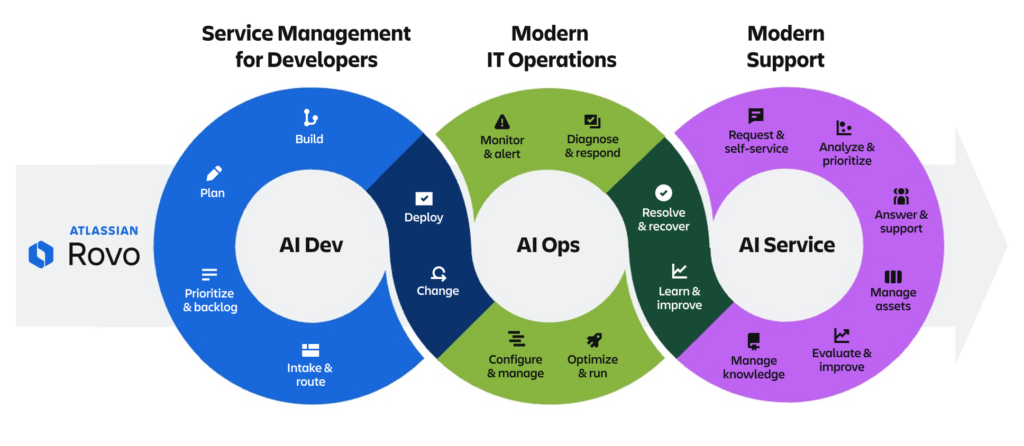
This transition aligns with Atlassianโ€™s broader strategy: moving key Opsgenie capabilities into Jira Service Management (JSM) and Compass to create a modern, AI-powered IT operations platform.

Atlassian Rovo Overview

Whatโ€™s Changing?

  • Opsgenie will no longer be available for purchase after June 4, 2025 โ€” no new instances will be sold.
  • Opsgenie will be fully retired on April 5, 2027 โ€” all access will be shut down, and unmigrated data will be deleted.
  • Jira Service Management will now own incident, problem, and change management with enhanced alerting capabilities.
  • Compass will provide service and robust alert management, offering context-rich alerts integrated with a comprehensive internal developer platform.

Why the Shift?

Atlassian is doubling down on AI-powered IT operations and consolidating tools to streamline workflows across DevOps, ITSM, and support teams. Instead of managing multiple platforms, teams can now centralize their incident and alerting workflows within Jira Service Management and Compass.

By embedding AI-driven alert grouping, automated alert resolution, and post-incident reviews (PIRs) into this consolidated platform, teams can resolve incidents faster, prevent outages, and increase productivity.

What Should Opsgenie Users Do Next?

Atlassian is offering two migration paths, depending on your organizationโ€™s needs:

  • Move to Jira Service Management (JSM) โ€” Ideal for teams needing a comprehensive ITSM solution with built-in incident response, problem, and change management.
  • Move to Compass โ€” Best for DevOps teams looking for advanced alerting and on-call management alongside an intuitive software component catalog.

How Oxalis Can Help

As an Atlassian Platinum Solutions Partner specializing in ITSM and Cloud, Oxalis is here to help your organization navigate this transition smoothly. Our team has deep expertise in JSM migrations, DevOps transformations, and IT operations strategy, ensuring you get the right solution for your needs with minimal disruption.

We can help with:

  • Migration planning and execution โ€“ Ensuring a seamless transition from Opsgenie to JSM or Compass.
  • Configuration and optimization โ€“ Tailoring JSM or Compass to fit your workflows.
  • Training and enablement โ€“ Equipping your teams to get the most out of Atlassianโ€™s modern IT Ops platform.

The clock is ticking on Opsgenie. Donโ€™t wait until the last minuteโ€”reach out to Oxalis today to start planning your migration and ensure your IT operations remain uninterrupted.

Contact Us


Donโ€™t Miss These Posts

Cloud or Data Center? The Best Atlassian Deployment for Healthcare


For healthcare organizations using Atlassian products like Jira or Confluence, navigating the shift to a cloud-first strategy is more important than ever. With Atlassian discontinuing Server support in 2024, organizations must decide whether to migrate to Atlassian Cloud, adoptย Data Center, or implement aย hybrid approach.

For highly regulated industries like healthcare,ย compliance, security, and data controlย are top priorities. The critical question is:ย Does Atlassian Cloud meet HIPAA requirements, or is Data Center the better choice?

This guide explores your options, addresses HIPAA compliance concerns, and provides expert insights into making the best decision for your organization.

Atlassian Cloud vs. Data Center: What Healthcare Organizations Need to Know

Atlassian Data Center: A Behind-the-Firewall Option

For healthcare organizations needingย full control over their infrastructure, Atlassianโ€™s Data Center products offer aย self-hosted, behind-the-firewall solution. This is particularly important for organizations that must store PHI/PII in Jira or Confluence but cannot meet compliance requirements in a cloud environment.

Key Advantages of Data Center:

  • Increased Security & Complianceย โ€“ Full control over hosting, access, and compliance settings.
  • Scalability & High Availabilityย โ€“ Load balancing and disaster recovery support.
  • Customization & Integration Flexibility โ€“ Ability to customize workflows and integrate with on-premises systems and security tools for enhanced compliance.

Atlassian Cloudโ€™s Compliance and Security Features

Atlassian has made significant investments in security, compliance, and scalability for its Cloud offerings.ย Jira Software, Jira Service Management, and Confluence on the Enterprise plan are HIPAA-compliant, and Atlassian is prepared to sign Business Associate Agreements (BAAs) for them.

However,ย Jira Work Management is not HIPAA-compliant, and Atlassian has no plans to certify it. If your organization is not on the Enterprise plan, other considerations, such as Data Loss Prevention (DLP) tools and controlled third-party plugin usage, become essential.

Key Considerations for Cloud Deployments:

  • HIPAA Complianceย โ€“ Available on Enterprise plans with a signed BAA.
  • Data Loss Prevention (DLP) Toolsย โ€“ Critical for enforcing PHI/PII storage policies.
  • Third-Party Pluginsย โ€“ Vendors may or may not be HIPAA-compliant; review all Marketplace apps carefully.
  • Process & Policy for Reporting and Remediationย โ€“ A structured approach is needed to flag, review, and remove PHI. If your organization needs assistance evaluating whether Atlassian Cloud is the right fit,ย Oxalis can help assess your compliance needs and implementation strategy.

Considerations for Data Center:

  • Higher Hosting & Maintenance Costsย โ€“ Requires dedicated IT resources and infrastructure investment.
  • User Minimumsย โ€“ Higher licensing costs with a 500-user minimum for Jira Software.

For organizations prioritizingย compliance, security, and control, Data Center remains aย viable alternativeย to Cloud, particularly for those not yet ready to fully migrate.

A Hybrid Approach: The Best of Both Worlds?

For organizations looking toย balance security and efficiency, aย hybrid cloud approachย may offer theย best of both worlds. This strategy allows teams to useย Atlassian Cloud for non-sensitive operationsย while keeping PHI/PII in aย secure Data Center environment.

Common Hybrid Cloud Scenarios:

  1. Customer-Facing Services on Cloud, Internal Systems on Data Center
    • Example: A healthcare IT company usesย Jira Service Management on Data Centerย for handling PHI in customer support requests, whileย Jira Software and Confluenceย remain in the Cloud for agile development and knowledge management.
  2. Sensitive Workflows in Data Center, General Operations in Cloud
    • Example: A multi-state healthcare providerย operates Quality Management in Jira Cloud, but runsย compliance-sensitive projects in Jira Data Centerย to meet regulatory requirements.

Making the Right Decision for Your Healthcare Organization

Choosing betweenย Atlassian Cloud, Data Center, or a hybrid approachย depends on yourย security needs, compliance requirements, and IT infrastructure.

  • If you need a fully managed solution with built-in compliance, Atlassian Cloud (Enterprise Plan) is a strong option.
  • If you require full control over data storage, security, and compliance policies, Atlassian Data Center is the better fit.
  • If you want flexibility, a hybrid approach offers tailored security and scalability.

Atlassian’s Compliance Roadmap

The chart below details current and future Cloud compliance standards according to the Atlassian Cloud compliance roadmap.

UPDATE STATUS TIMEFRAME
FedRAMP Moderate Authority to Operate (ATO) Coming Soon Q2-Q3 2025
FedRAMP Moderate Security Assessment and Agency Review Completed Q4 2024
HIPAA eligibility expansion Released Q3 2023
Notifications for HIPAA customers Released Q3 2023
WCAG (Web Content Accessibility Guidelines) Level โ€˜Aโ€™ Released Q1 2024
TISAX level 2 compliance Released Q3 2023
IRAP Compliance Future 2026
C5 Compliance Future 2026
BYOK Compliance in Copy Product Data Released Q2 2024
Accessibility Support in Primary Experiences Future 2025
SOC 2 Compliance for Rovo and AI Released Q4 2024
Usage limits monitoring for Rovo Released Q4 2024
Atlassian Cloud Migration Playbook

Oxalis’ Proven Methodology:ย Your Atlassian Cloud Migration,ย Simplified

As your trusted Atlassian Cloud Migration advisors,ย we’ve distilled our extensive experience into a step-by-step eBook. Whether you’re transitioning from Server or Data Center,ย this guide covers every aspect of your journey.

ย 

ย 

ย 

ย 

How Oxalis Can Help

Atย Oxalis, we specialize inย helping healthcare organizations navigate Atlassian deploymentsย while ensuring compliance with HIPAA and other regulatory frameworks. Our team provides:

  • Compliance Assessmentsย โ€“ Evaluating Cloud vs. Data Center fit for your organization.
  • Architecture & Deployment Strategyย โ€“ Implementing secure, scalable solutions.
  • Hybrid Cloud Solutionsย โ€“ Designing an optimal mix of Cloud and Data Center products.
  • Security & Compliance Best Practicesย โ€“ Ensuring ongoing HIPAA compliance and data protection.

Need expert guidance on your Atlassian deployment? Contact Oxalis today to explore the best path forward for your healthcare organization.


Is Jira HIPAA Compliant? What Healthcare Organizations Need to Know

For healthcare organizations and businesses handling protected health information (PHI), compliance with the Health Insurance Portability and Accountability Act (HIPAA) is a fundamental requirement. However, as organizations increasingly adopt modern cloud-based collaboration and service management tools, ensuring compliance becomes more complex. Atlassianโ€™s suite of productsโ€”particularly Jira and Confluenceโ€”offers powerful solutions for enterprise teams, but are they suitable for HIPAA-compliant environments? This guide breaks down the current state of Atlassianโ€™s HIPAA compliance, comparing Cloud and Data Center deployment options and providing best practices for maintaining compliance.

What You’ll Learn

  • An overview of HIPAA compliance
  • The HIPAA compliance status of Jira and Confluence Cloud
  • The HIPAA compliance considerations for Jira and Confluence Data Center
  • Best practices for using Jira in HIPAA-compliant environments

Is Jira HIPAA-Compliant?

HIPAA compliance is a critical concern for healthcare organizations and any entity handling protected health information (PHI). Atlassian has made strides in ensuring HIPAA compliance for select products. As of February 2023, Atlassian has implemented HIPAA compliance for specific Cloud products on its Enterprise plan. Additionally, Atlassian Data Center products continue to provide a self-hosted alternative for organizations that require full control over their compliance framework.

However, achieving HIPAA compliance is not solely about using a compliant product. Organizations must ensure their hosting, access controls, and plugin usage align with their HIPAA compliance program.

Interested in learning more about HIPAA compliance with Atlassian? Oxalis can help guide you through the decision-making and implementation process. Contact us below to get in touch. Keep reading to learn more about which Atlassian products are now HIPAA-compliant.

Are Jira and Confluence Cloud HIPAA-Compliant?

The short answer: partially. Atlassian provides HIPAA compliance for select Cloud products, but only under its Enterprise plan. Atlassian is also prepared to sign Business Associate Agreements (BAAs) for the following products:

  • Jira Software Cloud
  • Jira Service Management Cloud
  • Confluence Cloud

Notably, Jira Work Management is not HIPAA-compliant, and Atlassian has no current plans to make it so. Organizations using non-Enterprise Cloud plans should anticipate future expansions of HIPAA compliance, but currently, only Enterprise customers can fully leverage HIPAA protections.

For organizations considering Atlassian Cloud, it is essential to follow Atlassianโ€™s HIPAA Implementation Guide to configure their environment properly.

Is Jira/Confluence Data Center HIPAA Compliant?

The answer: it depends on your hosting strategy.

Atlassian Data Center offers a viable solution for organizations handling PHI, as it can be self-hosted or managed by a healthcare-oriented Managed Service Provider (MSP). This model provides greater control over compliance policies, security configurations, and access permissions. When properly implemented, Jira and Confluence Data Center can be part of a HIPAA-compliant infrastructure.

Organizations should ensure their Data Center deployment includes:

  • Secure hosting (on-premises or through an MSP with HIPAA safeguards)
  • Role-based access controls and audit logging
  • Regular security assessments and compliance audits

Regardless of whether you use Atlassian’s Cloud or Data Center products, we recommend the following:

  • Ensure your infrastructure’s configuration and controls (internally hosted or managed by an MSP) are aligned with your organization’s HIPAA Compliance Program.
  • Leverage a Data Loss Prevention (DLP) tool to keep PHI/PII out of your system, and eliminate it if found.
  • Analyze which plugins you intend to use, and whether the third party vendor is considered a business associate subject to a BAA.
  • Consider your options for remediating PHI/PII accidentally stored in issue data/history, pages, and attachments.

For an in-depth review, check out our article Atlassian Cloud vs Data Center: Which is Better for Healthcare Organizations?

Best Practices for HIPAA Compliance with Atlassian Products

Regardless of whether you choose Atlassian Cloud or Data Center, ensuring HIPAA compliance requires careful planning. Oxalis recommends the following best practices:

  1. Align Hosting and Configuration with HIPAA Requirements
    Ensure your Cloud or Data Center infrastructure aligns with your organizationโ€™s HIPAA compliance program.
  2. Use a Data Loss Prevention (DLP) Tool
    Implement a DLP solution to prevent PHI from being stored inadvertently and ensure it is removed when necessary.
  3. Evaluate Third-Party Apps and Plugins
    Review third-party apps and integrations to determine if vendors qualify as business associates and require a BAA.
  4. Develop a Remediation Plan for PHI Storage
    Establish procedures for identifying and removing PHI/PII that may have been accidentally stored in issues, pages, or attachments.

How Oxalis Can Help

At Oxalis, we understand that security and compliance are critical for healthcare organizations. Our team has extensive experience helping organizations determine whether Atlassian Cloud or Data Center is the right fit for their HIPAA compliance needs. We provide expert guidance on implementation, configuration, and ongoing compliance management.

If you need assistance navigating HIPAA compliance with Atlassian products, contact Oxalis today to schedule a consultation with our experts.

To learn more about making the right choice for your organization, download our whitepaper: Atlassian Cloud vs. Data Center: Key Considerations for Enterprise, Compliance-Heavy Organizations.


Recommended blog posts

Sana Benefits: Delivering Better Healthcare with Atlassian Cloud

The Challenge: Migrating to the Cloud with Compliance in Mind

Sana Benefits needed to move its Jira Software, Confluence, and Jira Service Management (JSM) environments to the Atlassian Cloud while maintaining HIPAA compliance. The transition required:

  • Regulatory Compliance: Ensuring sensitive health data remained protected throughout the migration.
  • Complex Data Environment: Migrating a highly customized Jira and Confluence setup with plugins and workflows.
  • Change Management: Training employees and preparing them for the new cloud-based experience.
  • Minimal Disruption: Executing a seamless migration without impacting daily operations.

The Solution: A Strategic, Secure, and Seamless Migration

Oxalis led an 8-week structured migration approach that ensured compliance, minimized risk, and maximized efficiency. The key phases included:

1. Current State Mapping & Gap Analysis

  • Conducted a comprehensive assessment of workflows, plugins, and data usage.
  • Identified non-migratable data and developed remediation strategies.

2. Migration Strategy Development

  • Created a clear roadmap for data transfer, testing, and user validation.
  • Designed a communication plan to keep all stakeholders informed.

3. HIPAA-Compliant Cloud Implementation

  • Assisted with the Business Associate Agreement (BAA) process.
  • Procured Atlassian Cloud licenses and configured Atlassian Guard for enhanced security.
  • Implemented Single Sign-On (SSO) and user provisioning via G Suite.

4. Technical Testing & Dry Runs

  • Conducted rigorous technical testing and two dry runs to validate processes.
  • Allowed users to test data in a sandbox environment before final migration.
  • Provided comprehensive Atlassian Cloud training to ensure a smooth transition.

5. Production Migration

  • Executed the migration during off-hours to minimize operational impact.
  • Ensured data integrity and system readiness.

6. Post-Migration Support & Adoption

  • Delivered post-migration support to address user concerns and optimize workflows.

The Results: A Faster, More Secure, and Cost-Effective Future

By partnering with Oxalis, Sana Benefits successfully migrated to Atlassian Cloud on time and within budget. The transformation delivered:

  • Cost Optimization โ€“ Reduced infrastructure and licensing costs with Atlassian Cloud.
  • Enhanced Security & Compliance โ€“ Maintained HIPAA compliance while leveraging Atlassianโ€™s latest security features.
  • Improved User Experience โ€“ Employees gained access to cutting-edge Atlassian features, enhancing productivity.
  • Operational Efficiency โ€“ Eliminated server maintenance and streamlined IT operations.
  • Successful Change Management โ€“ Employees adapted quickly thanks to structured training and communication.


โ€œThe engineering teams saw improvements in cycle times with a median cycle time of 24 hours for bugs and under 5 days for stories.โ€
โ€” James Cadena, Director of Information Security, Sana Benefits

Unified Atlassian services


Making Healthcare Easy with Atlassian Cloud

Founded in 2017, Sana Benefits is dedicated to making healthcare easy and accessible for small and medium-sized businesses.

With over 30,000 members and more than $320 million saved in medical billing, Sana offers affordable health plans that empower businesses to provide better care. As the company scaled, it relied on Atlassianโ€™s Data Center products to maintain compliance with HIPAA regulations while fostering collaboration across its teams.

When Atlassian Cloud achieved HIPAA compliance, Sana recognized an opportunity to enhance efficiency, reduce costs, and gain access to the latest features by transitioning from Data Center to Cloud.

To ensure a seamless migration, they partnered with Oxalis Solutions, an Atlassian Platinum Solution Partner specializing in cloud transformations for highly regulated industries.

  • Industry: Healthcare & Insurance
  • Location: Austin, TX
  • Company Size: 160+ Employees

THE CHALLENGE

  • HIPAA-compliant migration from Atlassian Data Center to Atlassian Cloud

THE TOOLS

  • Jira Software
  • Confluence
  • Jira Service Management (JSM)
  • Atlassian Guard

THE SOLUTION

  • Atlassian Cloud Migration
  • Change Management
  • Knowledge Management
  • Training

Moving Forward with Atlassian Cloud