Updates to Trello Pricing and Tiers – August 2021

What’s Happening?

As of August 24th, 2021, Atlassian has launched an updated suite of Trello tiers to provide simplified pricing and greater capabilities for teams of all sizes.

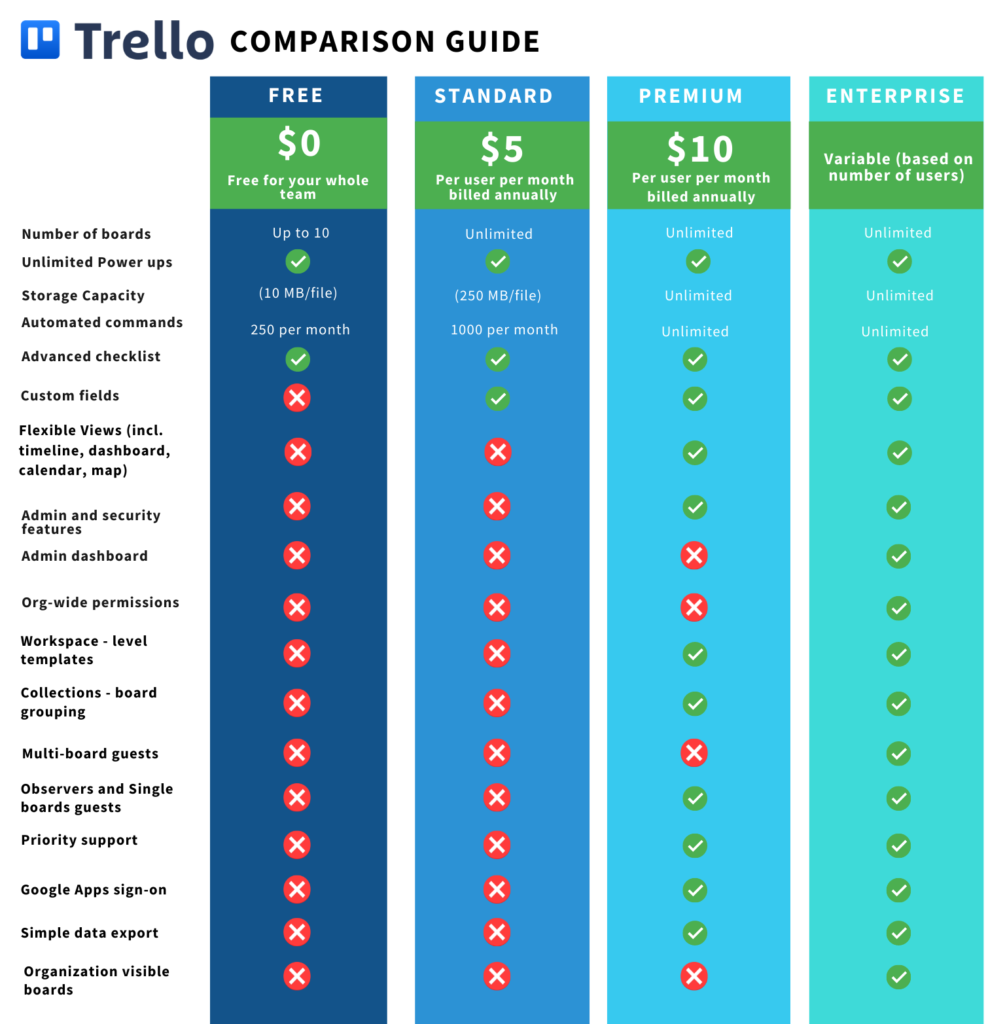
  • Trello “Business Class” is now called Premium and includes unlimited automation.
  • Atlassian is introducing a new Standard tier, which is a lower priced plan ($5/mo).
  • All users can now add unlimited Power-Ups and integrations with no limits.
  • Trello “Gold” is now discontinued and will be retired throughout September and October. Many of the old “Gold” tier features are now free.
  • Trello Enterprise remains as the go-to tier for customers seeking greater security and compliance controls.
  • Jira Work Management remains a powerful alternative for organizations looking to scale.

Curious about whether Trello is right for your organization? Contact us below to set up a free consultation.

What Do I Need to Do?

If you’re currently a Trello “Gold” customer, be mindful of the following dates:

  • August 24th, 2021 – Atlassian will stop the sale of new Gold subscriptions.
  • September 7th, 2021 – If you are a Gold user with a personal board, your board will automatically be migrated to a new Workspace with a 60-day Premium free trial.
  • September 24th, 2021 – Atlassian will stop the renewal of existing Gold subscriptions.
  • October 24th, 2021 – All Trello Gold subscriptions will expire.

For all other users, explore the new, powerful functionality unlocked with this change!

What Are the Differences Between Plans?

Trello Pricing Chart

Where Can I Learn More?

It’s time to escape fragile and messy Excel spreadsheets, countless email threads, and systems that do not integrate with the tools you need. Trello on its own is a strong asset—however, Oxalis unlocks the full potential of the software so your team can work more efficiently, connected, and effectively.

Let us show you how Oxalis makes Trello work for you.

Contact us

Streamlining Portfolio Reporting at a National Health Care Company

The Challenge

Streamlining Portfolio Reporting, a national healthcare organization was struggling to define, prioritize, and manage execution of their Infrastructure and Operation initiatives in a consistent manner. Countless hours were spent by teams creating and recreating status reports in various formats (Jira, Excel, Smartsheets) in an effort to keep leadership informed. Grassroots movements started and failed to transition the process to Jira, so Oxalis was brought in to help set up a structure for success.

Streamlining Portfolio Reporting -healthcare industry

Our Approach

Knowing that the crux of the problem was providing leadership-level visibility while enabling team autonomy, the Oxalis team immediately went to work analyzing the needs of both management and individual contributors.

Using Advanced Roadmaps for Jira, to streamline portfolio reporting, the Oxalis team helped put a structure in place so that individual delivery team epics could be rolled up to organization-wide Initiatives. Permission and data schemas were configured to ensure appropriate levels of segmentation, and to provide coverage for current reporting needs. Automation and subscription-based reports were used as controls to help promote data integrity, and training was developed for key personnel to establish and sustain usage of the tool.

Services we provided

  • Oxalis Integrated Services
  • Atlassian Licensing

[bodymovin anim_id=”1235″ loop=”true” autoplay_viewport=”true” align=”center”]

The Outcome

Over the course of three months, the configuration and process for managing initiatives in Jira was fully rolled out to streamline portfolio reporting.

Leadership is currently benefiting from a single view into the status of all key initiatives, which are updated in real-time based on the work completed by the delivery teams. Delivery teams can easily see how their work ties back to strategy while working in a way that suits them best to streamline portfolio reporting. Substantial savings from reporting overhead are anticipated over the coming years.

[bodymovin anim_id=”1236″ loop=”true” autoplay_viewport=”true” align=”center”]

Get more information

Feel free to send us a message in the form below

Making the Most Out Of Your Atlassian License

So, you’re thinking about making the move to Atlassian’s products and saw something about Atlassian licenses.

When you’re exploring whether to purchase Jira Software, Jira Core, Jira Service Management, Confluence, or any of the other members of Atlassian’s suite of tools, it’s easy to only think about the procurement and not the process of acquiring Atlassian licenses.

However, many don’t realize purchasing Atlassian licenses through an award-winning Atlassian license reseller like Oxalis, brings several benefits usually abandoned on the table.

We walk through many of the benefits to purchasing your license through Oxalis, but before diving in let’s cover the basics.

What is an Atlassian License?

Atlassian sells their products by way of selling licenses broken down by product, product tier, user/agent count, and deployment. These three factors can and should be considered before committing, whether you are purchasing or renewing your license. Since discontinuing Server licenses in February 2021, Atlassian’s licenses are only available on monthly (Cloud) or annual (Cloud and Data Center) terms. You can purchase both monthly and annual licenses with a partner, but purchasing an annual license is the most common between the two by a considerable margin. Ready to learn more?

Product

Atlassian sells licenses for each individual product. The most common products from Atlassian are Jira Software, Jira Service Management (formerly Jira Service Desk), Confluence, and Bitbucket. Atlassian does not bundle any of these products. Also, multiple products can be purchased for a single company. However, this is not advised, as Atlassian provides a volume discount for higher user counts (more on that below).

Product Tier (Cloud License)

As a recent update to Atlassian’s licensing model, they started offering different product tiers for their Cloud offerings: Free, Standard, Premium, and Enterprise. Each tier has incremental increases in pricing per user but also includes more features with the higher tiers. You can change your tiers at any time, given you’ve purchased on a monthly basis rather than an annual basis. 

Note: purchasing annual licenses will result in lower cost per user. Data Center licensed products do not have different product tiers.

Choosing between these tiers can seem complicated—it’s tough to know what features your team needs and what seems like a good idea but really is unnecessary for the cost. Oxalis uncovers real needs based on informative interviews with company stakeholders to understand a list of requirements and a list of “nice to haves”, which is an important distinction when prices are increasingly expensive per product tier.

User/Agent Count

The second-largest factor in pricing differences is user/agent count. This is relatively self-explanatory: however many employees within your organization are going to use the software, make sure they are included in your user count. You can upgrade your user tier at any time, so you can purchase without fear of locking your company in to that user tier for 12 months.

It gets a bit more complicated with Jira Service Management, which operates with “collaborators” and “agents”. 

  • Agents can do the following:
    • View the customer portal, queues, reports and SLA metrics within a project
    • Add, edit, and delete customer-facing and internal comments on issues
    • Add customers to a project
    • Author and read knowledge base content (with a paid Confluence license)
    • Manage Organizations (if allowed at the application level)
  • Collaborators, on the other hand, are users holding licenses to another Atlassian tool like Jira Software or Jira Core that can work and communicate with JSM agents internally. If you have users that don’t need full JSM privileges, it would be more affordable to license the users with Jira Core or Jira Software. 

Sectoring Agents and Collaborators is a prime example of how Oxalis helps customers optimize and streamline their Atlassian license. Get started.

Deployment

Atlassian offers two deployment options for their products: Atlassian Cloud and Data Center. The two options vary significantly in terms of pricing, security, and hosting.

  • Cloud is the Oxalis preferred deployment option for most clients, given there are no compliance or regulatory requirements. Atlassian recently doubled-down on their Cloud offering, creating a robust ecosystem with built-in features and integrations that most companies can take advantage of. 
  • Data Center is highly configurable and customizable, with built-in security capabilities and no hosting restrictions. We have sold, maintained, and optimized Data Center licenses for our high-compliance customers who are required to meet certain regulations. 

What about Server Licenses?

Atlassian announced they would end the sale of their Server license in February 2021. They are continuing the support until February 2024, but Atlassian has made it clear Server licenses are riding into the sunset and any Atlassian users should start planning on migrating to the Cloud or Data Center licenses. Find more information HERE

Are there Atlassian License Cost Differences?

When you purchase an Atlassian license through a trusted partner like Oxalis, you are not paying any more or any less. It’s simply a way to show our partners at Atlassian that your team is under our care. 

There is a financial advantage should your company want to pay for licenses annually. Atlassian partners like Oxalis have the ability to procure annual quotes based on user tiers vs. actual user counts. These tiers generally see a scaled benefit if you’re coming close to the top third of the range.

For example, if a company had 130 Jira Software Standard Cloud users, they would pay approximately $939 per month (or $11,268 per year). The annual cost for that license tier (101-200 users) comes out to $14,000—in this case Oxalis will recommend and procure monthly payment. But, as that company grows to 170 users, that monthly cost jumps to $1,191 per month ($14,292 per year) while the annual cost stays the same at $14,000 per year.

Oxalis monitors this growth opportunity and has the capability to optimize while their clients are scaling up to ensure they’re not paying extra costs when there is a more affordable option. Get help.

The real cost savings come in when you need Atlassian consulting or optimization services. Being an Oxalis-licensed partner means that you have a consultant at the ready to upgrade your licenses, add Atlassian Marketplace apps, and offer license optimization advice. 

Not to mention, our Oxalis-licensed partners receive exclusive services discounts as a thank you for committing to the partnership as much as we are. 

What does Managing an Atlassian License Mean?

Many benefits follow with a partner like Oxalis managing your Atlassian license. The services discount aside, licenced partners with Oxalis are free from challenges surrounding the licensing process:

  • User changes, upgrades, and instance additions
    • If you were managing yourself, you would need to go through Atlassian’s support system with each change. 
    • With Oxalis, we have what we call the “Superman Red Phone” to Atlassian. We experience rapid response times from their partner team to ensure that any changes you may want to make are done on your timeline. 
  • Management of your license 
    • Oxalis offers expert advice on how best to configure your licenses and to make sure you’re paying for what you actually need (especially if it is paired with Oxalis services).
    • Oxalis helps its partners pick out which Atlassian Marketplace Apps to add per their stated requirements.
    • If your company has acquired several licenses from various products over the years for individual teams, Oxalis can analyze your license use and offer consolidation advice. 
    • As a partner, Oxalis is the first to know about changes within the Atlassian ecosphere and therefore our licensed partners are the first to know if it impacts or will impact them—allowing for ample preparation time with expert advice.

Actual license consolidation (rather than advice) is a service Oxalis offers. Contact us to learn more.

  • Services Discount
    • Purchasing your license through Oxalis allows us to discount services as a Prefered Oxalis Partner. Purchasing through Oxalis shows that your company is willing to partner with us for the length of your Atlassian journey. 
Bottom line: Oxalis has the “red phone” that connects directly to Atlassian and we use it to make sure that you’re not only getting the licenses that you need, but also the correct configuration that will reduce tech debt, prevent sunk costs, and provide simple invoices for your accounting department. 

What if I Have an Existing Atlassian License?

If you’ve already procured and paid for your Atlassian License, you cannot transfer your license to Oxalis management. However, when you’re ready to renew or upgrade your licenses, you can purchase those through Oxalis and that will bring your license into our management for the benefits stated above.   

When you’re ready to get the most out of your Atlassian license, contact us to discuss your options.

Recommended blog posts

Atlassian Discontinuing Server Edition—Here is How to Prepare

Atlassian announced they are officially discontinuing service for Server edition licensed Atlassian products by 2024. Here is how you can prepare to migrate your systems to a Data Center or the Cloud quickly and effectively.

On Friday, Atlassian announced they would be discontinuing the sale and service of their Server products by February 2021, and end support by February 2024. For customers wondering what this means for them, we’ve created an informational guide to assist with the transition from Server to Cloud or Data Center, and which option best suits their needs. 

While the news of Atlassian ending sale and service for their Server licenses was a surprise to many Atlassian customers, we at Oxalis see this as a great opportunity for our customers to make a calculated transition to dynamic solutions that work for their data management and collaboration strategy. Whether it’s moving to the Atlassian Cloud or Data Center, there are options for many compliance needs or regulations. 

What Atlassian Has Announced

In a release about Atlassian discontinuing server licenses by 2024, the Jira Software creator announced as of February 2021 they would no longer be selling new Server edition licenses to the public and they will be updating pricing for existing server licenses. According to the release, this is part of a larger strategy to become a cloud-first company.

An important note: this change does not include any Data Center Licenses.

Here’s the Current Timeline

  • On February 2, 2021, the following changes will go into effect:
    • End of new server license sales: You can no longer purchase or request a quote for a new Server product.
    • Updates to Server license prices: Atlassian will implement new prices for Server license renewals and upgrades.

While the step in February 2021 starts a long chain of events that will eventually lead to Atlassian’s discontinuation of services and maintenance for their Server license, they are allowing a 3-year window to get your hosting affairs in order. And we’re here to help you through that process.

After February 2, 2024, Atlassian will no longer be supporting Server licenses. Effectively, Atlassian support and bug fixes will no longer be available for your Jira Software, Confluence, Jira Core, Bitbucket, or other Server-licensed Atlassian products. At this point, your Atlassian products need to be migrated away from self-hosted Server products to either the self-hosted Data Center edition or Atlassian’s Cloud SaaS offering.

To help with the transition, Atlassian is offering three years of support and maintenance for Server edition products, as well as loyalty discounts for eligible customers who can migrate their license to the Cloud or a Data Center. They are also offering a cloud migration trial for the length of your remaining Server license maintenance (up to 12-months) if you have purchased the additional Server license maintenance from Atlassian. Contact us to figure out if you’re eligible for these discounts or options.

While the cloud is Atlassian’s main focus, they recognize industry needs for higher security and compliance. Therefore they are strengthening their Data Center offerings for companies in regulated industries. 

Atlassian is adding some of their most powerful apps, like Advance Roadmaps for Jira, available with a Data Center license. They’re also offering priority support with data center subscriptions in most user tiers. The Data Center is a strong viable offering for regulated industry or government with features such as Advanced Logging and Authorization / Authentication options that support enterprises.

As Atlassian cloud migration advisors, Oxalis’s unique expertise ensures Cloud Migration success.

The Cloud Migration Playbook, written for any company that needs to migrate from Atlassian Server or Data Center to the Cloud, covers the entire migration process from pre-planning to testing to executing the migration.


What Hasn’t Been Announced

There is a lot that is up in the air at the moment, but we at Oxalis are always looking between the lines to help our customers make the best decisions for the future of their business. Here is what our team of experts are keeping an eye on:

  • This release is only about Atlassian products, not Atlassian Marketplace apps and plugins. While Atlassian apps and plugins are available through Atlassian Marketplace, they are not created or managed by Atlassian. Vendors have not announced their specific support plans yet based on the announcement. Therefore, until we hear from them, we recommend preparing for vendors to restrict their support of what is now an antiquated product.
  • The release did not mention what this means for their security-driven, highly-regulated industry clients. The heavily regulated industries could be hit hardest because moving to the Cloud—while highly secure—does not meet most high-compliance standards (government and government sub-contractors are a few industry examples). However, there are options to use the Data Center edition self-hosted or with AWS or Azure Cloud infrastructure that can support high-compliance standards. In any case, it’s would behoove high-compliance companies to make a migration plan now to help save money and resources down the road.
  • As of right now, there is no end of life roadmap for Data Center. This is great news, as it gives high-compliance industries a clear and direct path to migrate away from their Server licensed products. If you need to meet high-regulatory requirements, this is very promising—especially considering the additional support they are offering for future Data Center licensed products.

What You Should Do

IF YOU HAVE A CLOUD LICENSE

If your Jira products is hosted on Atlassian’s cloud, then there is no action required. Atlassian commits to consistently delivering high quality and value for their cloud services, and this move only solidifies that commitment. 

IF YOU HAVE A DATA CENTER LICENSE?

If you host your Atlassian products in a Data Center environment, there is no action required. In fact, Atlassian is improving their level of support with their Data Center hosted products (see above). On a Data Center license, you stand to benefit from some of those changes, specifically around the addition of powerful apps that will now be included with this edition.

IF YOU HAVE A SERVER LICENSE?

Since Atlassian is discontinuing their Server licenses by 2024, if you’re currently hosted on a self-managed Server edition this announcement directly applies to you. The good news is Oxalis can help your company plan a migration strategy with struct security and regulatory requirements in mind hosted within the Atlassian’s Cloud SaaS or Data Center edition hosting options.

We recommend you start with reassessing your migration plan. If one of Atlassian’s server licensed product was a part of your future strategy, you need to reevaluate. Creating a new or altered, future-proof data strategy will be paramount to your future success. If you are looking to create an actionable roadmap for migration with experts who will not only migrate but optimize your systems, schedule a meeting and we will get the process started.


WHAT YOU NEED TO KNOW BETWEEN NOW AND FEBRUARY 2, 2021
  • Atlassian will continue normal Server license management until February 2 2021, at which time they will stop selling new Server licenses and Server license pricing will increase.
  • This does not mean that your Atlassian and Jira software will no longer work. Rather, it means that Atlassian will begin the three-year transition away from Server licensed products. Between now and then, you will not notice a difference in how your Atlassian software performs or operates because there will be no difference. 
  • This 4-month period is a perfect window to start thinking about a plan forward for your Atlassian and Jira Software Licenses once Atlassian starts moving. 
  • It’s also a great time to schedule a meeting with the team at Oxalis to ensure you have a proper roadmap for your migration efforts. 
  • Lastly, this is a prime opportunity to clean up your systems and streamline processes to ensure you’re receiving the best price possible for your Atlassian usage. Oxalis can help you along this process.

HERE ARE YOUR SERVER MIGRATION OPTIONS:

Self-Hosted Server to Cloud Migration

Qualification: Companies using Jira Core, Jira Software, Jira Service Desk, Confluence, BitBucket, or other Atlassian software hosted on self-managed Server who have limited or no security or regulatory requirements requiring highly-regulated data storage.

Note: Atlassian’s Cloud does have high levels of security that are continually improving. Read more about it here. Are you curious if Atlassian’s security compliance standards are high enough for your needs? Message us and we’ll get back to you quickly with a clear and concise answer.

Why Migrate to Cloud?
  • Future-Proof—Atlassian has been putting most of their eggs into the cloud basket, and this move affirms that effort. With each passing month, Atlassian is dedicating more time, money, and effort to becoming the greatest cloud platform on the market, and you as the customer stand to benefit.
  • Product Roadmap—Atlassian has shown that they will increase the pace of cloud feature development, including the launch of some exciting Machine Learning capabilities. Features of this magnitude are largely only possible with Cloud technologies. Customers will want to consider this option as their first priority, due to the Atlassian investment in this route.
  • Integration—Some cloud product integrations are only possible with cloud API and capability. Atlassian has shown a commitment to allowing teams to have access to a ton of options including third party integrations. It is part of the Atlassian strategy—freeing teams constrained by the software and allowing integration to competitor tools. 
  • No more upgrades —You are essentially offloading the feature release, product development, and hosting burden to Atlassian for a fraction of the price it would be to do all this yourself. As a business, you need to decide whether your core business competency should be impacted with the IT burden of a productivity tool. We recommend unburdening your organization.
  • Safe and secure—Atlassian’s cloud is VPAT, FedRamp, GDPR compliant, along with several other compliance standards. See the full list here

What are the principal advantages of migrating Atlassian Server to Cloud?

Migrating from the Atlassian server to the Atlassian cloud can provide many advantages to your organization. In this blog post, we will discuss some main advantages of migrating to the cloud, as well as the benefits of the migration process itself.

Advantages of migrating to Atlassian cloud

  1. Improved scalability and flexibility

Atlassian cloud offers greater scalability and flexibility than Atlassian server. You can easily add or remove users and adjust your subscription as needed, making it an ideal solution for growing organizations or those with fluctuating needs.

  1. Automatic updates and maintenance

Atlassian cloud provides automatic updates and maintenance, which can save you time and resources. This means that you don’t need to worry about manually installing updates or maintaining the infrastructure, which can be a significant burden for server administrators.

  1. Enhanced security

Atlassian cloud provides enhanced security features, such as advanced encryption, security controls, and continuous monitoring. This can help protect your data and applications from security threats, giving you greater peace of mind.

  1. Access to the latest features and functionality

Atlassian cloud provides access to the latest features and functionality, which are not available in the server version. This can help your team stay up-to-date with the latest tools and best practices, improving productivity and collaboration.

  1. Lower total cost of ownership

While the upfront cost of migrating to Atlassian cloud may be higher than the server version, over time, it can be more cost-effective. This is because the cloud version eliminates the need for infrastructure, hardware, and maintenance, resulting in a lower total cost of ownership.

Benefits your team can get with the Atlassian migration process
  1. Improved data management

The migration process provides an opportunity to review and optimize your data management strategy. You can assess your data quality, identify any gaps or redundancies, and implement best practices to improve data governance.

  1. Standardization and consistency

Migrating to Atlassian cloud allows you to standardize your infrastructure and processes, resulting in greater consistency and efficiency. This can lead to improved collaboration and productivity among team members.

  1. Customization opportunities

The migration process provides an opportunity to review and optimize your customizations. You can assess the effectiveness of your current customizations, identify any redundancies or inefficiencies, and implement new customizations that better align with your business needs.

  1. Streamlined processes

The migration process provides an opportunity to review and optimize your processes, resulting in greater efficiency and productivity. You can identify any bottlenecks or inefficiencies, and implement new processes that better align with your business needs.

Migrating from Atlassian server to Atlassian cloud can provide many advantages to your organization. The benefits include improved scalability and flexibility, automatic updates and maintenance, enhanced security, access to the latest features and functionality, and a lower total cost of ownership. The migration process itself also provides many benefits, including improved data management, standardization and consistency, customization opportunities, and streamlined processes. By considering these advantages and benefits, you can make an informed decision about whether to migrate to the Atlassian cloud and how to approach the migration process.

Self-Hosted Server to Data Center Migration

Qualification: Companies using Jira Core, Jira Service Management, Jira Software, Confluence, Bitbucket, etc. in highly compliant industries with regulations. 

Why Migrate to Data Center?

  • Transition Benefits—Atlassian committed to making the transition from server licensing to their other products as easy as possible, offering loyalty discounts and adding a powerful suite of apps to their Data Center products. 
  • Higher Security—In Data Center, you’ll find stronger capabilities around Authentication & Authorization with advanced SSO and SAML 2.0 support
  • Security Configuration—Data Center ships with the ability to be clustered for High Availability, but also in a simple not clustered configuration if you do not have this requirement.
  • Reporting—Audit and logging is more advanced in Data Center allowing you to more easily achieve compliance.
  • Included Apps—Atlassian is bundling some of its top add-ons such as Advanced Roadmaps, to create a more comprehensive environment for your teams.

How We Can Help

Oxalis is widely regarded as the expert in Cloud Migration and Compliance Jira needs, having earned the prestigious Rising Star Partner of the Year status. As a government-verified Atlassian partner, we’ve implemented systems in regulated environments while protecting user data and improving processes. We have been working as an Atlassian partner for 4+ years, and we’ve got it down to a science.

We are committed to planning the best plan forward for your company, making this process seamless and successful. When you migrate with Oxalis, you’re not just migrating systems as they are, but improving them during the process. We are dedicated to streamlining your processes while we are under the hood, saving time and money in the long term. You’ll find that this migration will be more than a step needed to modernize—it’ll be a top-to-bottom house cleaning that not only moves your system but cleans and organizes to function with pure efficiency.

Starting now, with the release that Atlassian is discontinuing server licenses, we’re embarking on a 3-year journey together. Our team of experts will carry the weight as your Atlassian sherpa while we guide you to the promised land of secure, effortless, compliant, and effective Atlassian software.

Start with a free consultation. It will add immediate value.

Recommended blog posts
Taking The Complication out of Jira Cloud Migration

Migrating systems to the cloud is an increasingly pertinent subject. In the past 5 years, Google Searches for keywords related to “Cloud Migration Services” have jumped nearly 500% (and rising fast). Of course, this isn’t a new topic—not only have we written about cloud migration and its benefits on our Oxalis Blog, but a quick search will also pull hundreds of thousands of articles saying the same thing: given you don’t have any compliance or regulatory barriers, it’s time to migrate your system to Atlassian’s cloud

With the rise of the COVID crisis since March 2020, we’ve seen spiked demand as employees are required to work from home, manage systems remotely, and collaborate from afar. The flexibility surrounding cloud migration has never been more relevant than it is now. The COVID crisis forced many companies to make the leap out of necessity—only to discover they should have made it long ago.  

Atlassian Discontinuing Server Edition, Encouraging Cloud Migration

This post has never been more applicable, as Atlassian announced the future discontinuation of its Server edition products. The announcement, which was released in October, details a timeline of dwindling sales and support of Server edition products starting February 2, 2021, and officially ending support for Server edition products by February 2, 2024. Read our full breakdown of Atlassian’s announcement and what it means for your Server products.

If you’re teetering on the decision to migrate to Atlassian’s Cloud, either out of necessity or curiosity, we’re here to tip you in the right direction. Get support.

As Atlassian cloud migration advisors, Oxalis’s unique expertise ensures Cloud Migration success.

The Cloud Migration Playbook, written for any company that needs to migrate from Atlassian Server or Data Center to the Cloud, covers the entire migration process from pre-planning to testing to executing the migration.

The Top Oxalis-Endorsed Reasons to Migrate to the Cloud Today:

The Benefits from the Ecosystem:

Atlassian has created a bevy of integrations that work seamlessly with Atlassian’s cloud, and they will continue to do so. Here’s some proof: back in May 2020, Atlassian purchased HALP, a communication integration that turns popular workplace communication tools (like Slack) into a virtual help desk. They want the cloud to work for everyone, and they’ll continue making strategic moves to improve.

The Reassurances of Stability:

The cloud allows for seamless, effortless updates. You and your team will have the most up to date systems, creating less maintenance and operation costs, saving valuable time, and providing the highest security standards—all done automatically.   

The Atlassian Commitment to Product:

Take it from the Atlassian Gold Partners and the 2019 Rising Stars from the Americas—right now, the cloud is Atlassian’s baby. They care more about growing that part of their business than any other. Atlassian’s team will continue investing in this system, and you will be one of the beneficiaries. Talk to our experts.

After all of that, let’s say you’re now convinced. No more teetering. The question remains: how can I make this as easy as possible, with as little downtime as possible, and as few setbacks as possible? That’s where Oxalis comes in—we have the experts on staff to make sure that your migration is not only seamless, but also tailored to your business needs. 

Think about your last move…did you hire movers? 

  • If you didn’t, do you remember what a hassle that was? Loading up all of the boxes, try and play box tetris to get them to fit, driving that oversized truck around town? Asking friends to help, paying them in stacks of pizza and beverages for several hours of work? What about when someone dropped that box marked fragile and boom, now you need a new set of dinner plates?
  • If you did, do you remember how quick and easy it was? Do you remember pointing them in the right direction to load and unload the boxes, and do you remember how organized and beautiful the truck was when it was all loaded up? Do you remember the assurance that things would get there safely and securely, and all in considerably less time than loading and moving the truck yourself?

Now imagine the movers not only carry your precious house items from place to place, but then they offer advice on how to best use your new space for light and usability. They help you find things that were lost over the years, and made them a useful part of your home again. To top it all off, they offer some award winning interior design advice and help you hang just the right color of curtains to tie the room together. Learn more.

Oxalis does not simply move your data over to the cloud. We advise on optimal integrations that work best with the cloud, pinpoint the plugins and configurations that will help your system run smoothly. Additionally, Oxalis helps standardize your company’s flow and look for any points of improvement to make sure we’re leaving the job better than when we started. 

Think of us as your movers who take any and all extra steps. Oxalis makes this process safe, simple, and speedy while your business hums along. 

Recommended blog posts