Enterprise Service Management (ESM) – The Natural Extension of ITSM

In this blog post we’ll look at Enterprise Service Management (ESM) and its relationship to ITSM, as well as how IT processes apply to and can benefit business teams. We’ll review examples of how these teams are using tools and principles such as knowledge management, service request, change management, and more, to address challenges and apply solutions across ALL enterprise teams. We will discover how ESM, when implemented with Jira Service Management, captures invaluable data about the service your business teams are providing each other.

What is Enterprise Service Management? How Does it Compare to ITSM?

Enterprise Service Management (ESM) strategically expands the proven principles and practices of IT Service Management (ITSM) to encompass the entire organization. This approach optimizes service delivery across departments like HR, Finance, Legal, and beyond.

Key Differences Between ESM and ITSM

  • Scope: ITSM focuses specifically on managing IT services, while ESM encompasses the service needs of all business units.
  • Reach: ITSM typically serves internal IT customers, whereas ESM aims to improve service experiences for both internal and external stakeholders.

Core Components of ESM

As Forrester outlines, ESM typically involves these essential elements:

  1. Adapting ITSM Practices: Proven ITSM processes like incident management, change management, and knowledge management are tailored for use across various business functions.
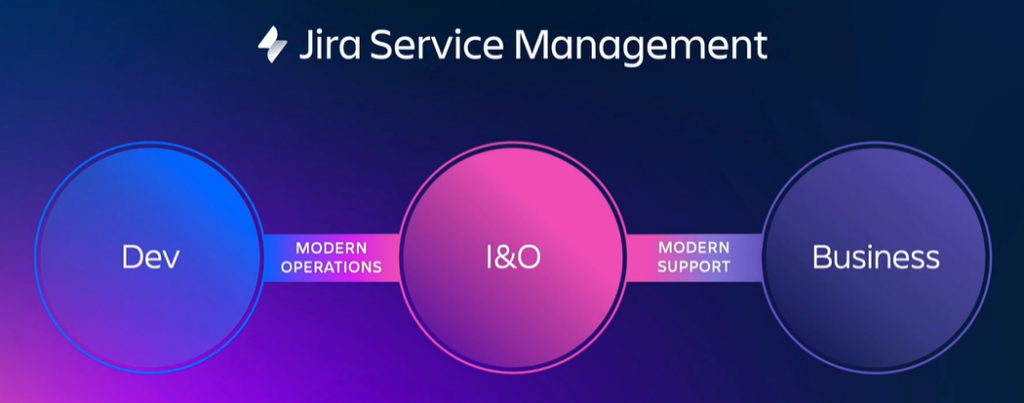
  2. Unified Platform: A centralized platform, often based on existing ITSM tools, offers a single service portal and catalog for all teams within the organization.
  3. Low-Code Automation: Low-code solutions streamline workflows and accelerate service delivery innovation, breaking down service barriers and empowering teams.

Beyond Bug Tracking: Understanding Jira’s Evolution and the Rise of ESM

Jira has come a long way from its humble beginnings as a bug-tracking tool. Atlassian wisely recognized its potential and expanded Jira’s capabilities to serve a whole range of teams.

The Power of Adaptability

In 2013, Atlassian saw a fascinating trend: 40% of users were already bending Jira to manage service requests! In response, Jira Service Desk was born, later evolving into Jira Service Management (JSM) in 2020 to fully embrace ITSM principles.
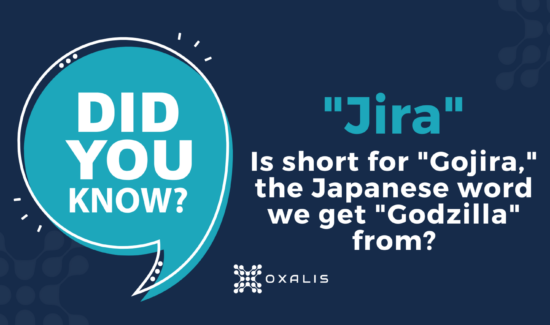
Read more about the origin of the name Jira.

But the story doesn’t end there. Organizations boldly (and successfully!) used Jira even beyond its original design. This showed that the service desk concept isn’t just for IT – it benefits HR, legal, facilities, literally any team that deals with requests. This realization paved the way for Enterprise Service Management. Atlassian itself uses a whopping 130 internal service desks – proof of ESM’s power!

The Core Idea

It’s simple: every team gets requests and needs to fulfill them. HR handles time-off, facilities tackles maintenance issues – the service desk model streamlines this process for everyone. ESM makes this ‘unofficial’ use case official, allowing JSM’s strengths to benefit the entire organization.

Enterprise Service Management (ESM) empowers your entire organization by creating a seamless and predictable help experience. Each team benefits from a standardized help portal where users can find self-service knowledge articles and easily submit and track service requests. This consistent approach boosts efficiency by eliminating confusion and streamlining workflows across all departments.

How do ITSM processes apply to non-IT teams?

Let’s go over some examples of the practices that Enterprise Service Management with Atlassian includes.

Knowledge Management

The Challenge

Most organizations can benefit from improving how they organize and manage their documents and information. A survey of 2,000 hybrid and remote office workers found that the average respondent needs to search for documents or other information seven times each day. In addition, respondents spent 13 minutes searching on their own before asking for help. Do the math: 13 minutes of searching, seven times a day, five days a week… that’s 455 minutes, about 7.6 hours. Almost a full workday every week lost to searching for information they need to do their job – per person.

Every team manages – whether intentionally organized or not – a body of institutional knowledge that people they serve will need to know at some point.  But how many teams, aside from IT, have systems and procedures in place to ensure that stakeholders get the right information, in the proper format, at the right level, and at the correct time, according to their access level and other relevant policies? 

The Solution

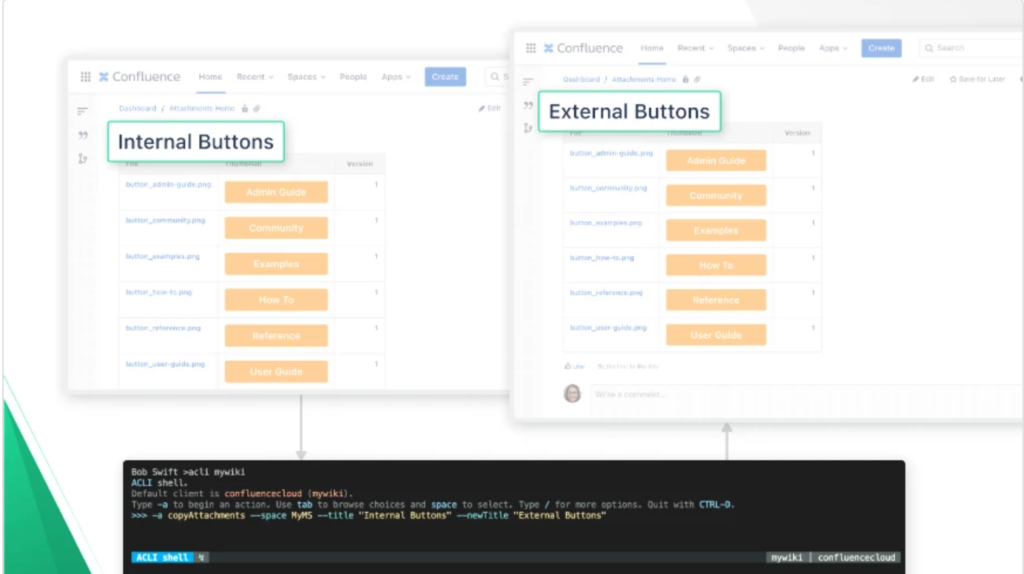
The practice of knowledge management is built around the knowledge base, a self-serve online library of information about a product, service, department, or topic, all easily accessible by a robust search engine.  By putting the organization’s information in one organized, access-controlled place like Confluence, where employees can search for what they need, you can go a long way toward minimizing time wasted.

And it does double duty, because it benefits both team members and those they serve; the latter use the knowledge base through the service portal.

Service Request Management

The Challenge

Every team’s work can be usefully described in terms of the services they provide to those outside the team.Users typically access those services haphazardly, whether it’s in Slack asking for payroll information, or by email reporting an urgent maintenance need, or as a walk-in wondering how to replace a security access card.  When teams must then track their work in multiple places, inevitably errors, oversights, and delays will creep in.

The Solution

Service Request Management is what ITSM is perhaps best known for.It begins with the concept of the Service Catalog: an organized, managed collection of repeatable, defined services within a group, including such information as description, ownership, dependencies, and escalation.

When employees start to submit a request in a service portal, recommended articles from the knowledge base appear with helpful information through a tool like Jira Service Management, getting employees the answers they need quickly while deflecting requests from busy teams. Requests submitted are all organized in one central place, saving time, hassle, and mistakes.

The growing body of fulfilled requests also becomes a time-saving resource for teams, by looking up the resolution of previous similar requests.

Change Management

The Challenge

The services that business teams provide usually follow defined procedures, and once employees understand those procedures, altering them can cause confusion, frustration, and wasted time if not implemented properly. Do all the stakeholders get a chance to provide feedback during planning? Are all potential users notified of the change and its timeline?

While business teams may not have the sort of mission-critical infrastructure – requiring 99.9% or 99.99% uptime – that IT teams support, they do provide important services that can be time-sensitive.  For instance, prompt coordination between HR and IR is vital for a behind-schedule project that needs an emergency contractor up and running ASAP.

Furthermore, every team’s ability to adapt its processes smoothly to new business needs matters to a growing organization.

The Solution

Modifications to the procedures business teams follow should be made thoughtfully, and in a controlled fashion that allows for review by stakeholders and ensures adequate communication.  Change Management practices enable this by breaking down silos, providing context and transparency, avoiding bottlenecks, and minimizing risk. They can also help meet regulatory standards.

Change Management with JSM helps accomplish change in the following ways: 

  • Establishing a framework to manage the change process 
  • Prioritizing necessary changes to properly allocate resources 
  • Incorporating relevant information for smarter decision making 
  • Involving necessary stakeholders from dev and IT for approvals 
  • Incorporating testing of changes, to avoid incidents
  • Streamlining and improving the flow of changes to deliver value more quickly

Problem Management

The Challenge

As with change management, when problems occur in the defined procedures that enable theservices business teams provide, confusion, frustration, and wasted time can result – like when an employee loses an afternoon dealing with a Payroll mistake.

And no team wants that to happen. It’s easy to ask “what caused that incident?” But uncovering the surface, immediate cause isn’t good enough when you aim to provide quality customer service. You need to dig into the underlying causes, the factors and conditions that led up to the incident. Why? A service-disrupting incident is an opportunity for improvement, because it reveals an inefficiency or a bottleneck or a miscommunication that can be identified and fixed IF you take the time to find out what’s really going on. The team’s service will improve.

The Solution

Problem management enables business teams to continually investigate, learn from incidents, and improve their procedures. It uses the same service portal as Service Request Management, so employees have a centralized, seamless service experience, and team members who work the problem reports benefit from all the features of JSM.

The smoother a team’s procedures work, the more time the team and the people it serves have to do the work the organization needs them to do. Effective problem management also builds inter-team cohesion across the organization by minimizing points of friction – when employees are always complaining about, say, how hard it is to get what they need from HR, the whole organization suffers.

Problem Management relies on basic steps like these:

  1. Proactive problem detection 
  2. Track and assess known problems
  3. Investigation and diagnosis
  4. Create a known error record
  5. Create a workaround, if necessary
  6. Resolve and close the problem

Workflow Automation

The Challenge

Every team faces repetitive, mundane tasks that waste employee time.  How many people do you really want to pay to track down a signature for a piece of paper? How much time should employees spend trying to figure out who to escalate a request to, or who has to approve?

You want every employee to devote as much time as possible to the work the organization needs them for.

The Solution:

Automation uses digital workflows to route requests properly, gather the information needed to work the request, apply SLAs, obtain approvals, escalate, notify, and much more.

In Jira Service Management, Automation is a per-project feature for building simple if-then workflows called “rules” that fire off whenever the defined trigger event occurs. You can configure your own by choosing what event(s) trigger the rule (like “Rule is run when an issue is created”), what additional conditions have to be true (like “Request Type equals Promotion”), then what happens – or you can use built-in templates like “Resolve issues due to inactivity” or “When an incident is created, create a post-mortem page in Confluence.”

Because JSM’s Automations are just a list of rules that can easily be individually configured and enabled/disabled, they’re fairly easy to work with. All Jira versions also come with customizable workflows that, while they require admin setup, provide a much more powerful form of automation that works across any projects you want.

Continuous Improvement with JSM

Each of the above Enterprise Service Management practices, when implemented with Jira Service Management, captures invaluable data about the service your business teams are providing each other. The combination of Jira’s native search/filter capability, its builtin reporting, and powerful reporting plugins available in Atlassian Marketplace, you can harness that data to analyze and understand, for instance:

  • What employees are actually requesting from different teams, which can provide insight into the reality of employee work experience and help identify pain points to resolve.
  • Where interdepartmental bottlenecks are occurring, so you can improve service efficiency.
  • Where bottlenecks are occurring within teams, such as with approvals, which also enables improving service efficiency.
  • What the best practices are for your organization to manage process changes, both within and between teams.

Think of this as continually tuning up the performance of the engine that is your organization. To build a car that wins the Indy 500, you have to measure performance, analyze it, and make adjustments, then repeat the process – constantly.

“The pace of business today demands that teams move at higher velocity. Technology is moving fast, from super quantum computing to artificial intelligence to self-driving cars. Enterprises across every industry – from traditional banks to pizza delivery – are undergoing massive digital transformation.”


Resource: The Atlassian Approach to ESM Whitepaper.

Oxalis has practiced Enterprise Service Management since our inception, using Jira and Confluence for all our teams – most recently including Marketing. Stop struggling to share information and visualize work across departments. Seamlessly connect ALL teams. Get the conversation started with Oxalis and get started with ESM today.

Contact Us

Elevate your entire IT service ecosystem with Oxalis. From strategy to implementation and ongoing optimization, we’re your end-to-end Atlassian ITSM partner.

 

Oxalis becomes an Official Atlassian Specialized Partner in Cloud

Oxalis Solutions, LLC is proud to announce that it has achieved the prestigious Atlassian Cloud Specialization designation. This recognition underscores Oxalis’s deep expertise, proven track record, and unwavering commitment to delivering exceptional cloud solutions for Atlassian customers.

Since the program’s inception in May 2021, Oxalis has consistently demonstrated a mastery of the Atlassian Cloud platform. The company has successfully migrated complex operations and supported enterprise-level use cases across the platform, earning high praise from its clients for its customer-centric approach and technical proficiency.

“We are honored to be recognized by Atlassian for our specialized cloud practice. This achievement is a testament to the tireless dedication of our team, our partners, and the trust our customers place in us. We are excited to continue leveraging our expertise to help organizations unlock the full potential of the Atlassian Cloud.”

— Jonathan Malanche, CEO, Oxalis

About the Atlassian Cloud Specialization Program

The Atlassian Cloud Specialization program is a rigorous assessment that recognizes partners who have demonstrated the highest levels of expertise in cloud migration, implementation, and ongoing support. This designation serves as a valuable indicator for customers seeking reliable and experienced partners to guide their cloud journey.

“Atlassian congratulates Oxalis on their specialized solution practice and their proven success in migrating operations and supporting enterprise-level use cases across the Atlassian Cloud Platform. Their commitment to delivering consistent, high-quality services exemplifies the values we seek in our partners.”

— Ko Mistry, Head of Global Channel, Atlassian

About Oxalis Solutions

Oxalis Solutions is a leading provider of Atlassian consulting and implementation services. With a team of certified experts and a proven track record of success, Oxalis empowers organizations to streamline workflows, enhance collaboration, and achieve their business goals through the power of Atlassian’s cloud-based tools.

A Commitment to Customer Success

Oxalis remains committed to delivering exceptional customer experiences and results. This recognition further solidifies Oxalis’s position as a trusted advisor and partner for organizations seeking to maximize the value of their Atlassian investment.

Contact Us

To learn more about how Oxalis Solutions can help your organization thrive in the Atlassian Cloud, contact our experts today!


Elevate Your Business with Expert Atlassian Cloud Migration

Oxalis, your trusted Atlassian partner, brings deep expertise and proven methodologies to seamlessly transition your Atlassian tools to the cloud. We understand the unique challenges and opportunities each industry presents, tailoring our approach to optimize your migration for improved collaboration and adoption.

Our Comprehensive Cloud Migration Solutions

  • Expert Planning & Execution: Our experienced consultants meticulously plan and execute your migration,ensuring a smooth and efficient process.
  • Enhanced Collaboration & Adoption: We prioritize improving team collaboration and user adoption during and after your migration, maximizing the value of your Atlassian investment.
  • Holistic Governance: Our robust Atlassian Governance Services establish clear policies and procedures, ensuring a secure and compliant cloud environment.
  • Enterprise-Level Support: Our Atlassian Enterprise Services cater to large organizations, offering scalable solutions and ongoing support.

Unlock the Full Potential of the Cloud

Experience increased agility, scalability, and cost-efficiency with Oxalis’s expert Atlassian Cloud Migration. Explore our comprehensive professional services and discover how we can empower your business to thrive in the cloud.

Take the First Step

Contact Oxalis today to discuss your Atlassian Cloud migration needs. Let us show you how our proven expertise and personalized approach can transform your business operations.

Recommended blog posts

How Oxalis Propelled Starfish Space’s Mission for Off-World Expansion

The Challenge

Starfish Space, a visionary aerospace startup, is pioneering autonomous satellite servicing to unlock a boundless off-world economy. Their mission faced several challenges:

  • Disconnected DevOps teams: Collaboration was essential for rapid innovation.
  • Rapid scaling: Their growth required adaptable technology solutions.
  • ITAR compliance: Strict regulations mandated secure hosting.
  • Unreliable software environment: Stability was crucial for mission-critical work.

Our Approach

Oxalis, specialists in secure DevOps solutions, partnered with Starfish Space to implement a transformative ITAR-compliant environment:

  • Deep Analysis: We meticulously analyzed existing security, tools, and processes.
  • AWS GovCloud: Ideal for Starfish Space’s needs, ensuring compliance and scalability.
  • Atlassian Suite: Tailored Jira Software, Confluence, and GitLab for secure collaboration and code management.
  • Ongoing Support: Training, security monitoring, maintenance, operations, and data management ensured peak performance.

What Starfish Space says about Oxalis

“When we sought out a trusted partner for DevOps platforms and hosting under heavy compliance for Aerospace, we found Oxalis. During our most uncertain times as a space startup, Oxalis’s commitment to us and ultimate belief in our business never wavered and has been demonstrated countless times.

We have now realized our product vision and are rapidly expanding, and Oxalis was there for the entire journey. I can recommend this company without hesitation and look forward to working with them on future technology projects.”

The Outcome

  • ITAR-compliant Success: Secure, robust Atlassian Data Center and GitLab in AWS GovCloud.
  • Scalability Achieved: Environment handled a 100%+ user increase with ease.
  • Mission-Critical Reliability: Regular maintenance windows keep systems up-to-date and protected.
  • True Partnership: Deep collaboration on security, DevSecOps, data, and knowledge management fuels Starfish Space’s growth.

Services Provided

  • ITAR-compliant Jira Software, Confluence, and GitLab in AWS
  • Security, maintenance, and data management advisory
  • Secure, expandable, unified environment
  • Enterprise-level service management

About Starfish Space

Starfish Space is a pioneering aerospace company at the forefront of cutting-edge space exploration. Their mission is to redefine the boundaries of human reach, utilizing innovative technologies and strategic collaborations to unlock new frontiers.

Let’s Discuss

If your mission, like Starfish Space’s, aims to redefine what’s possible, contact Oxalis. We specialize in crafting secure, tailored solutions to fuel ambitious projects.

Contact Us

Looking for similar results to Starfish Space? Get started with the expert team at Oxalis today.

Best Practices for Atlassian Cloud Security: Introducing Beacon

Concerned About Securing Your Atlassian Cloud?

Atlassian prides itself on putting security first, even ahead of feature development in its products. When security incidents do occur, they prioritize transparency and fixing the issue.

Reading about security incidents concerning products we use can understandably leave us wondering what to worry about and what not to. In this complicated security and compliance landscape, CIOs, CISOs. and security-minded personnel should know what the best practices are, and why.

In this blog post, we will provide you with five best practices for effectively managing internal security threats within your business. Additionally, we are excited to introduce Beacon, the latest security tool by Atlassian. Discover how Beacon’s advanced features, including real-time updates and dependable visibility, can bring assurance to teams as they monitor and detect security risks.

Internal Security Management

It’s vital to be clear on what you can and cannot control, and to focus on what you can.  You can’t control whether a third party vendor has a breach, but you can, for instance, control what access their employees have to your system, and you can monitor your systems for unusual activity.  You can’t control whether an exploitable defect is discovered in an Atlassian product – but you can, for instance, ensure every employee has no more access or permissions than they need, to minimize the damage if a user account is compromised, and you can monitor your systems for unusual activity.

If you’re using Atlassian Cloud products, the good news is that you’re already benefitting from the latest security improvements. But it is extremely difficult – and arguably impossible, given the complexity of software and tech interdependence – to achieve a perfectly secure environment all the time. So let’s look at the big picture to identify what you can do.


Top 5 Best Practices

#1 Create a Culture of Security

Security doesn’t just magically happen, and a breach only takes one weak point.  Conduct security trainings, especially for admins, and get feedback on those trainings so you can improve them.  Reward employees for finding weaknesses and pointing out potential vulnerabilities.  Ensure employees feel engaged and cared for, since disaffected employees are less likely to care about security.  

You want employees to be so motivated that they are willing to, for instance: 

  • Use strong, unique passwords every time, even though it’s more work.
  • Keep login information, API keys, etc., carefully controlled even for dev and test systems, even though that’s inconvenient.
  • Pay attention every time to what’s on those printouts they recycle, even when they’re in a hurry.

#2 Follow all Best Practices for General Security

You need to control who can access what, and how. 

Keep your security solutions and network systems up to date, by patching promptly, enforcing strong passwords, using MFA + SSO, employing least-privilege protocols and zero-trust policy, encryption mechanisms for sensitive data both in transit and at rest, etc.  Don’t forget the big picture too:

  • Make funding for security a top priority, because even the best policies, procedures, and methods will fail you if they’re not fully implemented due to budget constraints. Accept that this priority must be ongoing, since risk assessment and management must be continuous and adaptive or you’ll inevitably fall behind.
  • Put asset inventory programs in place for hardware and user software, and employ a central repository of all external components used by your products and tools so you can monitor and control any potential security risks they may introduce. You can’t effectively protect against vulnerabilities you don’t know exist.
  • Wherever possible, centralize security policies, methods, practices, etc. The more fragmented your security landscape is, the more likely something will slip – and you might not even know it. You need company-wide visibility, security policies, and control across your infrastructure (Atlassian Access provides this).

All these general best practices apply as much to Atlassian Cloud as any tech environment. Read more about what Atlassian recommends for securing your Atlassian Cloud platform, including setting up MFA, using Atlassian Access to enforce MFA and to set up SAML SS.

#3 Do the Same for Data Exchange

It’s easy to get caught up in thinking of your organization and its network as a closed system that you can defend like a castle. But in this interdependent, interactive tech world, data has to go back and forth constantly between you and other systems.

So make sure you apply all those same security principles and approaches to inter-system communication, especially where data is exchanged with third parties, such as add-ons, plugins, integrations, vendors, et al. Each of those represents a potential hole in your defenses.  The goal has to be to make it as hard for an intruder to breach your security through a third party as it would to do so directly.

And because data exchange involves another party, you need to build a good working relationship with that party, to work together to secure both sides of the exchange. Security, in this case, is a group affair.

In the case of Atlassian Marketplace apps, always study the app’s Privacy and Security tab.

Here the vendor explains the policies and procedures they have in place for data storage and management, security and compliance, and privacy, as well as listing any relevant security-related certifications.

#4 Define Where Data Belongs

Establish a clear policy on what data should and shouldn’t go into a particular system, based on what can be used to penetrate your security.  We’re not talking about CUI and other generally sensitive data.

This is:

  • Personal user data, which could provide clues to guess passwords or answer security questions
  • User credentials, which obviously gives an intruder front-door access
  • API keys, which can be used to make unauthorized requests, which can in turn be used to gather data that enables further breaches, and so on
  • Digital certificates, since they’re central to establishing identity

and other data that could be used to breach, to gain further access once inside, to corrupt or alter data, etc. All this must be store in secured locations, for production systems AND for dev/test systems; the latter can easily become vulnerabilities because it’s easy to think an intruder can’t do any real damage from there.

Use custom security schemes (like Issue Security in Jira, or group permissions and page-level restrictions in Confluence) to lock down access to sensitive data to only those who truly need it. Store as much authentication information as possible in central locations, to minimize the number of places you have to protect. For instance, if Confluence has pages for different dev/test systems, keep all login information for them in one page rather than storing it in each system’s page.

#5 What if Someone Gets in?

All the above practices help keep intruders out, and minimize what they can do if they get in.  But you can’t stop there.  Vigilance is required to identify when an intruder has gained access – an intruder who remains undetected has more time to penetrate further and do more damage.

The steps an intruder takes to achieve their goal, whether it’s ransom, sabotage, hijacking, espionage, or so on, leave traces behind. And those traces can be identified. Atlassian system admins should be monitoring for a variety of activities which, individually, an employee might do for legitimate reasons, but in a series of actions can form a suspicious pattern that’s worth investigating.

  • Marketplace and ecosystem app installs: You need know which Atlassian Marketplace apps have access to your system, and what they allow users to do with your data. If the same user who added an Organization admin used it for suspicious searches and mass exports, and then they install an app that adds options for exporting data, that’s worth looking into.
  • Product configuration events: Stay on top of changes to your Atlassian product configurations, so you know when security settings are weakened.
  • Data exfiltration: mass exports, exports of the System audit log in Jira or in Confluence, or of the App audit log. Exported data can be transmitted or transported outside your systems, giving intruders much more time to do damage with it.
  • Suspicious searches and excessive crawling: An intruder who’s looking for information they can use to expand their access, or who’s looking for data to export, would show up here.
  • Admin activity: logging in as another user, a user resetting their own password, adding/removing an Org admin, creating or modifying an API key, modifying IP allowlists, etc. These can be signs of an intruder who’s trying to gain more access, or reach certain information, or set up or exploit a vulnerability.

Beacon Can Help

All the monitoring described in #5 can be time-consuming – and therefore expensive, especially for a large organization.  Fortunately, Atlassian is stepping up to help security teams monitor for and identify security risks.

Real-time and Reliable Visibility

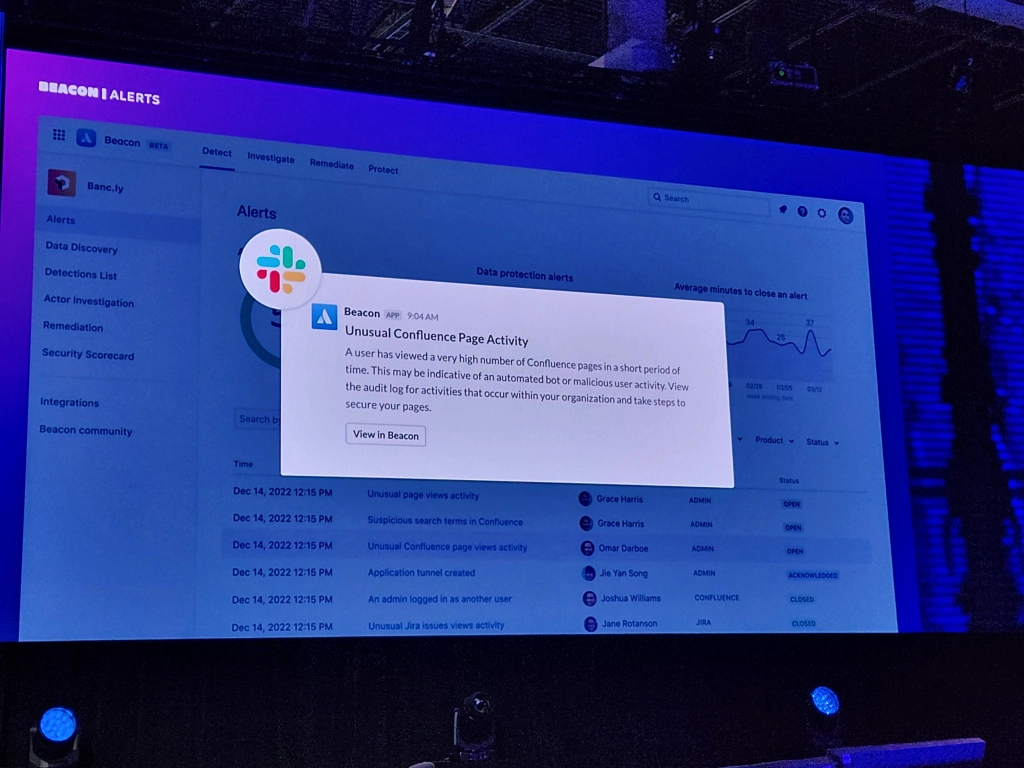
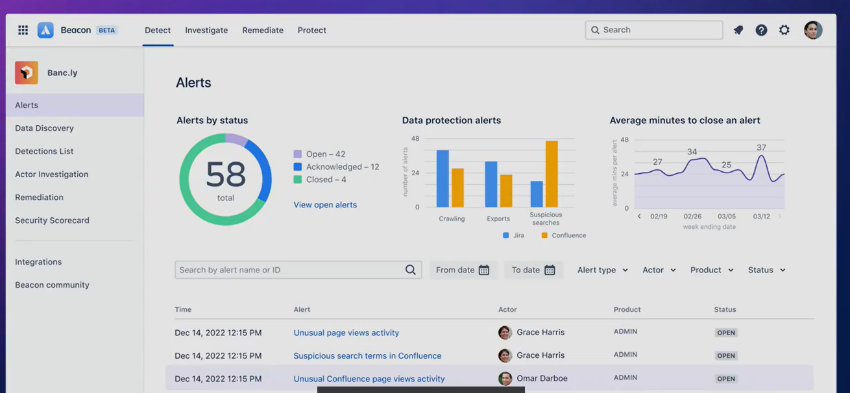
Beacon – currently in public beta – builds on an internal anomaly detection program Atlassian developed for their own security teams; it won a 2022 ARN Innovation Awards in the Vendor Innovation category.  They describe it as “an intelligent threat detection engine, built for Atlassian cloud products.”  Beacon provides a system of intelligence over your entire Atlassian Cloud suite, ingesting user activity and alerting you to review events that might post a risk.

Photo Credit. The Jira Guy – thejiraguy.com

How does it work?

Beacon continuously monitors your Atlassian Cloud products for five different kinds of events:

  • Authorization and access events: Safeguard your data against unauthorized access with alerts for unusual logins, policy changes, password resets, and API key changes.
    • Account access: An admin has logged in as another user, Org admin removed/added
    • Policy change: An IP allowlist has been created, modified, or deleted; A 2FA/MFA/2SV policy for a user or org changed, authentication policy created/updated/removed, Verified domain added/removed
    • Password change: An organization admin has reset their password
    • API key changes: An admin API key was created
  • Data exfiltration events: Secure the flow of information throughout your business with alerts for mass exports, audit log exports, and external syncing risks.
  • Unusual user activity: Spot high-risk user behavior at scale with alerts for suspicious searches and excessive crawling on Confluence and Jira.
  • Product configuration events: Surface insecure configurations that can impact your company’s hosted data, whether they’re created by accident or by malicious actors.
  • Integration change events: Always know which apps have access to your systems with alerts for marketplace and ecosystem app installs.

When Beacon identifies an unusual event, it alerts you with details like user location, previously triggered alerts, and recent user activity.  Atlassian also provides an ever-growing Detection Library, a catalog of detections to familiarize yourself with each alert you may receive. Some detections have instructions on testing or checking settings within the Admin hub.

Beacon also integrates with Teams, Slack, and SIEM so your teams can receive alerts where it’s most useful to them.

You can learn more about Beacon, and request to join the beta testing phase, on Atlassian’s Beacon product page.

With Beacon, you have visibility where it counts, and can act before suspicious activity becomes an incident.

Oxalis Is Here to Help

We provide Atlassian consultancy services to better enable businesses to be more productive while also enabling efficiency. As an Atlassian Platinum Partner, whatever your need, the team at Oxalis can help you scale, develop, and grow. 


NSWC Panama City Seamless Migration from DI2E to Self-Hosted Atlassian Data Center

The Challenge

The Defense Intelligence Information Enterprise (DI2E) DI2E was an online environment supporting software development, management, operations, communication, and collaboration for Federal Agencies in the Department of Defense and the Intelligence Community. DI2E provided integrated, hardened, and managed DevSecOps and lifecycle management tools, freeing Agencies to concentrate on the mission, not infrastructure or tools. The tools revolve around the Atlassian suite: Jira, Confluence, and Bitbucket, complemented by popular open-source tools like Jenkins, Nexus, and SonarQube.

The DI2E program was canceled, requiring all organizations utilizing it to move their work to a different location. The Naval Surface Warfare Center Panama City Division (NSWC PCD) was under a tight timeframe, needing to move their data, establish different access patterns and maintain security at the CUI level.

Their teams wanted to continue using the Atlassian toolset and were interested in standing up their own and migrating their data from DI2E into an on-premise Atlassian enterprise environment.

Our Approach

Oxalis performed a system introspection to understand NAVSEA Panama City security requirements, tools, and processes. We assessed the suitability of AWS GovCloud for meeting NAVSEA Panama City objectives of setting up an ITAR-compliant environment that fulfills their current needs and allows for future scalability. Oxalis designed, configured, and implemented Jira Software in an ITAR-compliant environment hosted in AWS GovCloud.

Oxalis expanded the environment over time to include Confluence and GitLab. Additionally, we provided training, ongoing security monitoring, support, maintenance, and operations activities, and efficient data management practices.

The Outcome

  • NSWCPC migrated all development activities off of DI2E before the End of life (EOL)
  • No unexpected (and mitigated) issues were encountered during the data migration
  • Teams experienced minimal downtime and disruption.
  • On-premise Atlassian Data Center environment stood up to replace DI2E and support long-term needs of NSWC PCD
  • Provided an optimized, validated, and executable migration plan for NSWC PCD RDT&E teams
  • Scalable and repeatable processes that can be used across Naval Surface Warfare Centers and other agencies migrating off of DI2E

Services Provided

  • Project Management
  • Asset Management
  • Change Management
  • Knowledge Management
  • Training & Transition Management
  • Product Development

About NSWC

NAVSEA designs, builds, delivers and maintains ships, submarines and systems reliably, on-time and on-cost for the United States Navy.

Get Started with Oxalis

Looking for similar results to NSWC ? Get started with the expert team at Oxalis today.

Atlassian’s Team 23 Takeaways & Product Announcements

We’re thrilled to announce that Oxalis attended Atlassian’s Team ’23 event in Las Vegas. Our team is excited to share the latest news about the Atlassian product announcements, and share how they directly impact your business. Who are these tools and updates for? And how can you best maximize your Atlassian investment with these upgrades?

Atlassian’s core mission is to unleash the potential of every team. They understand that different teams work differently, which is why Atlassian has enhanced their platform to enable teams to balance autonomy and alignment, and work differently together. Did you know Atlassian just surpassed 250,000 customers? Distributed work is here to stay, and technology is a core of every business. Let’s take a look at the latest product announcement and updates.

Atlassian Cloud Platform Updates

Atlassian Intelligence – Your New 24/7 Virtual Teammate

Atlassian has been integrating AI capabilities into its products for years, and Team ’23 announced the most significant leap forward yet. Meet your new virtual team member: Atlassian Intelligence uses generative AI technology from OpenAI to help unlock your team’s full potential. In keeping with Atlassian’s commitment to security, their partnership with OpenAI includes a zero-day retention policy, ensuring that no data is stored on OpenAI systems. 

Atlassian Intelligence interacts with text in Jira and Confluence to help you work more effectively by creating, summarizing, and extracting information from content. It’s there when you’re searching Jira issues, defining test plans, responding to customer requests, creating a new Confluence page using content from other pages – and more, and can do work for you.

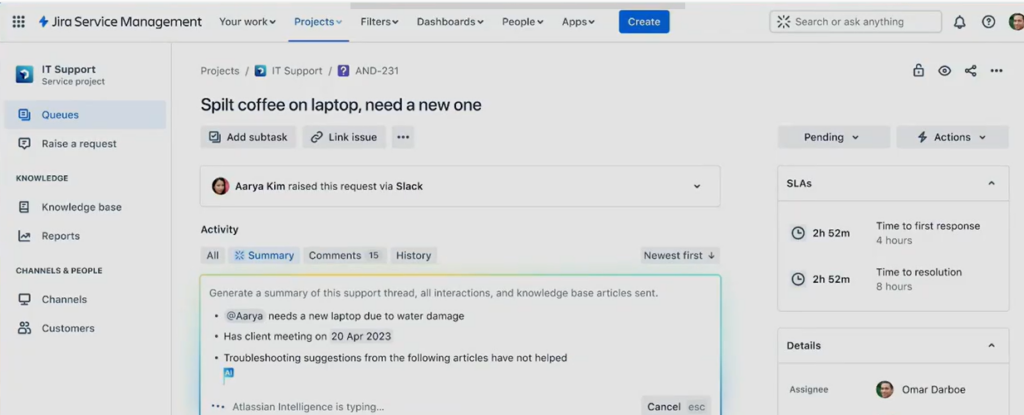
Atlassian Intelligence and Jira Service Management
Atlassian Intelligence generates a summary of the support history for a Jira Service Management ticket.

Who Can Use It?

As of this post, Atlassian Intelligence has a waitlist for beta testing.  Sign up to participate in the testing. 

How Will It Help?

Here are some of Atlassian Intelligence’s key abilities:

  • In Jira issue searches: Turn natural language into JQL.
  • In Confluence pages: Extract decisions and actions from meeting minutes.
  • In Jira Software: Help define test plans.
  • In Jira comments: Craft the perfect response, including changing the entire tone.
  • In Confluence pages: Jumpstart a first draft by pulling information from multiple Confluence pages.
  • In Jira Service Management: Via a virtual agent, meet user needs based on its understanding of knowledge base articles, and ask follow-up questions to take any necessary actions.
  • In Atlassian Analytics: Turn natural language queries into the SQL you need to analyze and visualize data across Atlassian products and connected third-party tools.

Atlassian Intelligence saves users time and frees them up for more meaningful work, which can dramatically accelerate what teams achieve.

You can see Atlassian Intelligence in action in Atlassian’s video demo.

Atlassian Together

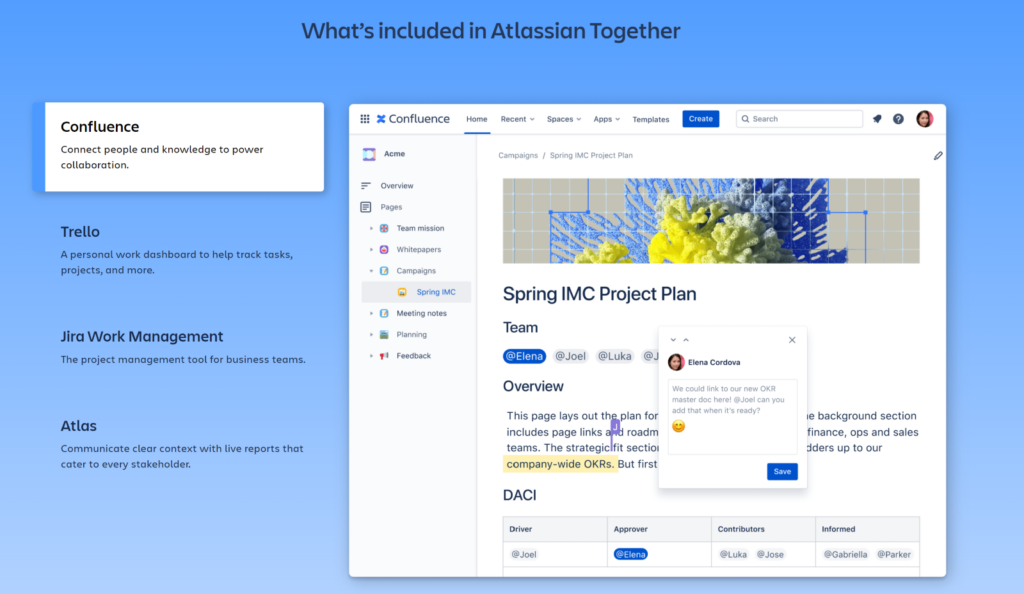
Atlassian has bundled their entire suite of work management products (Confluence, Trello, Jira Work Management, and Atlas) into a single cloud subscription with a unified admin experience. Each product within Atlassian Together empowers teams to work the way they want, while removing the barriers that keep teams from fully integrating.

Atlassian Together

Who Can Use It?

Enterprise Cloud plans have access to this bundle. 

How Will It Help?

As with insurance, bundling products saves money.  But Atlassian Together’s benefit extends beyond direct savings by integrating the work of entire organizations. Atlassian’s products have until recently focused on enhancing the performance of technical teams, but organizations will struggle to reach their full potential as long as business teams and technical teams remain siloed,operating on completely different platforms with disparate and disconnected tools.

Atlassian Together integrates seamlessly with Jira Software and Jira Service Management. This suite of work management products unblocks open, agile transformation for all teams, enabling unprecedented cross-company collaboration. It also improves asynchronous collaboration among distributed teams, by making it easy for people to: pick up where teammates leave off, follow, track, and contribute to important work along the way. And the more employees can collaborate asynchronously, the fewer meetings they need to stay in sync – which frees up even more time to be productive.

Atlassian Analytics 

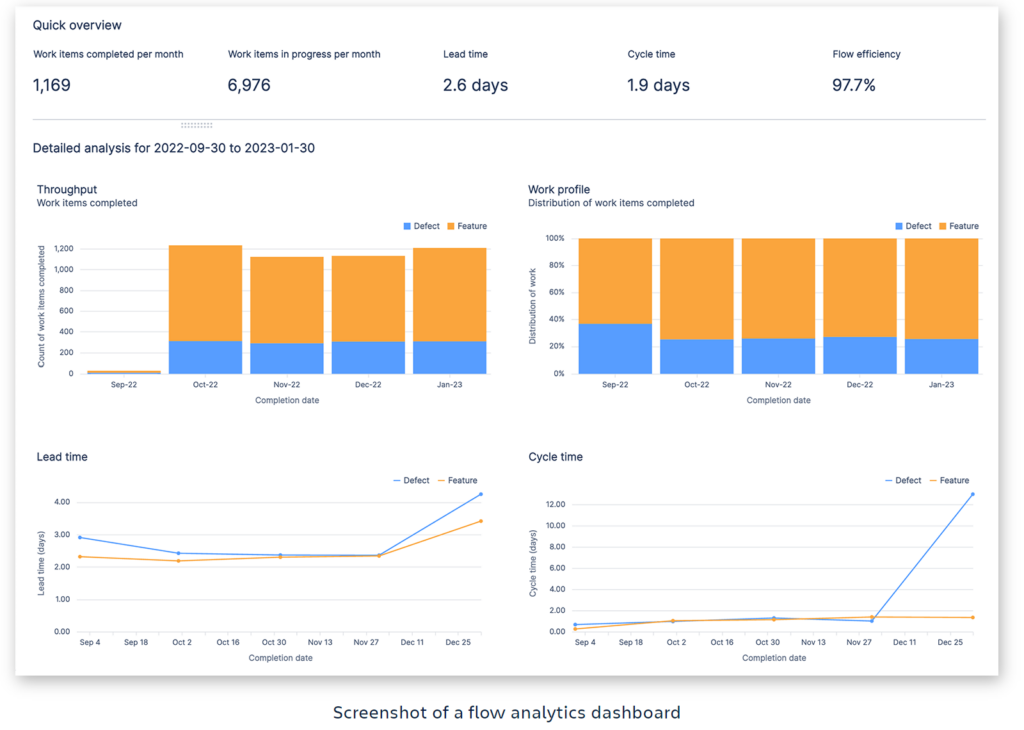
Individual Atlassian products typically come with their own reporting, but for larger organizations with many products, there has been no good way to create complex reports from data across Atlassian AND third-party data sources. Atlassian Analytics meets this need, providing straightforward and adaptable methods for visualizing data from Atlassian products as well as non-Atlassian data sources such as Snowflake, Amazon Redshift, Google BigQuery, Microsoft SQL Server, PostgreSQL, and more.

Atlassian Analytics

Who Can Use It?

Atlassian Analytics is built into the Enterprise Cloud plan.  If you’re already on Enterprise, you can add it to your site.  If you’re interested in upgrading to Enterprise, we can help. 

How Will It Help?

Need to understand how your development cycle is delivering value to your customers? With Atlassian Analytics, you can measure the ratio of defects and bugs to the total issues completed in a given time period, while tracking lead time, cycle time, and the distribution of work completed.

Need to track key metrics across change, incident, and request management? Now you can move beyond merely monitoring trends in change request resolution, to more advanced approaches like analyzing objects in your asset and configuration management system, their related issues and projects, and time spent on them.

In Atlassian Analytics, you configure which products and instances you want to pull data from, then include or exclude projects (Jira Software, Jira Service Management, Opsgenie), assets, or spaces (Confluence). You can use pre-built reporting templates, or build custom views and spin up new charts.

This see-everything-at-once reporting solution will speed up decision-making at all levels across your DevOps, IT service management, and business teams by giving you access to more comprehensive, integrated data.

For more information, read Atlassian’s product overview.

New Products

 At Team ’23, Atlassian revealed their highly-anticipated security product, Beacon. 

Beacon

beacon

Beacon builds on an internal anomaly detection program Atlassian developed for their own security teams; it won a 2022 ARN Innovation Awards in the Vendor Innovation category. They describe it as “an intelligent threat detection engine, built for Atlassian Cloud products.” Beacon provides a system of intelligence over your entire Atlassian Cloud suite, ingesting user activity and alerting you to review events that might post a risk. You may take all the precautions you can to prevent intruders from breaching your Atlassian Cloud suite, but if they do get in, you need to be prepared to catch them as soon as possible, and Beacon will help you.

Who Can Use It?

As of this post, Beacon is available for early access to all customers who sign up, and is free in beta. Keep your organization secure with the next generation of threat detection.  

How Will It Help?

Beacon continuously monitors your Atlassian Cloud suite for five different kinds of events: 

  1. Authorization and access events: Safeguard your data against unauthorized access with alerts for unusual logins, policy changes, password resets, and API key changes. 
  2. Data exfiltration events: Secure the flow of information throughout your business with alerts for mass exports, audit log exports, and external syncing risks. 
  3. Unusual user activity: Spot high-risk user behavior at scale with alerts for suspicious searches and excessive crawling on Confluence and Jira. 
  4. Product configuration events: Surface insecure configurations that can impact your company’s hosted data, whether they’re created by accident or by malicious actors. 
  5. Integration change events: Always know which apps have access to your systems with alerts for marketplace and ecosystem app installs. 

If your admins are already taking all these steps, Beacon will save them time, and you money. If they’re not doing these things, then Beacon will make your Atlassian suite a whole lot more secure.

Jira Product Discovery

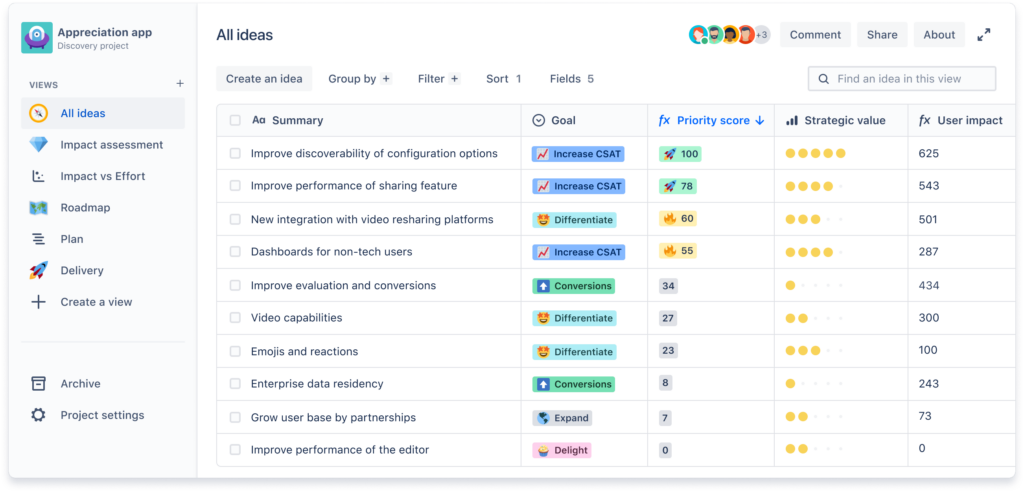
This new Atlassian product meets the particular needs ofProject and Product Managers on software teams, who are underserved by other Jira products. It providesa standardized, out-of-the-box tool for PMs to capture ideas – whether feature requests, bugs, input from stakeholders, etc. – organize them, prioritize them, communicate them visually via roadmap views, and convert them into Jira Software issues.

Until Jira Product Discovery, it was possible to use, for instance, Jira Work Management to handle this process, but that required Jira admins to set up each custom project, and still wouldn’t do everything a PM needs in the way they need it.

Jira Product Discovery
The All Ideas view in Jira Product Discovery

Who Can Use It?

As of this post, Jira Product Discovery is in beta for public testing. You can sign up to participate for free.

How Will It Help?

The success or failure of software teams can depend on how well the PM manages the team’s workload. A hodgepodge of spreadsheets and presentations may sort of get the job done, but it doesn’t maximize your team’s potential.

  • Bring order to chaos: Collect ideas and insights, wherever they come from, in one place.
  • Refine and distil: Assign each one a Goal, a Priority, a Strategic Value, and a User Impact (and other fields), then add key decisions and next steps.
  • Track the delivery: Create Jira Software issues right from the idea, then track the progress there.

Jira Product Discovery will help you do the right things, in the right order, and at the right time, focusing on work that will deliver on benefits.

New Features for Existing Products

Bring Your Own Encryption Keys

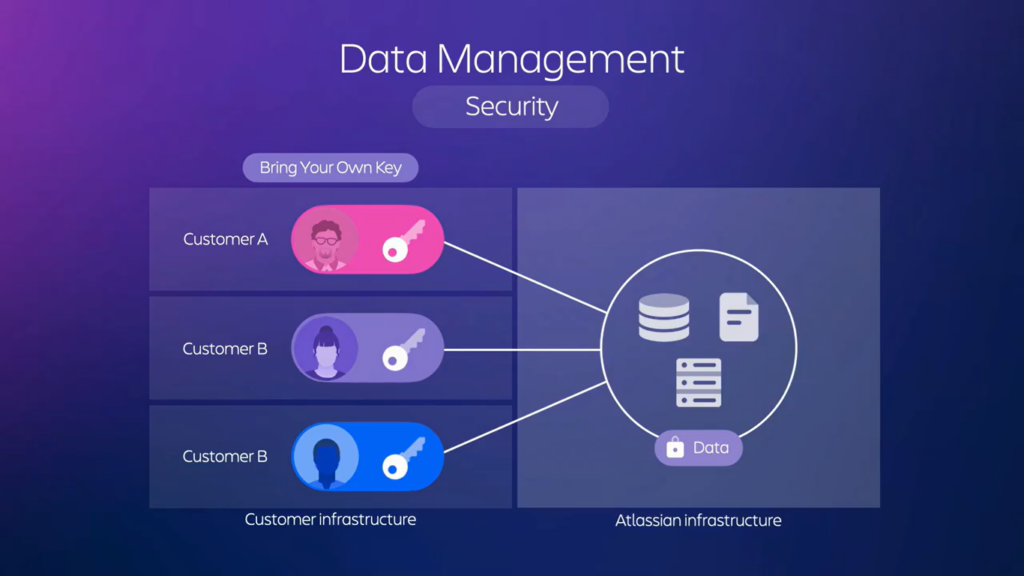
Data Management security

Atlassian continues to prioritize security.All customer data in Atlassian Cloud products is encrypted at rest and in transit, and until now, only Atlassian had the encryption keys. Soon they will allow you to use your own keys to encrypt your Cloud product data, affording you more control and therefore – if properly managed – an extra layer of security..

Who Can Use It?

An Early Access Program will be available Q1 2023 as part of Atlassian’s Enterprise plan.

How Will It Help?

The benefits of BYOK encryption include:

  • Reduced risk: BYOK adds another layer of protection for sensitive data.
  • Improved data governance: Access to encryption keys hosted in your AWS account can be logged and monitored via AWS CloudTrail.
  • Increased control: You can revoke access to your encryption keys without vendor reliance.

Learn more at Atlassian’s BYOK page

Confluence Updates

 Confluence is receiving various eye-catching enhancements, such as the introduction of a built-in whiteboarding content format, global commenting functionality, automation, and generative AI-powered abilities. 

Confluence Whiteboards

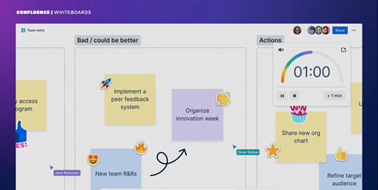
Confluence Whiteboards

Whiteboards add a dynamic component to Confluence, giving you a digital canvas to collaborate, share ideas and visualize work with features such as stickers, shapes, lines, and more. How many times have we all posted a photo of the whiteboard from the meeting room? That gets the information into Confluence, but it’s not useful or interactive. With Confluence Whiteboards, the content you add can link to and interact with Jira and other Confluence pages.

Who Can Use It?

Everyone with a subscription to Confluence Cloud, on any plan, can join the Early Access Program waitlist for beta.

How Will It Help?

Confluence’s new whiteboards will add a visual, dynamic way to brainstorm, organize, and conceptualize while keeping it all digital, in a way Confluence hasn’t been able to before. 

  • Freedom of expression: Brainstorm, collaborate, and diagram on an endless canvas.
  • Turn ideas into action: Convert stickies into Jira issues and Confluence pages; connect Jira issues together to map out work; edit Jira issues and Confluence pages without leaving your whiteboard.
  • Everything in one place: Whiteboards keeping your ideas, plans, and tasks connected in one hub, providing access for all and creating transparency by automatically ensuring every team can access information.
  • Cost savings: Consolidate tools with a digital whiteboard for no extra cost – it is included with Confluence.

Automate, Integrate, Migrate: Everything within Confluence

Automation for Confluence enables admins to manage content, organize spaces, and notify teams of important updates without the manual overhead. When admins create rules, Confluence Automation works behind the scenes to complete routine functions that would otherwise have to be done manually. And you can use pre-built rule templates for popular Confluence actions.

Automation for Confluence

Who Can Use It?

Automation is available to all Confluence Cloud Premium and Enterprise customers.

How Will It Help?

As with Automation for Jira, this new feature for Confluence saves time on tedious manual tasks, so you can get back to the work that really matters.

Here are some of the things Automation for Confluence can do:

  • Send team updates on work progress.
  • Remind people about incomplete tasks.
  • Auto-archive outdated or inactive content.
  • Auto-label or find-and-replace page labels.
  • Efficiently manage large amounts of external data from sources such as CSV files, databases, and other applications through bulk operations.
  • Provide an intuitive, text-based user interface to help you quickly construct commands and recall past actions.
  • Keep a log of previous actions, available in a readable JSON format.

Learn more about Confluence Automation.

Coming Soon to Confluence:  We can expect capabilities that will help enable secure and seamless collaboration with people who are not within your organization via External Collaboration, Confluence Guests, and Public Links.  

What About Scalability?

Team ’23 announced that Jira Software will expand from 30K users to 50K, and Jira Service Management will handle 20K agents instead of just 10K.  

It’s also worth mentioning that the Atlassian Admin hub serves as a central mission control where you can conveniently manage your users and product subscriptions in a single location. Atlassian constantly introduces new features to the Admin hub, such as visibility and monitoring of app and product usage through audit logs. 

Atlassian Administration

End Bad Service Management with Jira Service Management (JSM)

The upcoming updates of Jira Service Management include team-managed configurations, which let you customize the service desk according to your requirements without disrupting other teams. Additionally, JSM will introduce a Customer support template, promoting visibility and preventing silos.

Many businesses suffer from bad service management. A few of the common culprits are bloated budgets, irritable teammates, blurred vision, migraines from setup complexity, nausea from outdated experiences and paralysis death of deployments, but fortunately with Jira Service Management you can get rid of the principal IT service management pitfalls.  

End Bad Service Management

You can enjoy multiple advantages by using Jira Service Management such as customization, integration, workflow automation, reporting and scalability. Overall, Jira Service Management is a powerful tool for managing ITSM processes, providing businesses with the flexibility, integration, and automation capabilities they need to deliver high-quality services to their customers. 

Atlassian announced a discount of 30% off the first year of JSM through June of 2023 with a 3-year commitment.

Watch Team ’23 On-demand

Atlassian has made available on-demand videos from Team ’23.

Start the Conversation with Oxalis 

Do you have some questions or updates about the Atlassian’s key takeaways? We’d like to hear your comments, contact us in the form below. We provide Atlassian consultancy services to better enable businesses to be more productive while also enabling efficiency. As an Atlassian Platinum Partner, whatever your need, the team at Oxalis can help you scale, develop, and grow. 


Top 5 Jira Service Management Best Practices for Ultimate Efficiency

If you’re using Jira Service Management (JSM), you naturally want to optimize its potential and achieve the best possible return on your investment. These five strategies will help you streamline your IT service desk operations, empower both customers and support agents, and unlock the full value of JSM for your organization.

Here’s what you need to focus on:

  • IT Service Management (ITSM): Emphasizing the broader context in which JSM operates
  • Customer self-service: Highlighting the cost-saving benefits of self-resolution
  • Agent productivity: Tying improved workflows directly to agent efficiency
  • Jira customization: Stressing the power of tailoring JSM to specific needs
  • Jira Service Desk An alternate term for JSM, sometimes searched for by users

Maybe you’ve decided to move to Jira Service Management and want to do it right. 

Maybe you’ve been using this tool, and want to get more out of it. 

Either way, observing JSM best practices will get you there. Even non-IT teams like legal, HR, and finance are using it successfully. So how do we distill the top five JSM best practices, given the wide range of teams it works for? We focus on the key features that deliver value to all teams.

#1: Invest in Training

Jira Service Management is a powerful platform with extensive capabilities. Don’t miss out! Thorough training for everyone involved is essential:

  • Resources: Explore Atlassian’s documentation, blog posts, videos, or even hire consultants.
  • Beyond IT: JSM benefits many teams, so train all potential users.
  • Customization: Research plugins, consider custom workflows, or leverage the API to tailor JSM perfectly to your processes.

#2: Optimize Your Customer Portal

Your portal is the face of your service. Make sure it’s a great experience for your users:

  • Clarity: Clear language, intuitive navigation, and FAQs guide customers to quick solutions.
  • Request Types: Offer relevant options, starting with the essentials and adding as needed.
  • Automation: Use hidden fields and automation to route requests seamlessly.

#3: Master Your Queues

Queues are your agents’ workspaces – keep them efficient and organized:

  • Team Focus: Emphasize team priority queues to promote collaboration.
  • Personalization: Train agents on starred queues for individual customization.
  • Balance: Fine-tune queue filters to manage team priorities while allowing agent flexibility.
  • Visibility: Test workflows to ensure all issues are visible in the appropriate queues.

#4: Harness the Power of Knowledge Bases

The Knowledge Base (KB) feature of JSM is an efficiency tool that gets better with time, and serves both your portal users and your agents — if you let it. When appropriately configured, a project’s KB helps you two ways. First, it lets portal users answer their own questions without taking any of your agents’ time. Second, when an agent is working a request, the KB feature suggests content that might be relevant to that request. Let’s look at those.

Each KB article you create will answer one or more customer questions over and over. As a portal user types in the Summary field of a request form, JSM searches that project’s KB for the text they type, and suggests matching articles.

If a portal user doesn’t happen across the right article in the portal, an agent can easily reply by sharing it in a comment.

You can monitor how effective your KB is, to a certain extent, using the default reports.

“Requests deflected” shows per day how many portal users read a KB article and hit the ‘thumbs up’ button to answer the question “Did this article help?” at the bottom of the page; most users won’t take the time to do that, so that metric is of limited help. But the report also shows how many KB articles are viewed each day, and as you add to your KB, you can track that trend vs. the number of requests submitted, to get an overall sense for how well your KB is helping customers.

For agents viewing a request from within Jira, a Knowledge Base field in the issue will indicate how many articles match the words in the Summary field. That makes it easy to identify articles that may resolve the user’s request. But there’s more!

Under the issue’s details section, agents will see a “Similar Requests” section that lists similar previous requests based on the Summary and Description fields. This is how a well-used KB gets better with time — agents save time on more and more requests because they can easily see how similar requests were resolved, rather than having to figure each one out separately.

#5 Make the System Do the Work

When implementing JSM, it can be easy to focus on agents and how they work incoming requests.

There is not just one, but two ways you can reduce the amount of repetitive work your agents do:

  • Workflow customization, and Automation.

Workflows are obviously a key feature of all versions of Jira, and you may be familiar with the workflow editor. But customizing workflows goes way beyond adding transitions and statuses, or populating fields, or using whatever predetermined options an app may add.

Jira allows you, through apps such as Scriptrunner, to write your own Java code that executes either in a transition or whenever a system event occurs.

That code, using Jira’s and JSM’s APIs along with any publicly accessible Java library, vastly expands what your workflows can do for you. Complex math, complex logic, complex transformation of field content, integrating with other systems using their APIs — all this and so much more is possible.

Automation is a per-project JSM feature for building simple if-then workflows called “rules” that fire off whenever the defined trigger event occurs. You can configure your own by choosing what event(s) trigger the rule (like “Rule is run when an issue is created”), what additional conditions have to be true (like “Request Type equals Promotion”), then what happens – or you can use built-in templates like “Resolve issues due to inactivity” or “When an incident is created, create a post-mortem page in Confluence.”

Because Automations are just a list of rules that can easily be individually configured and enabled/disabled, they’re generally easier to work with — but you do have to add them to each project. Workflow customizations, on the other hand, may be more involved to work with, but are shareable and much more powerful. Jira Service Management gives you both options.

More Reading in JSM Best Practices

Atlassian’s JSM is a complex product, useful for change management, incident and problem management, service operations and support, and much more. If you want to dive into JSM best practices for different teams and individual features, Atlassian has a good starting place.

Get More Information

To get started, simply fill out the form below with details about what you are looking to achieve.
An expert member of our team will be in touch shortly. With Oxalis, you can expect results, not excuses.

Recommended Blog Post

Improving Asset Maintenance for Optimal Performance: A Case Study

The Challenge

A technology consulting company was providing maintenance and operational support for a diverse set of customers, but keeping track of all the necessary information created problems. Each customer had different software, infrastructure, and operational systems.

With a continuous schedule of maintenance required for their customers, tracking and managing this complexity became burdensome and inefficient.

Information about customers’ systems, setup, and environment was maintained in an ad hoc manual way.

Our Approach

Oxalis held and conducted stakeholder interviews to solicit needs and understand their pain points.

We then analyzed their existing processes and concluded that Jira Service Management and Atlassian Asset Management (formerly insight asset management) was the solution.

We designed and created an insight Asset Management schema that allowed easy organization and visibility into their client’s assets and infrastructure. Another vital component was adding intuitive automation and reports which helped to track expiration dates, maintenance schedules, and overall success.

Finally, we instituted overall governance for their new structure to manage cross-system integration and change.  Learn more about our Enterprise Services.

The Outcome

The company’s employees saw an average time savings of 35% per week searching for data. Their effort and time spent investigating security alerts were virtually erased. Because of their automated, no maintenance windows, they have witnessed no unforced errors to undetected expiration. The company eliminated human error in scheduling and planning preventative upkeep.

The Oxalis & Atlassian asset management system improved the client’s digital asset management by saving them time, increasing accuracy, and streamlining workflows. This resulted in better control and visibility of their assets, leading to more efficient and effective software development.

The impact of implementing the asset management system was remarkable. Our employees experienced an average time savings of 35% per week, as data became easily accessible without extensive searching.

Services Provided

  • Asset Management
  • Change Management
  • Knowledge Management
  • Transition Management
  • Training
  • Project Management

Contact Us

Revolutionize Your Work Management with Jira Service Management

Challenge

The client’s teams were struggling to manage work and keep up with service requests across various projects and teams.

The results led to difficulties managing operations and prompting a request for additional user licenses. This circumstance has created a challenging scenario for upper management to gain insight into service-related issues costing valuable time.


Our Approach

After conducting interviews with the client’s teams, Oxalis gained an understanding of the current scenario and began developing a strategy for how they desired their system to operate. Next, utilizing this information, we were able to design a new Jira Service Management (JSM) organizational structure that was better aligned with both their team and end-user teams.

Then after the system was designed, we successfully implemented the system for their teams and created their desired forms and needed reports. Next, our team migrated their data from their old infrastructure to the new while also preserving data history and vital knowledge base information.

Finally, we worked with the client’s team on change management and training through their new structure which connected all their users, developers in one easy to utilize ecosystem. Learn more about our Enterprise Services.

Services Provided

  • Change Management
  • Transition Management
  • Request Management
  • Training
  • Project Management
  • Data Migration

[bodymovin anim_id=”1235″ loop=”true” autoplay_viewport=”true” align=”center”]

Atlassian Toolset

  • Jira Service Management

The Outcome

Through Oxalis’s strategies, the client was able to decrease their Jira Service Management instances, resulting in significant cost savings and improved service management operations.

The implementation of Jira Service Management and customized features allowed for appropriate routing of work requests, leading to faster resolutions and better customer satisfaction. Additionally, the client was able to improve their operational management, gain greater visibility into service-related issues, and enhance tracking.

[bodymovin anim_id=”1236″ loop=”true” autoplay_viewport=”true” align=”center”]

Achieve Easy Work Management with Oxalis & Atlassian

Work management with Oxalis & Atlassian is made easy with its intuitive interfaces, powerful integrations, and a wide range of customization options, making it an ideal solution for teams of any size or industry. With the help of tools like Jira, Confluence, Trello, and Bitbucket, Oxalis provides end-to-end solutions for project and work management, from ideation to deployment.

Get more information


Looking to achieve similar results?
Fill out the form below to get in touch with our expert team today.