Atlassian Cloud Pricing Adjustments [October 2023]

Atlassian has announced an important update that will affect all Cloud customers, set to come into effect on October 18th, 2023.

What do you need to know?

Atlassian Cloud pricing will be adjusted to reflect the enhanced features, improved performance, and continued innovation that Atlassian is known for. The updates will apply to all Cloud customers, including both new and existing users.

UPDATES

Jira Software & Confluence

Starting October 18th, 2023, subscribers of the Standard, Premium, and Enterprise tiers for Jira Software and Confluence will observe a 5% price adjustment. This adjustment aims to align the pricing with the enhanced features and services that Atlassian is rolling out.

Jira Service Management

For Jira Service Management, the changes will be tier-specific:

  • In the 250-agent tier, subscribers across all Standard, Premium, and Enterprise tiers will experience a 5% increase.
  • For the 500-agent tier, a 30% increase will apply across all tiers.
  • In the 1,000-agent tier, prices will rise by 25% for all tiers.
  • All other tiers can anticipate a 20% increase.

Atlassian Access

For Atlassian Access, tiers exceeding 1,000 users will incur a 10% price adjustment. Moreover, it’s worth noting that tiers surpassing 10,000 users will no longer increment in 200-user steps.

Talk to Us

We understand that such changes may raise questions or concerns, and we want to assure you that we are here to support you every step of the way. Our dedicated support team is readily available to address any queries you may have regarding these adjustments.

At Oxalis, we remain committed to ensuring a seamless experience for our valued community, and we believe that these adjustments, while necessary, will ultimately contribute to an even stronger and more robust Atlassian Cloud ecosystem.

Our recommendations

As the October 18th date approaches, consider taking the following proactive steps:

  • Review Your Subscription: Evaluate your existing subscription to ensure it aligns with your team’s needs and goals.
  • Stay Informed: Keep an eye out for updates from Atlassian regarding the pricing changes. Atlassian will likely provide detailed information on how these updates will affect your specific subscription.
  • Reach Out: If you have any questions or concerns, don’t hesitate to reach out to Atlassian’s support or your account manager. They can provide insights and guidance tailored to your situation.

Contact Us


Recommended blog post

6 Reasons to Work With an Atlassian Platinum Solutions Partner

In the ever-evolving digital world, businesses need every advantage to streamline their operations and maximize productivity. Atlassian’s powerful suite of tools, like Jira, offers incredible potential – but only if implemented correctly. Unlocking that potential often requires expert guidance. That’s where Atlassian Platinum Solution Partners come in. These partners — like Oxalis — are deeply knowledgeable about Atlassian products. They can help you select the right tools, tailor them to your specific workflows, and ensure a smooth, successful integration for a significant productivity boost. In this blog, we’ll explore what it means to be an Atlassian Platinum Solution Partner and how they can transform your business.

What is an Atlassian Solution Partner?

Atlassian Platinum Partner & Atlassian Implementation Partners

Think of Atlassian Solution Partners as your guides to navigating the powerful world of Atlassian tools. These specialized companies work closely with Atlassian and fall into three tiers: Silver, Gold, and Platinum. Each tier reflects the partner’s level of experience and proven track record.

Platinum Partners: Your Atlassian Transformation Experts

Atlassian Platinum Solution Partners aren’t just resellers, they’re problem-solvers with a deep understanding of Atlassian’s enterprise-level solutions. These partners excel at delivering customized support, making them indispensable for businesses of all sizes.

What sets them apart:

  • Industry Insights: Platinum Partners understand your challenges. They’ve seen how businesses in your field use Atlassian tools to streamline project management, embrace agile methodologies at scale, revolutionize IT service desks, and optimize development cycles.
  • Tailored Solutions: No cookie-cutter approaches here! Platinum Partners analyze your specific needs and workflows. Then, they expertly configure Atlassian products to match, ensuring a seamless fit for your teams.
  • Staying Ahead of the Curve: In the fast-paced world of software, Platinum Partners are always learning. This means you’ll benefit from cutting-edge features, advanced integrations, and the latest Atlassian know-how.

The Bottom Line: With a Platinum Partner by your side, you’re not just buying software – you’re investing in a powerful transformation that drives measurable results for your business.

Why Work With an Atlassian Platinum Solution Partner?

Partnering with a Platinum Solution Partner like Oxalis unlocks a whole new level of success with Atlassian tools. Here are six reasons why.

1. Expert Guidance:

Platinum Solution Partners possess a level of expertise that sets them apart from the rest. When you work with them, you’re tapping into a wealth of knowledge and Platinum Partners have the deepest knowledge of Atlassian products. They’ll help you choose the right tools, tailor them precisely to your workflows, and ensure a smooth, effective rollout. It’s like having an in-house Atlassian expert.

2. Maximize Your Investment:

Platinum Partners are authorized Atlassian resellers. They’ll secure the best licensing deals, apply all available discounts, and make sure you’re never paying more than necessary.

3. The “Red Phone” Access to Atlassian:

Think of a Platinum Partner as your “inside line” to Atlassian. They have close ties, insider knowledge, and can quickly resolve technical issues or get you access to the newest features.

4. Success Stories Speak for Themselves:

Platinum Partners don’t just talk the talk. They have helped countless businesses like yours achieve their goals with Atlassian. Their track record is your reassurance.

5. Stay Ahead of the Game:

Atlassian is always innovating. Platinum Partners are on top of the latest updates, strategies, and integrations, so you’ll always have the competitive edge.

6. Solutions Built for YOU:

No one-size-fits-all approach here! Platinum Partners analyze your business inside and out. They’ll design a customized Atlassian setup that supports your unique goals and processes.

Oxalis: Your Atlassian Transformation Partner

As an Atlassian Platinum Solution Partner, Oxalis isn’t just about the tools — we’re about transforming the way you work. Our team of expert Jira consultants and Atlassian specialists become an extension of your team, guiding you every step of the way towards greater efficiency, collaboration, and success.

Why Oxalis?

  • Partnership, not just service: We don’t just install software — we understand your challenges deeply and build lasting solutions that align with your business goals.
  • Proven Excellence: Our Platinum status is more than a badge. It’s your guarantee of deep Atlassian knowledge, tailored implementations, and a track record of driving results for our clients.
  • Your Success is Our Mission: Our client-focused approach means we’re invested in your journey. We’re committed to empowering you to get the absolute most out of your Atlassian investment.

Ready to unlock the true potential of Atlassian? Partner with Oxalis and experience the difference a transformation partner can make.

Contact Us

Oxalis delivers Platinum-level expertise to businesses like yours. Let’s discuss how we can transform your workflows. Contact us now for a consultation.

Atlassian FedRAMP Moderate: Timeline and Alternatives for Secure Collaboration

Good news for government agencies! Atlassian is making significant strides towards FedRAMP authorization for its cloud products. Here’s an update on their progress and what it means for you.

Key Milestones Achieved

  • On Track for “In Process” Designation: Atlassian expects to achieve the “In Process” designation through agency authorization by Q2 2024.
  • Moderate Authorization to Operate Coming Soon: They are aiming for a “Moderate Authorization to Operate” by Q1 2025.
  • Expanded FedRAMP Coverage: Great news! Atlassian has expanded FedRAMP coverage to include Jira Service Management Cloud. This enables seamless collaboration across three of their core cloud offerings.

What This Means for Your Teams

  • Enhanced Security: Atlassian has implemented a substantial portion of the rigorous FedRAMP Moderate security controls throughout their platform.
  • Seamless Collaboration: The inclusion of Jira Service Management Cloud in the FedRAMP scope facilitates smooth collaboration across vital project management tools.

Do You Need FedRAMP Moderate?

Before migrating to the cloud, it’s crucial to assess your data components and confirm the necessary level of control is in place.

Need a Solution Now?

Since Atlassian Server support ended in February 2024, here are your options for secure collaboration as FedRAMP integration for the cloud progresses.

  • Atlassian Data Center: This on-premises solution provides robust security and support while Atlassian works towards FedRAMP authorization for the cloud.
  • Easy Data Center Migration: Transitioning to Data Center is now simplified. You can convert your Server instance to Data Center with just a new license key, if a clustered deployment isn’t required.
  • Alternative Cloud Solutions: Consider leveraging commercial cloud services like AWS in US regions with FedRAMP compliance.
  • Strategic Cloud Migration Planning: Proactively prepare for future cloud migration by implementing data governance practices, assessing plugins, and ensuring your systems are cloud-ready.
  • Hybrid Approach: A hybrid approach might be suitable depending on your specific restrictions and limitations.

What’s Not Covered Yet?

It’s important to understand what’s currently excluded from the FedRAMP scope:

  • Items outside ITAR/EAR regulations
  • The status of plugins (still under evaluation)

Partnering with Oxalis for a Smooth Transition

Oxalis can be your trusted partner in navigating this transition. We offer:

  • Expert Guidance: Our team can help you identify and inventory your data, define compliance requirements, and design or refine business processes for compliance.
  • High-Compliance Infrastructure: We can assist in setting up a secure data center environment, including high availability configurations and government cloud integration options.
  • Streamlined Governance: We help establish governance protocols to simplify future data transitions and platform moves.
  • Effortless Teamwork: Get started with Oxalis and empower your teams with seamless collaboration tools.

Don’t Wait!

Embrace secure and compliant collaboration. Contact Oxalis today to embark on your journey towards data security, regulatory compliance, and operational excellence. Together, we can shape the future of secure collaboration in your organization.

Secure, Scalable, HIPAA-Compliant: Cambia’s Atlassian Cloud Journey with Oxalis

The Challenge

Cambia Health Solutions, a leader in healthcare innovation for over a century, faced a pivotal moment. With Atlassian Server reaching end-of-life, Cambia needed to transition to the cloud—but with HIPAA compliance as a non-negotiable requirement, the migration posed significant challenges.

Beyond compliance, Cambia sought:

  • A seamless migration for over 700 users from Atlassian Server to the cloud.
  • Stronger portfolio-level reporting through standardized workflows.
  • A scalable enterprise support model to serve 2,000 users efficiently.

They turned to Oxalis, a trusted expert in regulated industries, to lead the transformation.

The Oxalis Approach

Oxalis designed a strategic, phased migration to ensure security, efficiency, and minimal disruption.

Knowledge & Change Management: As teams transitioned, Oxalis helped build a robust Atlassian Knowledge Base, ensuring long-term adoption and self-sufficiency.

Enterprise Standard Workflows & Best Practices: We conducted a deep analysis of Cambia’s existing workflows, defining standardized Jira configurations that balanced structure with team flexibility.

HIPAA-Ready Security Architecture: Our team integrated Azure AD with Atlassian Access, meeting Cambia’s stringent InfoSec requirements while reinforcing compliance safeguards.

A Cohort-Based Migration Strategy: Rather than a one-size-fits-all approach, we rolled out migration waves tailored to each team’s priorities. Continuous feedback from each phase informed improvements for the next.

The Outcome

Cambia achieved a seamless, secure, and scalable cloud transition with measurable benefits:

Full Migration & Consolidation: 147 Rally workspaces successfully migrated to Jira Software Cloud, benefiting 700+ users.
HIPAA Compliance Maintained: Patient and sensitive health information remained fully protected.
Stronger Reporting & Insights: Standardized issue structures improved portfolio-level visibility across teams.
Streamlined Workflows: Agile teams gained greater efficiency and consistency, enabling faster project execution.

Services Provided

  • HIPAA-compliant cloud migration
  • Workflow optimization and standardization
  • Change and knowledge management
  • Jira reporting and project management

“I cannot speak highly enough of our external partner, Oxalis. Oxalis has been nothing short of top-notch — from a level of professionalism to a trusted Atlassian advisor, to a well-organized project team with great communication, and especially down to their personable, responsive project team members. I only half-joke when I say that the cutover plan for Phase One migration is a work of art. Thank you, Oxalis.”

HEIDI BROWN
Manager of Program Management, Cambia Health Solutions

Get Started with Oxalis: HIPAA-Compliant Cloud Solutions for Healthcare Innovation

Looking to achieve results like Cambia? Partner with Oxalis for HIPAA-compliant cloud solutions that enhance patient care, streamline operations, and ensure compliance.

Future-Proof Your Business: Why Atlassian Cloud is the Ultimate Investment

In today’s fast-paced digital world, the benefits of cloud computing are undeniable. But is Atlassian Cloud the right move for your organization? If you’re weighing the pros and cons of migrating your Atlassian tools, this comprehensive guide is for you. We’ll explore the compelling reasons why now is the perfect time to embrace Atlassian Cloud, the hidden costs of staying on-premises, and how partnering with a cloud migration expert like Oxalis can make your transition seamless and successful.

Whether you’re looking to boost efficiency, enhance security, or streamline collaboration, Atlassian Cloud offers a wealth of advantages that can transform your organization. Let’s delve into why moving to the cloud is more than just a trend – it’s a strategic decision that can unlock your team’s full potential.

Rethinking ROI: It’s Not Just About Cost

When contemplating the cloud, many organizations fixate on the initial price tag. But that’s just one piece of the puzzle.The real question is: what’s the long-term return on your investment?

On-premise solutions might seem cheaper upfront, but they come with hidden costs that can drain your resources over time. Think endless maintenance, upgrades, security patches, and the valuable time your IT team spends on these tasks instead of driving innovation.

Atlassian Cloud, on the other hand, offers a compelling value proposition that goes beyond the sticker price:

Elevate Your IT Team’s Impact:

  • Free up valuable resources by eliminating the need for on-premise infrastructure maintenance.
  • Redirect your IT team’s focus to strategic initiatives that drive business growth.
  • Improve developer experiences and respond faster to evolving business needs.
moving to atlassian cloud

Accelerate Productivity and Collaboration:

  • Empower your teams with cloud-exclusive features, centralized documentation, and a streamlined workflow.
  • Reduce context switching and wasted time spent searching for information.
  • Build smarter plans across multiple teams, keep stakeholders informed, and gain deep insights into your projects.
  • Automate repetitive tasks, freeing up your team to focus on high-value work.

Prioritize Security and Compliance:

  • Rest easy knowing your data is protected by Atlassian’s robust security measures, including encryption, access controls, and proactive threat detection.
  • Benefit from Atlassian’s commitment to transparency and rapid response in the event of security incidents.
  • Allow your security team to focus on strategic initiatives rather than firefighting.

The Future is in the Cloud: Why Wait?

Gartner predicts that by 2025, 80% of enterprises will have migrated entirely away from on-premises data centers. The cloud is not just a trend; it’s a fundamental shift in how businesses operate. Don’t get left behind.

Whether you’re a growing startup or an established enterprise, Atlassian Cloud offers the flexibility, scalability, and security you need to thrive in the digital age.

Partner with Oxalis: Your Cloud Migration Experts

Migrating to the cloud doesn’t have to be daunting. Oxalis, your trusted Atlassian Platinum Solution Partner, can guide you through every step of the process, ensuring a smooth and successful transition.

Our team of experts will assess your unique needs, develop a tailored migration plan, and provide ongoing support to ensure you get the most out of your Atlassian Cloud experience.

Ready to unlock the full potential of your Atlassian tools and embrace the future of work?

Contact Oxalis today and let us help you embark on your cloud journey.

Oxalis’ Proven Methodology: Your Atlassian Cloud Migration, Simplified

As your trusted Atlassian Cloud Migration advisors, we’ve distilled our extensive experience into a step-by-step eBook. Whether you’re transitioning from Server or Data Center, this guide covers every aspect of your journey.

Your Roadmap to the Atlassian Cloud: A Guided Journey

moving to atlassian cloud

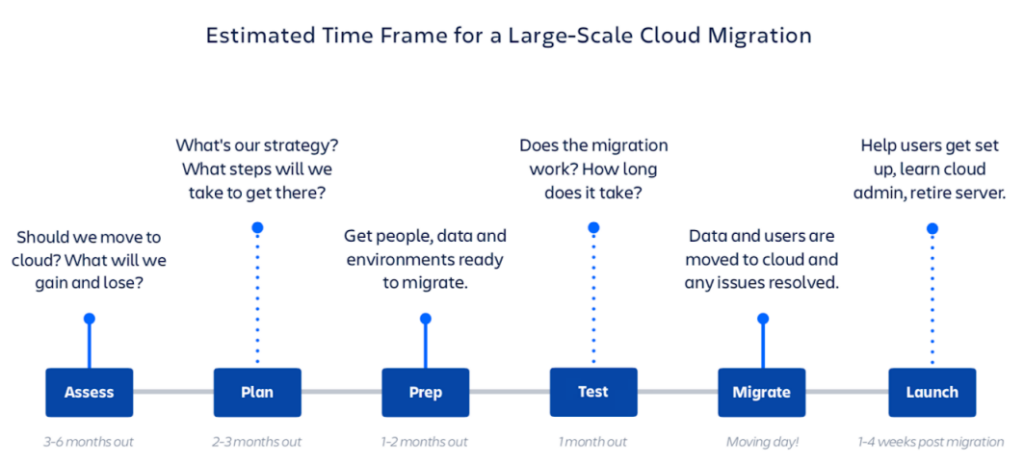
While the advantages of moving to Atlassian Cloud are undeniable, the migration process itself can seem like a daunting task. Let’s break it down into manageable phases, making your journey smoother and more predictable:

Pre-Migration: Laying the Foundation for Success

  • Assess: Before you take the first step, evaluate your current setup and determine if Atlassian Cloud is the right fit for your organization. This is the time to analyze your existing tools, processes, and data, as well as assemble your migration team.
  • Plan: With a clear destination in mind, it’s time to map out the technical and operational aspects of your migration. This includes choosing the right migration strategy and creating a detailed project plan and timeline. Oxalis, as your Atlassian Solution Partner, can provide a comprehensive audit and recommend the best approach for your specific needs.
  • Prepare: Get your teams, data, and environments ready for the big move. This might involve upgrading your on-premises products, cleaning up data, and preparing your users for the transition to the cloud.

During Migration: Smooth Sailing with Expert Support

  • Test: Before going live, conduct thorough testing to ensure a seamless migration. This crucial step helps you identify potential issues, refine your plan, and create a production migration checklist. Our team at Oxalis can provide the support you need for both basic and complex enterprise-level migrations.
  • Migrate: Once you’ve completed testing, schedule your migration for a time that minimizes disruption to your team’s work. With our expert guidance, you can confidently execute the migration, knowing that your data and applications are in safe hands.

Post-Migration: Thrive in Your New Cloud Environment

  • Launch: Welcome your team to the Atlassian Cloud! We’ll help you set up and configure your cloud sites, provide training resources, and ensure a smooth onboarding experience for everyone.

Which Atlassian Cloud Tools Are Right For You?

moving to atlassian cloud

Jira Work Management: Empower your business teams with intuitive project management tools designed to streamline processes and enhance collaboration.

Jira Software: Unleash your development team’s potential with agile project management, powerful issue tracking, and seamless integrations.

Jira Service Management: Deliver exceptional IT service experiences with efficient ticketing, automation, and collaboration tools.

Confluence: Create a centralized knowledge hub, foster team collaboration, and streamline communication with this versatile platform.

Oxalis: Your Trusted Partner for a Seamless Cloud Journey

Migrating to the Atlassian Cloud is a significant step for your organization. Let Oxalis be your trusted guide, providing the expertise and support you need to navigate this transition with confidence. We’ll help you unlock the full potential of the Atlassian Cloud and empower your teams to achieve their best work.

Ready to take the next step? Contact Oxalis today to start your Atlassian Cloud migration journey.

Empowering a Nonprofit’s Growth Through Streamlined Operations

The Challenge

A nonprofit organization dedicated to agricultural innovation faced a critical growth bottleneck. Their passionate, but small team was overwhelmed by manual processes across multiple areas: facilities management, HR, security, onboarding, and large-scale event coordination. This unsustainable workload limited their capacity to scale their impactful work. They sought a solution that could integrate their workflows, streamline request management, and maintain their personalized, high-touch service approach.

Oxalis’s Approach

Oxalis conducted a comprehensive six-month discovery process, including on-site observations, email analysis, and in-depth interviews. This deep dive revealed inefficiencies and opportunities to alleviate the team’s administrative burden.

Oxalis then developed and presented multiple demo solutions, mapping the organization’s existing processes onto a tailored system. A unified Atlassian environment, leveraging Jira Service Management (JSM) and Confluence, was identified as the ideal fit.

To ensure a seamless transition, Oxalis implemented self-service documentation and rigorously tested the new system. Critically, they provided hands-on, instructor-led training to the HR and Operations teams, fostering successful adoption of the new tools.

“Oxalis successfully eliminated administrative tasks for our Senior Operations Manager, resulting in a remarkable time savings of over 10 hours per week. This significant reduction in workload empowered her to fully dedicate her attention and expertise to her core responsibilities.”

The Outcome

The nonprofit achieved a transformative shift in operational efficiency:

  • Unified Operations: The integrated Atlassian system streamlined workflows for both HR and Operations teams.
  • Enhanced Responsiveness: Request management was significantly improved, saving valuable time and boosting overall productivity.
  • Scalable Support: The organization could now provide robust internal support while maintaining a fast, user-friendly experience.
  • Data-Driven Growth: By eliminating data silos and manual processes, the organization gained a solid foundation for future expansion and team growth.
  • Strategic Focus: Freed from operational headaches, the nonprofit’s team could redirect their energy towards mission-critical initiatives.

Oxalis’s change management expertise not only solved immediate challenges but also empowered the nonprofit to strategically plan for long-term success. By embracing efficient systems and processes, the organization is now better positioned to drive positive change in the agricultural sector.

Get Started with Oxalis

Looking for similar results with a Unified Atlassian System ? Get started with the expert team at Oxalis today.

From Organic Growth to Enterprise-Wide Adoption: DHCS’ Atlassian Success Story

The Situation

The California Department of Health Care Services (DHCS) manages one of the most complex public healthcare programs in the nation.

Within DHCS, the Medi-Cal Enterprise Systems Modernization (MESMD) team successfully leveraged Jira Software and Confluence Cloud for agile software development and work management. Their success sparked an interest in expanding the Atlassian suite agency-wide to improve project visibility, collaboration, and scalability.

Before scaling, DHCS needed to ensure:

  • Access and permission structures aligned with security policies and could scale across the agency.
  • Standardized project templates to support both technical and business teams with varied methodologies (scrum, waterfall, hybrid).
  • Comprehensive onboarding and training to enable new users to quickly adopt Atlassian tools with minimal disruption.

To support this transformation, DHCS partnered with Oxalis, an Atlassian expert with deep experience in public sector project management, governance, and I

The Challenge:

DHCS faced key obstacles in expanding Atlassian adoption and project standardization:

  • Inconsistent permission structures – With multiple teams and external contractors, DHCS required a standardized permission model to protect sensitive data while allowing seamless collaboration.
  • Lack of structured onboarding – Many teams lacked experience with Atlassian tools, requiring custom training and process guidance.
  • Disjointed project methodologies – Teams followed varied project management styles, making it difficult to standardize reporting and governance.
  • Limited visibility into project portfolios – Leadership struggled to gain a unified view of project progress and resource allocation.

Oxalis’s Approach

Oxalis designed and executed a scalable, structured approach to Atlassian adoption across DHCS.

1. Standardizing Permissions and Security

  • Developed and implemented a unified permission scheme, ensuring consistent user access controls for employees and contractors.
  • Aligned permission structures with DHCS security policies, ensuring compliance and minimizing risk exposure.

2. Enhancing Training and Onboarding

  • Created customized training materials, including documentation and instructor-led sessions.
  • Onboarded over 500 users across 75 projects and five divisions, ensuring consistent tool adoption.
  • Provided role-based training tailored to both technical and business teams using scrum, hybrid, or waterfall methodologies.

3.Establishing Project Templates and Best Practices

  • Designed structured project templates to standardize workflows and enable rapid project setup.
  • Implemented enterprise-level reporting structures, allowing leadership to track project health across the organization.
  • Integrated portfolio-based reporting, ensuring all projects rolled up into a common enterprise hierarchy.

4.Fostering a Community of Practice

  • Created a Community of Practice to support collaboration, knowledge sharing, and best practices across project teams.
  • Provided post-implementation support to refine workflows, optimize configurations, and reduce technical debt.
  • Developed a Project and Portfolio Management (PPM) Maturity Model, charting a roadmap for continuous improvement.

The Outcome

With Oxalis’ expertise, DHCS successfully scaled its Atlassian Cloud implementation, resulting in:

  • 500+ users onboarded across 75 projects, accelerating agency-wide adoption.
  • Improved security and governance, with standardized permission models ensuring data integrity and controlled access.
  • Greater project visibility, with enterprise-wide reporting allowing leadership to track progress and resource allocation.
  • Faster onboarding and reduced time-to-value, ensuring new users and projects can begin using Atlassian tools quickly and efficiently.
  • A structured approach to PPM maturity, providing a clear path for ongoing improvements and scalability.

ABOUT DHCS

  • Headquarters: Sacramento, CA
  • Annual budget: $100BN
  • 3,400 employees
  • Serves 15+ million Californians

DHCS works to ensure access to quality health care services, manages funding allocations, and collaborates with stakeholders to improve health outcomes across the state.

SERVICES PROVIDED

  • Project Management
  • Knowledge Management
  • Change Management
  • Training & Documentation
  • Jira Software (JSW)
  • Confluence

CONCLUSION

  • Successful Enterprise-Wide Adoption 
  • Enhanced Security & Governance 
  • Improved Project Visibility 
  • Accelerated Onboarding & Time-to-Value
  • Scalable PPM Maturity Framework

By partnering with Oxalis, DHCS successfully transitioned from ad-hoc Atlassian adoption to a structured, scalable project management framework.

Through standardized permissions, structured onboarding, and portfolio-level visibility, Oxalis ensured that DHCS could effectively scale Atlassian tools to support its mission of delivering high-quality healthcare services.

This case study highlights Oxalis’ ability to drive enterprise-wide transformation through governance, training, and scalable IT solutions, ensuring smoother operations, improved collaboration, and long-term success in public sector organizations.

Get Started with Oxalis

Looking to achieve similar results to DHCS? Get started with the expert team at Oxalis today.

What’s the Difference Between JWM and JSM?

Jira Work Management (JWM) and Jira Service Management (JSM) have similar names that could be confusing. Maybe you just started using JSM and discovered that it comes with JWM; why would you need two products?  Maybe you’ve been using Jira for a while, and missed the fact that Atlassian renamed Jira Core to Jira Work Management – a name that better reflects the product’s goal of serving business teams – and added a number of features in the process.  In this article we’ll review what features make each product distinctive and what features they share.

In this article you will learn:
  • Key differences & similarities between JWM & JSM
  • In-depth look at each product’s most distinctive features
  • Which product is the right for your business?

Jira Service Management

Jira Service Management is one of Atlassian’s flagship products, so we won’t describe it in detail. While it offers a number of features targeted at ITSM teams, JSM is at heart a service-oriented version of Jira.  It gives your team an organized, centralized way of managing work that comes from outside the team – whether from other teams or from external customers.  As we’ve written about, this service model can benefit business teams as well as ITSM teams, since most business teams get work from other teams.

Jira Service Management distinctive features

Here are the major features that set JSM apart from other Jira products.

  • Customer portals – Easy external access for self-service and submitting requests
  • Request types – Customer-facing variations on an issue type that enable more granular customer support
  • SLAs – Monitor and manage the level of service quality teams are providing
  • External comments – Communicate with the customer while keeping internal discussions separate
  • Queues – Manage the team’s work and know exactly where every issue is in its process
  • Confluence knowledge bases – Provide customer self-service in portals and improve agent efficiency
Sample customer portal in JSM
Sample project queue in JSM

Jira Work Management

In summary, JSM offers a service-oriented approach to managing work. Jira Work Management shares many of the basic features of JSM, but is geared toward business teams and offers extra features for them. It’s less complex, and cheaper, and is a good fit for some teams.  While it’s built into JSM, you can also get JWM on its own.

Jira Work Management takes a project management-oriented approach to managing work, offering a variety of ways to add, update, and track the tasks, resources, and timeline in a project – including the popular Gantt-style view. JWM makes it easy to keep track of progress, identify potential roadblocks, and keep everyone informed and in sync.

Just choose a project on the left, and a view or other tool from the options across the top.

Jira work management board

Let’s take a look at what makes JWM distinctive, then review what the two products have in common.

Here are the major features that set JWM apart from other Jira products.

  • Project templates: for common types of business process, like document approval, recruitment, procurement, sales pipeline, email campaign, and much more.  Each comes with workflows and other components that are tailored for that business process.
  • Summary view: shows recent activity in the project, a variety of numerical overviews of the issues and their types, number of assignments by person, and more.
  • Board view: shows the status of ongoing items for day-to-day work in the team, for daily work status; just drag an item between columns to change its Status.
  • List view: shows an Excel-like list of items and all information given by a user when completing a form.
  • Calendar view: shows the start and end dates (if any) of items for long-term planning.
  • Timeline view: shows a Gantt chart of the roadmap and dependencies between all items in the project.
  • Forms: let you can create one or more shareable forms, for a particular project and Issue type, that make it easy for anyone to create new items to a project.
  • Pages: a place to connect the project with a Confluence space, to easily access and create project documents.

Similarities Between JWM and JSM

To illustrate how much Jira Work Management and Jira Service Management have in common, here’s a list of major features they share. For simplicity sake, we’re only looking at the Standard plans.

FeatureJWMJSM
250 GB Storage
Unlimited projects
Unlimited tasks
Business project templates2410
Custom fields
Customizable workflows
Apps and integrations
Single-project automationUnlimitedUnlimited
Global and multi-project automation500 executions/mo.Unlimited
JQL filters
Dashboards
Reports
Issue-level security
Audit logs

As is true with all flavors of Jira, these features mean that both products can be heavily customized and extended to work for your particular needs.

JWM vs. JSM: Which Is the Best Fit?

Now that we’ve reviewed the similarities and differences between Jira Work Management and Jira Service Management, here’s a summary of who each product is the best fit for.

JWM might be a better fit if…

  • Your team is using a modern project management tool for the first time.
  • Your teams work on smaller or less complex projects.
  • You just don’t think the service model makes sense for you right now.
  • Your admins have limited bandwidth that would make configuring and/or managing JSM a challenge.
  • You want the project-planning tools that JSM lacks.
  • JSM doesn’t make financial sense at the moment (but don’t underestimate the potential productivity gains from JSM’s service model!).

JSM might be a better fit if…

  • You’re ready to take team productivity to the next level with the service model.
  • You need external customers to be able to submit work easily, and you want to track that work with agents working queues.
  • You want to track service level agreements.
  • Having dedicated projects with special features to manage IT assets, incidents, problems, and changes appeals to you.
  • Your teams have the bandwidth to create knowledge bases that enable customer self-service and improve agent response times.

Oxalis Can Help

We can review your business teams and requirements, and recommend an approach that works for you. Unlock the potential of Jira Service Management with an Atlassian ITSM Partner. Boost efficiency and ensure the seamless operation of your IT services. Elevate your IT service experience with our expertise.

Recommended blog posts

Enterprise Service Management (ESM) – The Natural Extension of ITSM

In this blog post we’ll look at Enterprise Service Management (ESM) and its relationship to ITSM, as well as how IT processes apply to and can benefit business teams. We’ll review examples of how these teams are using tools and principles such as knowledge management, service request, change management, and more, to address challenges and apply solutions across ALL enterprise teams. We will discover how ESM, when implemented with Jira Service Management, captures invaluable data about the service your business teams are providing each other.

What is Enterprise Service Management? How Does it Compare to ITSM?

Enterprise Service Management (ESM) strategically expands the proven principles and practices of IT Service Management (ITSM) to encompass the entire organization. This approach optimizes service delivery across departments like HR, Finance, Legal, and beyond.

Key Differences Between ESM and ITSM

  • Scope: ITSM focuses specifically on managing IT services, while ESM encompasses the service needs of all business units.
  • Reach: ITSM typically serves internal IT customers, whereas ESM aims to improve service experiences for both internal and external stakeholders.

Core Components of ESM

As Forrester outlines, ESM typically involves these essential elements:

  1. Adapting ITSM Practices: Proven ITSM processes like incident management, change management, and knowledge management are tailored for use across various business functions.
  2. Unified Platform: A centralized platform, often based on existing ITSM tools, offers a single service portal and catalog for all teams within the organization.
  3. Low-Code Automation: Low-code solutions streamline workflows and accelerate service delivery innovation, breaking down service barriers and empowering teams.

Beyond Bug Tracking: Understanding Jira’s Evolution and the Rise of ESM

Jira has come a long way from its humble beginnings as a bug-tracking tool. Atlassian wisely recognized its potential and expanded Jira’s capabilities to serve a whole range of teams.

The Power of Adaptability

In 2013, Atlassian saw a fascinating trend: 40% of users were already bending Jira to manage service requests! In response, Jira Service Desk was born, later evolving into Jira Service Management (JSM) in 2020 to fully embrace ITSM principles.

Read more about the origin of the name Jira.

But the story doesn’t end there. Organizations boldly (and successfully!) used Jira even beyond its original design. This showed that the service desk concept isn’t just for IT – it benefits HR, legal, facilities, literally any team that deals with requests. This realization paved the way for Enterprise Service Management. Atlassian itself uses a whopping 130 internal service desks – proof of ESM’s power!

The Core Idea

It’s simple: every team gets requests and needs to fulfill them. HR handles time-off, facilities tackles maintenance issues – the service desk model streamlines this process for everyone. ESM makes this ‘unofficial’ use case official, allowing JSM’s strengths to benefit the entire organization.

Enterprise Service Management (ESM) empowers your entire organization by creating a seamless and predictable help experience. Each team benefits from a standardized help portal where users can find self-service knowledge articles and easily submit and track service requests. This consistent approach boosts efficiency by eliminating confusion and streamlining workflows across all departments.

How do ITSM processes apply to non-IT teams?

Let’s go over some examples of the practices that Enterprise Service Management with Atlassian includes.

Knowledge Management

The Challenge

Most organizations can benefit from improving how they organize and manage their documents and information. A survey of 2,000 hybrid and remote office workers found that the average respondent needs to search for documents or other information seven times each day. In addition, respondents spent 13 minutes searching on their own before asking for help. Do the math: 13 minutes of searching, seven times a day, five days a week… that’s 455 minutes, about 7.6 hours. Almost a full workday every week lost to searching for information they need to do their job – per person.

Every team manages – whether intentionally organized or not – a body of institutional knowledge that people they serve will need to know at some point.  But how many teams, aside from IT, have systems and procedures in place to ensure that stakeholders get the right information, in the proper format, at the right level, and at the correct time, according to their access level and other relevant policies? 

The Solution

The practice of knowledge management is built around the knowledge base, a self-serve online library of information about a product, service, department, or topic, all easily accessible by a robust search engine.  By putting the organization’s information in one organized, access-controlled place like Confluence, where employees can search for what they need, you can go a long way toward minimizing time wasted.

And it does double duty, because it benefits both team members and those they serve; the latter use the knowledge base through the service portal.

Service Request Management

The Challenge

Every team’s work can be usefully described in terms of the services they provide to those outside the team.Users typically access those services haphazardly, whether it’s in Slack asking for payroll information, or by email reporting an urgent maintenance need, or as a walk-in wondering how to replace a security access card.  When teams must then track their work in multiple places, inevitably errors, oversights, and delays will creep in.

The Solution

Service Request Management is what ITSM is perhaps best known for.It begins with the concept of the Service Catalog: an organized, managed collection of repeatable, defined services within a group, including such information as description, ownership, dependencies, and escalation.

When employees start to submit a request in a service portal, recommended articles from the knowledge base appear with helpful information through a tool like Jira Service Management, getting employees the answers they need quickly while deflecting requests from busy teams. Requests submitted are all organized in one central place, saving time, hassle, and mistakes.

The growing body of fulfilled requests also becomes a time-saving resource for teams, by looking up the resolution of previous similar requests.

Change Management

The Challenge

The services that business teams provide usually follow defined procedures, and once employees understand those procedures, altering them can cause confusion, frustration, and wasted time if not implemented properly. Do all the stakeholders get a chance to provide feedback during planning? Are all potential users notified of the change and its timeline?

While business teams may not have the sort of mission-critical infrastructure – requiring 99.9% or 99.99% uptime – that IT teams support, they do provide important services that can be time-sensitive.  For instance, prompt coordination between HR and IR is vital for a behind-schedule project that needs an emergency contractor up and running ASAP.

Furthermore, every team’s ability to adapt its processes smoothly to new business needs matters to a growing organization.

The Solution

Modifications to the procedures business teams follow should be made thoughtfully, and in a controlled fashion that allows for review by stakeholders and ensures adequate communication.  Change Management practices enable this by breaking down silos, providing context and transparency, avoiding bottlenecks, and minimizing risk. They can also help meet regulatory standards.

Change Management with JSM helps accomplish change in the following ways: 

  • Establishing a framework to manage the change process 
  • Prioritizing necessary changes to properly allocate resources 
  • Incorporating relevant information for smarter decision making 
  • Involving necessary stakeholders from dev and IT for approvals 
  • Incorporating testing of changes, to avoid incidents
  • Streamlining and improving the flow of changes to deliver value more quickly

Problem Management

The Challenge

As with change management, when problems occur in the defined procedures that enable theservices business teams provide, confusion, frustration, and wasted time can result – like when an employee loses an afternoon dealing with a Payroll mistake.

And no team wants that to happen. It’s easy to ask “what caused that incident?” But uncovering the surface, immediate cause isn’t good enough when you aim to provide quality customer service. You need to dig into the underlying causes, the factors and conditions that led up to the incident. Why? A service-disrupting incident is an opportunity for improvement, because it reveals an inefficiency or a bottleneck or a miscommunication that can be identified and fixed IF you take the time to find out what’s really going on. The team’s service will improve.

The Solution

Problem management enables business teams to continually investigate, learn from incidents, and improve their procedures. It uses the same service portal as Service Request Management, so employees have a centralized, seamless service experience, and team members who work the problem reports benefit from all the features of JSM.

The smoother a team’s procedures work, the more time the team and the people it serves have to do the work the organization needs them to do. Effective problem management also builds inter-team cohesion across the organization by minimizing points of friction – when employees are always complaining about, say, how hard it is to get what they need from HR, the whole organization suffers.

Problem Management relies on basic steps like these:

  1. Proactive problem detection 
  2. Track and assess known problems
  3. Investigation and diagnosis
  4. Create a known error record
  5. Create a workaround, if necessary
  6. Resolve and close the problem

Workflow Automation

The Challenge

Every team faces repetitive, mundane tasks that waste employee time.  How many people do you really want to pay to track down a signature for a piece of paper? How much time should employees spend trying to figure out who to escalate a request to, or who has to approve?

You want every employee to devote as much time as possible to the work the organization needs them for.

The Solution:

Automation uses digital workflows to route requests properly, gather the information needed to work the request, apply SLAs, obtain approvals, escalate, notify, and much more.

In Jira Service Management, Automation is a per-project feature for building simple if-then workflows called “rules” that fire off whenever the defined trigger event occurs. You can configure your own by choosing what event(s) trigger the rule (like “Rule is run when an issue is created”), what additional conditions have to be true (like “Request Type equals Promotion”), then what happens – or you can use built-in templates like “Resolve issues due to inactivity” or “When an incident is created, create a post-mortem page in Confluence.”

Because JSM’s Automations are just a list of rules that can easily be individually configured and enabled/disabled, they’re fairly easy to work with. All Jira versions also come with customizable workflows that, while they require admin setup, provide a much more powerful form of automation that works across any projects you want.

Continuous Improvement with JSM

Each of the above Enterprise Service Management practices, when implemented with Jira Service Management, captures invaluable data about the service your business teams are providing each other. The combination of Jira’s native search/filter capability, its builtin reporting, and powerful reporting plugins available in Atlassian Marketplace, you can harness that data to analyze and understand, for instance:

  • What employees are actually requesting from different teams, which can provide insight into the reality of employee work experience and help identify pain points to resolve.
  • Where interdepartmental bottlenecks are occurring, so you can improve service efficiency.
  • Where bottlenecks are occurring within teams, such as with approvals, which also enables improving service efficiency.
  • What the best practices are for your organization to manage process changes, both within and between teams.

Think of this as continually tuning up the performance of the engine that is your organization. To build a car that wins the Indy 500, you have to measure performance, analyze it, and make adjustments, then repeat the process – constantly.

“The pace of business today demands that teams move at higher velocity. Technology is moving fast, from super quantum computing to artificial intelligence to self-driving cars. Enterprises across every industry – from traditional banks to pizza delivery – are undergoing massive digital transformation.”


Resource: The Atlassian Approach to ESM Whitepaper.

Oxalis has practiced Enterprise Service Management since our inception, using Jira and Confluence for all our teams – most recently including Marketing. Stop struggling to share information and visualize work across departments. Seamlessly connect ALL teams. Get the conversation started with Oxalis and get started with ESM today.

Contact Us

Elevate your entire IT service ecosystem with Oxalis. From strategy to implementation and ongoing optimization, we’re your end-to-end Atlassian ITSM partner.