How You Can Benefit from Atlassian’s New Acquisition, Halp
Atlassian software solutions work to enable the distributed workforce by providing tools that help to streamline functionality when working in a remote environment. As many companies transition to life while working from home, Atlassian continues to develop new and exciting ways to support teams with increased efficiency and transparent communication. Atlassian continues to deliver on this commitment, as shown through the acquisition of Halp, a cutting-edge virtual help desk.
Is a software as a solution service platform utilized to help streamline support between IT service providers and their clients, was born out of demand in 2019, offering support services for ticketing automation to leverage the efficiency of technical operations teams. Halp’s ticketing platform seamlessly integrates into messaging platforms, like Slack or Microsoft Teams, to develop and track support tickets within organic conversations. Halp saw a need to quickly process internal requests within native communication environments as opposed to the many steps required for email approval or formal service requests. Halp uncovered the opportunity to develop consistency, and efficiency, throughout the process by meeting people where they’re already working. Talk to our experts.
Using different classifiers like emojis or targeted phrases, Halp classifies “tickets” made within conversations for service requests, custom forms or report tickets, automating progress. These tickets are automatically delivered to external platforms, including Jira Service Desk and Confluence, to process these requests without additional communication. Halp limits the need for additional communication, such as formal requests or email chains, in order to maximize efficiency and meet clients within their native environments, on their own terms. Halp will also pre-populate answers to frequently asked questions, integrating with your knowledge base in order to streamline answers to pressing questions.
What does Atlassian’s acquisition of Halp mean for you and your teams?
Atlassian aims to provide solutions to your greatest problems, on your own terms. This mission is realized through the most recent acquisition of Halp. Halp supports teams to create and manage service and communication requisitions, on the tools you are already using. Integrating Halp into your current process helps to maximize efficiency through the use of a fully automated, monolithic service desk. Halp will not only recognize previously addressed topics but will also automatically reply to key phrases in order to provide answers as quickly as possible. Get support.
Halp also works to streamline the ticketing process through the use of automated ticket development and tracking, while seamlessly integrating into your unique workflows. Tickets and requests created by Halp within Slack, or your current messaging system, to then transfer and sync with external platforms for processing, like Jira Service Desk or Confluence. Specifically seen within Slack, users can react to messages with a targeted emoji, which then translates as a unique qualifier to create a new ticket within your service desk platform, like Jira. This helps to create tickets within organic conversations that are automatically organized with the appropriate identifiers and user admins.
Halp supports streamlined services, no matter the scale.
Halp provides in-depth support with ease and efficiency, helping your teams prioritize progress. No matter the size of your organization or your constraints also has proven success for many diverse situations throughout the first year of operation. As Halp transitions to Atlassian, many industry learning companies have seen success through the use of Halp including Adobe, VMWare, GitHub, Slack, and many more. Halp supports these teams by managing and maintaining communication without having to transition to another platform to create work items. This frees up valuable time for your teams while also providing expedited answers and progress for your clients, on the platforms you know and love. Learn more.
This tool can provide consistency and clarity while expediting progress, for your teams and your clients. Find the support you need to deliver progress faster with unified and transparent communication, through the help of Oxalis. Oxalis is here for you and your teams to help provide clarity and stability within remote work environments and technology solutions. We understand how difficult it can be to implement new services and manage unified teams at the same time but, Oxalis has the tools and expertise to guide you through this process. To understand more about the power of Halp and what it can do for your teams, schedule a demo below.
Contact us
For CIOs, Here’s the Importance of a Cloud Computing Strategy
Are you a CIO with no cloud strategy? You’ve already been left behind in the dust.
If you’re a CIO or technology leader, it’s important to have a cloud strategy. Here are 3 key reasons for having a solid cloud computing strategy.
1. Updated Cyber Security Standards:
Standards organizations such as NIST are updating rules that will require some elements that Cloud providers have already baked into their service offerings.
For example, in the recent NIST revisions, you will see new recommendations for bi-annual recreation of your infrastructure to thwart embedded cyber threats and established breaches. This can only really be down easily with services such as Cloud Formation (infrastructure as code) that allows for the ease of building new environments from scratch. Get started.
2. It is not a matter of cost savings, it is a matter of Agile technology
Virtualized on premise environments are great, but they do not come with extensibility and the ability to rapidly template and deploy layered infrastructure services at the snap of a finger. Examples are using Lambda to quickly build a micro service or to quickly stand up Jira in a secure manner. These are enabled with Cloud services that quickly extend and enhance existing solutions.
3. Your business partners are looking at your IT department as a barrier to progress instead of a key enabler.
IT has historically been reactive to customer demands versus proactive. The Cloud is a tool to rapidly prototype and explore new technology without incurring heavy cost and burdens. In this case, think about the ability to stand up and tear down infrastructure quickly. In addition, think about how the Cloud IAM (Identity and Access Management) functions move quicker for provisioning and external accessibility.
This speed of movement comes at a risk, however, with proper compartmentalization of the VPC, you can isolate risk while still pleasing and supporting your business partners. Next time you get a request, surprise your business with a very rapid deploy of capable software to solve a business problem. A perfect example is rapidly deploying Jira to unburden a business team. Get help.
Here are a few steps that can be taken in the right direction.
Establish a Cloud account on AWS or Azure.
Consider a few lower priorities on the roadmap that are more simple packaged application deployments for a Cloud deployment.
Identify 1 or 2 quick wins for a workload migration.
Deploy a quick start for a reference robust and well-architected pattern.
Copy this pattern and deploy your packaged app or migrated workload as a POC.
Harden your deployment and conduct a retrospective on what you learned.
Finding time to get out from beneath the backlog of requests is difficult, but with a sensible start small attitude, you will be able to make inroads to your cloud strategy. Contact our experts.
Once you are on the cloud, consider the fact that you’ve unlocked vendor capability to help accelerate your roadmap. It is a more accessible environment and service organizations such as Oxalis Solutions will know how to help you from day one.
Contact us
Jira Hacks for Effective Scaling: Simple Changes, Huge Results
Agile development is the new normal for software development across various industries—from tech to healthcare to manufacturing.
We’ve served as lead consultants for Agile development across many industries, serving as experts who can configure Jira software to fit any workflow. Over the course of those projects, we’ve learned and improved our processes—allowing for our experts to gain a wealth of knowledge along the way.
Don’t use your valuable time stumbling through trial and error processes. Our team of Jira consultants has worked with Jira Software, Jira Core, Jira Service Desk, Confluence, and other Atlassian suite programs to optimize Jira use. We’ve compiled our ideas after trial and error so you don’t have to learn Jira hacks the hard way.
Software teams initially created Agile Development to quickly react and adapt to unpredictable changes. It is a fast response system, encouraging quick communication to catch potential roadblocks before they stop work altogether. As a set of frameworks set aside in the 12 Principals of Agile, companies that adopt Agile Development are more nimble, react to issues quickly, and reduce delivery times from huge deliverables to more digestible releases. Get more information.
As mentioned above, the system was developed for software teams. However, we’ve implemented Agile Development successfully in many industries and we can help your company do the same.
Watch our Agile at Scale Webinar On-Demand
Top 5 Jira Software Hacks for Scaling
Jira Hack #1: Design Boards to Meet your Goals
Configuring boards in Jira can be an incredibly useful process; however, it can easily become overly complicated. Jira recognizes issues shared across multiple projects, and data is frequently excluded from certain boards. Information is then watered down based on the issues you are viewing.
Tailoring boards to meet their ultimate end goal gives more consistency and clarity when rendering data. The fewer issues a board has, the faster Jira can render reports. Selecting issues that are relevant to the goals of the board allows for faster, more consistently clear rendering of your important data. Have some doubts about jira scrum board swimlanes? Send us a message below.
Many Jira users often place Quick Filters on larger boards to monitor their complex workflows. Jira’s Quick Filter function chunks larger boards into smaller subsets of issues to deliver closer inspection of only relevant issues.
It is important to look across various Quick Filters that have been set in Jira in order to simplify large workflow boards. If the same or similar issues appear across multiple Quick Filters, it might be time to create a separate board.
Creating a separate board in Jira breaks down large workflows into smaller, more manageable boards. This helps to increase the relevancy of issues within a workflow and evokes a more in-depth focus on pertinent issues. A simple way to clean up inactive issues is to utilize the Jira Query Language, known as JQL, to search issues under “time since last update” to understand which issues are underutilized or irrelevant within your board. Learning JQL for quick searches will speed up your processes and improve overall Jira navigation. Send us a message.
While this is one of the five Jira hacks included, this is less of a hack and more of a frame of mind, understanding the client’s perspective when interacting with the platform will help to improve user experience. Oftentimes, it can be frustrating, confusing, and overwhelming for customers to access large boards. Jira, as a project management tool, can be very overwhelming. Make sure your best practices are not only for your internal teams but implemented for your client communication as well.
Depending on their network connectivity and the device they access from, large boards can be difficult to render. Knowing how your clients are accessing your platform will help to meet their needs. Tailoring your platform to function within your clients’ typical methods of communication will help to elevate and improve the overall user experience for your clients. Adding the extra consulting layer to client communication separates your efforts from the competition.
Jira Hack #4: Your Team is Unique, Why Isn’t your System?
Large teams can often have subsequently large boards, which can create delays when rendering important reports in real-time. Understanding the dynamic between team members and the work they produce will help to customize boards to fit their needs.
Creating sub-team boards off of large team projects promotes heightened visibility and awareness of problems as they arise. This allows Project Managers to see the project overview through an aggregate board of “Stories” from all sub-team boards. The visibility of workflow issues can also be elevated through the use of heavy-handed implementation of unique customization.
For example, adding strong customization to Swimlanes can promote critical or unassigned issues to top priorities when processing through a workflow. Talk to an expert.
Jira Hack #5: Utilizing Jira’s Swimlanes
“Jira Swimlanes” is one of the more underutilized tools within Jira. Swimlanes are a separate collection of issues in Active Sprints, Scrum Boards, or Kanban Boards. Swimlanes help categorize and distinguish tasks from other workstreams, users, or application areas. They are displayed horizontally, separately from the main board, for ease of visibility.
Separating a determined collection of issues, assets, stories, epics, etc into a swimlane ensures that your issues are not getting lost within the overall project. This can be specifically helpful when you’re looking to separate out issues assigned to you, separating stories from issues, or keeping epics separate from each other.
An important note: You must be a Jira administrator or a board administrator for the board to configure its swimlanes.
Implementing Agile development across your enterprise is very important when trying to keep up to date with advancing technology standards. As your company grows, institute system processes that will scale with you. Using these Jira hacks ensures success with Jira’s platform and Agile’s framework.
Did any of these Jira hacks give you pause? Are you wondering how to configure Jira’s Scrum board or Kanban board for your project management?
The Oxalis team of experts has configured Atlassian-suite software from large enterprises to local firms, and we can configure and customize Jira to meet your company’s or client’s needs. As award-winning Atlassian partners, we’ve seen it all and done it all. If you need help implementing these Jira hacks, if you need help scaling by migrating to the cloud, or if you want to optimize your existing Jira software, Oxalis is here to make it happen. Get help.
Why wait? Now is the time to implement agile development. The sooner you do, the faster you’re able to execute the highest quality of work with fewer errors and more customer satisfaction.
Bonus
How to get the most out of Jira?
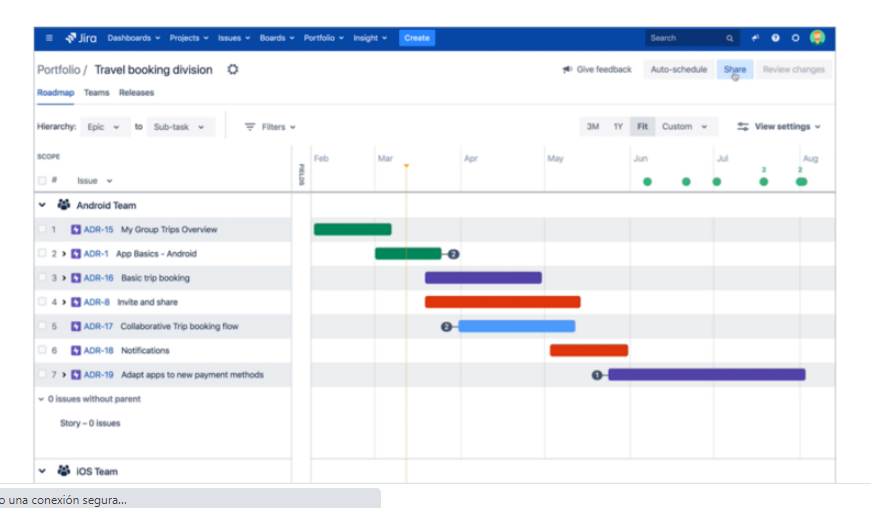
Jira is a powerful project management tool that helps teams to plan, track, and manage their work efficiently. One of the key features of Jira is the Portfolio View, which provides teams with a bird’s-eye view of their project portfolio.
The Portfolio View in Jira provides a high-level overview of all the projects in a portfolio. This view includes information such as project progress, key dates, and resource allocation. The view is customizable, allowing users to filter information based on specific criteria such as project status, team, and release date. One of the major benefits of the Portfolio View in Jira is that it allows teams to identify dependencies and conflicts between projects. This can help teams to better manage their resources and prioritize their work to ensure that all projects are completed on time.
Another key advantage of the Portfolio View is that it enables teams to create different scenarios for their project portfolio. Users can create different “what-if” scenarios, testing the impact of changes to project priorities or resource allocation. This allows teams to make more informed decisions and ensures that they are better prepared to respond to changes in the project landscape.
Jira Portfolio offers a range of features that enable teams to visualize their project portfolios and manage dependencies between different projects. The tool allows teams to create custom views of their project portfolios, set up their own planning hierarchies, and create custom reports. With these features, teams can align their project portfolio with their overall business goals and make informed decisions based on data.
One of the key benefits of Jira Portfolio is its flexibility. The tool can be customized to meet the specific needs of different organizations, ensuring that teams can manage their work in a way that aligns with their business needs. With Jira Portfolio, teams can easily prioritize their work, manage dependencies between different projects, and ensure that all projects are completed on time and within budget.
In summary, the Portfolio View in Jira is a powerful tool for project managers and teams. It provides a high-level overview of the project portfolio, allowing teams to better manage their resources and prioritize their work. By enabling teams to create different scenarios, the Portfolio View helps teams to make more informed decisions and ensures that they are better prepared to respond to changes in the project landscape.
How Jira Portfolio can help you?
Jira Portfolio Management is a critical aspect of project management that provides a holistic view of all projects in an organization’s portfolio. Jira, one of the most popular project management tools, offers a powerful Portfolio Management tool, called Jira Portfolio, that helps teams manage their project portfolios with ease.
Jira Portfolio offers a range of features that enable teams to visualize their project portfolio, prioritize their work effectively, and manage dependencies between different projects. With Jira Portfolio, teams can get a clear view of their project timelines, identify any potential issues, and make informed decisions about resource allocation and project priorities.
One of the key benefits of Jira Portfolio is its flexibility. The tool allows teams to create custom views of their project portfolios, set up their own planning hierarchies, and create custom reports. This level of customization ensures that teams can manage their work in a way that aligns with their specific business needs.
Another important feature of Jira Portfolio is its integration with Jira Software. This integration means that teams can manage their projects and portfolios within the same platform, making it easier to track progress and make informed decisions about project priorities.
Overall, Jira Portfolio is a powerful tool for portfolio management that can help organizations manage their project portfolios more effectively. With its range of features, flexibility, and integration with Jira Software, Jira Portfolio is definitely worth considering for any organization looking to improve its portfolio management capabilities.
If you have questions about Jira license cost, Jira Cloud offers four different pricing plans: Free, Standard, Premium, and Enterprise. The Free plan is limited to a maximum of 10 users, while the Standard, Premium, and Enterprise plans offer more features and support for larger teams.
It’s important to note that the cost of the Jira license can vary depending on the number of users and the level of service required. In summary, the cost of a Jira Cloud license depends on the number of users and the level of service required. With a range of pricing plans available, Jira Cloud offers an affordable and flexible solution for project management that can be customized to meet the needs of different organizations. If you’re interested in using Jira Cloud, it’s worth exploring the pricing plans in detail to determine which one best suits your needs and budget.
Why wait? Now is the time to implement Agile development.Contact us
Technology Change Considerations and Approach
Workplace technology changes? When taking on the task of keeping up with technology in business, no matter how established the organization or the size, there are a few key factors to consider to ensure the right technology solution is chosen, and the proper steps are taken.
Our Approachabout workplace technology changes:
Without a systematic and methodical approach, any major technology decision could be rooted in misinformation or lack of information, resulting in a change that causes productivity loss, non-adoption by users, or a solution that becomes costly to scale or implement correctly. Talk with our experts.
When taking on or adapting to new technology in the workplace, the approach to technology changes should include three major steps:
Requirements
The first and arguably most important phase of the approach involves discovering and defining the requirements for the sought-after or emerging technology solution. To enable this process, there are a few intermediary steps that should be taken, in the form of tangible artifacts:
1. Current State and Future State Analysis
To understand the technology and business needs, the decision-makers need to understand what the business is currently doing, and how the business wants to function in the future.
2. Gap Analysis
After an understanding of the current and future state of the technology and business is reached, a gap analysis should be conducted, defining what is currently missing in the business practices.
3. Technology Roadmap
As a key artifact for all businesses, a technology roadmap should be included in all technology change initiatives, to ensure that a solution aligns with the strategic vision.
Evaluation
After defining the requirements for this the emerging technology solution, the next step is to evaluate different solution options. To do so, three key dimensions: People, Process and Technology, are the focus of the evaluation.
1. People
As the main users of the chosen solution, both the people in the current role and how they function, and the ideal configuration of people in your business context must be examined. What are they used to using? What do they need to have? What do they want to have? All of these must be considered.
2. Process
Both the business processes and the current technology process must be a part of the evaluation. Business Process considerations: In what process flow must this solution function? Can there be any process improvements? How might a technology solution enable a process improvement?
3. Technology
The chosen technology solution, as a key outcome, must be carefully evaluated. A technology change can easily be derailed by choosing a solution that is either not precise enough and therefore not helpful for the user or does not meet all of their needs, forcing them to use multiple applications, creating confusion and bad user experience. A holistic view should be taken, to ensure that the chosen solution fully meets the business needs.
Each potential solution option is evaluated across these three dimensions, which should be clearly defined in the Requirements phase. A common evaluation is conducted using a scoring system, across the three dimensions, including cost and partner fit. The scoring system should be weighted, based on the importance of each Requirement to the business.
Implementation
After the evaluation stage is completed, the most suited solution plan will have been chosen, and with the future state requirements already enumerated, the new system can be implemented. This is a critical stage and is oftentimes multi-threaded. At this stage, varying amounts of training and transition will be required to ensure the smooth and positive adoption of the new process and technology. Using a flexible and agile approach is very beneficial during this stage, implementing it with an iterative rollout while taking user feedback into account, to support and encourage adoption. Get started.
To conduct a successful technology change process, and implement a new solution or system, it is important to be methodical and tactical in approach. By following these general steps, you can ensure that the technology decision your company makes is productive and fits your business requirements.
Need help with a workplace technology change, solution options, Atlassian products or an evaluation? Contact one of our consultants to get the conversation started! We offer a range of technology consulting services.
Contact us
Cookie Consent
We use cookies to improve your experience on our site. By using our site, you consent to cookies.
Used by Google Analytics 4 to persist session state and track usage across visits. The XXXXXXXXXX portion corresponds to the Oxalis Google Analytics property ID.
1 year
_gac_
Contains information related to marketing campaigns of the user. These are shared with Google AdWords / Google Ads when the Google Ads and Google Analytics accounts are linked together.
90 days
__utma
ID used to identify users and sessions
2 years after last activity
__utmt
Used to monitor number of Google Analytics server requests
10 minutes
__utmb
Used to distinguish new sessions and visits. This cookie is set when the GA.js javascript library is loaded and there is no existing __utmb cookie. The cookie is updated every time data is sent to the Google Analytics server.
30 minutes after last activity
__utmc
Used only with old Urchin versions of Google Analytics and not with GA.js. Was used to distinguish between new sessions and visits at the end of a session.
End of session (browser)
__utmz
Contains information about the traffic source or campaign that directed user to the website. The cookie is set when the GA.js javascript is loaded and updated when data is sent to the Google Anaytics server
6 months after last activity
__utmv
Contains custom information set by the web developer via the _setCustomVar method in Google Analytics. This cookie is updated every time new data is sent to the Google Analytics server.
2 years after last activity
__utmx
Used to determine whether a user is included in an A / B or Multivariate test.
18 months
_ga
ID used to identify users
2 years
_gali
Used by Google Analytics to determine which links on a page are being clicked
30 seconds
_ga_
ID used to identify users
2 years
_gid
ID used to identify users for 24 hours after last activity
24 hours
_gat
Used to monitor number of Google Analytics server requests when using Google Tag Manager
1 minute
Marketing cookies are used to follow visitors to websites. The intention is to show ads that are relevant and engaging to the individual user.