For CIOs, Here’s the Importance of a Cloud Computing Strategy

Are you a CIO with no cloud strategy? You’ve already been left behind in the dust.

If you’re a CIO or technology leader, it’s important to have a cloud strategy. Here are 3 key reasons for having a solid cloud computing strategy.

1. Updated Cyber Security Standards:

Standards organizations such as NIST are updating rules that will require some elements that Cloud providers have already baked into their service offerings.

For example, in the recent NIST revisions, you will see new recommendations for bi-annual recreation of your infrastructure to thwart embedded cyber threats and established breaches. This can only really be down easily with services such as Cloud Formation (infrastructure as code) that allows for the ease of building new environments from scratch. Get started.

2. It is not a matter of cost savings, it is a matter of Agile technology

Virtualized on premise environments are great, but they do not come with extensibility and the ability to rapidly template and deploy layered infrastructure services at the snap of a finger. Examples are using Lambda to quickly build a micro service or to quickly stand up Jira in a secure manner. These are enabled with Cloud services that quickly extend and enhance existing solutions.

3. Your business partners are looking at your IT department as a barrier to progress instead of a key enabler.

IT has historically been reactive to customer demands versus proactive. The Cloud is a tool to rapidly prototype and explore new technology without incurring heavy cost and burdens. In this case, think about the ability to stand up and tear down infrastructure quickly. In addition, think about how the Cloud IAM (Identity and Access Management) functions move quicker for provisioning and external accessibility.

This speed of movement comes at a risk, however, with proper compartmentalization of the VPC, you can isolate risk while still pleasing and supporting your business partners. Next time you get a request, surprise your business with a very rapid deploy of capable software to solve a business problem. A perfect example is rapidly deploying Jira to unburden a business team. Get help.

Here are a few steps that can be taken in the right direction.

  • Establish a Cloud account on AWS or Azure.
  • Consider a few lower priorities on the roadmap that are more simple packaged application deployments for a Cloud deployment.
  • Identify 1 or 2 quick wins for a workload migration.
  • Deploy a quick start for a reference robust and well-architected pattern.
  • Copy this pattern and deploy your packaged app or migrated workload as a POC.
  • Harden your deployment and conduct a retrospective on what you learned.

Finding time to get out from beneath the backlog of requests is difficult, but with a sensible start small attitude, you will be able to make inroads to your cloud strategy. Contact our experts.

Once you are on the cloud, consider the fact that you’ve unlocked vendor capability to help accelerate your roadmap. It is a more accessible environment and service organizations such as Oxalis Solutions will know how to help you from day one.

Contact us


Using Jira for Non-Software Projects: Yes, Your Non-Software Team Should Use It!

As organizations across various industries transition to agile development, you may be wondering—should you follow suit? While created for software development, the agile approach’s focus on self-organizing, cross-functional teams who use adaptive planning, early delivery, and continual improvement can be applied in other areas too. In fact, agile has even been applied to family life.

Once you decide to go agile, you need a good tool to implement it with. Jira’s success with agile development teams (and service desk organizations) obscures the fact that it’s well-suited for a wide variety of business processes. Teams have used it for purposes as different as handling document review with approvals, tracking the inspection of power lines—even managing the repair of US Navy ships.

Wait, what is Jira?

Jira Software is an Atlassian software platform for work tracking and project management. For agile work, it offers both Kanban projects for ongoing work management, as well as Scrum projects for iterative, delivery cycle-based work management. The two fundamental elements Jira offers to organize work are: the project, which can be a classic project with a defined endpoint or a bucket for a team’s ongoing work; and the issue, which is a unique document that holds almost any data you want, comes with a workflow that can be adapted to fit whatever business process you need, and stores all user communication about the document via comments.

Notable Jira features include: highly-customizable workflows for issue tracking, a flexible and granular user permissions model, notification schemes and in-issue communication with @mentions, robust reporting and dashboards—and for agile teams, epics, sprints, stories, releases, versions, boards, and roadmaps. Jira allows users throughout the entire organization the visibility and control needed to track projects in real-time with complete transparency.

Realistically reflect your unique processes.

Each team is unique, and you need a work management tool that adapts to your team rather than forcing you to adapt to it. In addition to Jira’s built-in flexibility, a marketplace full of thousands of add-ons helps you make Jira work for you. You can even create your own add-ons using the extensive API. If you need a custom field that pulls from a custom database, Jira can do that. If you need to push data to another application when a process completes, Jira can do that. If your workflow spans five different teams and requires custom notifications at multiple points, Jira can do that. Whatever the nature of your team’s work, Jira can help you do it more collaboratively and more efficiently.

Embrace change and prepare for the future.

The reality is, however, that while you can define your workflows and business processes to reflect how you work at a a given point in time, most organizations make frequent changes to those flows and processes in order to achieve objectives and adapt to changing markets. Well, change is central to agile thinking. The same flexibility and customization Jira provides you to meet today’s needs will help you meet next month’s, next year’s, and next decade’s needs. Say you take on a large new customer who requires some special handling in your workflow. Rather than changing the workflow for all your customers, or creating a separate workflow for the new customer that’s mostly the same as your regular workflow, you can add a hidden field that tells the workflow “only show this part to our new customer.” Or say there’s a reorganization of your teams, and now half your users are in different teams who report to different managers than before. Jira lets you manage users using both groups and roles, which enables you to move people around without having to touch your workflows.

Real-time reporting, tailored to your audience.

Reports can be rendered at any point within the workflow process to reflect the progress of specific projects. This can be tailored to any level or your organizational hierarchy, allowing varying degrees of visibility depending on the audience viewing the report. This allows real-time progress updates which can be rapidly produced, in order to increase communication regarding project progress.

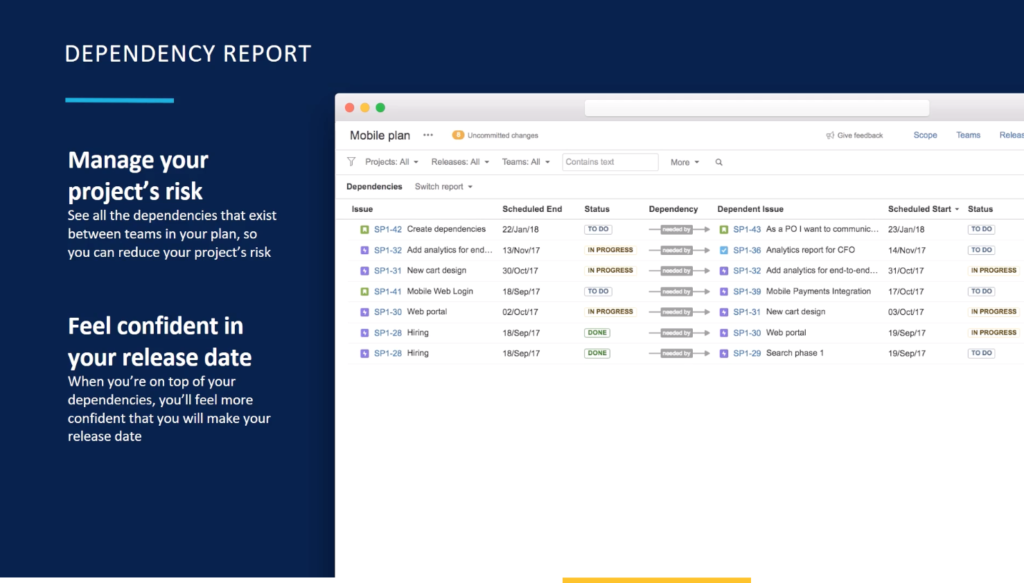
Jira: Dependency Report

Cross-department collaboration

In reality, projects are often shared between multiple departments across an organization. This can cause discontinuity within workflows when communication is not abundantly apparent between teams. Jira allows projects to be broken down into smaller boards, based on issue types. This allows users to focus on only pertinent issues to them while also protecting data irrelevant to their work within a project from being accidentally changed or lost. Users will have only relevant information to their section of the project but can still share issues across multiple boards without changing the specific issue’s progress in another. This allows multiple users to more clearly visualize and communicate the work they are doing, across different departments within an organization.


Agile development has become the new normal, not just for IT departments.

Now is the time to transition agile to elevate and progress your processes. Reflect your workflows within Jira, realistically, to help institute positive change and increase cross-team collaboration. Scale agile and Jira across your non-software team to help institute agile development at scale! Our team can help, with our Jira consulting services.


Ready to take the next step? Schedule your demo, today

5 “Do-Now” Business Cybersecurity Changes

As technology gets smarter, so do hackers. Your data could be at risk without even knowing it. Don’t wait until it is too late to institute change, we have highlighted the top 5 cybersecurity changes for your business or organization to institute today. 

1. Enable IAM MFA

The easiest way to increase the security of your data is to control how your users can access it. Single-sign on passwords is obsolete, opening doors for hackers to enter through. Creating a Multi-Factor Authentication creates more barriers to entry for hackers. It becomes more difficult to gain access to a user’s sensitive accounts when there are multiple steps before gaining the ability to accessing data. This is incredibly important to institute for Identity and Access Management Users are known as IAM users within Amazon Web Service platforms. Introducing multiple steps of authentication before allowing access is imperative for IAM users who possess greater access and increased editing capabilities within the platform, which are very lucrative to hackers. Get more information.  

Cybersecurity strategies

2. Turn on CloudTrail. Now.

CloudTrail is a very beneficial feature within Amazon Web Services. This feature creates an access history of your AWS account, allowing an ongoing record of your valuable projects. This also helps to increase the security within AWS accounts as it increases viability. CloudTrail helps you spot errors faster and smarter. CloudTrail also increases functionality such as downloading, searching, archiving or responding to account activities. Why wait? Download your free trial of CloudTrail today! 

3. Your sensitive data may not be safe, can you plug the leak? 

Hackers can often infiltrate systems without notice until it is too late. You run the risk of exposing your data to various threats, without even knowing it. Do not wait for an attack to happen, enhance your security today. Prepare for the possible outcome of the risks you face, don’t wait until it is too late. 

4. Do a quick scan

It is important to understand your security protocols from an overarching perspective. Continually checking your systems will promote familiarity and consistency, helping you better spot and limit the abilities of unwanted users accessing your sensitive information. Regularly scanning your systems quickly on a foundational level will help you maintain security with ease. Get started.

Cybersecurity strategies for your company

5. Lockdown your ACLs. Don’t be the one to make your S3 bucket public.

The AWS S3 bucket saves your data to a public cloud, allowing increased accessibility and heighten security. However, it can be easy to accidentally make sensitive information available publicly for external users. Creating and securing Access Control Lists, or ACLs, within AWS limits accidental mistakes. These lists delegate access to buckets and objects, allowing you to expressly control who gets to see what. This will also help to decrease access to fraudulent accounts that attempt to access from within internal domains or accreditations. Talk to an expert.

Time to take the Business Cybersecurity Changes

It is important to institute a cybersecurity roadmap for your business before your sensitive information is in the wrong hands. Comprehensive assessments are sometimes needed to better understand your company’s security structure. Security is no longer a “one and done” situation. Now is the time to emphasize the operational effectiveness of your data security. Learn how Oxalis can help you cover your blind spots, keeping data in your own hands. In case you need help with Atlassian, feel free to contact us.

Recommended blog post

Contact us

Why Small Agile Scrum Teams Work Better

If you rely on big systems, you’re missing the point

Agile development is consistently at the forefront of workflows across various industries. Change is centralized at the core of agile development. Possessing the ability to move quickly in response to change is imperative. This rapid response can often get lost in translation across various teams across an organization. That’s why, when considering the size of your agile teams, scrums work better for smaller-sized agile teams. In this post, we will review the advantages of scrum for small teams.

scrums for small teams

Large, establish system integrators can appear to be an efficient solution. It may feel easier to institute a technology solution instead of allowing time and effort to transition to new methods of development. Agile development is the new normal, regardless of industry or the size of the team. Don’t prolong your inevitable switch, transition to agile development today as your teams begin to grow. 

Why put a band-aid on a broken system?

Today, smaller-sized scrum teams are utilizing agile development to work faster, smarter. It can cumbersome and frustrating to work with multiple users across various departments on the same projects. Regardless of team role, breaking projects down within an agile software platform, like Jira, allows heightened visibility and increased accuracy among scrum team members.

Jira Scrum

With Portfolio for Jira, users can segregate the same issue across multiple boards. The specific issue will remain the same across all boards, allowing readers consistency when advancing projects. Separating issues based on the task of the team looking at them across various boards prevents errors from perpetuating problems across various boards. This will help to advance the most accurate solutions when developing projects within Portfolio for Jira. 

Portfolio for Jira
Jira provides clarity throughout all stages of the workflow process, optimizing efficiency for you and your users.

Understanding your teams’ perspective is essential when scaling agile development. Multiple moving parts across the various stages of projects can prevent progress in reality. Creating smaller sub-divisions of agile teams across projects can transform your workflows. The same data points are leveraged against various activities while promoting consistency and accuracy, without the added frustration of various users continually manipulating data. 

Learn how you can benefit from agile development, across your enterprise to work smarter and faster. Oxalis has a wealth of expertise leveling agile across various industries within organizations of varying team sizes. We understand what it takes to find the right framework for your agile teams. We are ready to help when you need it, so why wait? We offer Jira consulting services and a full range of technology consulting services to help you scale.

Recommended blog posts

Connect with Us!

Jira Keyboard Shortcuts that Improve Daily Productivity

Atlassian Jira Software allows agile development to be at the forefront of all of your progress. As an integral pillar of agile development, change can be created or responded to incredibly quickly within real-time. Learn how you can optimize your Jira experience and expedite response time with some of our favorite shortcuts for Jira platforms. Jira keyboard shortcuts work outside of the text field within both Jira Software and Confluence. Below, we will detail some of the most lucrative shortcuts to help increase efficiency when creating, editing or developing workflows within Jira.

Implement global board shortcuts to help navigate with efficiency and ease.

At Oxalis, we utilize Jira software within our own workflows and processes. We understand the best ways to implement Jira in order to harness the utmost benefits. Utilizing Jira keyboard shortcuts can help you introduce small changes that have profound impacts on the way your users work. Learn more.

These key, global shortcuts help you to navigate through boards within Jira with ease and fluidity. You can easily access your personal dashboard at any point within Jira by simply pressing the keys “G” and “D” simultaneously. Returning to the dashboard is just one navigational short cut offered out of many within Jira. Below are some of our personal favorite shortcuts to efficiently navigate at a universal level within Jira.

Jira Keyboard Shortcuts
Simply click the specified keys allocated to each shortcut and you will be moving smoothly throughout your various boards! – Jira Board Shortcuts

One of the most useful Jira keyboard shortcuts from a global perspective is the “Administrative Quick Search” shortcut. This shortcut helped us to personally transform the way we utilize this function within a board. Simply pressing your “/” allows the Administrative Quick Search to be promoted to your screen without having to exit a board. You do not have to stop the work you are doing in order to access this Quick Search from the dashboard window. Utilizing the Administrative Quick Search allows you access to various Jira shortcuts so you can optimize the work you are creating, within losing momentum.

Transform your interaction with issues using agile specific board shortcuts.

Jira Shortcuts
Jira Board Shortcuts

Bonus

Jira is a powerful tool for managing projects, tracking issues, and collaborating with team members. However, navigating Jira’s menus and options can be time-consuming, and can slow down your workflow. That’s why using Jira keyboard shortcuts can help you save time and increase your productivity. In this blog post, we’ll explore some of the most useful Jira keyboard shortcuts that can improve your daily productivity.

  • Create new issue: To quickly create a new issue in Jira, use the “c” shortcut. This will bring up the “Create Issue” dialog box, where you can fill in the details of the new issue.
  • Comment on an issue: To add a comment to an issue, use the “m” shortcut. This will bring up the “Add Comment” dialog box, where you can type in your comment and hit Enter to save it.
  • Edit an issue: To edit an issue, use the “e” shortcut. This will bring up the “Edit Issue” dialog box, where you can make changes to the issue’s details.
  • Move an issue: To move an issue to a different project or issue type, use the “m” shortcut. This will bring up the “Move Issue” dialog box, where you can select the target project and issue type.
  • Copy an issue: To copy an issue, use the “y” shortcut. This will create a copy of the current issue, which you can then edit or move as needed.
  • Open issue details: To open the details of an issue, use the “o” shortcut. This will bring up the issue details view, where you can see the issue’s status, assignee, priority, and other details.
  • Change issue status: To change the status of an issue, use the “s” shortcut. This will bring up a list of available statuses, and you can select the one you need using the arrow keys.
  • Open Jira help: To open Jira’s help system, use the “?” shortcut. This will bring up the help menu, where you can search for information or browse the help topics.
  • Advanced search: To perform a more advanced search in Jira, use the “g” shortcut. This will bring up the “Issue Navigator” view, where you can use Jira’s advanced search syntax to filter and search for issues.
  • Filter issues: To filter issues in Jira, use the “f” shortcut. This will bring up the “Issue Navigator” view, where you can create custom filters to display only the issues you’re interested in.
  • Navigate between issues: To navigate between issues in Jira, use the “j” and “k” shortcuts. Press “j” to move to the next issue, and “k” to move to the previous issue.
  • Add a link to an issue: To add a link to an issue, use the “l” shortcut. This will bring up the “Link Issue” dialog box, where you can select the type of link and the target issue.
  • Assign an issue: To assign an issue to a user, use the “a” shortcut. This will bring up the “Assign Issue” dialog box, where you can select the user to assign the issue to

What are the principal advantages of using Jira shortcuts?

There are several advantages to using Jira keyboard shortcuts to navigate and perform actions within the platform:

  1. Time savings: Using Jira keyboard shortcuts can save you significant amounts of time over using the mouse to navigate menus and click on options. This can be especially beneficial for users who spend a lot of time in Jira every day.
  2. Improved productivity: By using shortcuts to quickly perform common tasks, users can work more efficiently and effectively. This can help improve productivity and reduce the time spent on manual tasks.
  3. Streamlined workflow: Jira keyboard shortcuts can help create a more streamlined workflow, allowing users to move quickly between different areas of the platform and perform actions with ease.
  4. Reduced strain: Using the mouse and clicking on menus and options can cause strain on the wrist and fingers, which can lead to repetitive stress injuries over time. Using keyboard shortcuts can help reduce this strain and prevent injuries.
  5. Consistency: Keyboard shortcuts provide a consistent way to perform actions within Jira, making it easier for users to learn and remember the various commands.
  6. Accessibility: Keyboard shortcuts can be particularly beneficial for users who have mobility or visual impairments that make using a mouse or navigating menus difficult.

In summary, Jira keyboard shortcuts can help save time, improve productivity, create a streamlined workflow, reduce strain, provide consistency, and enhance accessibility. By using these shortcuts, users can work more efficiently and effectively within Jira, ultimately improving their overall experience with the platform.

Oxalis delivers Jira consulting services. Learn more about our Jira consulting services.

Contact us

Don’t miss these posts: 

What the 2019 Capital One Breach Means for your AWS Firewall

Capital One Breach 2019: Here’s is the summary:

July 17, 2019, Capital One Financial Corp. was notified that an online hacker was soliciting the circulation of various sets of sensitive data mined from within internal servers. The source of the data stems from a system breach on March 22 and 23, 2019, which was quickly identified and neutralized. Within the limited amount of time the system was accessed, hacker Paige A. Thompson was able to gather sensitive information impacting millions of US and Canadian citizens.

Over 140,000 Social Security Numbers, 80,000 Bank Account Numbers, and 1 Million Canadian Social Insurance numbers were jeopardized.

Capital One was alerted, nearly 4 months after their data had been accessed, that sensitive information from various credit card applications was being advertised within private chat pages on social media. Thompson, under the alias “Netcave”, spoke openly on a public chat page within the software development site GitHub. She then created a private messaging channel under similar nomenclature within the messaging platform Slack. On this channel, Thompson posted various databases that she was able to hack into, naming various other organizations that could have been impacted including Ford Motor Co, Michigan State University, as well as the largest bank within Italy, UniCredit. Thompson, a Seattle resident, also posted her resume to the GitHub channel identifying her time as an Amazon Web Service engineer, which the CapitalOne servers were deployed on. She gained access to over 30 GB of CaptialOne data from within credit card applications submitted from consumers and small businesses the years 2005 until early 2019. Thompson went into detail on her twitter page, under the name “erratic” bosting about how she easily gained access. Learn more.

The Twitter account associated with Thompson shared insight into her methodology.

As an Amazon Web Service Client, how can you feel confident in your data security?

Thompson was able to gain access to through a “flimsy” firewall protecting Capital One’s cloud deployment on Amazon.com’s AWS software. Though Thompson posses familiarity with Amazon Web Services, working as a prior software engineer, the fault lies within Captial One’s weakened security. At the forefront of cloud deployment, Captial One sought to lead the charge with cloud-based software in the banking industry. The company rapidly deployed cloud-based software across all avenues, in hopes of revolutionizing the way industry leaders store information. Announced in 2015, Capital One rapidly integrated AWS software in hopes of consolidating data centers while emphasizing agile development.

Capital One’s major push toward innovative technology ultimately leads to detrimental ends.

After announcing the forward focusing initiate almost 5 years ago, Capital One faced major setbacks. Effectively having to rewrite all applications for a modern architecture proved to be much more time-consuming in reality. With progress halting on bold claims, Capital One instituted half-hearted security measures that proved to be far more detrimental than the progress made toward the cloud. Focusing on successfully deploying all cloud-based applications led to extreme oversight that, today, caused weak security standards to put millions of people at risk. Contact our experts.

Modern Architecture

How will you learn from Capital One breach mistake?

About what we could learn about the Capital one breach. Hackers, like Thompson, are numerous in today’s technological economy. Your data is incredibly valuable and could be at risk of exposure, how can you protect your cloud-based computing? Oxalis understands the implications, both positive and potentially negative when deploying to the cloud. Here are some of our best practices to deter hackers and limit access from your sensitive information.

  • Passwords: make sure passwords are continuously changed on a regular basis while also encouraging the use of “strong” passwords or phrases.
  • Two-factor authentification: this is incredibly important to provide roadblocks whenever possible to limit the access pathway for hackers. Instituting these methods whenever possible will help you gain valuable time to neutralize a threat once it is identified. Utilizing mobile codes as methods of authentification will help to increase the capabilities of bots or spoofed accounts.
  • Monitor your activity: Capital One is beginning to contact the accounts effected, do not wait until it is too late. Monitor your accounts for suspicious activity to help limit the access and reach of the hacker within internal domains. Get help.

Are you confident in your AWS security protocols?

After large corporations like Equifax and Capital One have been made incredibly vulnerable, how can you be entirely confident in your data security? Hackers have become incredibly sophisticated, transforming cyber attacks into cyber-warfare. Make sure you are utilizing the best resources as your disposal to maintain confidence in the protection of your sensitive data. Oxalis is here to help you understand the benefits and implications of scaling on the cloud, limiting your blind spots and vulnerabilities. We offer a range of AWS consulting services, including data security.

Contact us