Taming the IT Beast: How to Master Your Operating Model and Maximize Value
The IT department: a constant whirlwind of activity. From launching cutting-edge projects to keeping the email server humming, IT teams juggle a mind-boggling array of responsibilities. This complexity can make prioritization a nightmare, leaving IT leaders feeling like they’re constantly putting out fires instead of driving strategic value.
But fear not! By understanding the nuances of your IT operating model and leveraging the right tools, you can transform your department from a reactive cost center into a proactive value powerhouse.
Understanding the IT Operating Model
Every IT department, regardless of size or industry, operates across three core areas:
Projects: The engine of innovation. Projects deliver the new systems, capabilities, and products that keep your organization competitive and future-ready. Think of things like implementing a new CRM, developing a mobile app, or migrating to the cloud.
Operations: The bedrock of stability. This involves keeping the lights on—ensuring systems are running smoothly, data is secure, and users can access what they need. Daily tasks include server maintenance, security patching, and incident response.
Services: The face of IT. This is where your team provides direct support to end-users, resolving issues, answering questions, and fulfilling requests. Think password resets, software installations, and troubleshooting those “my computer is slow” complaints.
Each of these areas comes with its own unique challenges, and when we focus on one, it can sometimes mean that another gets overlooked. For instance, if we see a rise in service tickets, it might slow down our progress on strategic projects or impact the operations team’s ability to keep our systems running smoothly. It’s important to find a balance that allows us to address all these aspects effectively.
The Balancing Act: Why Prioritization is Key
Each of these areas demands attention, but resources are finite. Focusing on one inevitably means deprioritizing another. A sudden influx of service tickets can derail critical projects, while an operational crisis can drain resources needed for innovation.
Without a clear prioritization strategy, IT departments risk falling into common traps:
Missed SLAs: Failing to meet service level agreements erodes user trust and impacts productivity across the organization.
Stalled Projects: Strategic initiatives get bogged down as resources are constantly diverted to address urgent operational or service issues.
Wasted Effort: Time and money are invested in projects that don’t align with overarching business goals.
Gaining the Upper Hand with Atlassian
The key to effective prioritization? Visibility. You need a clear understanding of where your team is spending its time and how that effort aligns with your strategic objectives. This is where Atlassian shines.
Jira: The gold standard for project management. Jira allows you to track progress, manage resources, and ensure your projects stay on track and deliver maximum value.
Jira Service Management (JSM):Purpose-built for IT service management, JSM streamlines incident management, change requests, and service delivery, freeing up your team to focus on higher-value work.
Analytics Tools: Whether you use Atlassian Analytics or another platform, integrating data from Jira, JSM, and other sources provides a holistic view of your IT operations.
With this data-driven insight, you can:
Identify bottlenecks and resource constraints.
Track SLA compliance and identify areas for improvement.
Ensure projects are aligned with business priorities.
Make informed trade-offs between competing demands.
Strategic Decision Making in Action
Imagine this: your service desk is overwhelmed with tickets. Armed with data from your Atlassian tools, you identify the root cause: a recent software update. You can then make informed decisions, such as:
Temporarily reassign staff to the service desk to address the backlog.
Accelerate development of a self-service portal to deflect common requests.
Implement automated solutions to reduce the need for manual intervention.
The Path to IT Excellence
Mastering your IT operating model is an ongoing journey. By embracing a data-driven approach and leveraging powerful tools like Jira and JSM, you can strike the right balance between projects, operations, and services.
The result? A high-performing IT department that delivers exceptional service, drives innovation, and consistently aligns with your organization’s strategic goals.
Unlock Your IT Potential with Oxalis
Ready to take control of your IT destiny and unlock the true potential of your team? Oxalis, an Atlassian Platinum Solutions Partner specializing in ITSM, can help! We’ve empowered countless organizations to streamline their operations, optimize service delivery, and achieve their strategic goals with Atlassian. Explore our range of services and discover how we’ve helped clients like you conquer the complexities of IT. Or, if you’re ready to take the next step, reach out to one of our experts today for a no-obligation consultation. Let’s build a better IT future, together!
5 Strategies to Seamlessly Integrate Agile and Waterfall Methods in Your Project Portfolio
In the realm of project management, the age-old debate between Agile and Waterfall methodologies persists. While Agile champions flexibility and iterative development, Waterfall emphasizes structured planning and sequential execution. But what happens when your portfolio includes a mix of both Agile and Waterfall projects? How do you bridge the gap and ensure seamless management across different methodologies?
The reality is that many organizations operate in a hybrid environment, where some projects are best suited for Agile, while others thrive under Waterfall. The key lies in finding a balanced approach that accommodates both methodologies within your portfolio.
Agile: Emphasizes iterative development, frequent feedback, and adaptability to change. Ideal for projects with evolving requirements and a high degree of uncertainty.
Waterfall: Follows a sequential process with distinct phases, emphasizing thorough planning and documentation. Suitable for projects with well-defined requirements and a predictable scope.
Bridging the Gap: Strategies for Success
Here are some practical strategies to effectively manage a portfolio with both Agile and Waterfall projects:
Embrace a Hybrid Approach: Recognize that there’s no one-size-fits-all solution. Adopt a flexible approach that allows for both Agile and Waterfall methodologies, choosing the best fit for each project based on its specific needs and characteristics.
Establish Clear Communication Channels: Foster open communication and collaboration between Agile and Waterfall teams. Ensure that everyone understands the different methodologies, timelines, and dependencies. Regular meetings, shared documentation, and collaborative tools can facilitate effective communication.
Adapt Reporting and Tracking: Adjust your reporting and tracking mechanisms to accommodate both Agile and Waterfall progress. Use tools and techniques that can visualize progress across different methodologies, providing a holistic view of the portfolio’s performance.
Foster a Culture of Collaboration and Learning: Encourage cross-functional collaboration and knowledge sharing between Agile and Waterfall teams. This can help break down silos, promote understanding, and foster a culture of continuous learning. Even with different methodologies, all projects within the portfolio should contribute to common organizational goals. Define clear objectives and metrics that apply across both Agile and Waterfall projects, ensuring alignment and facilitating performance tracking.
Leverage Tools and Technologies: Utilize project management tools that support both Agile and Waterfall methodologies. These tools can help you manage tasks, track progress, and visualize workflows across different project types, providing a centralized platform for portfolio management.
Oxalis: Your Partner in Bridging the Gap
Navigating a hybrid portfolio can be challenging, but you don’t have to do it alone. Oxalis Solutions, an Atlassian Platinum Solution Partner, is your experienced guide in bridging the gap between Agile and Waterfall.
Our team of certified experts takes a creative, consultative approach, understanding the unique dynamics of managing a diverse portfolio. We work closely with you to tailor solutions that accommodate both methodologies, ensuring seamless integration and optimized performance.
With Oxalis, you can trust that your portfolio management journey will be handled with the utmost care and expertise, ensuring a smooth transition and maximized ROI. We’re committed to your success, providing ongoing support and partnership every step of the way.
Ready to Harmonize Your Portfolio?
Don’t let the Agile vs. Waterfall debate hinder your portfolio’s success. Embrace a hybrid approach, foster collaboration, and leverage the right tools to bridge the gap and achieve seamless portfolio management. Contact us today for a no-obligation consultation and let’s chart your course to a harmonious and high-performing portfolio!
AWS GovCloud User Guide is here to help you. Amazon Web Service’s GovCloud offers the similar services and the same high level of security as AWS, and meets specific regulatory and compliance requirements of US government agencies – such as FedRAMP High, ITAR, DFARS, and HIPAA – by running on a dedicated U.S. platform of hardware, network, and software, that are maintained by U.S. citizens only and provide customers with the ability to access the regions through FIPS 140-2 service endpoints.
GovCloud is available to federal government contractors and organizations in regulated industries, and is used by educational institutions.
For companies, government entities, and other organizations that do not have the manpower, capital, or other resources to host applications and digital workloads on their own, the AWS GovCloud offering provides the necessary compliant hosting infrastructure in the cloud. Quickly satisfy compliance requirements, such as CMMC Levels 1 through 3, without the overhead and risk of managing a data center on your own [Read our perspective on the state of CMMC here]. GovCloud offers all of this capability along with the traditional benefits of cloud scale and speed. Get started with Oxalis AWS GovCloud services.The services available with AWS GovCloud do differ from the services available with the public cloud offering of AWS, though AWS strives constantly to narrow the gap. For standard workload requirements, application hosting, or storage needs, services residing on Amazon’s sovereign cloud are more than sufficient, compliant, and safe to use; if there are specific services you need in GovCloud, AWS provides a guide to the service differences. Continue reading our AWS GovCloud User Guide to decide if this platform is right for you.
However, please note, AWS GovCloud is just a platform. Without a trusted partner or in-house knowledge of this advanced technology, you can quickly get yourself into trouble. Data exposures, compromised services and systems, or worse have all happened when organizations do not develop, deploy, or maintain well architected and operated cloud solutions.
Advantages of Moving to the Cloud
If you are thinking about moving to the cloud, chances are you have considered these main advantages. For those who are still evaluating, here are the primary advantages of moving your workloads to the cloud in a generic sense:
Elasticity – Using auto-scaling and load balancing, only use resources according to your demand.
Cost Savings – Only pay for the computing power, storage, and resources that you use! The AWS cloud also has no long-term contracts or up-front commitments.
Flexibility – You choose the system, programming language, and services that are right for your business.
AWS GovCloud (US) offers all of these advantages, with the addition of high security and compliance.
GovCloud is a compliant hosting infrastructure in an isolated section of Amazon’s AWS cloud.
GovCloud is equipped to handle all categories of Controlled Unclassified Information (CUI) data and government-oriented, publicly available data.
GovCloud restricts physical and logical administrative access to US citizens, and can run workloads that contain all categories of CUI data.
AWS only allows vetted US citizens with access controls to administer the GovCloud Region, and the AWS GovCloud sovereign cloud is completely isolated from Amazon.com.
Even though AWS does manage access controls for GovCloud, each business is responsible for controlling their own content.
Do you have questions about moving to the Cloud? Do you think AWS GovCloud is the right move for your business, or do you want to learn more? Oxalis provides AWS Govcloud Services that can help you scale your efforts.
There are many benefits of Amazon’s AWS as a cloud platform. For people unfamiliar with what AWS offers, here is a quick run down of the most common AWS Cloud services and why they matter:
Amazon Elastic Cloud Compute (EC2)
AWS Elastic Cloud Compute (EC2), one of the basic building blocks of any AWS cloud solution, provides dynamic and scalable compute capacity. EC2 is available in pay-as-you-go plans or discounted long-term contracts.
Business Example: EC2 can be used for dedicated hosting of applications, software and websites on the cloud. Dynamic and scalable compute capabilities make EC2 a key solution for a growing application or application
Amazon Simple Storage Service (S3)
The second key building block of an AWS cloud solution, S3 provides secure data storage on the cloud. S3 storage is accessible from any system connected to the internet and correctly authenticated into your AWS configuration.
Business Example: Permission-based file storage, accessible from anywhere by individuals or applications with the appropriate credentials.
Amazon Aurora and Amazon DynamoDB
Amazon Aurora and DynamoDB are the final core building blocks of the AWS cloud solution, offering relational and nonrelational database capabilities, respectively. Amazon Aurora is a relational database built for your cloud services and is compatible with both MySQL and PostgreSQL. Amazon DynamoDB is the NoSQL parallel to Amazon Aurora.
Business Example: Cost-effective open source database solution for your cloud applications and environments.
AWS Lambda
Similar to EC2, AWS Lambda offers compute capacity in the cloud, but executes serverlessly. Lambda comes at a small premium, but lets you run code without managing EC2s or incurring the ongoing costs of a dedicated instance. AWS Lambda will handle all administrative tasks, including server and system maintenance, capacity provisioning and scaling, and code monitoring and logging.
Business Example: Background tasks are best suited for AWS Lambda, where persistent server environments are not necessary and workloads are small, sporadic, or hard to predict.
Amazon ELB
Distribute incoming application traffic using an Amazon ELB (Elastic Load Balancing). ELB can function across availability zones and services including EC2 instances, containers, IP addresses, Lambda functions, and virtual appliances.
Amazon VPC
Amazon’s virtual private network solution, isolated within the AWS GovCloud. Defined per your requirements and specifications, including private IP address range, subnets, route tables, and network gateways.
Business Example: Deploy a VPC and ELB to logically isolate production back-end services from public entry point.
Amazon Workspaces
Secure, persistent, and managed cloud desktop virtualization services. Accessible from supported devices.
Business Example: Virtual Desktop Infrastructure is a standard security practice for organizations desiring to centralize their workforce within compliant and secure desktop infrastructure. Amazon Workspaces is the AWS GovCloud-available solution to meet this need
Simple Email Service (SES)
Recently added to the Amazon GovCloud (US) suite, SES is an email service for your AWS GovCloud (US) services.
Redshift
Redshift is a data warehouse service in the cloud. Capable of managing petabytes of data, Redshift is the AWS solution for acquiring new insights for your business.
CloudWatch
CloudWatch is AWS’s resource monitor service that can be used to collect and track metrics relevant for your applications and resources.
Business Example: Set up alarms to alert your administrators during an unauthorized access attempt to your AWS Console. Tie these alarms to a slack channel for quick and distributed alerting. An overview of a reference implementation can be found below:
AWS works constantly to improve their service offerings. Examples of recently announced GovCloud improvements include:
Adding Amazon SageMaker Studio to AWS GovCloud (US) Regions: SageMaker Studio is an integrated development environment (IDE) that provides a single web-based visual interface where you can quickly upload data, use notebooks on a wide range of instance types, train and tune models, run experiments, and collaborate seamlessly within your organization.
Adding AWS CodePipeline to AWS GovCloud (US-East): CodePipeline automates the build, test, and deploy phases of your release process when there is a code change, based on the release model you define.
Adding AWS Directory Service support for smart card authentication in AWS GovCloud (US-East) Region: Use Common Access Card (CAC) and Personal Identity Verification (PIV) smart cards to authenticate users into Amazon WorkSpaces through your self-managed Active Directory (AD) and AWS Directory Service AD Connector.
How do AWS GovCloud (US)’s Services Differ from Standard AWS’s?
AWS GovCloud vs AWS. Compliant vs. General Purpose. Premium vs Bargain. How do these two AWS tiers stack up against each other and is GovCloud worth it?
The good news is that both products provide agencies and businesses with a complete infrastructure web services platform in the cloud. This includes all of the above-mentioned compute, analytics, networking, monitoring, and storage services. If you need compliance, though, standard AWS can’t help you, since its data may be stored outside the continental U.S. and managed by non-US citizens, and AWS GovCloud (US) endpoints are only accessible to AWS GovCloud (US) customers. Similarly, FIPS 140-2 compliant endpoints are also available exclusively for AWS GovCloud (US) Regions.
It’s important to note that while most AWS services are available in GovCloud, there are often limitations, missing features, and restrictions to GovCloud services – due to the challenges of meeting compliance requirements. AWS provides a complete list of these differences, so do your homework. Here are a few examples:
EC2: Instances must be launched in an Amazon Virtual Private Cloud.
S3: The features S3 Transfer Acceleration, S3 Replication Time Control (S3 RTC), S3 Storage Lens are unavailable.
AWS Trusted Advisor: Not all checks are supported in GovCloud.
Amazon Cognito: Not all features are supported in GovCloud.
What Regulatory and Compliance Requirements can be Satisfied by AWS GovCloud (US)?
AWS GovCloud (US) is designed to meet the most stringent regulatory and compliance requirements encountered by U.S. Government agencies and contractors. Below is a list of some of these frameworks supported by AWS GovCloud (US):
International Traffic in Arms Regulations (ITAR) – ITAR controls the export of sensitive defense and military data, information, and technology.
Defense Federal Acquisition Regulation Supplement (DFARS) – DFARS is actually supported by the standard AWS cloud as well as GovCloud. This regulation applies to the safeguarding of DoD data, which includes data in the cloud.
The Federal Risk and Authorization Management Program (FedRAMP) – A Federal Government program that provides standardized security assessment and authorization criteria, as well as continuous monitoring for cloud products and services.
Department of Defense (DoD) Cloud Computing Security Requirements Guide (DOD SRG) – Standardizes the security assessment and authorization process for sensitive Defense Department data and systems operating in the cloud.
Cybersecurity Maturity Model Certification (CMMC) – The DoD’s comprehensive cybersecurity program to protect sensitive information.
Criminal Justice Information Services (CJIS) – Governs the security of criminal justice information services for federal and state and local law enforcement.
IRS-1075 – Applies to the protection of federal tax information.
FIPS 140-2, which specifies cryptographic security requirements to protect sensitive U.S. government information.
Health Insurance Portability and Accountability Act (HIPAA) – Protects the processing and storage of health information.
General Data Protection Regulation (GDPR) – Protects European Union (EU) individuals’ fundamental right to privacy and the protection of personal data.
AWS provides a full list of compliance certifications, attestations, regulations, alignments, and frameworks that are satisfied by GovCloud. It is important to note here that AWS GovCloud provides the infrastructure and design to enable customers to meet these regulatory requirements, but ultimately the implementation of cloud services within AWS GovCloud requires careful and intentional management to ensure security and compliance.
What are the Pros and Cons of AWS GovCloud versus Azure Government or regular AWS?
An entire article could be dedicated to this comparison, but for the sake of this blog we will keep it short. Amazon AWS and Microsoft Azure make up the largest public cloud services. Each company has made significant investment in security for their standard tier cloud infrastructure and extended that into full Government compliance with the AWS GovCloud and Azure Government offerings.
A few considerations to take into account:
AWS has been around longer. Launched in 2006 with the standard cloud offering, AWS was the first to offer Government-level compliant cloud services.
AWS features quick-start guides, helping you configure your instances to the tightest compliance requirements, such as HIPAA and CMMC.
Need help deciding? The choice can be difficult, but Oxalis is experienced in both Azure Government and AWS GovCloud. Reach out to our experts for assistance with evaluating the cloud migration dilemma. Get help with Govcloud Services.
Who Can Use AWS GovCloud (US)? What Requirements Do I Have to Meet In Order to Use AWS GovCloud (US)?
All U.S. persons can request access to AWS GovCloud (US) resources, but access is subject to approval. Access is restricted to customers who:
Are U.S. persons.
Not subject to export restrictions.
Who comply with US export control laws and regulations, including the International Traffic in Arms Regulations (ITAR).
Government entities are required to sign a customer agreement and an agreement specific to AWS GovCloud (US) in order to access AWS GovCloud (US) resources.
Interested in applying for access to AWS GovCloud? Oxalis has experience applying, deploying, and managing multiple AWS GovCloud instances internally as well as for our customers. Reach out for a fit consultation to determine if AWS GovCloud (US) is the right solution for your needs. Our U.S.-based team of experts can help you navigate the application process.
Once you’ve determined that AWS GovCloud (US) is the right solution for you, qualified customers can request access to from the AWS Management Console of a standard AWS account, by contacting an AWS business representative, or by reaching out to Oxalis for assistance.
What does AWS GovCloud Pricing Look Like? What Does Amazon Web Service Hosting Cost?
The AWS offerings within standard and GovCloud are vast and flexible. For the purposes of this quick comparison, we will focus on relative costs of the major compute and storage offerings of AWS Govcloud vs AWS. AWS is the standard for cloud-based offerings and can be taken as a benchmark when calculating the impact of moving to a compliant cloud like AWS GovCloud.
Note: Cloud compute and storage prices are constantly in flux so please consult the AWS calculator for the most up-to-date pricing: https://calculator.aws. The numbers included below are up-to-date as of August 2021.
Before diving into the numbers, let’s have a look at the AWS compute tiers to better understand what options are available and begin to decipher Amazon’s naming conventions. EC2 offers the most customization and the options can often be overwhelming when reviewed for the first time. Read on to learn the framework. Contact us to learn more about AWS Govcloud Services.
An Intro to EC2 Tiers
Amazon groups EC2 compute options into tiers, which offer varying optimization balances to maximize your EC2 purchase. These tiers are differentiated by an alphanumeric ID representing the ratio of Memory, vCPU, Network Performance, and Storage provided to each instance. Each tier is cost-optimized for that particular ratio. You can use the AWS calculator to determine the appropriate tier based on a particular memory or vCPU requirement, or you can select a specific tier via the Advanced Estimate option.
The EC2 Families
To better understand the AWS offerings, we can group the tiers into five families:
General Purpose
T3, T3a, T2 Instance Types are configured for the lowest price general purpose computing.
These are your standard current-generation instances for a majority of your application support needs.
Compute Optimized
The C5, C5n, and C4 instance types offer the lowest price per CPU ratio of the instance types.
Memory Optimized
The R6g, R5, R5a, R5n, R4, X1e, and X1 instance types are memory optimized with standard network performance for a more affordable option than the Accelerated Computing family.
Accelerated Computing
P3, P2, Inf1, G4, G3, and F1 feature accelerated computing with high Network Performance ratings and enormous Memory options.
Storage Optimized
The I3, I3en, D2, and H1 families make up the storage optimized instances, featuring dedicated SSD storage instead of the standard EBS storage option.
AWS Pricing Compared to AWS GovCloud (US)
Note: Cloud compute and storage prices are constantly in flux so please consult the AWS calculator for the most up-to-date pricing: https://calculator.aws. The numbers included below are up-to-date as of August 2021.
You likely have a number of questions when it comes to AWS GovCloud pricing:
How much more expensive is AWS GovCloud (US)?
How much does a standard selection of AWS GovCloud (US) services cost when compared to AWS Standard?
How much does AWS GovCloud (US) cost per hour? Per month? How does that pricing change when reserved in an annual subscription?
Using AWS GovCloud West and US West (Oregon) regions for GovCloud and AWS Standard estimates, respectively.
1 year cost estimate is for 100% upfront payment
1 – S3 Standard Storage Costs per Month
Storage Size
AWS (USD)
AWS GovCloud (US) (USD)
% Difference
1 TB
23.55
39.94
70% Increase
100 TB
2,304.00
3,891.20
69% Increase
1000 TB
22,067.20
37,222.40
69% Increase
2 – EC2 Hourly Compute Costs per Hour (On-Demand and 1 Year Reserved)
Example Specifications
Family
Tier
Memory
vCPUs
Network Performance
Storage
General Purpose
t3.large
8 GiB
2
Up to 5 Gigabit
EBS only*
Compute Optimized
c5.large
4 GiB
2
Up to 10 Gigabit
EBS only*
Memory Optimized
r6g.large
16 GiB
2
Up to 10 Gigabit
EBS only*
Accelerated Computing
inf1.xlarge
8 GiB
4
Up to 25 Gigabit
EBS only*
Storage Optimized
i3.large
15.25 GiB
2
Up to 10 Gigabit
1 x 475 NVMe SSD
*EBS = Elastic Block Store: either SDD or HDD-based high-performance block storage
Cost Comparison
Family
Selected Tier
On-Demand Hourly Cost AWS (USD/hr)
1 Year ReservationAWS (USD/hr)
On-Demand Hourly Cost GovCloud (US) (USD/hr)
1 Year Reservation AWS GovCloud (US) (USD/hr)
% Difference (1 year reserved)
General Purpose
t3.large
0.0832
0.0487
0.0976
0.0574
18% Increase
Compute Optimized
c5.large
0.085
0.05
0.102
0.06
20% Increase
Memory Optimized
r6g.large
0.1008
0.0593
0.1208
0.071
20% Increase
Accelerated Computing
inf1.xlarge
0.228
0.134
0.228
0.169
26% Increase
Storage Optimized
i3.large
0.156
0.099
0.188
0.12
21% Increase
3 – Lambda – Serverless Compute Costs Per Month
AWS Lambda starts to become more cost-effective than standard EC2 when running small workloads at most one quarter of the time (when compared to an always-on compute load). Interestingly enough, there does not appear to be a premium on running Lambda functions on AWS GovCloud (US) at this time.
Lambda Memory Size (GB)
Execution-seconds*
AWS (USD)
AWS GovCloud (US) (USD)
% Difference
2
1296000
36.59
36.59
0 %
2
2592000
80.05
80.05
0 %
4
1296000
79.79
79.79
0 %
4
2592000
166.45
166.45
0 %
*Assuming each execution runs for either 0.5 or 1 second, distributed over 1 month.
Increased compliance and security comes at an increased cost. Approximately 25% greater cost.
As expected, our calculations show that AWS GovCloud (US) is more expensive than standard, approximately 10% to 70% increase in cost, depending on the service. Some key takeaways:
Certain services, such as CloudWatch, did not experience a significant price change (7-8%) when upgraded to an AWS GovCloud (US) datacenter deployment while Lambda services did not increase in price at all.
Storage was the most significant increase in price at an average of 69% increase
Compute resources fell within the average with a 18% – 26% increase in price for computing.
Calculating your migration costs and need help? Reach out to our team of experts to evaluate your cloud migration landscape and anticipated costs. We can help you set up the cost calculator and find the solution(s) that meet your specific needs. Ready to learn more about GovCloud services?
So you’ve decided AWS GovCloud is the right solution for your needs. How do you go about purchasing a license and getting started with configuration? The first step is to sign up for the service, which can be done manually or through a solution provider such as Oxalis.
Interested in contacting a Govcloud services provider? Learn more about Us.
Sign Up
Option 1 – Create an AWS GovCloud (US) account through a Solution Provider.
Recommended for organizations who don’t yet know what AWS services they will need, or those who are interested in optimizing their AWS GovCloud procurement and resource allocation.
Option 2 – Create an AWS GovCloud (US) from a standalone AWS account.
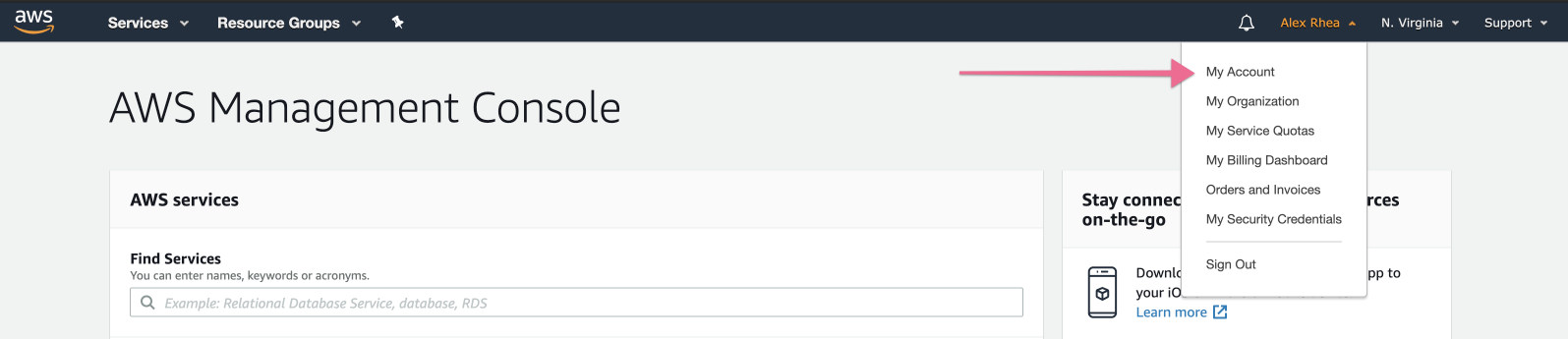
To do this, create or log into your AWS standard account and navigate to the “My Account” page at the top of the Console
At the bottom of the “My fAccount” page, there will be a GovCloud (US) section. If you do not see this section, ensure you logged in with the root credentials otherwise, create a support ticket. Click “Sign up for AWS GovCloud (US).”
This will navigate you to the AWS GovCloud (US) Sign Up Portal where it will ask you to accept the AWS GovCloud (US) legal agreement and provide additional information, so we can verify your eligibility for an AWS GovCloud (US) account.
Accessing the My Account Page and GovCloud Signup
Option 3 – Create an AWS GovCloud (US) with AWS Organizations.
AWS Organizations allows your organization to create and manage a set of accounts across regions and partitions.
Since AWS GovCloud (US) accounts are associated with standard AWS accounts for billing, service, and support purposes, customers are required to have an existing standard account before signing up for an AWS GovCloud (US) account. It is recommended to create a new AWS account that will only be used solely for AWS GovCloud sign up and billing to ensure your standard AWS workloads will not be affected when transferring or closing GovCloud accounts.
Onboarding
There are a few steps required to onboard your AWS GovCloud account, which are outlined here:
Sign in to your account.
Create an alias for your account.
Create and download access keys.
Verify AWS CloudTrail is Enabled.
Configuration
At this step, we recommend configuring a few console items to secure your account before allocating any AWS services or migrating data to the cloud:
Configure the AWS CLI
Create an IAM User to Access the Console
Configure Audit Logging
Enable Multi-Factor Authentication (MFA) for IAM users
Sign Up for AWS GovCloud (US) Customer Support
Allocation
Last but not least, you will need to procure the AWS services that your organization needs for the cloud. Below is an example of what a final implementation may look like for a moderately-sized application on AWS GovCloud (US):
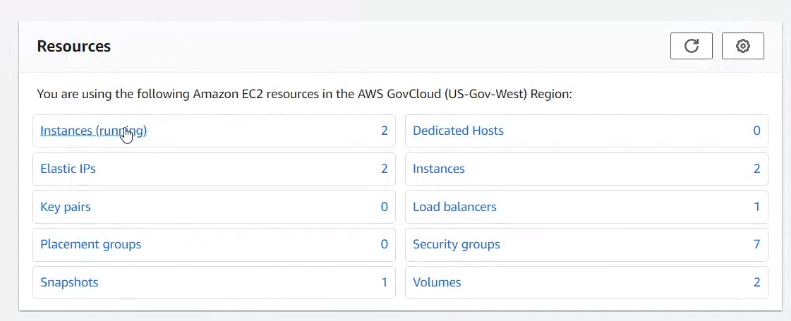
The EC2 instances allocated for this application are deployed on T3 and T2 instance types for the general purpose, long-running, burstable workloads of the application:
What does success look like?
HR and compliance company Mineral needed to get their primary revenue generating application to the cloud fast. The business was about to scale dramatically and something needed to be done to set the stage for the uptime, expansion, and partnerships coming quickly. Oxalis was engaged to assess, architect, and migrate Mineral’s monolith code base to AWS services and resilient cloud architecture so that the business could proceed with revenue generating partnerships.
Previous efforts had failed and something needed to be done.
Do you think AWS GovCloud is the right move for your business, or do you want to learn more? Enter your information below to contact one of our experts to start the conversation today, or learn more about our Amazon Govcloud services.
Need more Info? Check out our AWS GovCloud Services User Guide
Here is what our AWS GovCloud user guide includes:
Overview of AWS GovCloud Services with related ITAR boundaries.
Instructions on signing up for and setting up AWS GovCloud.
Differences between standard AWS regions vs. GovCloud.
Agile Collaboration at Scale: Unlocking Enterprise Agility with Jira
Agile methodologies have taken the world by storm. Teams love the flexibility, faster delivery, and increased collaboration that Agile offers. But scaling Agile to the enterprise level? That’s where things get tricky. Many companies struggle to break free from traditional hierarchies and mindsets, leading to Agile initiatives getting lost in a sea of bureaucracy.
The Agile Essentials
Before we dive into scaling, let’s recap the Agile basics. The Agile Manifesto, published in 2001, introduced a new way of working. Instead of rigid, sequential plans (waterfall), Agile emphasizes iterative progress, frequent feedback, and adapting to change. This means:
Autonomy: Empowering teams to make decisions and innovate.
Customer-centricity: Building what customers truly need.
Collaboration: Working closely together to overcome obstacles.
Why Agile Scaling is Hard
Scaling Agile across an entire organization requires a significant shift in culture and mindset. Here’s why many companies stumble:
Lack of leadership buy-in: Agile transformations need strong leadership support and investment to succeed.
Unclear organizational structure: Teams need to be organized in a way that supports Agile principles and clear responsibilities.
Loss of autonomy: Scaling Agile shouldn’t mean stifling the very autonomy and innovation that makes it work.
To truly reap the benefits of Agile at scale, companies need to address these challenges head-on:
Invest in Agile: Go beyond training and tools. Foster an Agile mindset across all levels of the organization. Encourage leaders to become problem-solvers and remove roadblocks for teams.
Define clear team structures: Organize teams around value streams, product lines, or customer journeys. Ensure everyone understands their roles and responsibilities.
Maintain autonomy and trust: Empower teams to make decisions and innovate within clearly defined strategic priorities. Foster a culture of trust and transparency.
Organizing for Scale: Why Clarity Matters
While Agile thrives on close collaboration, scaling it across a large organization requires a more structured approach. Simply put, you can’t rely solely on personal relationships when you have hundreds or thousands of employees.
Many Agile frameworks use Dunbar’s number (150) as a guide for team size, recognizing the cognitive limits of maintaining close relationships. However, most enterprises far exceed this number. Therefore, it’s crucial to establish a clear organizational taxonomy – a well-defined structure that outlines team responsibilities and capabilities.
Think of it this way: everyone should know who’s doing what. As USAA COO Carl Liebert puts it, you should be able to ask, “Who owns X?” and get a clear, confident answer from the responsible team. This eliminates confusion, streamlines decision-making, and ensures accountability.
There are various ways to structure teams at scale, such as by feature area (like in the Spotify model), by product, or by customer journey. The key is to find an organizational design that aligns with your company’s values and priorities, enabling efficient collaboration and value delivery.
Empowering Teams: The Foundation of Agile at Scale
Agile thrives on trust and autonomy. As the Agile Manifesto states, “motivated teams are more likely to deliver their best work.” This principle becomes even more critical when scaling Agile.
However, traditional top-down management practices often undermine autonomy. Instead of empowering teams, organizations may inadvertently create rigid structures and processes that stifle innovation and erode trust.
To avoid this pitfall, leaders should focus on setting clear strategic priorities and goals. Then, trust your teams to determine the best way to achieve those goals. Empower product owners to collaborate closely with customers and make informed decisions. This approach fosters a sense of ownership and allows teams to leverage their expertise and creativity.
Remember, Agile is about adapting to change. Be prepared to adjust priorities and goals as needed, maintaining a flexible and responsive approach to meet evolving customer needs.
Scaling Agile: A Journey of Transformation
Successfully scaling Agile requires a fundamental shift in mindset and culture. It’s not just about adopting new processes; it’s about embracing the core values of Agile throughout the organization.
Teams, leaders, and organizational structures must evolve in unison, always aligning with the company’s overall purpose. This means fostering a culture of collaboration, trust, and continuous improvement.
Crucially, no team should be left behind in this transformation. Every part of the organization needs to embrace Agile principles to ensure everyone is moving in the same direction. Otherwise, you risk creating internal friction and hindering the progress of your Agile journey.
Agile Frameworks: Your Roadmap to Success
Scaling Agile doesn’t have to be a journey into the unknown. Several frameworks can guide your transformation:
Scaled Agile Framework (SAFe): A Structured Approach to Enterprise Agility
The Scaled Agile Framework (SAFe) provides a comprehensive blueprint for implementing Lean and Agile practices at the enterprise level. It offers a set of organizational and workflow patterns that help align strategy with execution, enabling large organizations to deliver value more effectively.
SAFe is built on seven core competencies of the Lean enterprise and introduces concepts like Program Increments (PIs) and Agile Release Trains (ARTs) to coordinate work across multiple teams. While SAFe emphasizes alignment and planning, it’s sometimes considered less “purely Agile” than other frameworks due to its more structured, top-down approach.
Large-Scale Scrum (LeSS): Scaling Simplicity
LeSS takes the principles of Scrum and applies them to the enterprise level, with a focus on minimalism. Instead of adding complexity, LeSS aims to reduce it. Teams continue to use Scrum boards, sprints, and ceremonies, but they might share a single product backlog and sprint cadence to improve coordination.
A key role in LeSS is the Area Product Owner, who provides guidance and oversight across multiple Scrum teams. By keeping rules and guidelines to a minimum, LeSS empowers teams to self-manage and deliver value efficiently, while minimizing waste and unnecessary overhead.
The Spotify Model: Agile-at-Scale in Action
More than a rigid framework, the Spotify Model is a compelling example of how a company successfully scaled Agile. Introduced in a 2012 whitepaper by Henrik Kniberg and Anders Ivarsson, it highlights Spotify’s unique approach to Agile at scale, emphasizing autonomy, culture, and network-based collaboration.
At its core, the Spotify Model empowers individuals and teams. Teams have the freedom to choose their preferred Agile framework and organize themselves into “Squads” focused on specific features or missions. To foster knowledge sharing and cross-team collaboration, individuals with similar skills can join “Chapters” and “Guilds” based on their interests and expertise. These squads are then grouped into “Tribes” to tackle larger initiatives.
While the Spotify Model offers valuable insights, it’s important to remember that it was tailored to Spotify’s specific needs and culture. It’s not a one-size-fits-all solution, but rather an inspiring example of how to adapt Agile principles at scale.
Don’t Just Copy, Adapt!
Every organization is unique. Find a framework (or combination of frameworks) that aligns with your specific needs and culture. Be prepared to adapt and evolve your approach over time.
When it comes to scaling Agile, Atlassian’s Jira suite stands out as a leading solution. With a proven track record and a wide range of tools, Jira supports organizations of all sizes in their Agile journey.
Jira Software, used by thousands of teams worldwide, provides a robust foundation for Agile work management. Its flexibility allows teams to adopt various Agile methodologies, while features like Advanced Roadmaps offer portfolio-level visibility and planning.
For larger enterprises with complex needs, Jira Align offers a dedicated platform for scaling Agile frameworks like SAFe, LeSS, and more. Jira Align provides out-of-the-box support for popular frameworks, incorporating their terminology and reporting structures, and integrates seamlessly with existing Jira deployments.
However, even without Jira Align, the Atlassian ecosystem provides a powerful solution for scaling Agile. Jira Software, Confluence, Bitbucket, and Jira Service Management can be combined to create a customized platform that empowers teams, enhances collaboration, and provides leadership with the insights they need to manage at scale.
Key benefits of Atlassian for scaling Agile:
Flexibility: Supports various Agile methodologies and team structures.
Customization: Adapts to your unique organizational needs and workflows.
Scalability: Grows with your organization, from individual teams to large enterprises.
Integration: Connects different tools and teams for seamless collaboration.
Whether you’re just starting your Agile journey or looking to optimize your existing practices, Atlassian’s Jira provides the tools and flexibility to scale Agile effectively.
Jira: Empowering Teams While Maintaining Alignment
Jira Software provides the flexibility to support various Agile styles, from Kanban and Scrum to hybrid approaches like Scrumban. This allows teams to choose the method that best suits their needs and preferences.
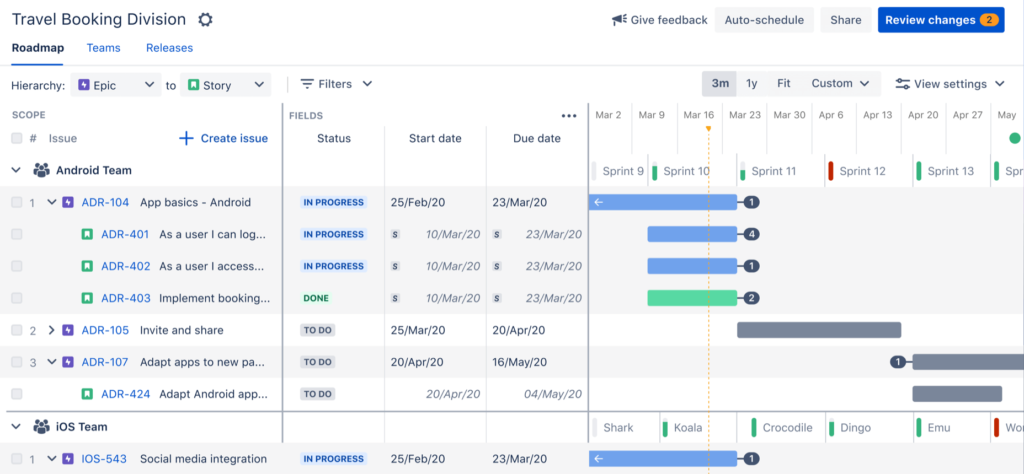
Jira’s issue hierarchies enable effective management of work at different levels. Leaders can track long-term initiatives and programs, while teams focus on features and epics. Advanced Roadmaps provides a clear overview of planned work, with the ability to drill down for more detailed information. Effort estimation is streamlined across the organization, making it easier to allocate resources and plan strategically.
Beyond software development, Jira’s capabilities extend to other business functions. Jira Work Management supports marketing, HR, finance, and more, while Jira Service Management integrates service desk operations with the rest of the organization. This cross-functional approach ensures alignment and collaboration across all teams.
If you’re unsure whether Jira meets your specific needs, Oxalis can help. We’ll assess your Agile maturity and create a tailored transformation roadmap to guide your implementation.
Atlassian is heavily invested in cloud technology, recognizing its ability to deliver value quickly and enable rapid adoption of best practices. Their streamlined cloud offerings — Cloud Standard, Cloud Premium, and Data Center (for on-premises needs) — provide flexible options for organizations of all sizes and compliance requirements.
This focus on cloud demonstrates Atlassian’s commitment to providing cutting-edge Agile tools with enhanced accessibility and scalability. To learn more about the different cloud options and choose the best fit for your organization, check out our white paper: “Atlassian Compliant Cloud vs Data Center.”
Oxalis: Your Partner in Scaling Agile with Atlassian
Scaling Agile successfully requires a deep understanding of your organization’s unique structure, culture, and existing tools. It’s a journey of continuous improvement, involving testing, measuring, learning, and adapting.
Whether you’re new to Atlassian or already using their products, Oxalis can help you navigate this journey. We’ll work closely with your team to design a tailored solution that meets your specific needs. Our services include:
Comprehensive discovery: We’ll analyze your current state and identify areas for improvement.
Best-practice implementation: We’ll guide you in adopting Agile best practices and configuring Atlassian tools effectively.
Expert support: Our dedicated team provides ongoing support and expertise to ensure your success.
If you’re looking to migrate to Atlassian or consolidate existing tools, our cohort-based migration approach has a proven track record of success. We’ll help you seamlessly transition to a unified platform, enabling better collaboration and efficiency across your organization.
Scaling Agile is a journey, not a destination. Here are some key starting points:
Cultivate an Agile mindset: Encourage a proactive, problem-solving approach at all levels of the organization. Empower individuals to identify and remove roadblocks, fostering a culture of agility.
Establish clear team structures: Define a clear organizational taxonomy that outlines roles, responsibilities, and team structures. This promotes effective communication and collaboration.
Foster trust and transparency: Implement feedback mechanisms and prioritize transparency to build a culture of trust and autonomy. This empowers teams to make decisions and drive innovation.
While the full benefits of Agile-at-scale may take time to realize, you’ll likely see positive changes early on. By investing in Agile best practices now, you’re building a foundation for adaptability and responsiveness, enabling your organization to thrive in the face of changing market dynamics and seize new opportunities.
Used by Google Analytics 4 to persist session state and track usage across visits. The XXXXXXXXXX portion corresponds to the Oxalis Google Analytics property ID.
1 year
_gac_
Contains information related to marketing campaigns of the user. These are shared with Google AdWords / Google Ads when the Google Ads and Google Analytics accounts are linked together.
90 days
__utma
ID used to identify users and sessions
2 years after last activity
__utmt
Used to monitor number of Google Analytics server requests
10 minutes
__utmb
Used to distinguish new sessions and visits. This cookie is set when the GA.js javascript library is loaded and there is no existing __utmb cookie. The cookie is updated every time data is sent to the Google Analytics server.
30 minutes after last activity
__utmc
Used only with old Urchin versions of Google Analytics and not with GA.js. Was used to distinguish between new sessions and visits at the end of a session.
End of session (browser)
__utmz
Contains information about the traffic source or campaign that directed user to the website. The cookie is set when the GA.js javascript is loaded and updated when data is sent to the Google Anaytics server
6 months after last activity
__utmv
Contains custom information set by the web developer via the _setCustomVar method in Google Analytics. This cookie is updated every time new data is sent to the Google Analytics server.
2 years after last activity
__utmx
Used to determine whether a user is included in an A / B or Multivariate test.
18 months
_ga
ID used to identify users
2 years
_gali
Used by Google Analytics to determine which links on a page are being clicked
30 seconds
_ga_
ID used to identify users
2 years
_gid
ID used to identify users for 24 hours after last activity
24 hours
_gat
Used to monitor number of Google Analytics server requests when using Google Tag Manager
1 minute
Marketing cookies are used to follow visitors to websites. The intention is to show ads that are relevant and engaging to the individual user.