From Organic Growth to Enterprise-Wide Adoption: DHCS’ Atlassian Success Story
The Situation
The California Department of Health Care Services (DHCS) manages one of the most complex public healthcare programs in the nation.
Within DHCS, the Medi-Cal Enterprise Systems Modernization (MESMD) team successfully leveraged Jira Software and Confluence Cloud for agile software development and work management. Their success sparked an interest in expanding the Atlassian suite agency-wide to improve project visibility, collaboration, and scalability.
Before scaling, DHCS needed to ensure:
Access and permission structures aligned with security policies and could scale across the agency.
Standardized project templates to support both technical and business teams with varied methodologies (scrum, waterfall, hybrid).
Comprehensive onboarding and training to enable new users to quickly adopt Atlassian tools with minimal disruption.
To support this transformation, DHCS partnered with Oxalis, an Atlassian expert with deep experience in public sector project management, governance, and I
The Challenge:
DHCS faced key obstacles in expanding Atlassian adoption and project standardization:
Inconsistent permission structures – With multiple teams and external contractors, DHCS required a standardized permission model to protect sensitive data while allowing seamless collaboration.
Lack of structured onboarding – Many teams lacked experience with Atlassian tools, requiring custom training and process guidance.
Disjointed project methodologies – Teams followed varied project management styles, making it difficult to standardize reporting and governance.
Limited visibility into project portfolios – Leadership struggled to gain a unified view of project progress and resource allocation.
Oxalis’s Approach
Oxalis designed and executed a scalable, structured approach to Atlassian adoption across DHCS.
1. Standardizing Permissions and Security
Developed and implemented a unified permission scheme, ensuring consistent user access controls for employees and contractors.
Aligned permission structures with DHCS security policies, ensuring compliance and minimizing risk exposure.
2. Enhancing Training and Onboarding
Created customized training materials, including documentation and instructor-led sessions.
Onboarded over 500 users across 75 projects and five divisions, ensuring consistent tool adoption.
Provided role-based training tailored to both technical and business teams using scrum, hybrid, or waterfall methodologies.
3.Establishing Project Templates and Best Practices
Designed structured project templates to standardize workflows and enable rapid project setup.
Implemented enterprise-level reporting structures, allowing leadership to track project health across the organization.
Integrated portfolio-based reporting, ensuring all projects rolled up into a common enterprise hierarchy.
4.Fostering a Community of Practice
Created a Community of Practice to support collaboration, knowledge sharing, and best practices across project teams.
Provided post-implementation support to refine workflows, optimize configurations, and reduce technical debt.
Developed a Project and Portfolio Management (PPM) Maturity Model, charting a roadmap for continuous improvement.
The Outcome
With Oxalis’ expertise, DHCS successfully scaled its Atlassian Cloud implementation, resulting in:
500+ users onboarded across 75 projects, accelerating agency-wide adoption.
Improved security and governance, with standardized permission models ensuring data integrity and controlled access.
Greater project visibility, with enterprise-wide reporting allowing leadership to track progress and resource allocation.
Faster onboarding and reduced time-to-value, ensuring new users and projects can begin using Atlassian tools quickly and efficiently.
A structured approach to PPM maturity, providing a clear path for ongoing improvements and scalability.
ABOUT DHCS
Headquarters: Sacramento, CA
Annual budget: $100BN
3,400 employees
Serves 15+ million Californians
DHCS works to ensure access to quality health care services, manages funding allocations, and collaborates with stakeholders to improve health outcomes across the state.
SERVICES PROVIDED
Project Management
Knowledge Management
Change Management
Training & Documentation
Jira Software (JSW)
Confluence
CONCLUSION
Successful Enterprise-Wide Adoption
Enhanced Security & Governance
Improved Project Visibility
Accelerated Onboarding & Time-to-Value
Scalable PPM Maturity Framework
By partnering with Oxalis, DHCS successfully transitioned from ad-hoc Atlassian adoption to a structured, scalable project management framework.
Through standardized permissions, structured onboarding, and portfolio-level visibility, Oxalis ensured that DHCS could effectively scale Atlassian tools to support its mission of delivering high-quality healthcare services.
This case study highlights Oxalis’ ability to drive enterprise-wide transformation through governance, training, and scalable IT solutions, ensuring smoother operations, improved collaboration, and long-term success in public sector organizations.
Get Started with Oxalis
Looking to achieve similar results to DHCS? Get started with the expert team at Oxalis today.
What’s the Difference Between JWM and JSM?
Jira Work Management (JWM) and Jira Service Management (JSM) have similar names that could be confusing. Maybe you just started using JSM and discovered that it comes with JWM; why would you need two products? Maybe you’ve been using Jira for a while, and missed the fact that Atlassian renamed Jira Core to Jira Work Management – a name that better reflects the product’s goal of serving business teams – and added a number of features in the process. In this article we’ll review what features make each product distinctive and what features they share.
In this article you will learn:
Key differences & similarities between JWM & JSM
In-depth look at each product’s most distinctive features
Jira Service Management is one of Atlassian’s flagship products, so we won’t describe it in detail. While it offers a number of features targeted at ITSM teams, JSM is at heart a service-oriented version of Jira. It gives your team an organized, centralized way of managing work that comes from outside the team – whether from other teams or from external customers. As we’ve written about, this service model can benefit business teams as well as ITSM teams, since most business teams get work from other teams.
Jira Service Management distinctive features
Here are the major features that set JSM apart from other Jira products.
Customer portals – Easy external access for self-service and submitting requests
Request types – Customer-facing variations on an issue type that enable more granular customer support
SLAs – Monitor and manage the level of service quality teams are providing
External comments – Communicate with the customer while keeping internal discussions separate
Queues – Manage the team’s work and know exactly where every issue is in its process
Confluence knowledge bases – Provide customer self-service in portals and improve agent efficiency
Sample customer portal in JSM
Sample project queue in JSM
Jira Work Management
In summary, JSM offers a service-oriented approach to managing work. Jira Work Management shares many of the basic features of JSM, but is geared toward business teams and offers extra features for them. It’s less complex, and cheaper, and is a good fit for some teams. While it’s built into JSM, you can also get JWM on its own.
Jira Work Management takes a project management-oriented approach to managing work, offering a variety of ways to add, update, and track the tasks, resources, and timeline in a project – including the popular Gantt-style view. JWM makes it easy to keep track of progress, identify potential roadblocks, and keep everyone informed and in sync.
Just choose a project on the left, and a view or other tool from the options across the top.
Let’s take a look at what makes JWM distinctive, then review what the two products have in common.
Here are the major features that set JWM apart from other Jira products.
Project templates: for common types of business process, like document approval, recruitment, procurement, sales pipeline, email campaign, and much more. Each comes with workflows and other components that are tailored for that business process.
Summary view: shows recent activity in the project, a variety of numerical overviews of the issues and their types, number of assignments by person, and more.
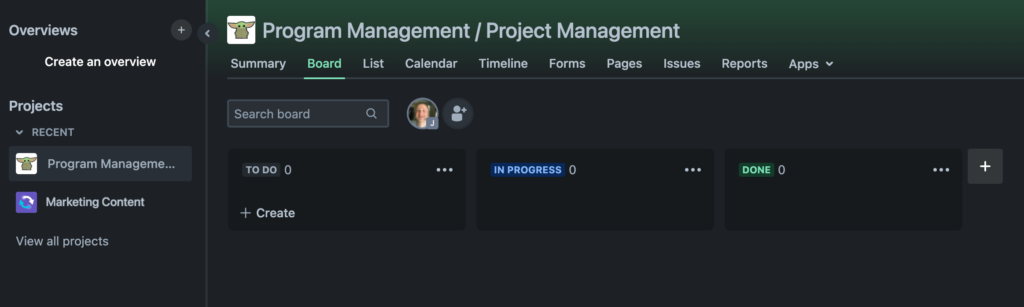
Board view: shows the status of ongoing items for day-to-day work in the team, for daily work status; just drag an item between columns to change its Status.
List view: shows an Excel-like list of items and all information given by a user when completing a form.
Calendar view: shows the start and end dates (if any) of items for long-term planning.
Timeline view: shows a Gantt chart of the roadmap and dependencies between all items in the project.
Forms: let you can create one or more shareable forms, for a particular project and Issue type, that make it easy for anyone to create new items to a project.
Pages: a place to connect the project with a Confluence space, to easily access and create project documents.
Similarities Between JWM and JSM
To illustrate how much Jira Work Management and Jira Service Management have in common, here’s a list of major features they share. For simplicity sake, we’re only looking at the Standard plans.
Feature
JWM
JSM
250 GB Storage
Unlimited projects
Unlimited tasks
Business project templates
24
10
Custom fields
Customizable workflows
Apps and integrations
Single-project automation
Unlimited
Unlimited
Global and multi-project automation
500 executions/mo.
Unlimited
JQL filters
Dashboards
Reports
Issue-level security
Audit logs
As is true with all flavors of Jira, these features mean that both products can be heavily customized and extended to work for your particular needs.
JWM vs. JSM: Which Is the Best Fit?
Now that we’ve reviewed the similarities and differences between Jira Work Management and Jira Service Management, here’s a summary of who each product is the best fit for.
JWM might be a better fit if…
Your team is using a modern project management tool for the first time.
Your teams work on smaller or less complex projects.
You just don’t think the service model makes sense for you right now.
Your admins have limited bandwidth that would make configuring and/or managing JSM a challenge.
You want the project-planning tools that JSM lacks.
JSM doesn’t make financial sense at the moment (but don’t underestimate the potential productivity gains from JSM’s service model!).
JSM might be a better fit if…
You’re ready to take team productivity to the next level with the service model.
You need external customers to be able to submit work easily, and you want to track that work with agents working queues.
You want to track service level agreements.
Having dedicated projects with special features to manage IT assets, incidents, problems, and changes appeals to you.
Your teams have the bandwidth to create knowledge bases that enable customer self-service and improve agent response times.
Oxalis Can Help
We can review your business teams and requirements, and recommend an approach that works for you. Unlock the potential of Jira Service Management with an Atlassian ITSM Partner. Boost efficiency and ensure the seamless operation of your IT services. Elevate your IT service experience with our expertise.