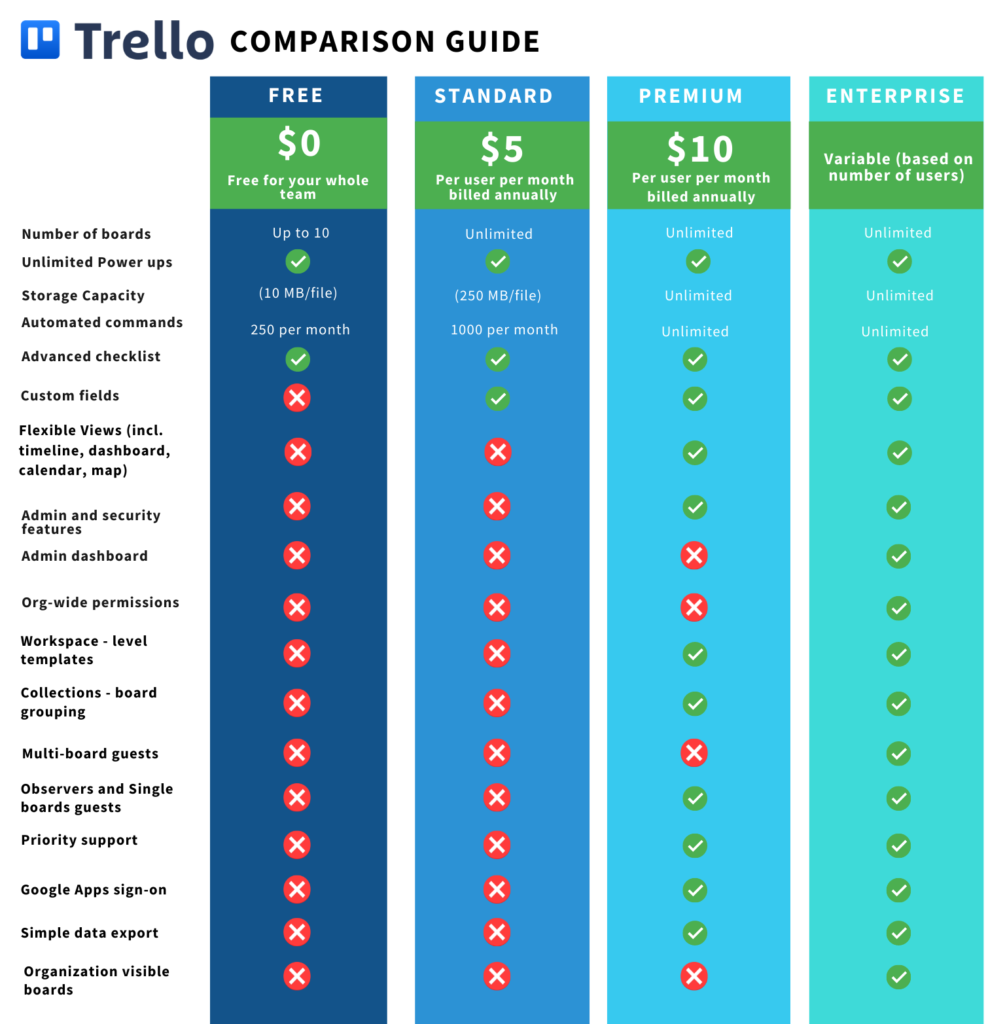
As of August 24th, 2021, Atlassian has launched an updated suite of Trello tiers to provide simplified pricing and greater capabilities for teams of all sizes.
Trello “Business Class” is now called Premium and includes unlimited automation.
Atlassian is introducing a new Standard tier, which is a lower priced plan ($5/mo).
All users can now add unlimited Power-Ups and integrations with no limits.
Trello “Gold” is now discontinued and will be retired throughout September and October. Many of the old “Gold” tier features are now free.
Trello Enterprise remains as the go-to tier for customers seeking greater security and compliance controls.
Jira Work Management remains a powerful alternative for organizations looking to scale.
Curious about whether Trello is right for your organization? Contact us below to set up a free consultation.
If you’re currently a Trello “Gold” customer, be mindful of the following dates:
August 24th, 2021 – Atlassian will stop the sale of new Gold subscriptions.
September 7th, 2021 – If you are a Gold user with a personal board, your board will automatically be migrated to a new Workspace with a 60-day Premium free trial.
September 24th, 2021 – Atlassian will stop the renewal of existing Gold subscriptions.
October 24th, 2021 – All Trello Gold subscriptions will expire.
For all other users, explore the new, powerful functionality unlocked with this change!
What Are the Differences Between Plans?
Where Can I Learn More?
It’s time to escape fragile and messy Excel spreadsheets, countless email threads, and systems that do not integrate with the tools you need. Trello on its own is a strong asset—however, Oxalis unlocks the full potential of the software so your team can work more efficiently, connected, and effectively.
Let us show you how Oxalis makes Trello work for you.
Used by Google Analytics 4 to persist session state and track usage across visits. The XXXXXXXXXX portion corresponds to the Oxalis Google Analytics property ID.
1 year
_gac_
Contains information related to marketing campaigns of the user. These are shared with Google AdWords / Google Ads when the Google Ads and Google Analytics accounts are linked together.
90 days
__utma
ID used to identify users and sessions
2 years after last activity
__utmt
Used to monitor number of Google Analytics server requests
10 minutes
__utmb
Used to distinguish new sessions and visits. This cookie is set when the GA.js javascript library is loaded and there is no existing __utmb cookie. The cookie is updated every time data is sent to the Google Analytics server.
30 minutes after last activity
__utmc
Used only with old Urchin versions of Google Analytics and not with GA.js. Was used to distinguish between new sessions and visits at the end of a session.
End of session (browser)
__utmz
Contains information about the traffic source or campaign that directed user to the website. The cookie is set when the GA.js javascript is loaded and updated when data is sent to the Google Anaytics server
6 months after last activity
__utmv
Contains custom information set by the web developer via the _setCustomVar method in Google Analytics. This cookie is updated every time new data is sent to the Google Analytics server.
2 years after last activity
__utmx
Used to determine whether a user is included in an A / B or Multivariate test.
18 months
_ga
ID used to identify users
2 years
_gali
Used by Google Analytics to determine which links on a page are being clicked
30 seconds
_ga_
ID used to identify users
2 years
_gid
ID used to identify users for 24 hours after last activity
24 hours
_gat
Used to monitor number of Google Analytics server requests when using Google Tag Manager
1 minute
Marketing cookies are used to follow visitors to websites. The intention is to show ads that are relevant and engaging to the individual user.